Video Frame Extractor
Video Frame Extractor
Description
Tired of manually taking screenshots of your videos for featured images or content thumbnails? Video Frame Extractor provides a seamless solution right within your WordPress dashboard.
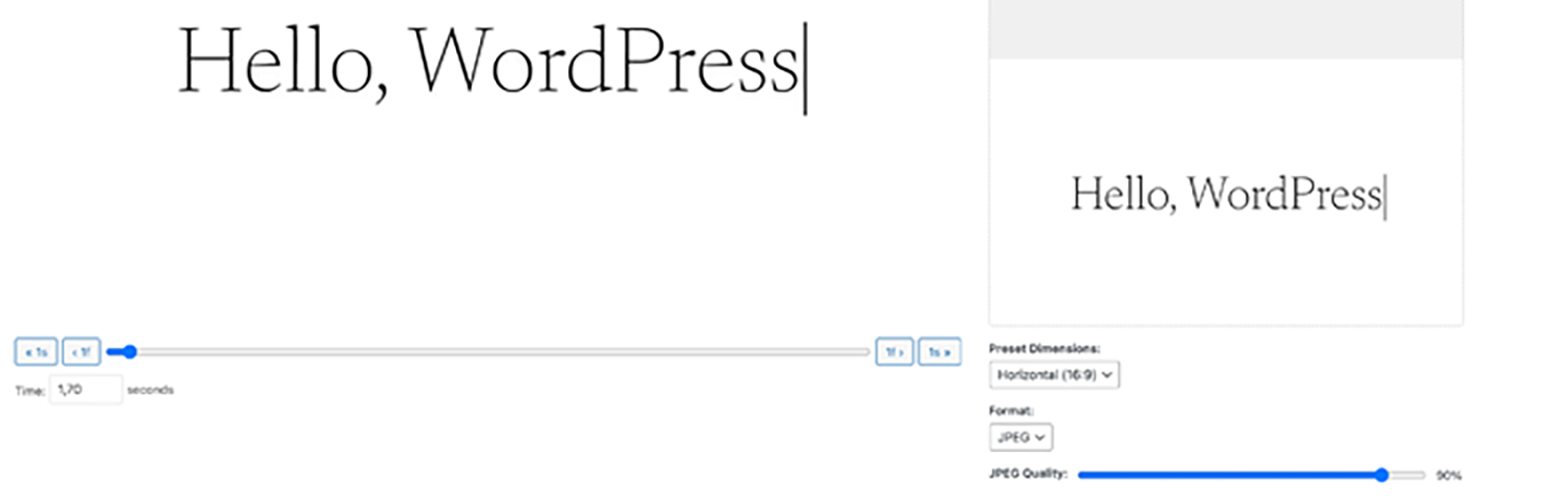
This plugin adds a dedicated admin page under “Media” -> “Video Frame Extractor”. Simply select a video from your library, and you’ll get a powerful editor that allows you to:
- Scrub Through Your Video: Use a precise slider and frame-by-frame controls to find the perfect moment.
- Live Preview: See exactly how your cropped screenshot will look before you generate it.
- Dimension Presets: Instantly set dimensions for Horizontal (16:9), Vertical (9:16), or Square (1:1) aspect ratios.
- Custom Dimensions: Need a specific size? Enter any width and height for full control.
- Format & Quality Control: Choose between JPEG and PNG formats. For JPEGs, you can even adjust the compression quality to balance file size and clarity.
- Standalone Interface: No more struggling with crowded media modal popups. The entire process happens on a clean, dedicated page for the best user experience.
Stop wasting time with external tools. Generate the perfect video thumbnail in seconds without ever leaving WordPress!
Installation
- Upload the
video-frame-extractorfolder to the/wp-content/plugins/directory. - Activate the plugin through the ‘Plugins’ menu in WordPress.
- Go to Media -> Video Frame Extractor to start creating screenshots.
Faq
You can find the plugin’s page in your WordPress admin dashboard under Media -> Video Frame Extractor.
The plugin relies on your web browser’s ability to play the video. It supports all formats that are natively supported by modern browsers like Chrome, Firefox, and Safari (e.g., MP4, WebM).
All generated screenshots are saved directly to your WordPress Media Library, just like any other uploaded image. You can find them there to use as featured images, insert into posts, or manage them as you wish.
Reviews
It more than meets my needs.
By 
It was an add-on I was looking for but couldn’t find. It really helped me a lot. It made my work easier and is very practical.
I await your feedback and suggestions.
By 
Please specify any features you'd like to see in the extension, as well as any bugs or errors.
Changelog
1.1
- Security Hardening: Added sanitization and validation for all user inputs in the AJAX handler to comply with WordPress.org security standards.
- Fixed a critical bug that prevented the media library from opening.
- Major Refactor: Moved the entire interface to a dedicated admin page under “Media” for a stable and improved user experience.
1.0
- Initial release.