W Auto Page Pre Loader
W Auto Page Pre Loader
Description
W Auto Page Pre Loader shows a clean loading animation or your custom image before the page becomes visible. This prevents the blank-screen moment users often experience during load time. The plugin is lightweight, responsive, and works with all modern WordPress themes.
You can customize the loader image, size, duration, background color or background image, and preview everything directly from the admin panel. The loader fades out smoothly once the page is ready, ensuring a polished experience on both desktop and mobile.
Features
- Simple enable or disable control.
- Upload a custom logo or loader image.
- Adjustable loader width and height.
- Duration control for fade-out timing.
- Background color and background image support.
- Background size and position settings.
- Smooth fade-out animation.
- Responsive design for all devices.
- Live preview in settings.
- Option to hide the preloader for logged-in users.
- Show the preloader only once per browser session.
- Option to hide the preloader on mobile devices.
- Display delay setting to prevent flashing on fast-loading pages.
- Exclude selected URL paths from the preloader.
- Respect reduced-motion visitor preferences.
- Customize spinner color, overlay opacity, fade duration, and z-index.
- Lock scrolling while active, expose ARIA status, and allow Escape-key dismissal.
- Option to skip the preloader on the site homepage.
Installation
- Upload the plugin folder to
/wp-content/plugins/or install using the Plugins menu in WordPress. - Activate the plugin.
- Open “W Auto Page Pre Loader” in your dashboard to configure settings.
Screenshots
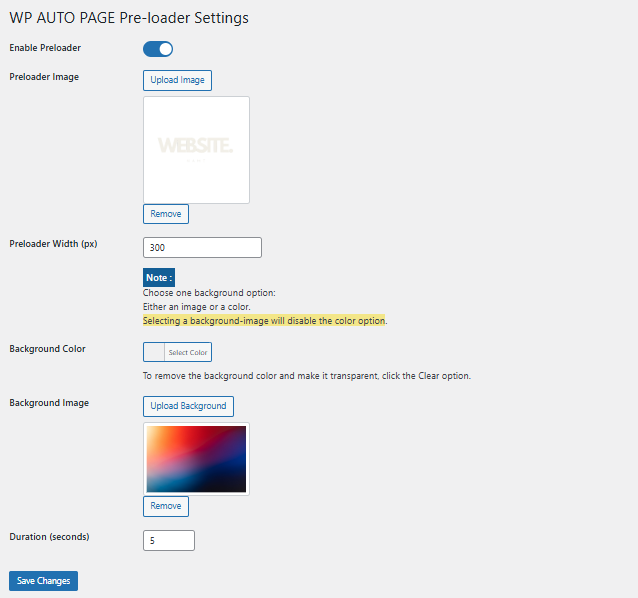
Settings panel with live preview.
Faq
Yes. Use the excluded URL paths setting for selected pages, or enable Hide On Homepage to skip the front page.
Yes. Enable the “Hide For Logged-in Users” option in the plugin settings to skip the preloader for any signed-in user.
Yes. Enable “Show Once Per Session” to show it once during the visitor’s browser session.
Yes. Enable “Hide On Mobile” to keep mobile browsing faster.
The background image becomes the primary background. The color is ignored when an image is selected.
No. The plugin uses optimized CSS and JavaScript and removes itself as soon as the page is ready.
Reviews
Changelog
4.1.0
- Added a setting to hide the preloader on the site homepage.
- Preserved existing behavior by keeping the new setting disabled by default.
4.0.0
- Added versioned session memory so show-once behavior resets cleanly after major upgrades.
- Added CustomEvent support when the preloader finishes for theme and analytics integrations.
- Added back-forward cache handling to prevent stuck preloaders after browser navigation restore.
- Improved ARIA busy state cleanup and duplicate hide protection for smoother accessibility.
3.1.0
- Added active body class for better scroll control while preloader is visible.
- Added Escape key support so visitors can dismiss the preloader quickly.
- Added ARIA status attributes for better assistive technology behavior.
- Improved frontend cleanup after the fade-out completes.
3.0.0
- Added URL path exclusions.
- Added reduced-motion bypass support.
- Added spinner color control.
- Added overlay opacity control.
- Added fade duration control.
- Added z-index control.
2.2.0
- Added show once per session control.
- Added hide on mobile control.
- Added display delay control to prevent quick loader flashes.
- Updated WordPress.org banner artwork for the release.
2.1.0
- Added a setting to hide the preloader for logged-in users.
- Fixed automatic fade-out when duration is set to 0.
- Updated internal plugin versioning.
2.0.0
- New settings layout.
- Improved fade-out timing.
- Cleaner animation performance.
- Updated branding.
2.0.2
- Refactor
1.0.3
- Minor bug fix.
1.0.2
- Auto duration feature added.
1.0.0
- Initial release.