Wbcom Designs – WB Ad Manager

Wbcom Designs – WB Ad Manager
Description
WB Ad Manager is a powerful and easy-to-use ad management plugin for WordPress. It allows you to create and manage ads with multiple placement options, targeting rules, and supports BuddyPress, bbPress, and Jetonomy.
Key Features:
- Ad Rotation & A/B Comparison – Multiple ads rotate in same placement with weighted priority; side-by-side CTR comparison metabox with “winner” badge (full statistical A/B testing with traffic splitting is in Pro)
- 5 Ad Types – Image, Rich Content, HTML/JS Code, Google AdSense, and Email Capture
- 16+ Placements – Header, Footer, Content, Paragraph, Sticky, Popup, Comments, Archive, Shortcode, Widget, BuddyPress, bbPress, Jetonomy
- Google AdSense – Native AdSense support with automatic script management and Auto Ads
- Email Capture – Inline newsletter/subscribe form with customizable colours and optional name field; captured leads are viewable and exportable to CSV from the admin (with per-row delete for GDPR erasure), plus a
wbam_email_capturedhook for forwarding to Mailchimp / ConvertKit / webhooks - Link Management & Cloaked URLs – Turn long, messy URLs like
amazon.com/gp/product/B07XYZ?ref=affiliate_123into clean, branded links on your own domain (e.g.yoursite.com/go/book). Every click is tracked, and you can group links into categories, set expiration dates for time-limited offers, and add SEO-correctrel=nofollow/rel=sponsoredattributes. Use the cloaked URL directly in your content or drop[wbam_link id="123"]Anchor text[/wbam_link]in any post. - Link Partnerships – Shortcode-driven inquiry form (paid link / exchange / sponsored post) with accept / reject admin workflow and auto emails
- BuddyPress Integration – Activity stream + 4 directory positions (members + groups)
- bbPress Integration – 7 positions (forums, topics, between replies with configurable frequency)
- Jetonomy Integration – 7 positions: sidebar (top / after About / bottom), after topic body, before/between/after replies (requires Jetonomy v1.3.0+)
- Geo-Targeting – Target ads by country using IP geolocation (ip-api.com, ipinfo.io, ipapi.co)
- Device Targeting – Desktop, tablet, or mobile specific ads
- Scheduling – Start/end dates, day-of-week, and time-of-day targeting
- Frequency Control – Limit ad impressions per session (cookie-based)
- Setup Wizard – Easy first-time configuration with sample ads + one-click demo-data cleanup
- REST API – Endpoints for ads, analytics, links, partnerships, and email captures
- Privacy & GDPR – IP anonymization, consent-gated AdSense, opt-in delete on uninstall
Ad Types:
- Image Ad – Banner images with link, alt text, and target options
- Rich Content – WYSIWYG editor for HTML content
- HTML/JS Code – Paste ad network code (custom scripts)
- Google AdSense – Native integration with auto script management
- Email Capture – Inline newsletter subscribe form as an ad type
Placements:
- Header (wp_head)
- Footer (wp_footer)
- Before/After Post Content
- After Paragraph X (with repeat option)
- Archive Pages (between posts)
- Sticky/Floating Ads (corners, bars)
- Popup/Modal Ads (time delay, scroll, exit intent)
- Comment Areas
- Shortcode
[wbam_ad id="123"] - Widget Areas
- BuddyPress Activity Stream
- BuddyPress Member/Group Directories
- bbPress Forums and Topics
- Jetonomy: Sidebar (top, after About, bottom), After Topic Body, Before/Between/After Replies
Targeting Options:
- Post types and page types
- Categories and tags
- Device type (desktop/tablet/mobile)
- User status (logged in/out)
- User roles
- Geographic location (country)
- Custom scheduling
Everything listed above is included in the free plugin — no account, no ad limit, no add-on required. The features below are part of the separate WB Ad Manager Pro upgrade and are not included in this free plugin.
Turn your site into a revenue engine with WB Ad Manager Pro
Free gets your ads on the page. WB Ad Manager Pro turns your site into an ad marketplace. Let advertisers sign up, pick a package, pay with their own wallet, and manage their own campaigns. You review, approve, and collect the revenue. Everything in the free plugin keeps working, with a full monetization layer added on top.
Who Pro is for:
- Niche publishers and bloggers who want to sell banner space to 3-5 regular sponsors without emailing back and forth every month.
- Community sites (BuddyPress, bbPress, Jetonomy) that want to sell classified listings, featured placements, or sponsored activity posts to members.
- Agencies managing ad inventory across multiple client sites that need reporting, audit logs, and per-advertiser share-of-voice.
- Directory and marketplace operators who want a full classifieds system with paid upgrades, seller profiles, and buyer-seller messaging built in.
Advertiser Portal:
Let advertisers sign up, submit ads, track performance, and manage billing themselves. You stay in control with a built-in review queue. Fourteen-tab self-service dashboard covering:
- Overview, My Ads, Campaigns, Classifieds, Inquiries
- Favorites, Following, Messages, Link Partnerships
- Wallet (credit balance and transaction history)
- Membership plans, Analytics, Share of Voice, Profile
Wallet, Credits, and Payments:
- Prepaid credit wallet for every advertiser with a hold -> deduct -> refund lifecycle (failed ads refund automatically)
- WooCommerce, Stripe, PayPal, and manual top-up integrations
- Full transaction ledger with audit trail and CSV export
- CPM, CPC, and flat-rate billing models
Campaigns and Packages:
- Publish ad packages (price, duration, impression cap) that advertisers buy in one click
- Campaigns with start/end dates, budget caps, and budget-aware pacing
- Per-advertiser session caps so one big spender cannot dominate every slot
- Subscription membership plans (monthly, quarterly, yearly) with listing limits and auto-renewal
Classifieds Marketplace:
- Full classified listings system with image galleries and custom fields
- Category and location taxonomies with sidebar filters and search
- Paid upgrades: Featured, Highlighted, Urgent, Bump to top
- Three price types: fixed, negotiable, free
- Buyer inquiry system, favorites and saved listings, seller profiles with reviews and ratings
Advanced Analytics and A/B Testing:
- Daily impression and click aggregation with time-series reports
- CTR and revenue reports with geo and device breakdowns, CSV export
- A/B testing with statistical significance and traffic splitting
- Slot inventory view (AdSense-style capacity overview across your whole site)
- Share of Voice analysis per advertiser
Advanced Link Management:
- Keyword auto-linking: the plugin turns mentions of your keywords into affiliate links automatically
- Link Scanner: finds monetization opportunities in your existing content
- Broken-link detection and redirect management
- CSV bulk import for links and keywords
- Advanced link analytics (referrer, device, country)
Community and Developer Extras:
- Enhanced BuddyPress integration: seller profiles in the member directory, activity stream for listings, following/favorites system
- Admin audit logs of every ad, credit, and campaign action
- Ad review queue with approval workflow
- Priority support from Wbcom Designs
Installation
- Upload the plugin files to
/wp-content/plugins/wb-ad-manager/directory, or install through WordPress plugins screen. - Activate the plugin through the ‘Plugins’ screen in WordPress.
- Complete the Setup Wizard or go to WB Ad Manager menu to create your first ad.
Screenshots
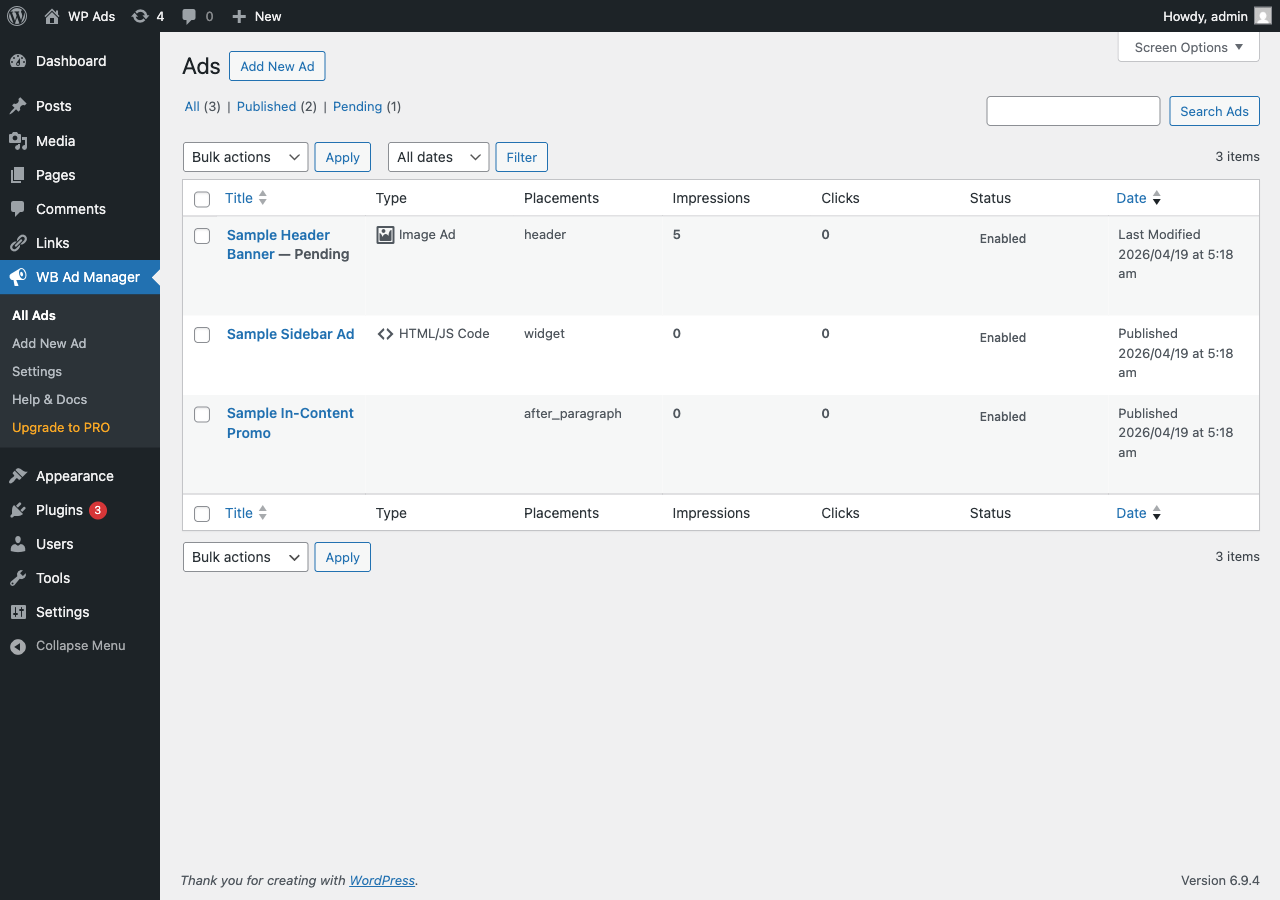
All Ads list. Impressions, clicks, placement, and status for every ad at a glance.
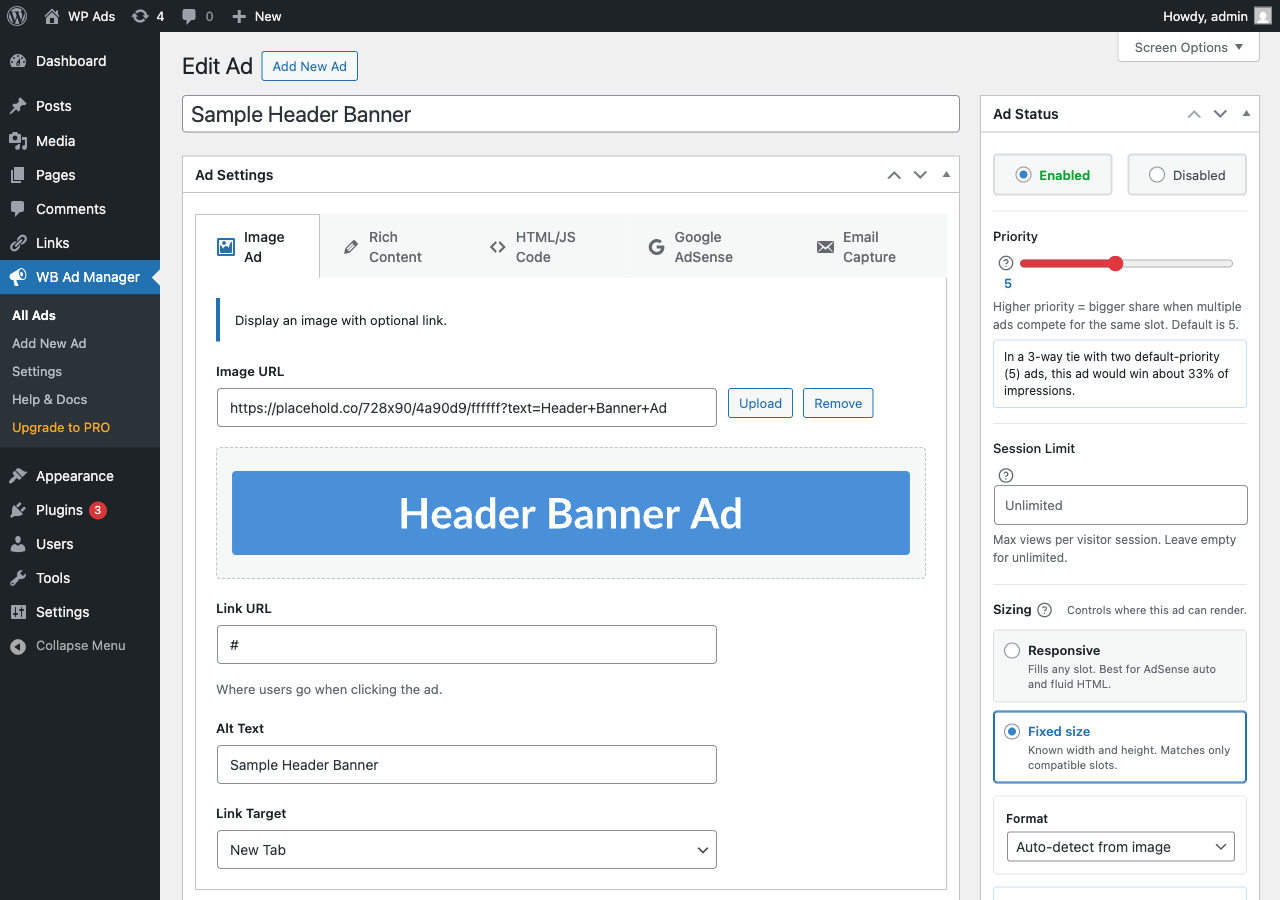
Ad editor. Five ad types (Image, Rich Content, HTML/JS Code, Google AdSense, Email Capture) with a weighted-priority slider, session-limit cap, and responsive/fixed sizing.
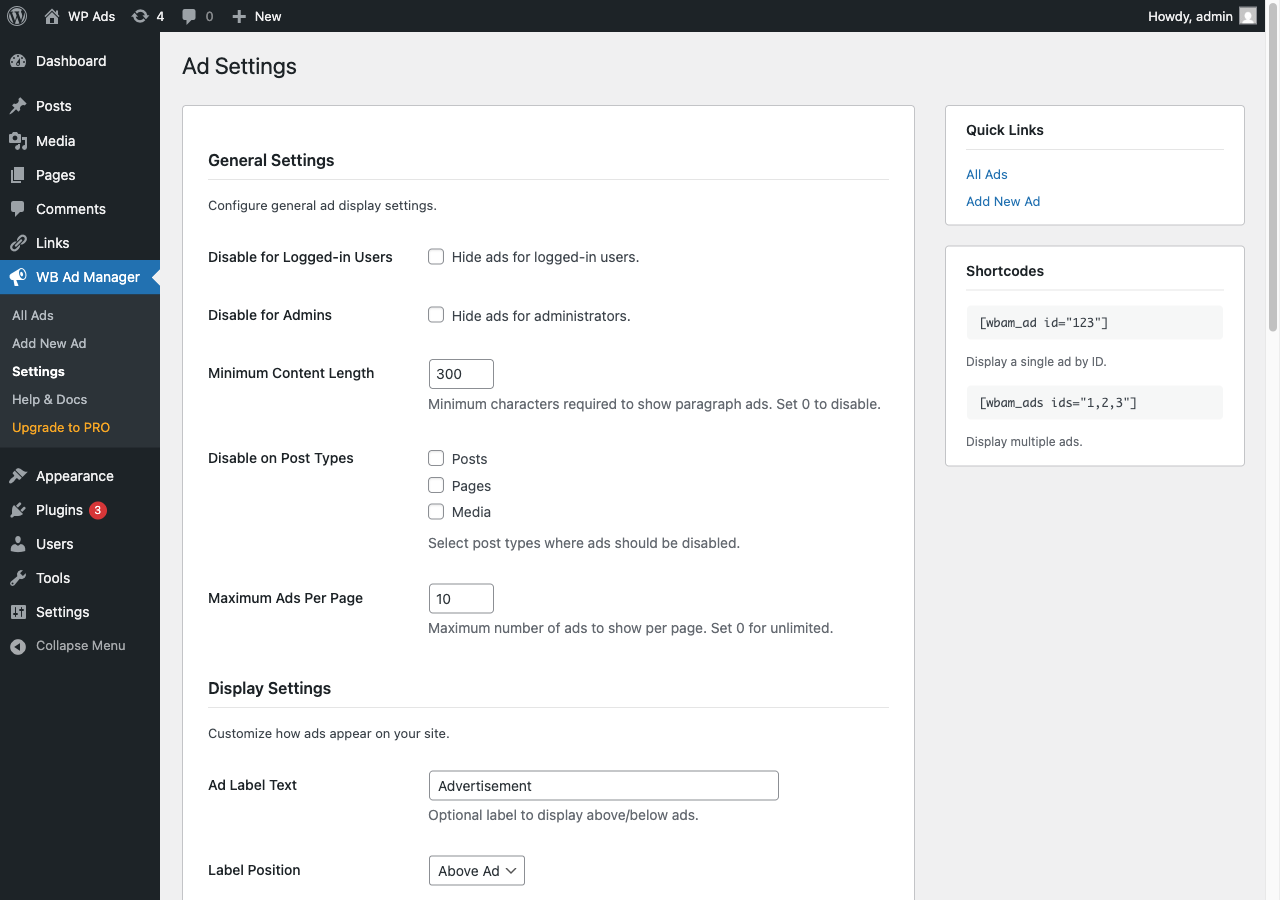
Settings page. General, display, performance, geo, AdSense, privacy, and advanced options in one place.
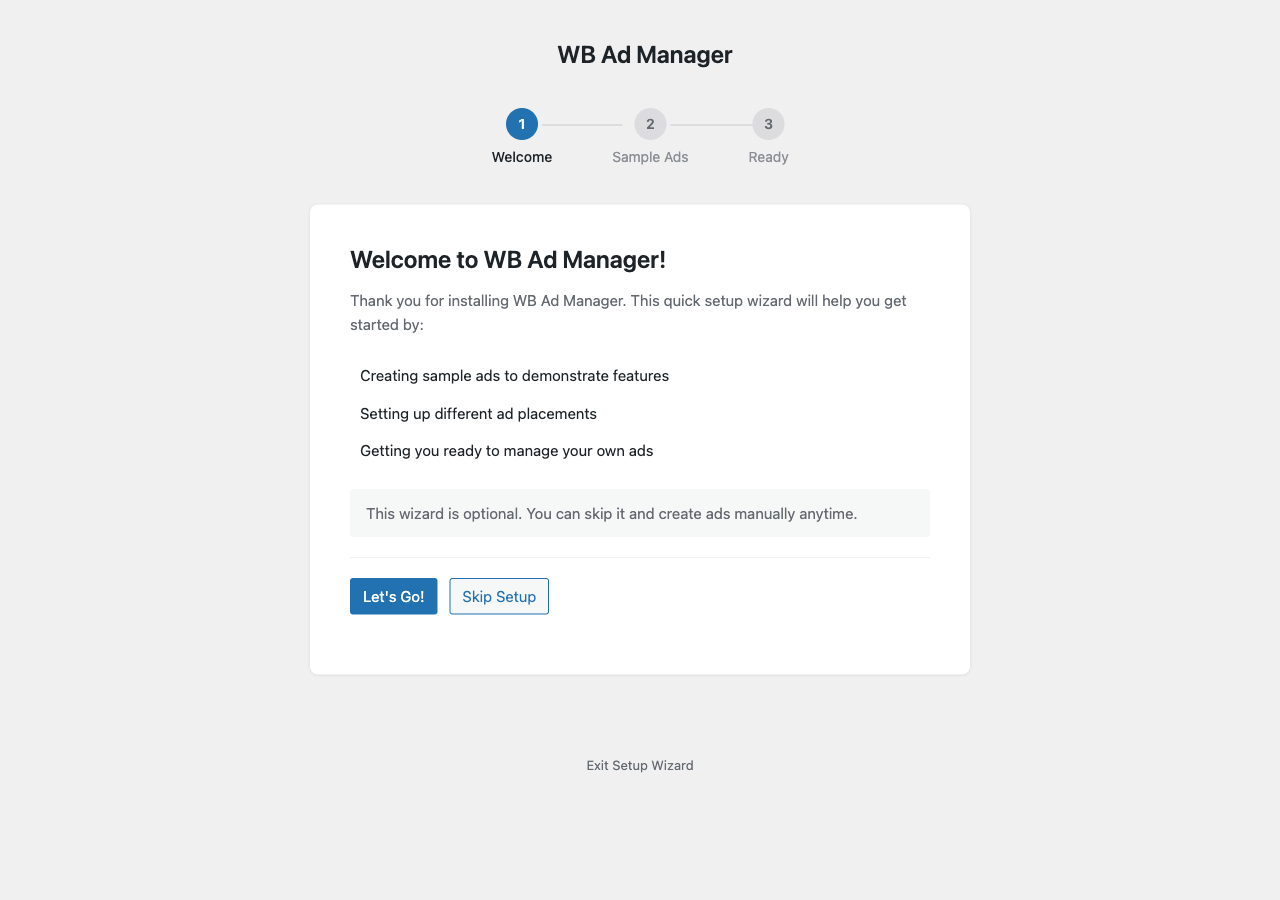
Setup Wizard. Three-step first-run flow that seeds sample ads so you see the plugin in action in under a minute.
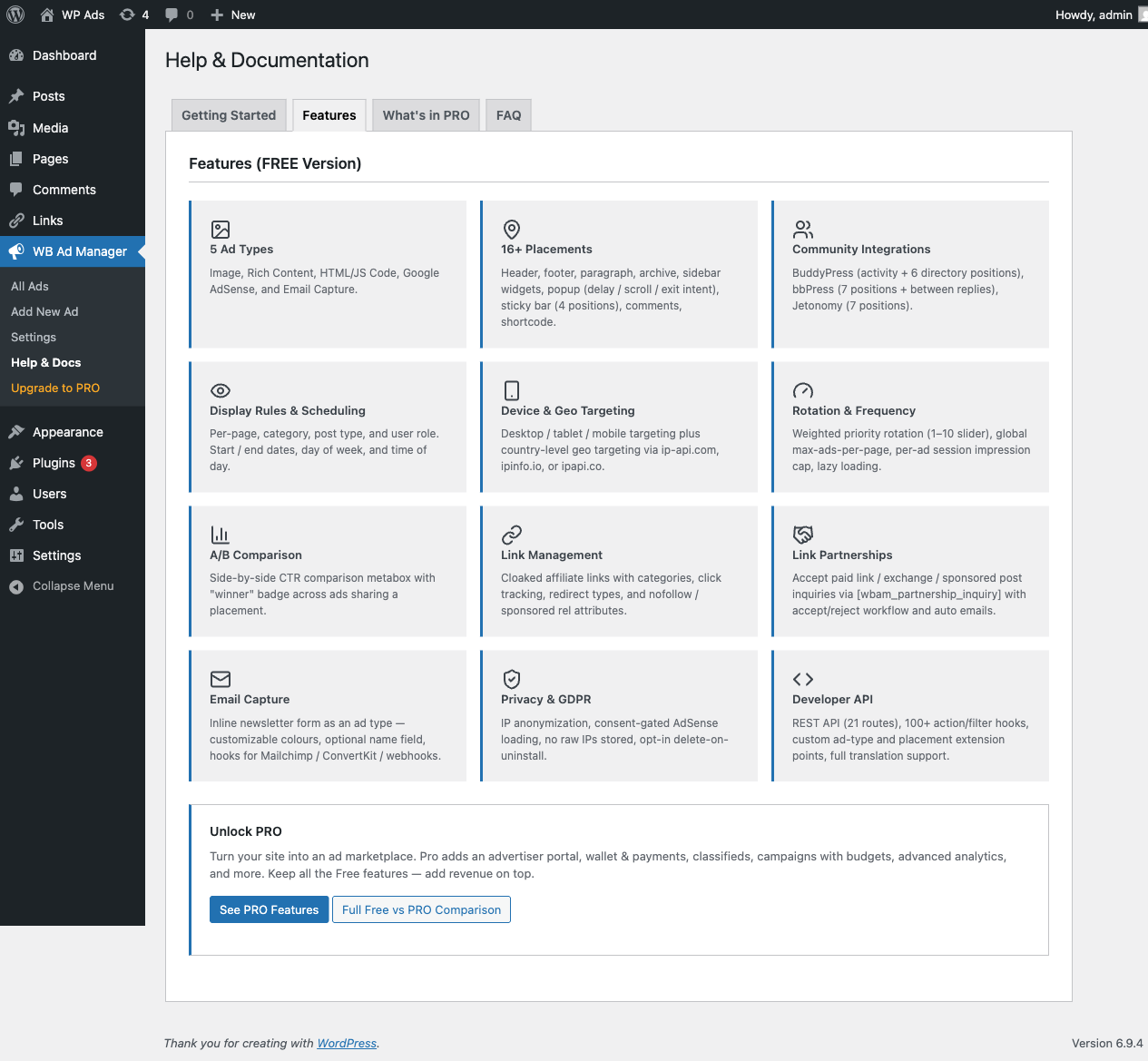
Help & Docs, Features tab. Full inventory of what the free plugin ships (5 ad types, 16+ placements, community integrations, A/B comparison, link partnerships, email capture, and more).
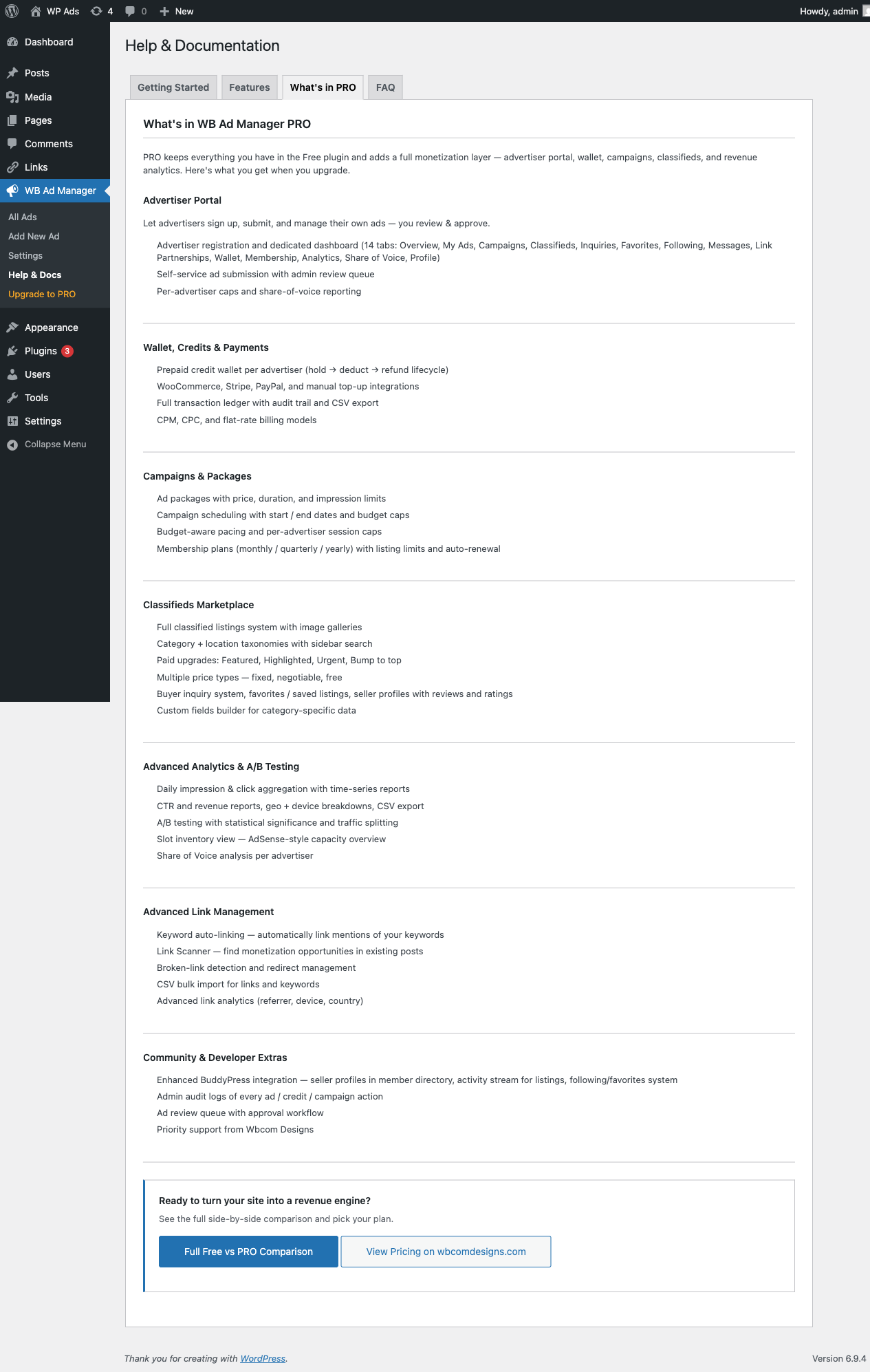
Help & Docs, "What's in PRO". Clear breakdown of Pro-only additions (advertiser portal, wallet, campaigns, classifieds marketplace, advanced analytics, link scanner).
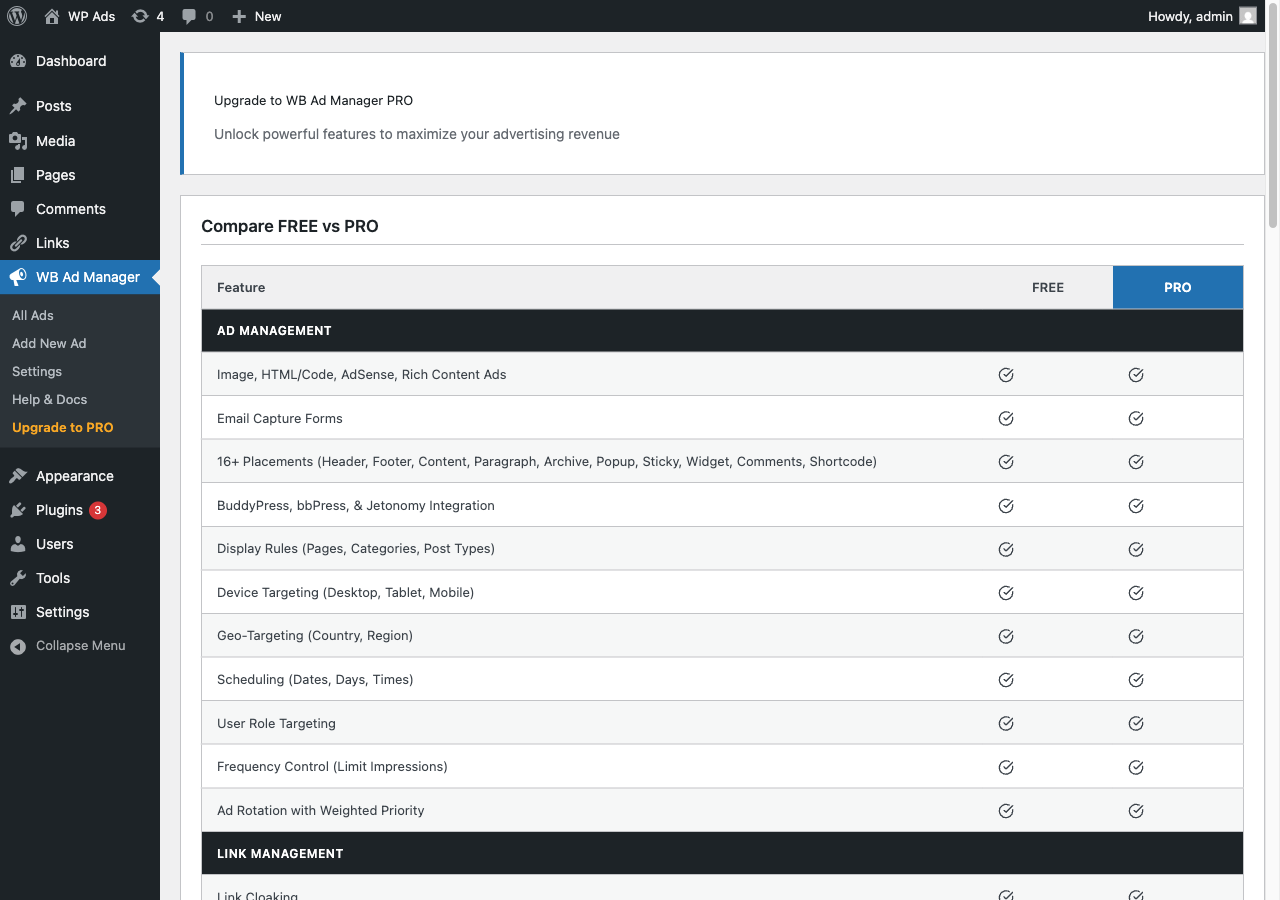
Free vs PRO comparison. Row-by-row feature table so you know exactly what you're getting at each tier.
Faq
Go to WB Ad Manager > Add New. Enter a title, select the ad type, add your content, choose placements, and publish.
Use the shortcode [wbam_ad id="123"] where 123 is your ad ID. For multiple ads: [wbam_ads ids="1,2,3"]
Yes! WB Ad Manager has native AdSense support. Set your Publisher ID in Settings, then create AdSense ad types. The AdSense script is automatically managed and only loads once per page.
Yes! If BuddyPress is active, you can display ads in activity streams, member directories, group directories, and use BuddyPress-specific widgets.
Yes! If bbPress is active, you can display ads in forums, topics, and between replies.
Yes, you can set start/end dates, specific days of the week, and time-of-day ranges for each ad.
The plugin supports ip-api.com (free), ipinfo.io (free tier), and ipapi.co for IP geolocation.
Reviews
Changelog
3.1.1 – September 2026
- Fix – Video ads no longer render as standalone banners in header, footer or content placements. They are served in-stream by the host plugin only, which is what the ad edit screen has said since 2.11.1.
- Fix – Seller ratings show as filled stars again. A four-star rating rendered as five identical outlines, which read as no rating at all, on classified listings, the advertiser portal and the admin reviews table.
- Dev – The combined download is named for a single version when free and Pro ship together, instead of carrying both version numbers in the file name.
- Compat – Aligned with WB Ad Manager Pro 3.1.1, which fixes a critical error on credit charges when another Wbcom plugin bundles an older credits library. Install both updates together.
3.1.0 – August 2026
Ad tags for grouping and bulk-switching ads, plus a round of delivery and rendering fixes.
- New – Ad tags. Group ads by sponsor, season, format or anything else, with as many tags on one ad as you need. Filter the ads list by tag, then use the existing Enable or Disable bulk actions to act on that whole group at once.
- Improve – The BuddyPress and Jetonomy notices appear on the ads list only, instead of stacking above the form on every Settings tab.
- Fix – Rich Content ads render again. The type name was normalized so saved ads using older slug variants resolve to the same handler.
- Fix – Ads rendered directly by ID now respect the full delivery gate set, including schedule, frequency caps and geo targeting, matching rotation-served ads.
- Fix – An ad whose creative is missing or broken gives up its slot to the next eligible ad instead of rendering an empty space.
- Fix – Partnership links no longer advertise the cloaked URL when link cloaking is turned off.
- Fix – Ads rendered by the placement shortcode keep their configured spacing, and the ads-list tag filter shows clean counts.
- Fix – A click on an ad is recorded once when WB Ad Manager Pro is active, not twice, so click counts and click-based billing are no longer doubled.
- Fix – The ads list Impressions and Clicks columns include aggregated daily rows, so they agree with Ad Analytics instead of dropping to zero once older events roll up.
- Fix – Finishing the Pro setup wizard clears the free plugin’s “Run Setup Wizard” prompt as well.
- Fix – Saving Placements no longer clears which slots may be sold to advertisers. The Advertisers column is hidden when Pro is absent, and a hidden column previously read as “sell nothing”, so a site that saved Placements with Pro deactivated could not sell any slot when Pro came back.
- Dev – New wbam_ad_tag taxonomy on the ad post type, flat, admin-only, with term management gated on manage_options and assignment on edit_posts. Registration arguments are filterable through wbam_ad_tag_taxonomy_args.
- Dev – Uninstall now removes ad tag terms. WordPress leaves terms behind when a taxonomy stops being registered, so they would otherwise persist invisibly.
- Compat – Aligned with WB Ad Manager Pro 3.1.0. Install both updates together; the Pro Ad Folders screen builds on this release’s tags and menu.
3.0.0 – July 2026
Ad slots you control at two levels, a security fix for the setup wizard, one consistent admin design, and Email Capture leads you can finally see and export.
- New – Ad slot control. Choose which placements your site uses, and separately which of those advertisers may sell into. Closing a site slot stops delivery; closing an advertiser slot only removes it from their picker, so a creative someone already paid for keeps running. An empty list means every placement, so nothing changes until you tick something.
- New – Email Captures admin screen: view, export to CSV, and delete (for GDPR erasure) the leads collected by the Email Capture ad type, plus a GET /wbam/v1/email-captures REST endpoint. Previously the captured names and emails were stored with no way to see or remove them.
- New – Link Cloaking settings section lets you set the cloak URL prefix and choose what happens to inactive or expired links (404, homepage, or a custom URL). These were read at runtime but had no way to configure them before.
- New – Total impression cap on the ad Schedule, so an ad automatically stops serving after a set number of impressions.
- New – Ad disclosure label now renders above or below each ad when a label is set in Display settings.
- Improve – Redesigned admin: every screen now shares one consistent design system (cards, tokens, buttons), and the WB Ad Manager submenu is grouped into labelled sections.
- Improve – Admin list tables now use that same design system for spacing and headers, so a list screen and a settings screen read as one product.
- Improve – Confirmation prompts are now in-page dialogs rather than browser alerts, and they no longer block the page while open.
- Improve – Link Manager is now an optional module you can turn off if you only need ad rotation.
- Improve – Accessibility: admin form fields are properly labelled and controls show a visible focus outline.
- Fix – Link click tracking now works again for non-cloaked links (a script variable mismatch stopped clicks from recording), and the REST link tracking and category endpoints record and count correctly.
- Fix – Cloaked links reach external destinations again instead of being blocked as unsafe redirects.
- Fix – An ad now goes live when you publish it, without needing a second save.
- Fix – Resolved HTTP 500 errors on the placements and ad-types REST endpoints, and invisible icons in the Setup Wizard.
- Fix – Links admin screens now link to the correct menu parent instead of a 403 page.
- Fix – Settings fields no longer touch their card border, and the BuddyPress directory placement count is corrected to 4 (before and after members and groups).
- Fix – The plugin zip now bundles its vendor assets, fixing a missing-icon 404, and the Link Partnership form follows dark mode on BuddyX 5.1+ and Reign.
- Fix – The ad sizing summary now reflects only the placements you ticked, the placement matrix stacks correctly on mobile, and video ads no longer show size panels that do not apply to them.
- Security – The setup wizard now checks permissions. It rendered from an early hook that runs before WordPress applies the capability attached to its menu, and matched on the page parameter alone, so any logged-in user could open it and create sample ads. Sites that already completed setup were not affected.
- Security – The public ads REST endpoint no longer exposes disabled ads.
- Security – Link bulk actions and admin notice dismissal now verify capability alongside the existing nonce.
- Dev – Removed three settings toggles that did nothing (minimum content length, cache ads, lazy load) and the unused settings-filter framework; impressions are now counted atomically so caps cannot over-deliver.
- Dev – Added an atomic impression-claim and per-visitor view recording to the frequency manager so in-stream video players can enforce session and total-impression caps per ad break.
- Dev – New Placement_Engine::get_selectable_placements() is the single source of truth for which slots may be offered, so the ad editor, the advertiser portal, the REST route and the Abilities endpoint can no longer disagree.
- Dev – Shared toast/confirm toolkit and wp-pointer emitter now live here and are consumed by Pro, replacing two copies of each.
- Dev – Database: added visitor_hash and referrer columns to the link-clicks table (DB version 1.7.0, applied automatically on update); the rate-limits table is dropped on uninstall.
- Compat – Pairs with WB Ad Manager Pro 3.0.0. If you run Pro, update both together.
2.9.0 – June 2026
Frontend dark mode that follows your active theme, plus RTL support.
- New – Dark mode for all frontend ad, link, and partnership output. The plugin adopts your theme’s dark palette automatically instead of staying light on a dark site.
- New – Right-to-left stylesheet for frontend output, so ads and link blocks lay out correctly on Arabic, Hebrew, and other RTL sites.
- Improve – Frontend styling now inherits BuddyX 5.1+ and Reign color tokens, so ad blocks match the active theme out of the box.
- Fix – Dark mode now engages when BuddyX 5.1+ or Reign switch to dark with their runtime toggle, not only on the older theme setting.
- Dev – Clean pass on WordPress Plugin Check (zero errors and warnings) and PHPStan level 7, plus a documented RTL stylesheet load.
2.8.1
- Performance: The Google AdSense script is now loaded only on pages that actually display an AdSense ad. Pages with no AdSense ad no longer pay for the extra script request — faster page loads and a cleaner Lighthouse score across the rest of the site.
- Fix: A/B test winners are now declared only when one variant beats the other by a meaningful margin. Previously the dashboard could flag a winner when the two variants were within normal click-rate noise, so admins could be misled into picking a variant that wasn’t actually better.
- Fix: The analytics dashboard now records the visitor’s device type (desktop / mobile / tablet) on every event. The “Device” breakdown chart now reflects real traffic instead of showing every event as Unknown.
2.8.0
- New: Jetonomy integration module with 7 placement positions: sidebar (top / after About card / bottom), after topic body, before / between / after replies. Requires Jetonomy v1.3.0+.
- New: Admin notice suggesting Jetonomy installation when not detected, with direct link to https://store.wbcomdesigns.com/jetonomy/
- New: REST API (21 routes across ads, analytics, links, partnerships) and WordPress Abilities API (15 abilities)
- New: Full Lucide icon migration across admin and frontend. Replaces dashicons with a consistent icon set that renders at any size without pixelation
- New: Semantic CSS token layer with theme.json inheritance and prefers-color-scheme dark-mode override across 9 stylesheets. Plugin now re-skins automatically to the active theme’s palette
- New: Email Capture ad type documented and surfaced. Inline newsletter subscribe form with customisable colours, optional name field, and wbam_email_captured action for Mailchimp / ConvertKit / webhook integrations
- New: Link Partnerships admin module. [wbam_partnership_inquiry] shortcode, admin list with accept/reject workflow, automatic email notifications, 24-hour duplicate-submission window
- New: Before Archive / After Archive placements (loop_start / loop_end)
- New: Four BuddyPress directory placements. Before / after members and before / after groups
- Improvement: Third-party admin notices are now suppressed on WB Ad Manager screens only (keeps your own notices intact, other admin pages unaffected)
- Improvement: Setup wizard is now fully self-contained. Renders correctly regardless of the active theme or admin-chrome state
- Fix: WordPress.org hardening pass. Zero PCP errors on clean dist, all admin $_POST / $_GET reads wrapped in wp_unslash() before sanitization
2.7.0
- Improvement: Updated translation strings
- Compatibility: Tested up to WordPress 6.9
2.6.0
- New: Complete rewrite of upgrade page with comprehensive Free vs Pro comparison
- New: 47 features across 9 sections (Ad Management, Link Management, Advertiser Portal, Payments, Analytics, Classifieds, Developer, Support)
- Improvement: Add CSS variables with multi-theme dark mode support to partnership form
- Improvement: Frontend CSS for link shortcodes ([wbam_link] and [wbam_links])
- Improvement: Comprehensive documentation with screenshots
- Fix: Distribution excludes development files
- Dev: Updated POT file for translations
2.5.0
- Fix: Add GDPR privacy helper for IP anonymization in frequency tracking
- Fix: Frequency tracking now properly calls track_impression via wbam_ad_output filter
- Improvement: Add npm scripts for build/dist/watch commands
- Improvement: Fix Gruntfile makepot config for correct plugin name
- Improvement: Add future roadmap for planned features
- Dev: Update POT file for translations
2.4.0
- Security: GDPR compliance – stop storing raw IP addresses in analytics
- Security: Add user-based rate limiting to AJAX handlers
- Security: Add capability check to setup wizard dismiss handler
- Security: Document security model for unescaped ad output in placements
- Security: Add security measures for code ad type
- Performance: Add object caching for placement ad queries
- Performance: Cache table existence checks to avoid repeated queries
- Fix: Impressions not being recorded properly
- Fix: Image upload/remove button functionality
- Fix: Paragraph placement HTML corruption with preg_replace_callback
- Fix: wp_send_json_error signature and add missing HTTP status codes
- Fix: Raw $_POST passed to hooks before sanitization
- Fix: Geo targeting UI simplified with single mode selector
- Fix: Device detection reliability improvements
- Fix: Image ad UI with proper container width constraints
- Fix: Display Rules UI clarity and organization
- Fix: Specific Pages dropdown now only shows pages
- Fix: 16 additional bugs from comprehensive audit
- New: Comprehensive marketing materials included
2.0.0
- Complete rewrite with modern architecture
- Ad rotation and split testing with weighted priority system
- 4 ad types: Image, Rich Content, Code, Google AdSense
- 14+ placement options including sticky, popup, and comment ads
- Google AdSense integration with Auto Ads support
- BuddyPress integration (activity stream, directories, widgets)
- bbPress integration (forums, topics, replies)
- Geo-targeting with 3 IP providers
- Device, schedule, and user targeting
- Frequency control and ad priority
- Setup wizard with sample ads
- Full internationalization support
- PSR-4 style namespaces and modular architecture
1.0.0
- Legacy version