WBAI BlogsAi
WBAI BlogsAi
Description
WBAI BlogsAi is a WordPress plugin that allows you to generate blog post ideas, complete AI-written articles, and featured images directly from your WordPress dashboard.
The plugin is designed for content creators, bloggers, agencies, and businesses who want to automate content creation while keeping full control over SEO, publication, categories, tone, language, and scheduling.
WBAI BlogsAi works natively inside WordPress. No external editors, no copy-paste, and no complex setup.
🎥 Video preview
See WBAI BlogsAi in action in this short demo video:
https://youtu.be/TBtO3I82gkg
Key Features
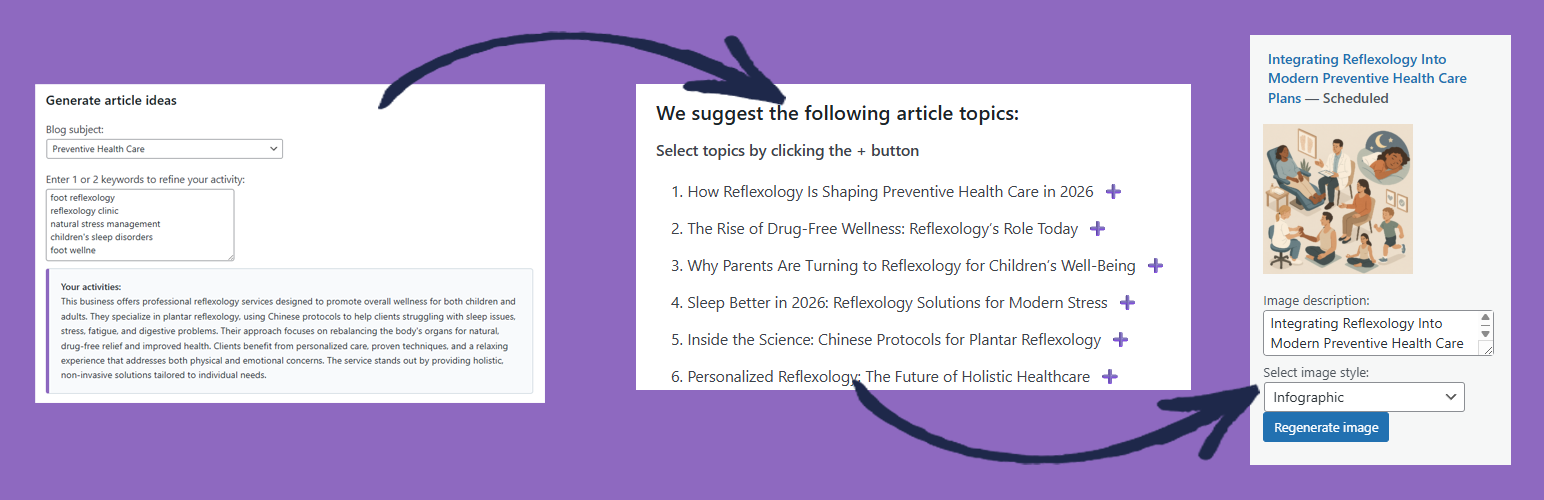
- Generate blog post ideas based on keywords and business activity
- Generate full AI-written articles directly as WordPress posts
- Generate featured images using artificial intelligence
- Schedule articles automatically to avoid SEO penalties
- Choose writing language, tone, and image style
- Manage categories and keywords before generation
- Works fully inside the WordPress admin interface
- Compatible with standard WordPress and SEO plugins
WBAI BlogsAi helps you save time while keeping control over your editorial strategy.
External services
This plugin requires a mandatory connection to the WBAI (WPBLOGS.AI) external service in order to function.
Without an active account connection, content generation and analysis features are not available.
The external service is used to:
– Authenticate the administrator account
– Associate the website with the user account
– Generate AI-based blog content and featured images
– If the “Your activities” field is empty during login, publicly accessible website content may be analyzed once to generate an activity summary used for content suggestions. This analysis is limited to publicly accessible content and is not performed continuously.
When the administrator logs in or manually requests content generation from the WordPress dashboard, the following data is transmitted to https://wpblogs.ai via secure HTTPS connection:
- Email address
- Authentication token
- Website URL
- Content parameters provided by the administrator (such as subject, keywords, tone, language, and optional business context)
No visitor personal data is collected or transmitted automatically by this plugin.
Generated content may be temporarily processed and stored by the external service on secure servers for the duration necessary to complete the request.
AI processing may involve OpenAI as a sub-processor for content generation.
The plugin uses WordPress WP-Cron to process background generation tasks.
During this process, the website URL and job identifier may be transmitted securely to https://wpblogs.ai to retrieve generated images associated with previously requested content.
This process runs automatically in the background until the generation task is completed.
Service providers:
WBAI (WPBLOGS.AI)
Terms of Service: https://wpblogs.ai/terms
Privacy Policy: https://wpblogs.ai/privacy-policy/
OpenAI
Terms of Service: https://openai.com/terms
Privacy Policy: https://openai.com/privacy
Installation
- Upload the plugin files to the
/wp-content/plugins/wbai-blogsaidirectory - Activate the plugin through the Plugins menu in WordPress.
- Go to WBAI BlogsAi in your WordPress admin menu.
- Log in or connect your account to start generating content.
Screenshots

Generate article ideas – AI-generated blog topic suggestions based on your activity and keywords.

Generate a single article – Full AI-written article with title, content, categories and featured image ready to publish.

Article scheduling calendar – Visual calendar showing scheduled AI-generated articles to avoid SEO penalties.

AI image generation settings – AI-generated featured image preview with customizable style and description.

Plugin settings page – Configure language, tone, scheduling, notifications and account connection.
Faq
WBAI BlogsAi uses external AI services to generate text and images.
Data such as prompts and content parameters are sent securely when the administrator initiates a generation action. Additional background requests may occur via WordPress WP-Cron to retrieve generated content.
Articles can be generated and scheduled. You always remain in control of publication.
Yes. You can select the writing language before generating content.
Yes. WBAI BlogsAi includes scheduling options to spread publications over time.
Yes. WBAI BlogsAi generates standard WordPress posts and is compatible with common SEO plugins.
Reviews
Changelog
1.0.0
- Initial public release