Blacklist Manager – WooCommerce Anti-Fraud, Blacklist & Checkout Verification

Blacklist Manager – WooCommerce Anti-Fraud, Blacklist & Checkout Verification
Description
Blacklist Manager is a WooCommerce blacklist, anti-fraud, and spam prevention plugin for stores that need to block fake orders, suspicious customers, spam registrations, and unwanted form submissions.
The free plugin is a complete local protection toolkit, not a Premium trial. Use blacklist rules for phone numbers, email addresses, IP addresses, and email domains at WooCommerce checkout, registration, comments, product reviews, REST API orders, and supported WordPress forms.
The plugin works with WooCommerce Classic Checkout, WooCommerce Checkout Blocks, Contact Form 7, Gravity Forms, and WPForms.
What the free plugin includes
- Manage local email, phone, IP address, and email-domain entries through Suspects and Blocklist workflows.
- Stop matching identities at WooCommerce checkout and protect registration, comments, product reviews, supported forms, and WooCommerce REST API orders.
- Require built-in checkout email verification for the policies you configure. Core owns and runs email verification; phone OTP and Twilio/TextMagic SMS transport belong to Blacklist Manager Premium.
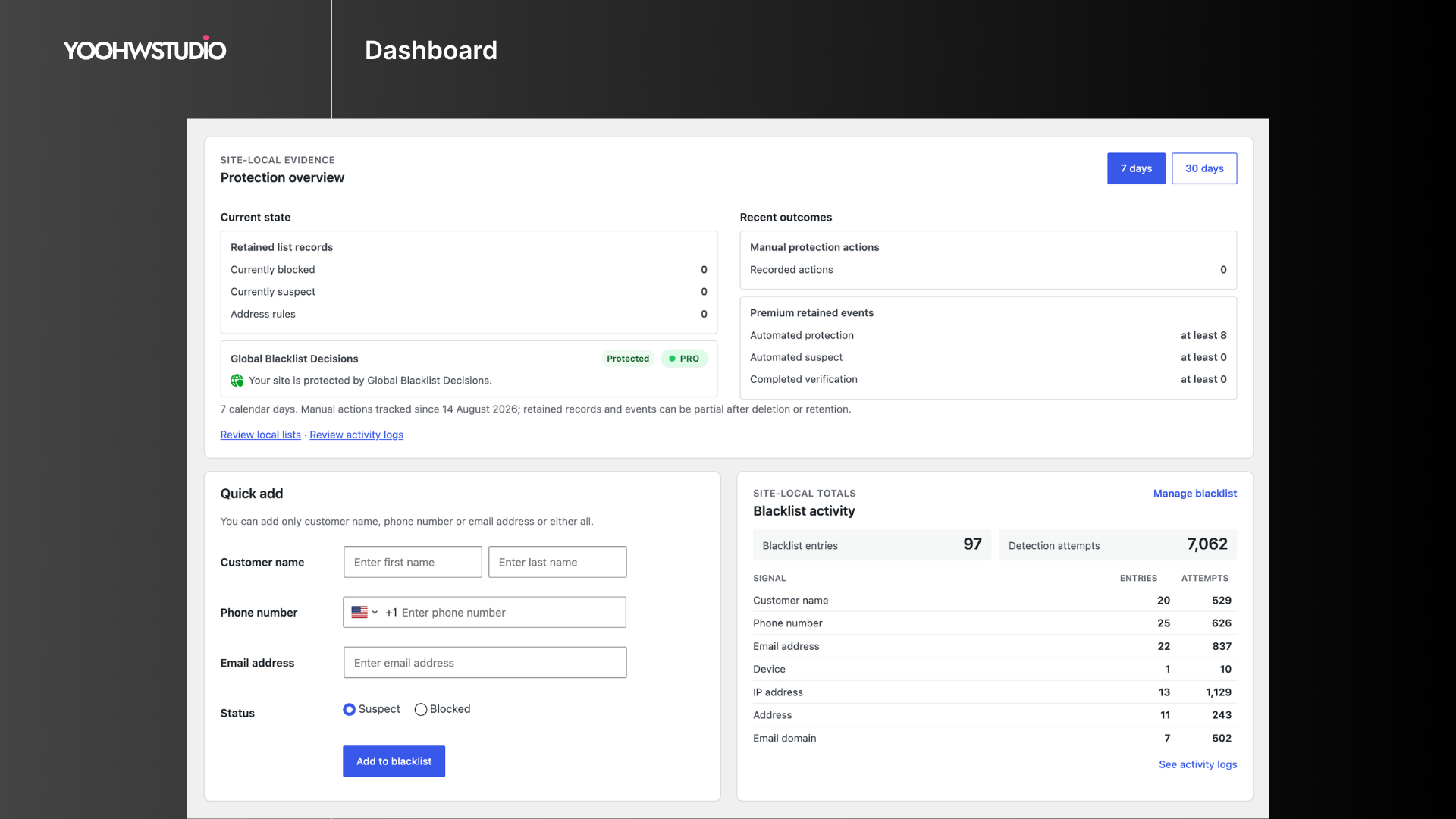
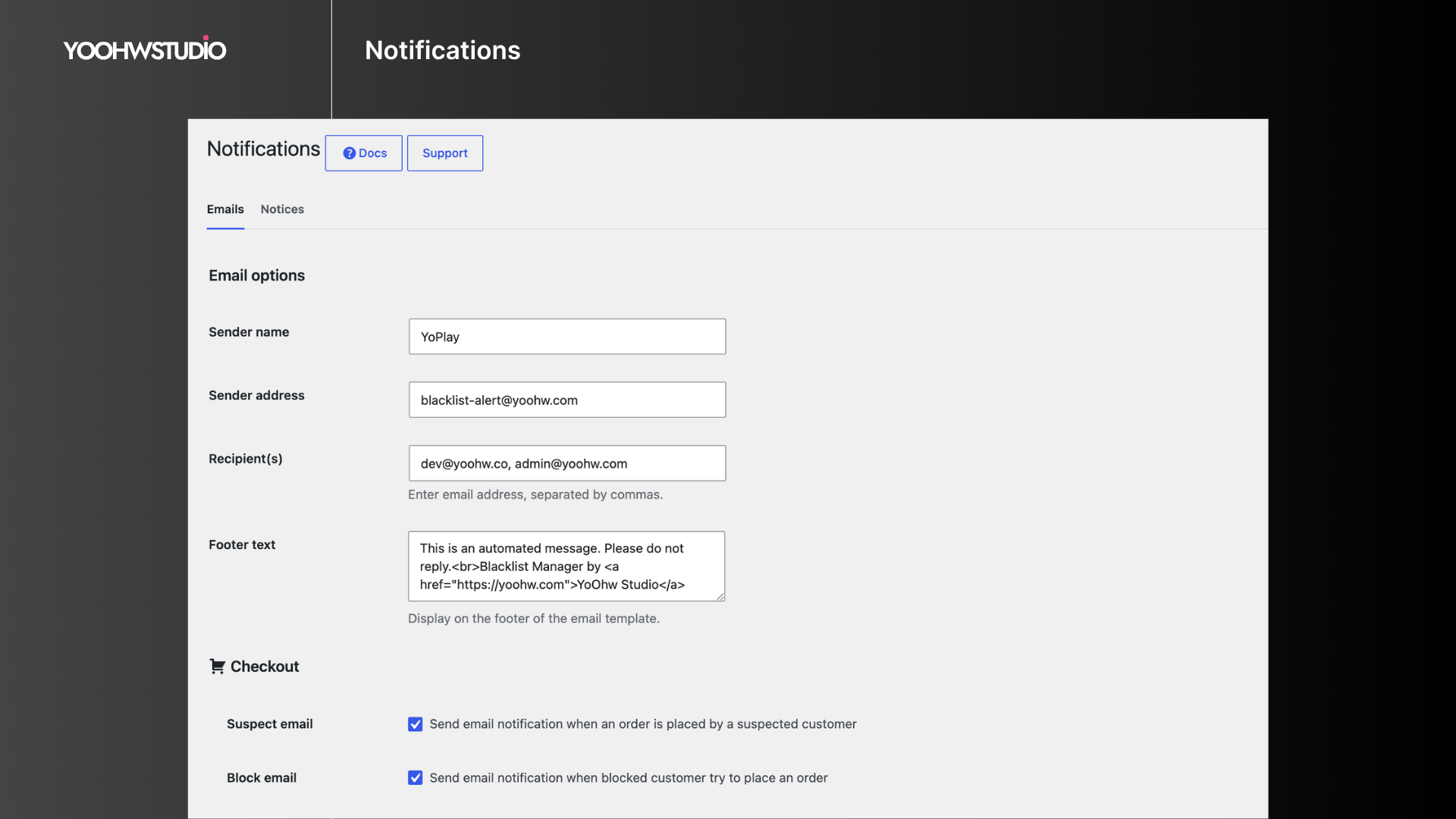
- Configure free customer notices and admin alerts, then review dashboard blacklist and detection statistics.
Documentation | Support | Demo
Key Features
- WooCommerce checkout protection: Block or review orders using phone, email, IP address, and email domain rules.
- Suspect and blocked lists: Review risky identities before moving confirmed abuse to the blocklist.
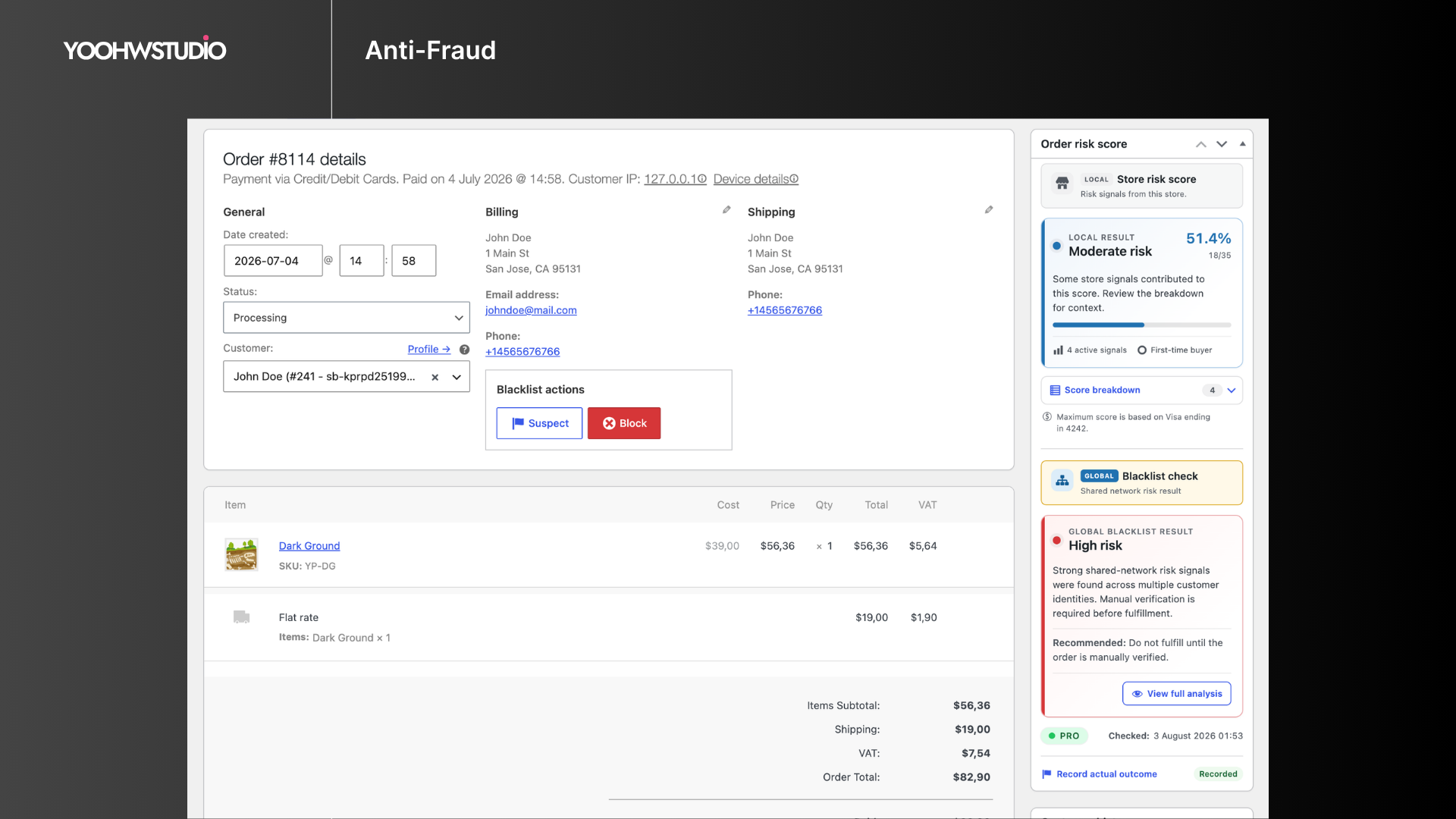
- Fast blacklist management: Add entries from the dashboard or directly from the WooCommerce order screen.
- Registration protection: Stop signups that match blocked emails, IP addresses, or email domains.
- Comment and review blocking: Prevent comments and product reviews from blacklisted emails.
- Form spam protection: Check Contact Form 7, Gravity Forms, and WPForms submissions against blacklist data.
- Checkout email verification: Require a Core-owned email verification code before allowing checkout to continue.
- WooCommerce REST API protection: Block blacklisted identities from creating orders through external apps or integrations.
- Custom notices and alerts: Customize customer-facing block messages and admin email alerts.
- Dashboard stats: Review blacklist entries and detection attempts from the admin area.
Checkout Compatibility
Blacklist Manager supports WooCommerce Classic Checkout, WooCommerce Checkout Blocks, and many third-party checkout plugins that use standard WooCommerce checkout and order creation flows.
Global Blacklist Decisions
Blacklist Manager can optionally connect your store to Global Blacklist Decisions, a separate broader-risk service that checks order identities such as email, phone, IP address, address, and email domain against network data. It is not required for local Core protection and is not a prerequisite for Premium.
Learn more about Global Blacklist Decisions
Premium Features
Consider Blacklist Manager Premium when recurring abuse makes manual blacklist maintenance too time-consuming, when checkout or payment patterns need automatic action, when repeat attackers change individual identity fields, or when your team needs deeper investigation and audit tools.
Premium is the advanced local/store extension. It adds:
- Risk scoring for blacklist, identity, IP, address, payment, device, and order pattern signals.
- Automation rules to auto-suspect, auto-block, or auto-review orders.
- Payment intelligence for Stripe, PayPal, Mollie, Braintree, WooPayments, AVS, card country, and payer mismatch signals.
- Device identity checks to link repeat abuse across emails, phones, IPs, addresses, and accounts.
- Advanced blocking for customer name, address, device, disposable email, disposable phone, country, VPN, and proxy signals.
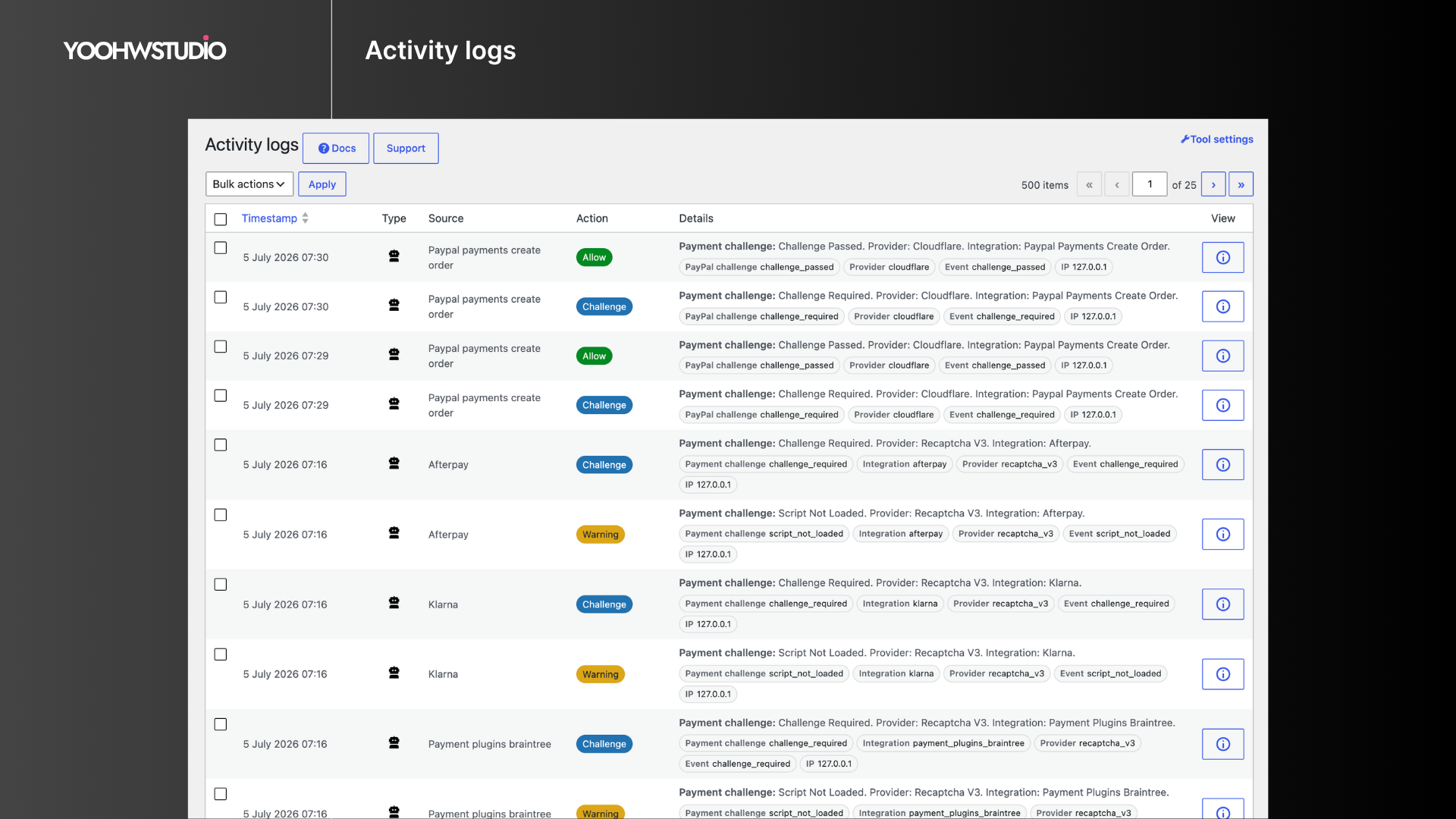
- Activity logs, import/export, cleanup tools, permissions, multi-store sync, CAPTCHA, IP intelligence, geocoding, and email validation integrations.
- Phone OTP runtime and Twilio/TextMagic SMS transports; Core continues to own checkout email verification.
Supported Plugins and Integrations
Supported plugins
Premium integrations
- WooCommerce Stripe Gateway, Payment Plugins for Stripe WooCommerce, WooCommerce PayPal Payments, Payment Plugins for PayPal WooCommerce, Braintree for WooCommerce, Mollie Payments for WooCommerce, and WooPayments.
- Cloudflare, reCAPTCHA v3/v2, hCaptcha, IP-api, BigDataCloud, ZeroBounce, NumCheckr, Google Maps, Twilio, and TextMagic.
Use Cases
- Block fake WooCommerce orders before payment review.
- Prevent repeat abuse from known phone numbers, email addresses, IP addresses, and domains.
- Reduce spam registrations, comments, product reviews, and form submissions.
- Require Core email verification during checkout without installing Premium.
- Add Premium phone OTP when a store also needs SMS-based phone ownership checks.
- Review suspicious customers before moving them to the blocklist.
- Use Global Blacklist Decisions as an additional fraud signal.
Installation
- Install the plugin from Plugins > Add New, or upload the plugin folder to
wp-content/plugins. - Activate Blacklist Manager from the WordPress Plugins screen.
- Go to Blacklist Manager > Settings and enable the checks that match your workflow.
- Add phone numbers, email addresses, IP addresses, or domains to the Suspects or Blocklist lists.
- Configure Core checkout email verification when needed. If you separately use Premium phone OTP, configure its Twilio or TextMagic transport in Premium.
Screenshots
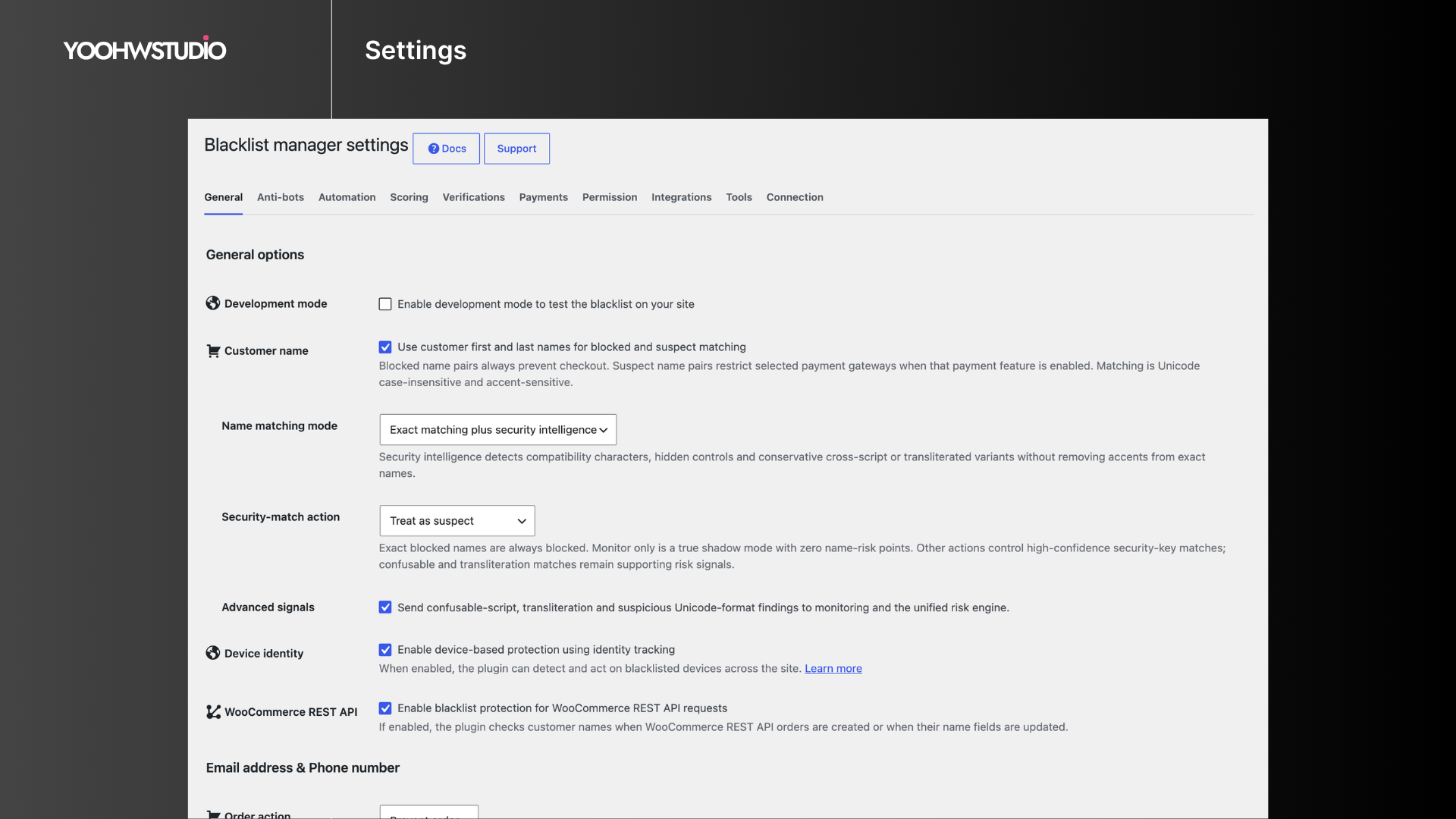
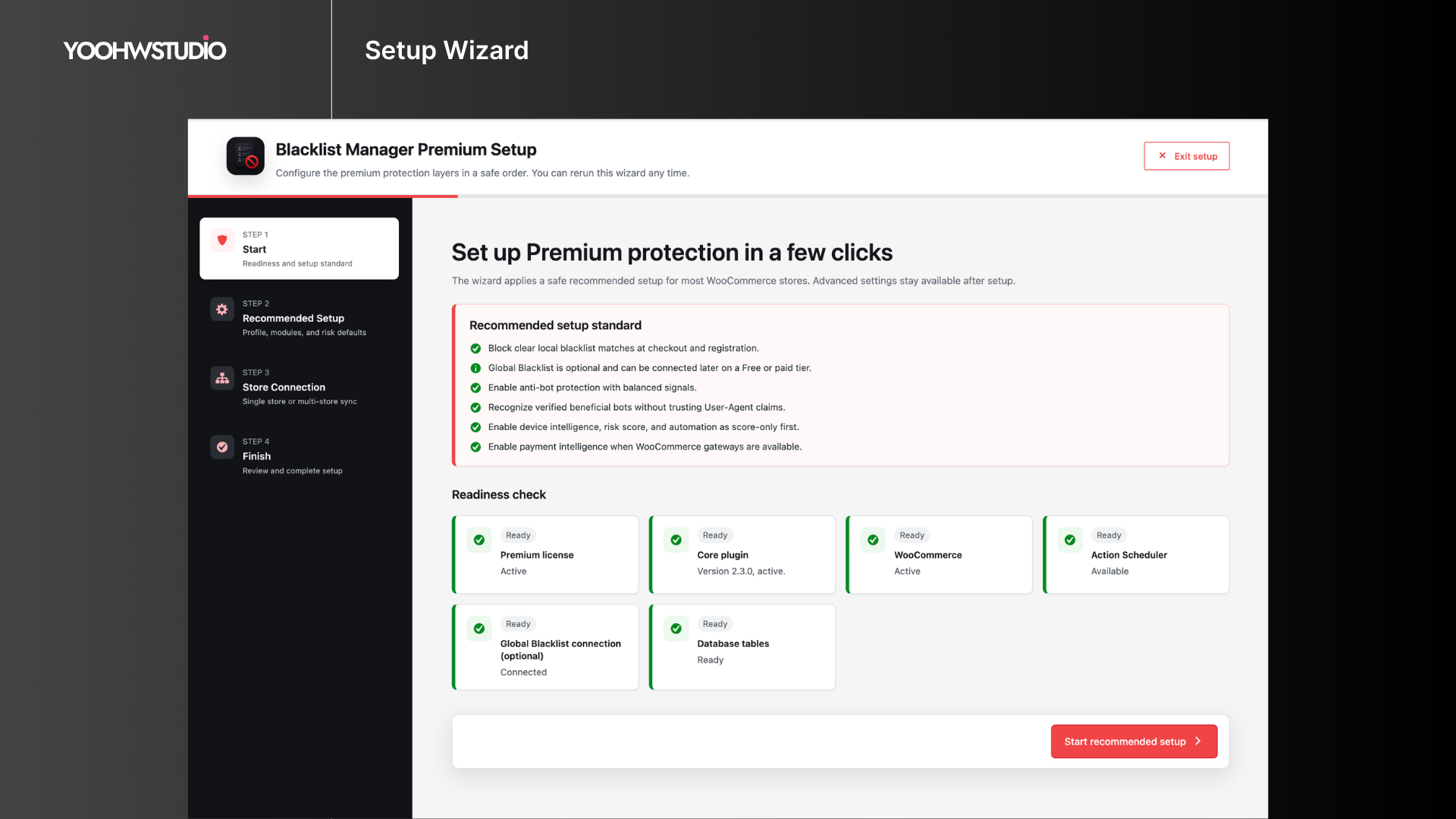
Faq
Yes. Go to Blacklist Manager > Settings and enable checks for checkout, registration, comments, reviews, forms, or REST API orders.
The Suspects list gives you a review step before fully blocking a customer. Use it when an identity looks risky but should not be rejected immediately.
Yes. Blacklist Manager checks customer details during the WooCommerce checkout and order creation flow before the payment gateway becomes the final decision point. Test custom checkout flows on staging.
Yes. Blacklist Manager supports Contact Form 7, Gravity Forms, and WPForms submissions.
Blacklist checks run only when needed, such as checkout, registration, comment submission, form submission, or API order creation. The checks are designed to stay lightweight.
No. Core includes local blacklist management, checkout protection, Suspects and Blocklist workflows, registration/comment/review/form/REST protection, checkout email verification, notices, and dashboard statistics. Premium is appropriate when you need automated risk actions, payment or device intelligence, phone OTP, detailed activity history, multi-store tooling, or advanced integrations.
Blacklist Manager Premium extends protection and administration inside your store. Global Blacklist Decisions is a separate optional connected service for broader-risk checks. You can evaluate either offering for its own use case; neither is a required step before the other, and Core’s local protection works without both.
Global Blacklist Decisions is a connected fraud-prevention service. Data exchange depends on the Global Blacklist connection and checks you enable. Review the Global Blacklist settings, plan details, and privacy terms before using it in production.
Reviews
Plugin was blocking all orders!!!
By 
The plugin decided it was a good idea to block all orders regardless of the emails/ip being blocked or not. We've lost a lot of money today because of this error. Stay away!
Excellent plugin, great support.
By 
An excellent plugin, I've been using it for a while and it's worked for me to block some orders from problematic customers. Best of all, the support is excellent and extremely fast.
Free version is extremely crippled
By 
Almost everything mentioned in the description is not available in the free version. You could call that a "bait and switch". At the very least, it is dishonest.
Only 2 settings for the free version of the plugin!
By 
The free version of this plugin is hilariously useless. As you go through the settings panel every setting in 7 of the 8 settings panels requires to be unlocked via the pro plugin version.
There are only 2 settings in the general panel that can be used. One is Cancel the order / Prevent customers from checking out if they use the phone number or email address is on the blocklist. But you cant actually use the phone number or email blocking unless you upgrade!
The only actual setting that works is via subscribing to their global blacklist. Such blacklists are useless (I explain why below).
Going through the grayed out settings almost all are useless in any case. Bot farms attempting to test stolen credit card numbers use public domain email variations such as johndoe24f5@gmail/hotmail/yahoo and if you block a top level free mail provider your at risk of losing most of your potential customers. And bot farms have access to hundreds of thousands of ips worldwide so they will rotate the ips for every order attempt - we just dealt with one CC swarm which used over 75k American ips. Simple IP blocking is 5th grade amateur level defense that is easily defeated by an attack.
The only settings in this plugin that would be useful are matching IP address to the order address, preventing multiple orders with the same email/phone and requiring a confirmation email or text. And none of those features are available in the free version of the plugin.
Garbage in, garbage out.
Works Very Well
By 
WooCommerce site was being flooded with Failed orders and CC fraud. Installed the plugin, configuration was fairly easy. And it stopped the CC failed orders. Will keep an eye on the situation, but for now, it works as advertised. Tech support and customer service is very good.
Breaking all form functionality
By 
All of my forms and woocommerce checkout is getting a critical error when a user submits. The risk for lost customer trust is not worth installing.
Works well
By 
Installed this plug-in to block the IP addresses of some malicious 'customers' who would order and deny receiving the goods to seek refunds. Even though we had proof of delivery. No more bad orders since using the plug-in
Works perfect
By 
The free version works very well for basic blocking of fraudulent users. It's very useful. Great job! Thank you very much.
Very helpful plugin
By 
My client had over 1000 spam orders and I installed this plugin and it took care of the issue immediately. Very easy to use. I highly recommend.
Excellent Support!
By 
We started using this plugin (upgrading to premium) while experiencing high bot traffic placing false orders on our website. Support has been very quick and helpful working with us to stop this issue. We have no complaints!
Changelog
2.4.0 (Oct 22, 2026)
- New: Makes Global Blacklist checks post-order in every mode. Light records results; Moderate adds advisory order warnings without enforcing a hold or cancellation. Strict holds pending/processing challenge orders and cancels block decisions even for paid/completed orders; cancellation does not issue a refund. Global no longer rejects checkout synchronously; independent local and Premium protections remain in effect.
- New: Creates new manual order reports exclusively as v2 and sends them only with a fresh signed service capability. Missing capability defers the immutable report candidate for up to 24 hours without downgrading it to v1; delivery is not guaranteed.
- Fix: Recovers eligible native WooCommerce New order email after asynchronous checks finish, including early Global-check failures, while preserving fraud holds, native recipients and explicit resend. Only a confirmed failed transport receives one scheduled retry; accepted or uncertain delivery is not replayed automatically, and historical orders are not replayed.
- Fix: Keeps per-order email dispatch and recovery state out of subscription, renewal and resubscribe copies.
- Fix: Keeps checkout verification state bound to the current challenge lifetime, preventing expired or replaced challenges and delayed responses from confusing a newer verification attempt, and preserving a rejection from another checkout gate.
- Fix: Clarifies database-readiness maintenance guidance and preserves failed-repair diagnostics without repeatedly scheduling an unsupported online index repair. Missing reporting indexes do not remove blacklist records or disable local protection.
- Improve: Places Global Reconnect controls inside the expandable Plan & connection card.
- Improve: Coalesces Global plan, control and capability refreshes with bounded retry and Retry-After handling, while keeping existing rate limits, credential checks and deferred report ownership.
- Compatibility: Existing v1 queued reports and historical revoke remain supported. Old forms and current legacy automation retain local actions/local-only behavior and do not manufacture evidence for a new v2 report.
- Compatibility: Core remains standalone with schema contract 1. The additive OTP row-incarnation column uses the existing administrative schema repair path; an older cached verification page requires a full refresh. Older Premium email consumers may conservatively hold advisory-score mail until compatible completion information is available.