Where Did You Hear About Us Checkout Field for WooCommerce

Where Did You Hear About Us Checkout Field for WooCommerce
Description
This plugin adds a custom field in the checkout page to ask your customers where they heard about your store.
This plugin also offers an “Other” field where your customer can provide a specific answer in a separate textbox.
Features:
- Easily change the labels and choices for the custom field in the checkout page.
- View reports on the “Reports” section in WooCommerce.
- Enable/disable the custom field to be required on checkout.
- Enable/disable the “Other” field.
- Modify order statuses you want to include in the reports.
- Export Orders with Customer Source field
Installation
Install via the WordPress Dashboard:
- Login to your WordPress Dashboard.
- Navigate to Plugins, and select “Add New” to go to the “Add Plugins” page.
- In the right side, enter “Where Did You Hear About Us Checkout Field for WooCommerce” in the search input bar, and press Enter.
- Click install, and wait for the plugin to download. Once done, activate the plugin.
Install via FTP:
- Extract the zip file, login using your ftp client, and upload the storefront-site-logo folder to your
/wp-content/plugins/directory - Login to your WordPress Dashboard.
- Go to “Plugins” and activate “Where Did You Hear About Us Checkout Field for WooCommerce” plugin.
Screenshots

The custom field in action on the checkout page.

The custom field value displayed on the order edit page.
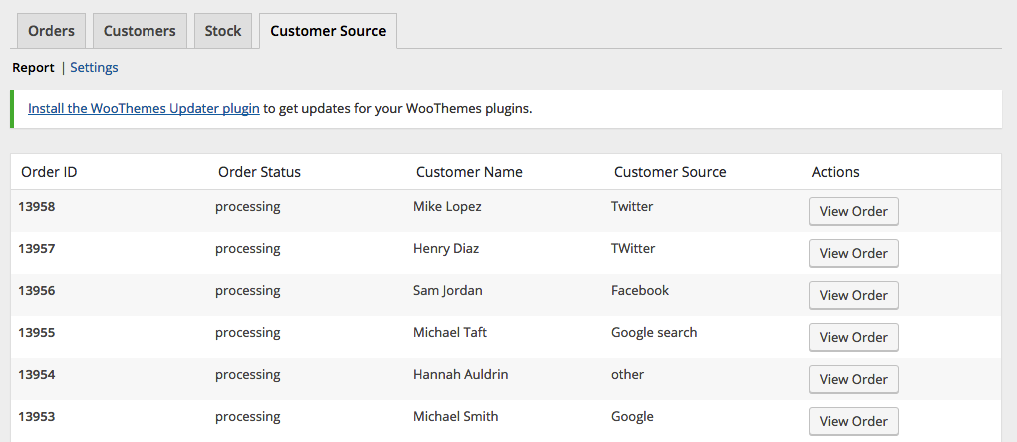
Report page.
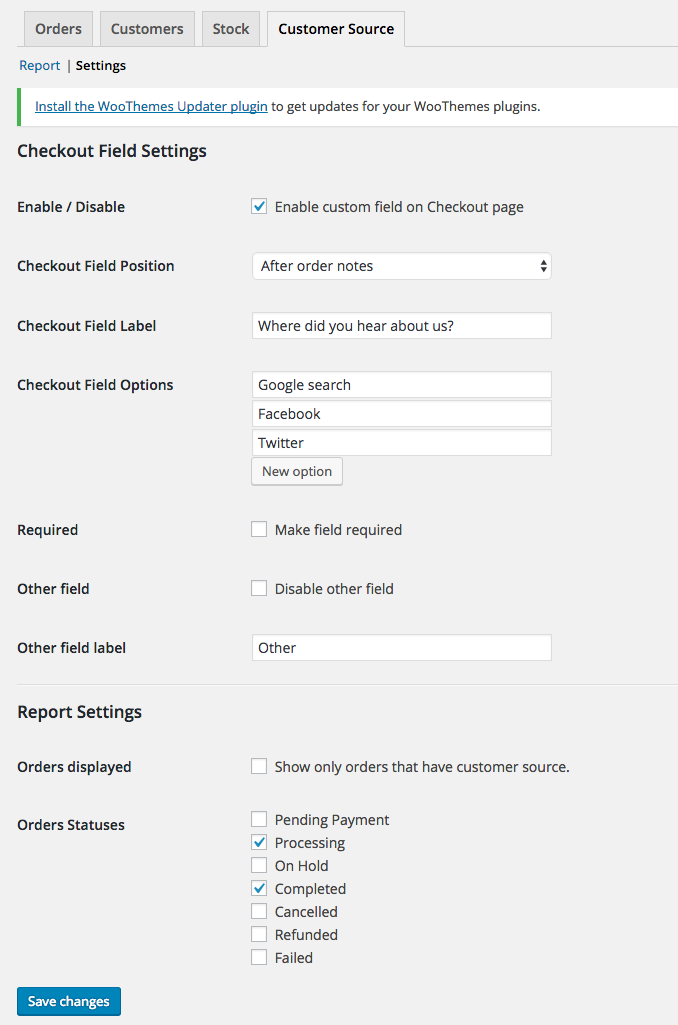
Settings page.
Faq
You can find the report page by navigating to WooCommerce > Reports and click on the “Customer Source” tab.
You can find the settings page by navigating to WooCommerce > Reports and click on the “Customer Source” tab, and then click on the “Settings” link on the sub-navigation.
Reviews
Field meta name/key
By 
Hi there,
Thanks for this plugin.
We are using another plugin to automatically export and import orders into another system. In this plugin we have the capability to select certain 'meta fields', however we do not know what exact meta name / meta key your plugin uses. Could you please tell us?
Thanks in advance
Just what we needed
By 
A simple way to get feedback from you customer. Installed and running in 2 minutes.
A great little plugin! 🙂
By 
No mess, no fuss, straight-forward plugin. Was up and running in around 10 minutes. It's great that we can now ascertain how people found our site when going through the checkout process. Awesome stuff! 🙂
Does what it needs too
By 
Great simple plugin, does exactly what it says, nothin more, no extra fluff. More plugins should be like this.
Great plugin, needs one small fix
By 
Great plugin, works fine. One suggestion:
Currently the line "Other" is not translated in the dropdown-menu (only in the field label).. To fix: on wc-customer-source.php, line 589, please change the text-domain from woocommerce-admin to woocommerce, and it will work flawlessly.
Works great
By 
Good approach but several technical flaws
By 
__( 'Customer Name', 'woocommerce-admin' ),
__( 'Orders', 'woocommerce-admin' ),
__( 'Other', 'woocommerce-admin' )
__( 'Other', 'woocommerce' )
__( 'Select an option…', 'woocommerce' )
__( 'Customer', 'woocommerce' )It works
By 
Changelog
1.0.0
- initial release
1.0.1
- Logged Out user can now see the form
- Tested with WordPress 4.9.2
- Tested with Storefront 2.2.7
- Tested with WooCommerce 3.2.6
1.1.0
- Added Order Export Feature
- Tested with WordPress 5.2.1
- Tested with Storefront 2.5.0
- Tested with WooCommerce 3.6.4
1.1.1
- Updated code as suggested by @d9media
1.1.2
- Updated code for tanslations
1.2.0
- moved menu location due to deprecation of Reports section
- updated codes for php8 compatibility
1.3.0
- fixed php 8 compatibility
- fixed export php notice
1.3.1
- patched XSS Vulnerability
1.3.2
- patched XSS Vulnerability (updated escaping code)
1.3.3
- fixed translation issue of ‘Other’ field