Weather Effect

Weather Effect
Description
Weather Effect lets you add animated falling objects to your website. You can display snowfall during winter, falling leaves in autumn, rain drops, or festive decorations for holidays like Christmas, Halloween, and Valentine’s Day.
The plugin works by overlaying animated elements on your pages. Visitors see these effects as they browse your site, which can help create a seasonal atmosphere or celebrate special occasions.
Demo and Documentation
What This Plugin Does
Weather Effect adds falling animation effects to your website. Here’s what you can display:
- ❄️ Snow and snowflakes for winter themes
- 🍂 Falling autumn leaves
- 🌧️ Rain drops with umbrella graphics
- 🎄 Christmas decorations like Santa, bells, candy, and gifts
- 🎃 Halloween elements including bats, pumpkins, and ghosts
- 💕 Valentine’s Day hearts and roses
- 🎆 New Year balloons and celebration graphics
How It Works
After installing the plugin, go to the Weather Effect settings page in your admin dashboard. Select the season or occasion you want, choose the falling objects, and save your settings. The effects will appear on your website immediately.
You can preview the effects before making them live using the Preview button in the settings panel.
Free Version Features
- Multiple seasonal themes (Christmas, Winter, Autumn, Rain)
- Snow falling animation
- Snowflake effects
- Settings panel for configuration
- Live preview option
- Works on mobile devices
Pro Version Features
The pro version includes additional falling objects and customization options:
Seasonal Themes Available:
- Christmas: Balls, Bells, Candy, Gifts, Hat, Ribbon, Santa, Sleigh, Snowman, Socks, Stars
- Winter: Snowfall, Snowflakes
- Autumn: Falling Leaves
- Spring: Spring Leaves
- Summer: Summer themed graphics
- Rain: Rain Drops, Umbrella, Clouds
- Halloween: Ghost, Bats, Moon, Pumpkin, Spider Web, Witch
- Thanksgiving: Turkey decorations
- Valentine’s Day: Roses, Hearts, Balloons
- New Year: Balloons, Celebration stickers
Additional Pro Features:
- Control falling object size randomly
- Adjust falling speed
- Set timeout for effects
- Exclude specific pages or posts
- Upload up to 10 custom images (PNG, JPEG, GIF supported)
- Enable or disable effects easily
Installation
Automatic Installation
- Go to Plugins > Add New in your WordPress dashboard
- Search for “AWPLife Weather Effects”
- Click Install Now, then Activate
- Go to Weather Effect in the admin menu to configure
Manual Installation
- Download the plugin zip file
- Go to Plugins > Add New > Upload Plugin
- Upload the zip file and click Install Now
- Activate the plugin
- Go to Weather Effect in the admin menu
Setting Up
- Go to Weather Effect in your admin menu
- Select a season or occasion
- Choose the falling objects
- Adjust speed and size if needed
- Click Preview to check the effect
- Click Save to apply
Screenshots

Christmas snow falling effect on a website
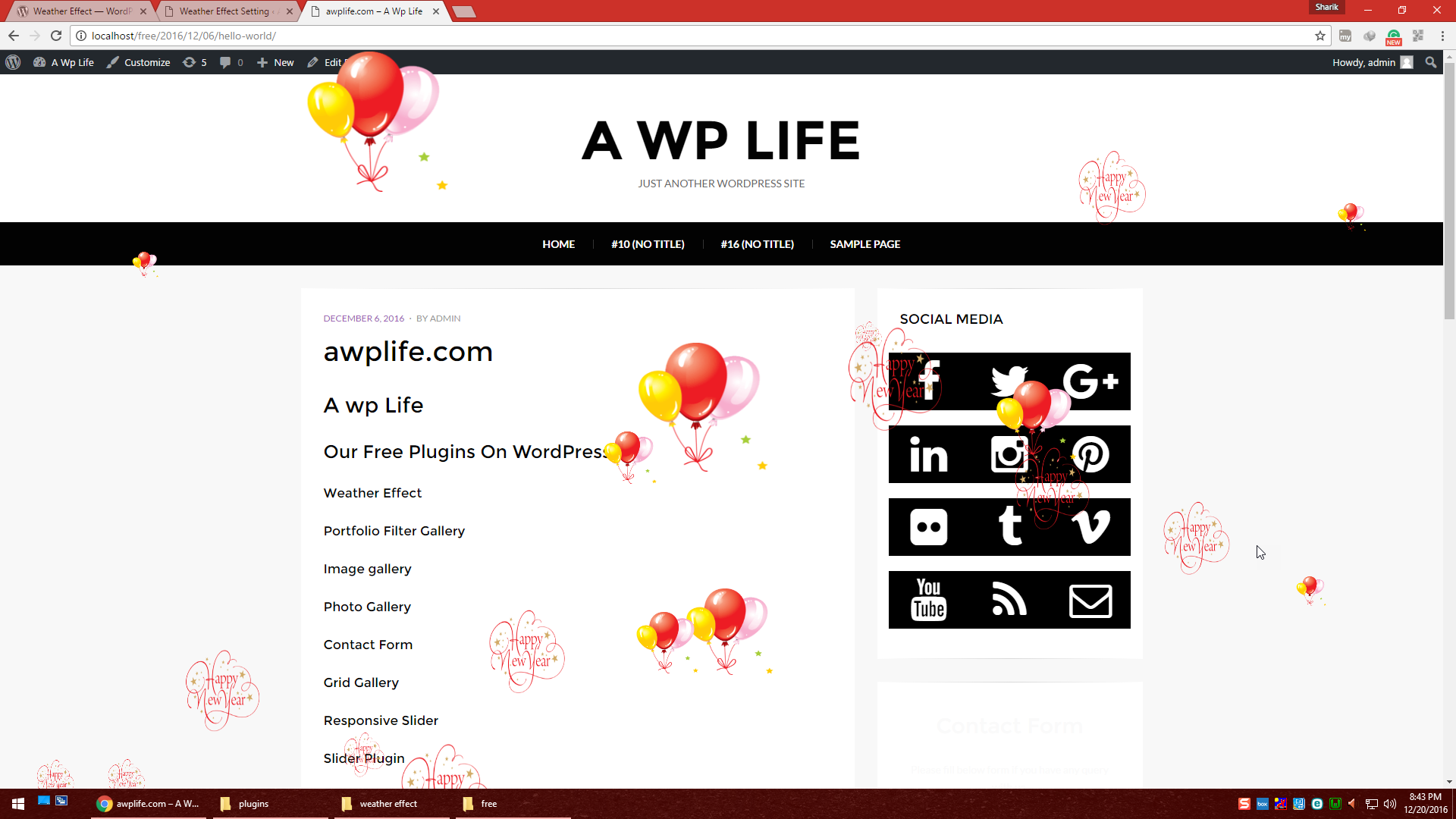
New Year celebration effect with balloons
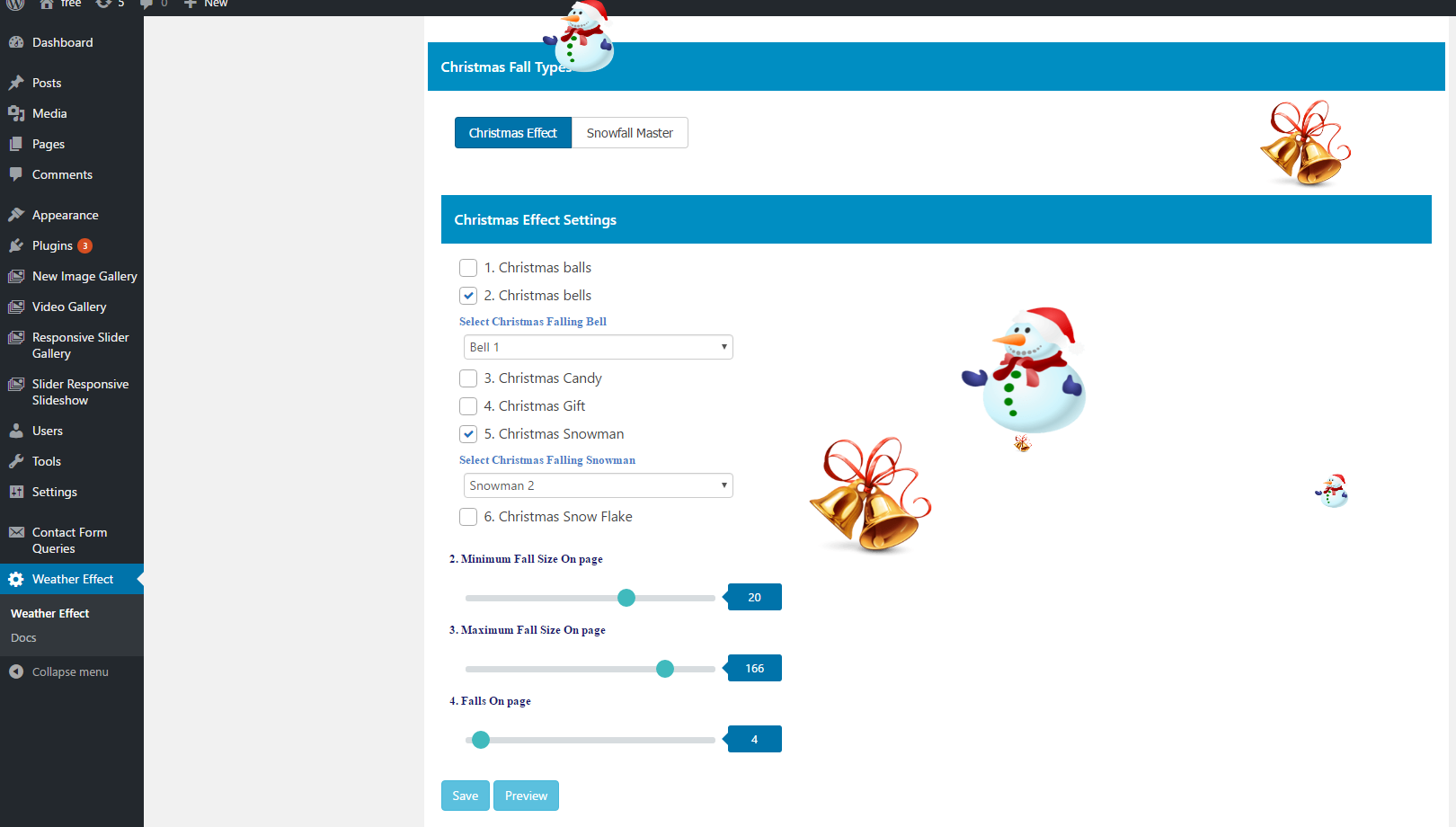
Admin settings page for Christmas effects
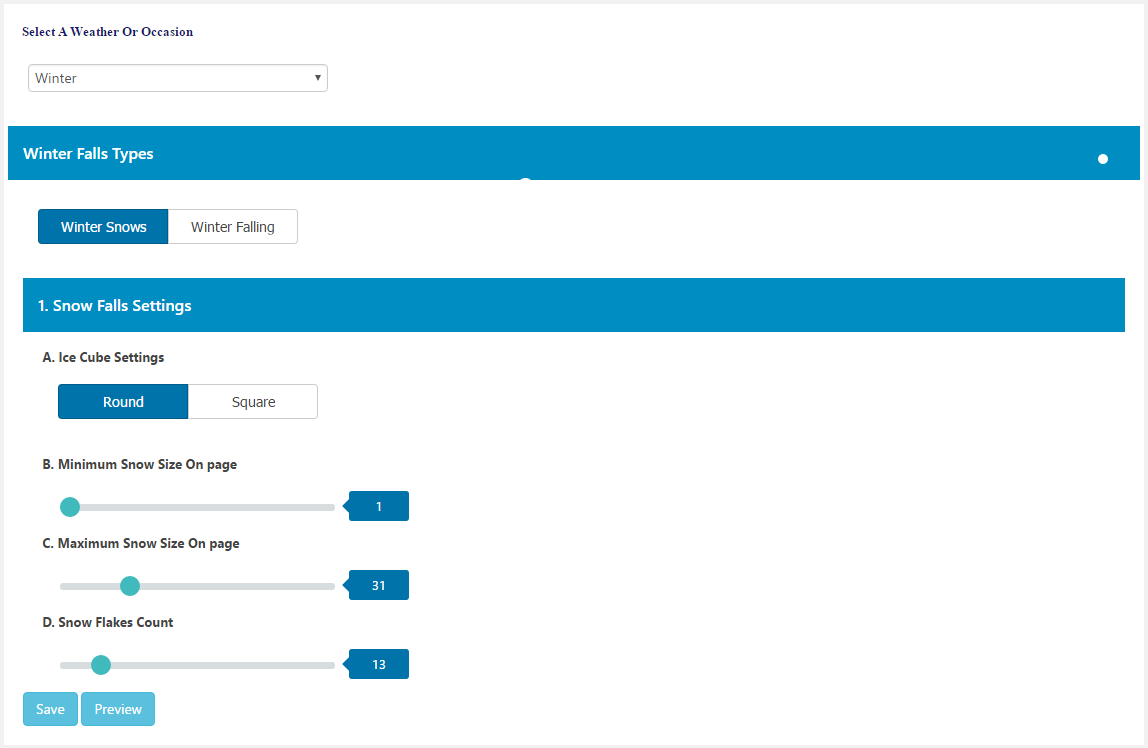
Winter season settings configuration
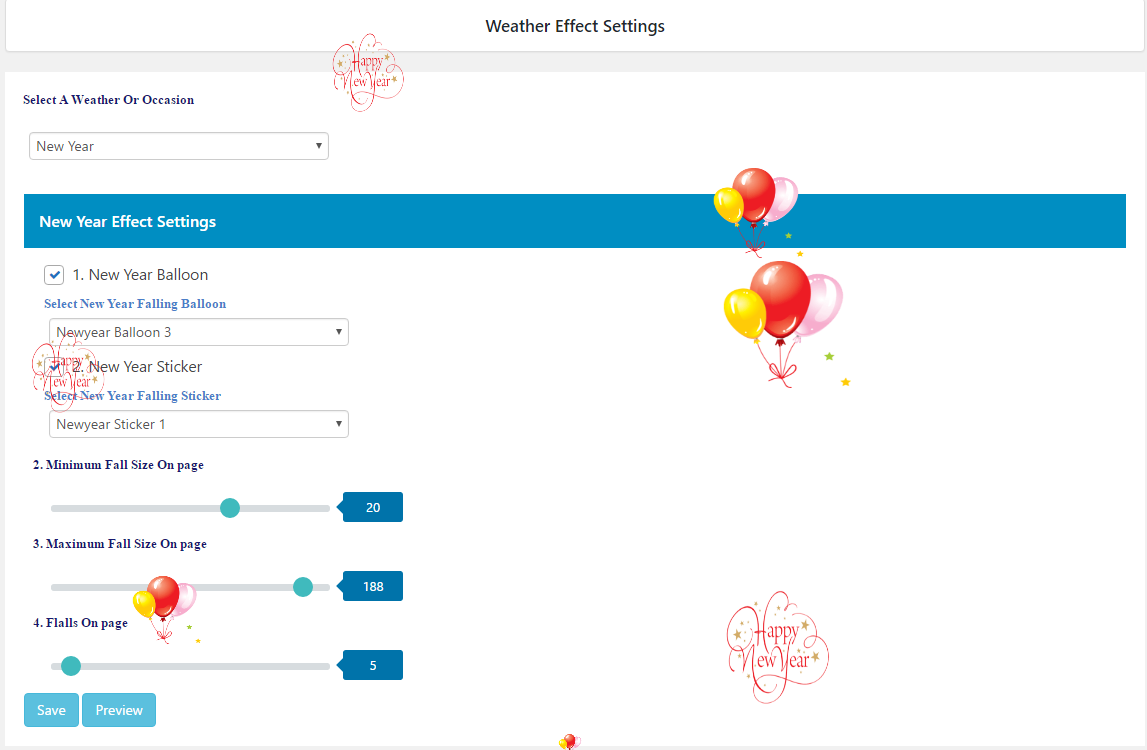
New Year settings page
Faq
Weather Effect adds animated falling objects to your website. These can be snowflakes, rain drops, autumn leaves, or seasonal decorations like Christmas ornaments or Halloween bats.
No. The plugin has a settings page where you select what you want to display and save. No coding is needed.
Weather Effect works with standard WordPress themes. It also works with page builders like Elementor, Divi, and Beaver Builder.
Yes. There is a Preview button in the settings panel. Click it to see how the effects look before saving.
The plugin uses JavaScript to display animations. On most websites, this runs smoothly. If you notice any slowdown, you can disable the effects from the settings.
In the free version, effects appear on all pages. The pro version lets you exclude specific pages or posts.
The pro version allows you to upload up to 10 custom images. Supported formats are PNG, JPEG, and GIF.
The plugin includes effects for: Winter, Autumn, Spring, Summer, Rain, Christmas, Halloween, Thanksgiving, Valentine’s Day, and New Year.
Yes. The animations display on desktops, tablets, and mobile phones.
Post your questions on the WordPress.org support forum.
Reviews
Excellent
By 
Excellent little novelty plugin to add some fun effects to your website, has lots of settings and customisations like speed, type of images, and how many you want on the page.
Very good
By 
Very good plugin, the best for events.
Great Customer Service
By 
Had an issue with the plugin working. They pinpointed the problem and then took care of it right away.
great plugin, but give fatal error in network mode
By 
Well, plugin actually work on multisite frontend, but whether you go to wp-admin/network/plugins.php or wp-admin/network/update-core.php - it gives you fatal error.
So, until this plugin is activated I cant add/remove/update any of sites plugins.
great plugin
By 
Thankyou just what I was looking for. This is a good plugin.
top
By 
Love it!
Use this every year
By 
I use this little plugin every year for some of my clients to make their website Christmassy. Works a treat!
İnce Düşünce 🙂
By 
İnce düşünce ile oluşturulmuş bir eklenti-plugin 🙂 Teşekkürler üretene.
I LOVE IT
By 
Congratulations for making such a beautiful plugin. I'd suggest you add more weather effects. Keep up the good work
Easy to use
By 
very easy to use and free version offers a good choice of effects, thanks
Changelog
1.6.1
- Enhancement: Added dynamic Live Preview auto-update on dashboard settings modification.
- Enhancement: Added live background color picker to the Live Preview card header.
- Enhancement: Displayed the plugin version dynamically in the dashboard settings header.
- UI Fix: Removed button text underlines on all settings buttons.
- UI Fix: Enhanced text color contrast on primary button hover/focus/active states.
- UI Fix: Removed horizontal scrollbar overflow on “Our Themes” and “Our Plugins” sub-pages.
- UI Fix: Removed the cloud icon from the admin settings loading screen.
- Link Fix: Updated the “BUY NOW” button to direct to the premium signup page.
- Clean Up: Removed the obsolete “Try Pro Version” link.
1.6.0
- Security: Hardened administrative settings with capability checks and nonces.
- Security: Implemented robust output escaping and sanitization across all frontend effects.
- Standards: Migrated asset loading to standard WordPress hooks (wp_enqueue_scripts/wp_footer).
- Standards: Applied unique prefixes to all constants and functions to prevent namespace collisions.
- Feature: Added new “Our Themes” and “Our Plugins” submenus to showcase the ecosystem.
- Optimization: Removed unused files and optimized database queries.
1.5.9
- Tested: WordPress 6.8.3 compatibility
1.5.8
- Tested: WordPress 6.8.1 compatibility
1.5.7
- Tested: WordPress 6.7.2 compatibility
1.5.6
- Tested: WordPress 6.7.1 compatibility
- Fixed: Fatal error on multisite installations
1.5.5
- Tested: WordPress 6.7.1 compatibility
- Fixed: Footer bottom space and scroll bug
1.5.4
- Tested: WordPress 6.6.2 compatibility
1.5.3
- Tested: WordPress 6.6.1 compatibility
1.5.2
- Tested: WordPress 6.5.4 compatibility
1.5.1
- Fixed: Minor bug fixes
- Tested: WordPress 6.4.3 compatibility
1.5.0
- Fixed: Minor bug fixes
- Tested: WordPress 6.4.2 compatibility