Web Directory plugin Free – AI powered

Web Directory plugin Free – AI powered
Description
Web Directory plugin Free is a WordPress directory plugin that turns your site into a searchable business directory. Sort listings into categories and locations, build your own listing form, drop the directory onto any page with a shortcode, and let visitors search and browse – as a list, as cards, or on an interactive map.
In the free edition you add and edit listings from the WordPress admin, and visitors browse, search and view them on the front end.
AI that writes the listing, and search by sentence
Add a key for a free AI service and a Write button appears beside the listing description: it reads the entry name, its categories and its location, and drafts the text. Nothing is sent anywhere until you enter that key, and the fields a person has to state as fact – prices, phone numbers, dates, opening hours – are never generated, because a plausible invented price is worse than an empty one.
The free edition ships with Groq, which has a free tier that needs no payment card. The separate AI Assistant Add-on widens it: OpenAI, DeepSeek, Mistral, OpenRouter and Google Gemini as further services, a Write button on every text field on the form instead of the description alone, and one control that fills every empty field in a single request so the texts agree with each other.
The add-on also brings assisted search. A visitor writes what they are after as a sentence, “a cheap place open on Sunday that takes cards”, and it is read into the search form’s own filters rather than into the keyword box: the category, the location and the distance, the sliders and the dropdowns your form carries. Only values the form actually offers are set, every one of them is shown above the results as a chip the visitor can drop, and a filter they set or cleared themselves is left exactly as they left it. A one-word search is answered the way it always was, without asking the model at all. The add-on is a plugin of its own and is managed from the same AI settings tab.
Live demo: directory.salephpscripts.com
What you can build
A local business directory, a member or staff directory, a property or vehicle catalogue, a venue or event guide, a service-provider index, a classifieds board. Anything that is a list of places or things with fields, categories and a map.
Organise your listings
- Categories and locations are hierarchical, so Country, Region, City nests the way you expect, and each level gets its own page.
- Each category can carry its own marker icon and colour, so the map reads at a glance.
- Every category and location page is a real URL with its own listings, search and map.
Build the listing form yourself
The form builder is drag and drop: arrange fields in rows and columns, and add your own on top of the built-in ones. Field types included:
- Title, Content, Excerpt
- Categories
- Address and Map
- Images & Videos – photos plus YouTube or Vimeo links, shown in one gallery with a lightbox
- Contact info, Phone, Email, Website URL
- Text/string, Number, Price
- List – as a dropdown, radio buttons or checkboxes
- Date-Time
- Opening hours
- File upload
Every field can be placed independently on the listing card, the listing page, the search form and the map popup, so a field can be searchable without cluttering the card.
Put the directory anywhere
Each directory has a page builder: choose which elements appear on the home, category, location and listing pages, and in what order – search form, map, categories block, listings grid, slider, breadcrumbs, page title, buttons.
If you would rather place things by hand, every element is also a shortcode: [webdirectory], [webdirectory-search], [webdirectory-map], [webdirectory-listings], [webdirectory-categories], [webdirectory-locations], [webdirectory-slider], [webdirectory-breadcrumbs], [webdirectory-listing-page] and more. They work in the block editor, in Elementor and in WPBakery.
Maps
- Three engines: Google Maps, Mapbox and MapLibre with MapTiler tiles. Pick per site.
- Marker clustering, so thousands of listings stay usable.
- Per-category and per-listing marker icons.
- Rich popups built from the fields you chose, with the listing photo.
- A map sidebar that lists what is currently in view, and follows as the visitor pans.
- Radius search from an address, in miles or kilometres.
- Several layouts, including a full-width hero map and a sticky map beside the listings.
Search that finds things
The search form is built the same way as the listing form: drag in the elements you want.
- Keyword, categories, locations, address plus radius, rating.
- Any custom field you added becomes a filter – a price range, a number range, a date, a dropdown.
- A “More filters” separator to keep the visible form short.
- Sorting by newest, oldest, title, rating, random, or any numeric or date field you defined.
- Grid and list views, with the visitor’s choice remembered.
- With the AI Assistant Add-on, a whole sentence instead of a form: the filters above set themselves from it, and the visitor can drop any of them.
Ratings
Built in, no add-on: visitors rate a listing, the average shows on the card, the listing page and the map popup, and rating becomes a search filter and a sort option. Ratings can be switched off entirely.
Bulk work
- CSV import and export for listings, including categories, locations, custom fields, images and video links. Import creates or updates; export round-trips.
- Demo content: 5 ready-made directories with their maps and pages, and a listing form template, imported in one click.
- A thumbnail regeneration tool for when you change image sizes.
Plans and listing lifetime
- Plans decide what a listing gets: how many categories, locations, images and videos, which fields, a logo, the map, ratings, and a sticky badge that keeps it first in the lists you choose.
- An active period per plan – days, weeks, months or years – or none at all. A listing whose period ends leaves the site on its own.
- Reminder emails before a listing expires, once or several times (for example 7, 2 and 1 day before), and an email when it expires.
- After expiration, a plan can hand the listing to another plan instead of taking it down: a featured period that falls back to a basic listing.
- Pause takes a listing off the site without spending its period. Renew an expired listing, or give any listing a date of its own, from its edit screen.
Looks and setup
- An install wizard that creates the pages and the first directory for you.
- Colour palette controls so the directory matches your theme, with several presets.
- Translation ready: ships a POT file for any standard gettext or PO editor.
Emails and spam protection
- Email notifications with editable subjects and texts, each one switchable.
- Google reCAPTCHA (v2 or v3) on the listing contact form.
Ready for large directories
- A dedicated search index and sort index keep tens of thousands of listings responsive, and both rebuild in the background.
- A diagnostics page that checks the directory is wired up correctly and tells you what to fix if it is not.
This plugin uses external services: the map provider you choose, Groq for AI writing once you add a key, Google reCAPTCHA if you turn it on, and salephpscripts.com for the AI Assistant Add-on and the demo data. See the External Services section below.
What is not in the free edition
Front-end submission and payments. In the free edition listings are created and edited in the WordPress admin; visitors browse and search. The paid version adds front-end submission with a member dashboard, where members pick a plan, pause and renew their own listings, and WooCommerce checkout for paid listings, renewals, raise-ups and plan upgrades.
Get the full version: Web 2.0 Directory on CodeCanyon
External Services
Web Directory plugin Free uses the following third-party services. Nothing is sent until you use the matching feature:
- Map providers (Google Maps, Mapbox, MapTiler / MapLibre) – when a map loads or an address is geocoded, the request (coordinates, the address being searched, and your API key/token) is sent to the provider you chose. See that provider’s terms and privacy policy.
- Google reCAPTCHA – when you turn it on for the contact form, the visitor’s interaction is checked with Google. See Google’s terms and privacy policy.
- Groq (AI writing) – only when you have entered a Groq API key and pressed a Write button. What is sent is the text the draft is built from: the entry name, its categories, its location and the fields already filled in. Nothing is sent without a key, and no key ships with the plugin. See Groq’s terms (https://groq.com/terms-of-use/) and privacy policy (https://groq.com/privacy-policy/).
- salephpscripts.com (the plugin author) – when you open the AI tab of the settings, the plugin asks salephpscripts.com for the latest version of the AI Assistant Add-on, at most once an hour; only the add-on’s name is sent. When you press the button that installs the add-on or the one that downloads the demo data, the file comes from salephpscripts.com, and your site’s domain and the plugin version are sent with that request.
Updates come through WordPress.org. The free edition does no license or “phone-home” checks.
Installation
- Upload the plugin folder to /wp-content/plugins/, or install the ZIP via Plugins -> Add New -> Upload Plugin.
- Activate Web Directory plugin Free from the Plugins menu.
- Open the settings page, pick your map engine and enter its API key/token (Google Maps API key, Mapbox token, or MapTiler key).
- Create your categories and locations, build the listing form, add listings, and place the directory on any page with the shortcode.
Screenshots
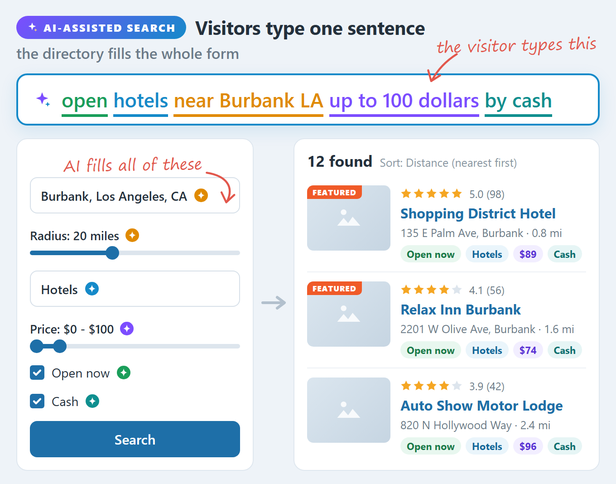
With the AI Assistant Add-on, a visitor types one sentence and the search form fills itself: location, radius, category, price range and filters.
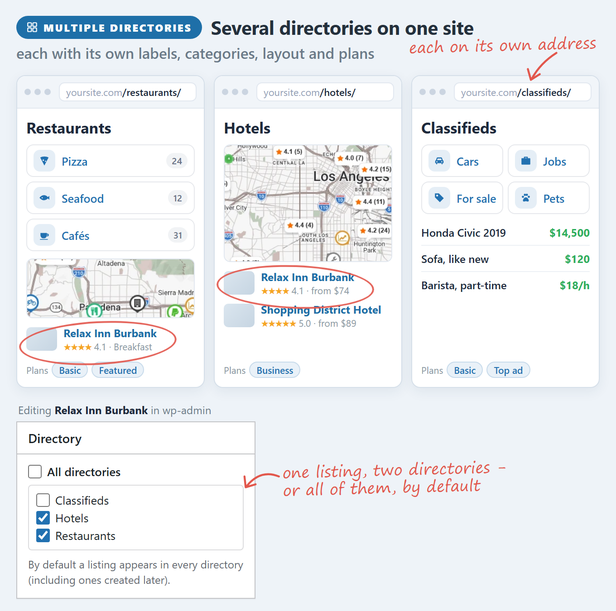
Several directories on one site, such as restaurants, hotels and classifieds, each with its own address, labels, categories, layout and plans; a listing can appear in one, several or all of them.
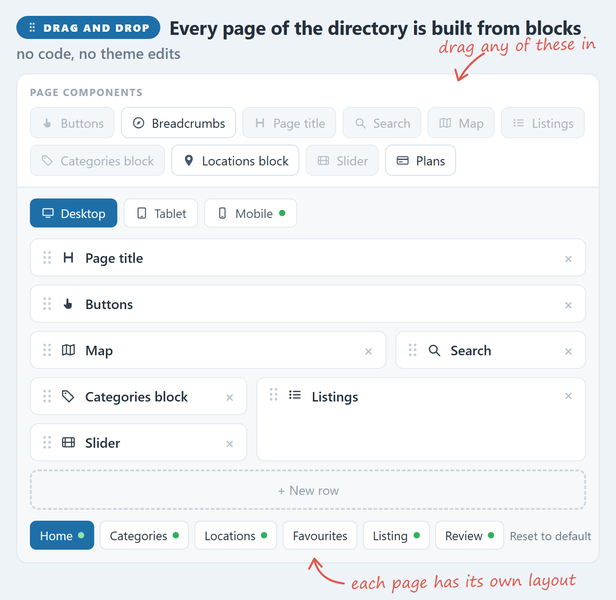
The directory page builder: drag search, map, listings, categories, slider and other blocks into rows, with a separate layout for each page and for tablet and mobile.
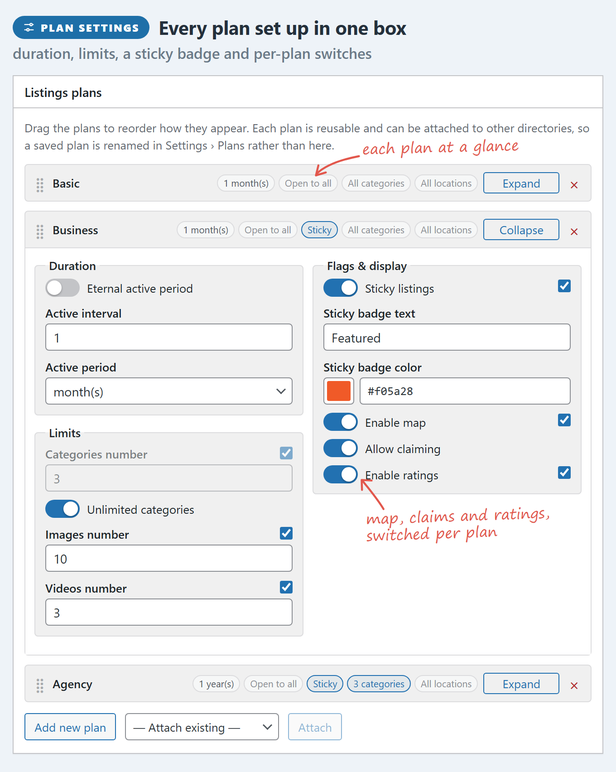
Listing plans in wp-admin: how long a listing stays live, how many categories, images and videos it gets, a sticky badge, and whether it has a map, claims and ratings.
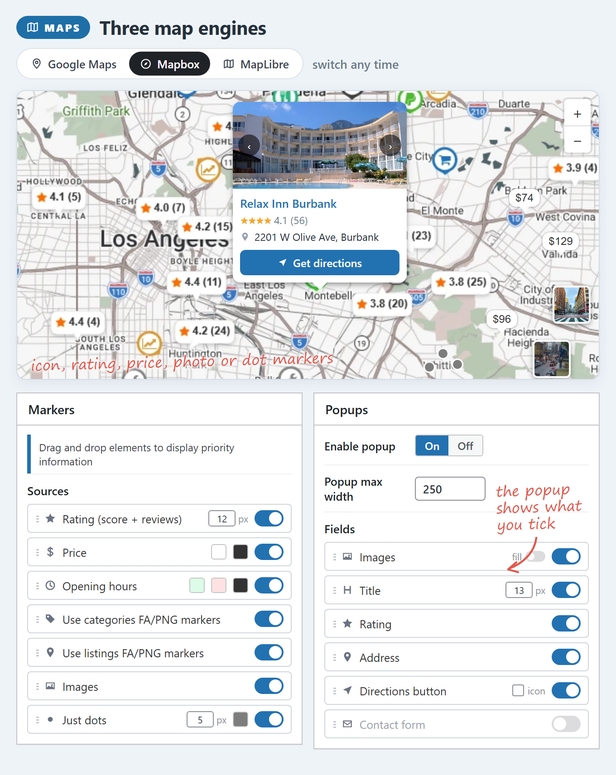
Google Maps, Mapbox or MapLibre, switchable at any time: icon, rating, price, photo or dot markers, and popups that show the fields you tick.
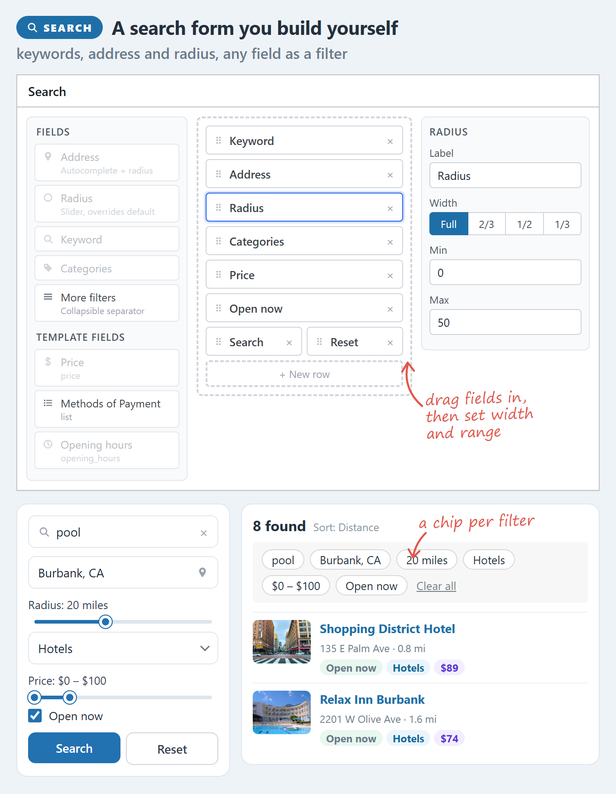
The search form builder: drag in keyword, address, radius, categories and any custom field; every active filter shows above the results as a chip.
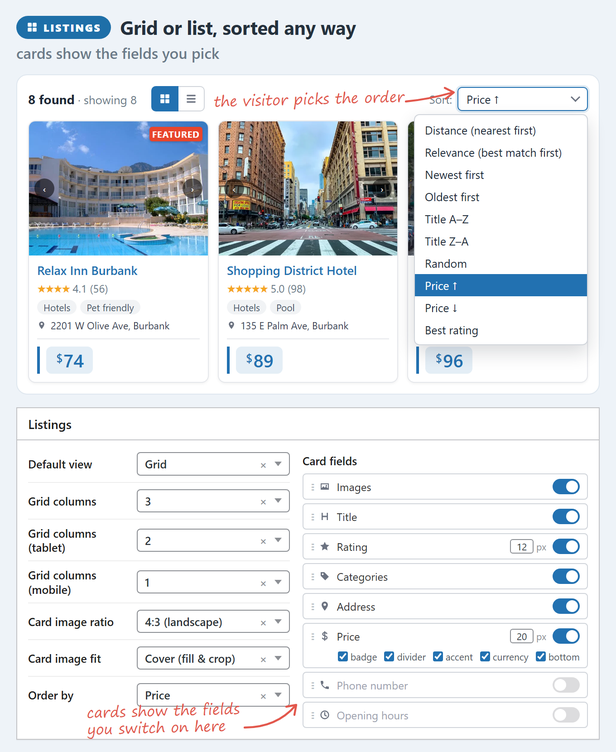
Listings as a grid or a list, sorted the way the visitor picks; the settings set the columns per device, the card image and the fields each card shows.
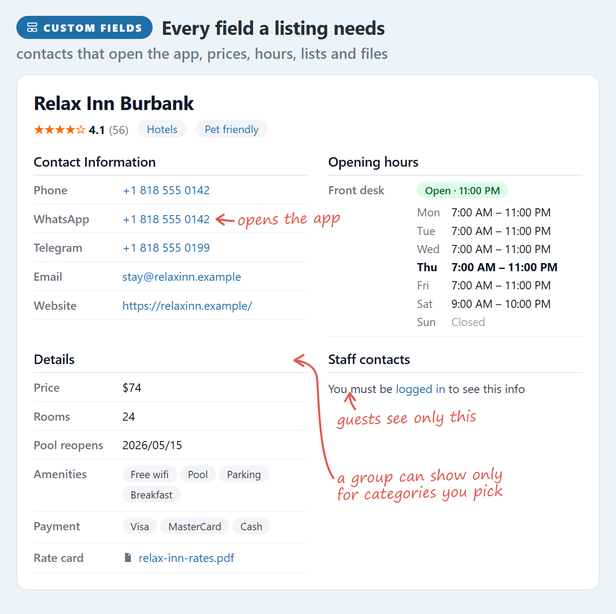
A listing page with its custom fields: phone, WhatsApp and Telegram links, opening hours, price, lists and files, and a group only logged-in users can see.
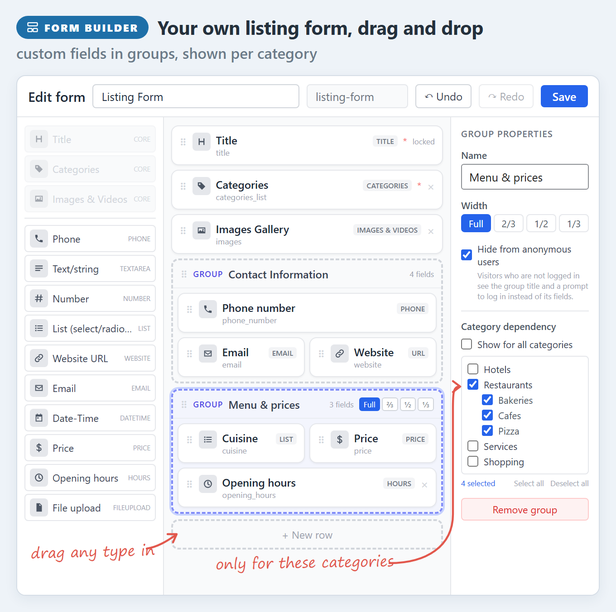
The drag-and-drop listing form builder: add fields by type, arrange them in groups, and show a group only for the categories you pick.
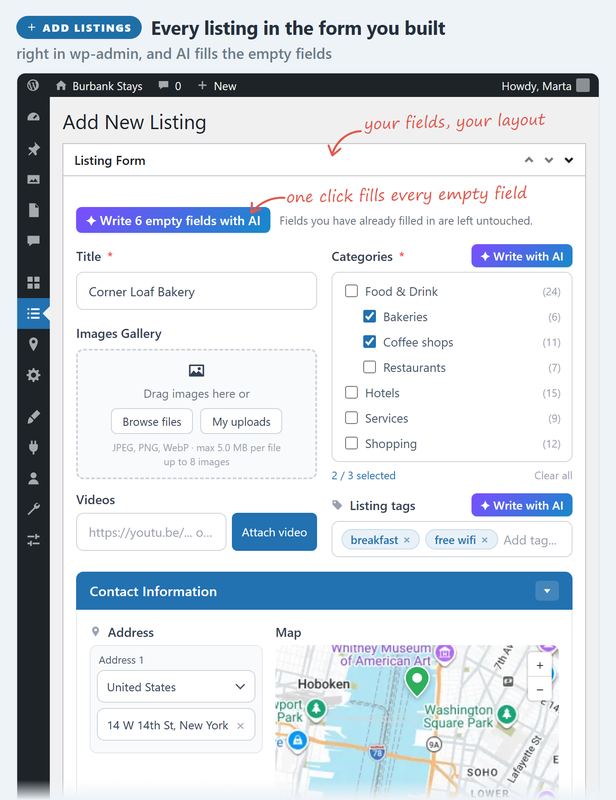
Adding a listing in wp-admin with the listing form you built; with the AI Assistant Add-on, one click fills every empty field.
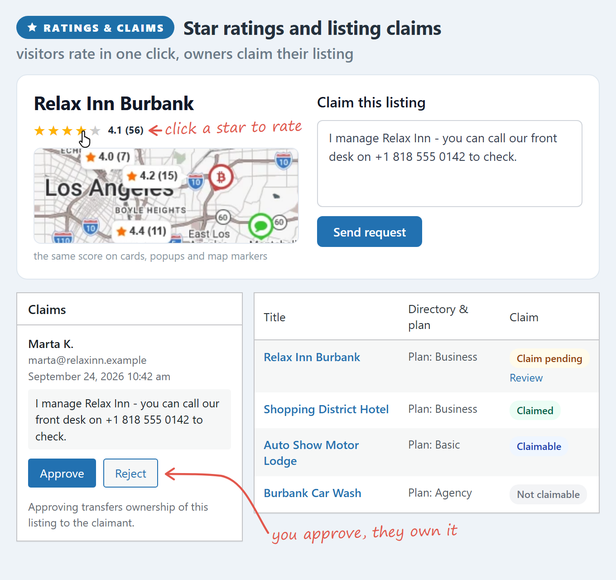
Star ratings in one click, shown on cards, popups and map markers, and listing claims: approve one and the listing passes to its owner.
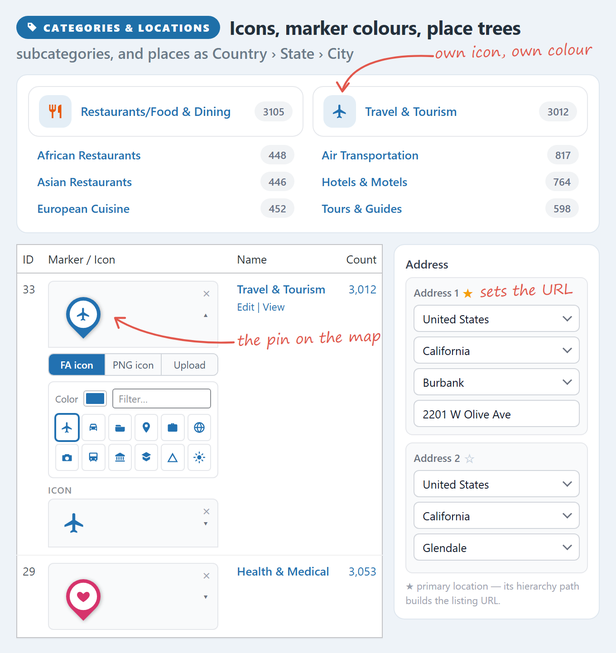
Categories with their own icons and marker colours, and locations as a Country, State, City tree; the primary location builds the listing URL.
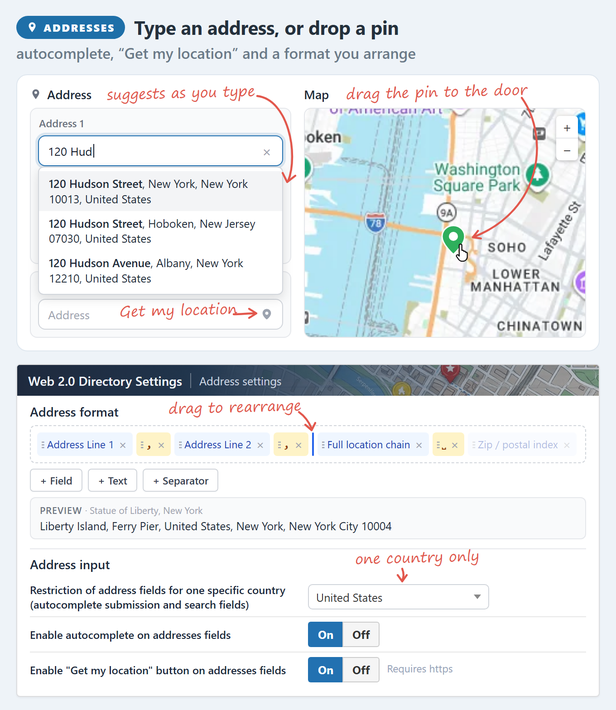
Address input with autocomplete, a Get my location button and a map pin you can drag, plus an address format you arrange yourself.
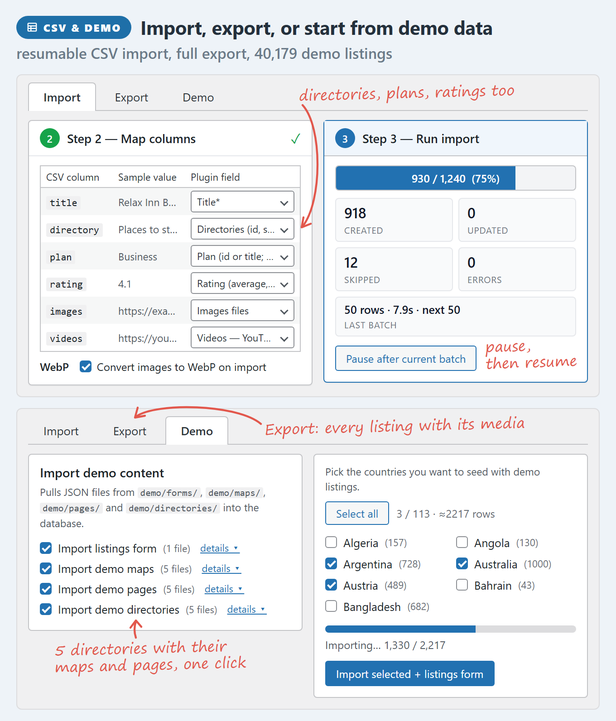
CSV import with column mapping and a resumable progress bar, full export, and demo content: 5 directories with their maps and pages, and demo listings for the countries you pick.
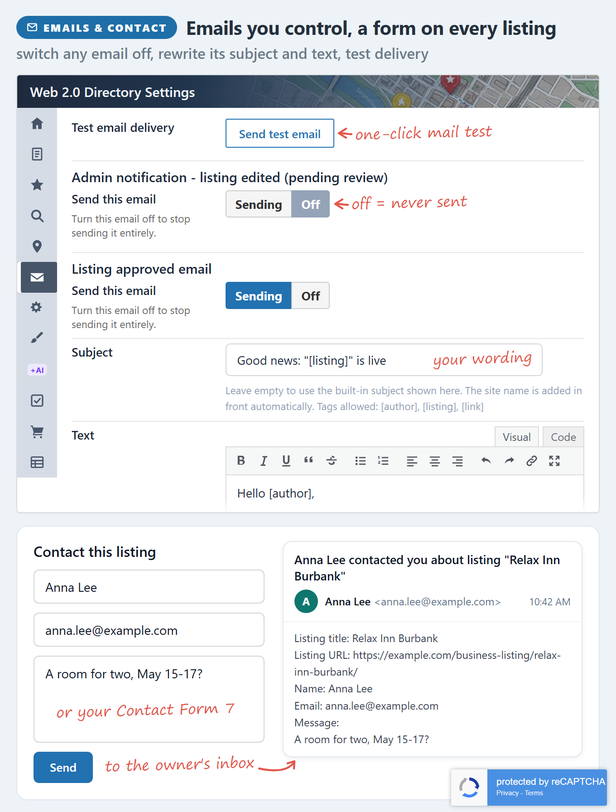
Email notifications you can switch off or reword, a test-email button, and a contact form on every listing, protected by reCAPTCHA.
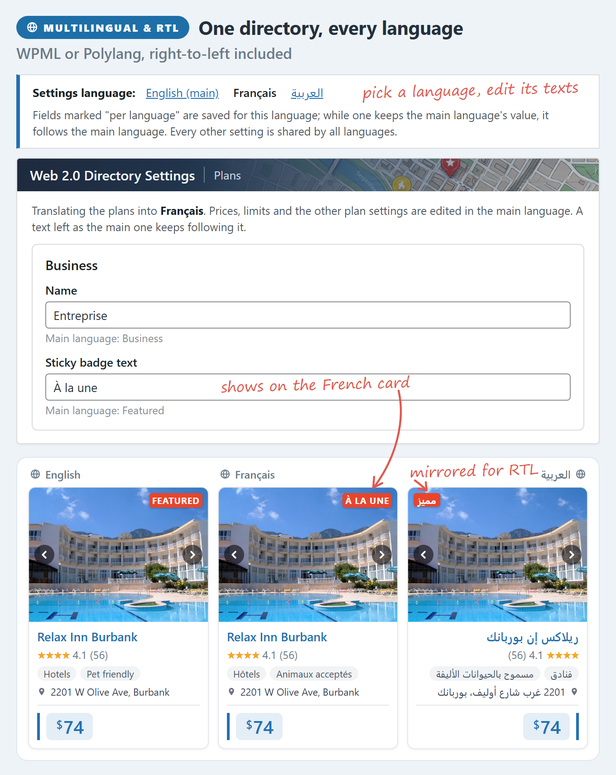
WPML and Polylang, with settings per language, and right-to-left languages: the same listing card in English, French and Arabic.
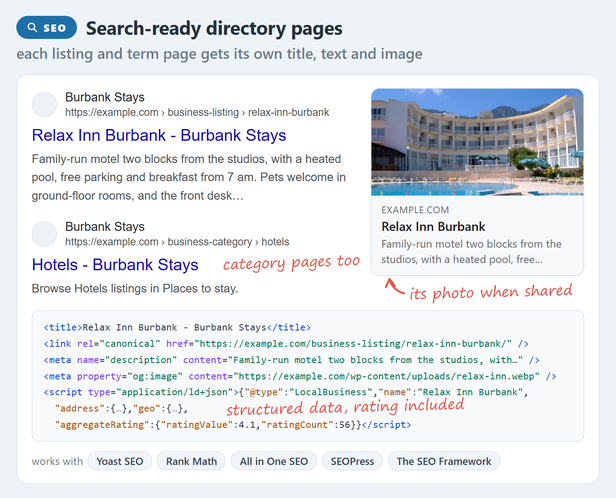
Every listing and category page gets its own title, description, share image and structured data, alongside Yoast, Rank Math, All in One SEO, SEOPress or The SEO Framework.
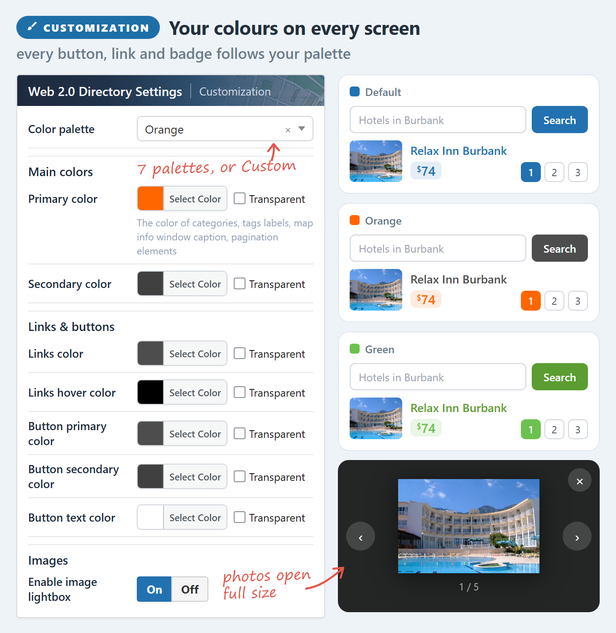
Seven colour palettes or your own colours, applied to every button, link and badge, and an image lightbox.
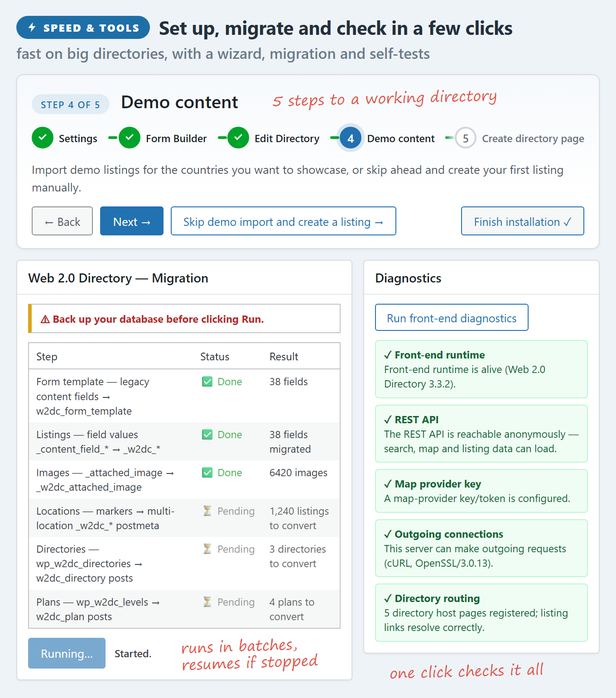
The setup wizard, migration from the previous version in resumable batches, and one-click diagnostics.
Faq
Listings are created and edited from the WordPress admin. Front-end submission (with optional moderation, expiration and renewal) is part of the full version.
For maps, yes – each map provider needs its own key/token, entered on the settings page. Keys are stored on your site and are never sent to us.
Google Maps, Mapbox, and MapLibre with MapTiler tiles. You pick one on the settings page.
Yes. A languages/w2dc.pot template is included; translate it with any standard gettext/PO editor.
Paid submission, membership plans and WooCommerce checkout come with the full version of Web 2.0 Directory, not the free edition.
Reviews
My Expectations
By 
Whenever I’m faced with a paid version of a free plugin, my expectations usually circle the drain. And when I’m dealing with free plugins, knowing that this is an ecosystem of people that includes needy users who don’t really know what they’re doing, it can spawn very frustrated and “rude” support, especially when corners were cut on the documentation.
Very good support
By 
The plugin works well and does what it's supposed to. The support from the author is very good, with a quick response.
Good plugin, Rude support
By 
The plugin itself isn't bad. Dated compared to the competition but robust.
Rated low for the developers conduct. He is very rude, arrogant, unprofessional and impatient. This is the first time I've encountered a developer who gets "annoyed" when you reach out for support. What a shame - thanks a lot Mihail!
EDIT: Because this author did not like my review they contacted my client publicly on Facebook with half-truths and also left me a bad review on my Google business profile. This has been a truly disappointing experience - do not deal with unethical people, it's not worth your time!
Can not mobile responsive Custom Home1
By 
Plugins is very good for directories, but there is responsive issue, please solve the issue asap.When I see in mobile or in Tablet view the Map placed below the search form which I can not reverse.
Used as a Database
By 
I am using the free version to make a database of social VR platforms (metaverse). I am also using it as a database for places in the metaverse, and for various software. There's over a hundred aspects that need to be searchable. The categories are allowing me to easily separate out the types of databases, and the search forms are allowing me to make clear searches. With a few tiny tweaks this could easily be marketed as a general database plugin. So far I have not run into any show-stopping bugs or lack of features.
The plugin is good and not difficult to set up.
By 
The plugin is good and not difficult to set up. But I can't figure out how to make the photo upload field required. Can someone help me?
Map on demand
By 
best of all for WordPress directory sites
By 
Doesn't uninstall properly
By 
Misleading demo (not same as free plugin options)
By 
Changelog
2.3.6 – 2026-10-21
- New: tags get their own section – an address of their own, a page in Edit Directory with a Tags block, and listings and a map narrowed to the tag.
- New: Lazy load mode in Map Settings: a map loads with the page, when it scrolls into view, or on a click on its placeholder; until then none of its scripts or requests load, and a search made meanwhile shows once it does.
- New: in Edit Directory the map has its own lazy load mode and height for each directory page.
- Improvement: the reCAPTCHA diagnostics test a real token from the page, so they catch a key that does not cover this domain – the keys themselves can look perfect while every form says the captcha did not pass.
- Improvement: the Google Maps script is loaded the way Google asks for it now (loading=async), so it no longer holds the page up and its warning leaves the browser console.
- Improvement: address autocomplete asks Google’s current Places service and falls back to the old one where a project has not enabled it, so a site on a Google project created after March 2025 – which no longer gets the old service at all – has working address suggestions.
- Improvement: routes ask Google’s current Routes API and fall back to the old Directions service where a project has not enabled it, which is the same March 2025 cut-off.
- Improvement: on Mapbox and MapLibre maps a route is drawn the way it is on Google: its start and end marked A and B, and the map fitted to it.
- Improvement: a search in the page address reads plainly – ?address=Paris&radius=20 rather than sf_address=… – and carries the radius it ran with. Links with the old sf_ names still open the same search.
- Improvement: a route stays on the map until the new Reset button beside Go takes it off; closing the directions panel only hides the panel. Clicking the route on the map opens the panel again.
- Improvement: route steps and the map follow each other: pointing at the route lights up its step in the list, pointing at a step lights it up on the map, and clicking a step zooms the map to it.
- Improvement: each search filter chip has an x that removes that filter.
- Improvement: a cluster that zooming cannot break up – listings at one address, or a map already at its closest zoom – opens a list of its listings on click instead of doing nothing, and picking one opens its popup.
- Improvement: a listings grid shows placeholder cards of the right size while it loads – on every search, page and sort, and on the directory before the page’s scripts have even run – instead of a spinner that collapsed the page.
- Improvement: the map diagnostics say whether Places API (New) and the Routes API are enabled for the Google key, and what it means when they are not.
- Improvement: the Google key fields name the APIs actually needed now: the browser key’s link switches on the Routes API and Places API (New), and the server key no longer asks for Places, which it never used.
- Improvement: a hand-built directory home ([webdirectory custom_home=1]) shows the Edit directory button too.
- Improvement: the listing page’s image gallery has its own Lightbox switch in Edit Directory.
- Improvement: search forms on one page stay in step: a search from one shows its values in the others.
- Improvement: beside a directory’s Search element, the map’s own search form opens on the same values, searches with all of the element’s filters, and adds no second row of chips.
- Improvement: in Edit Directory the left column keeps the box you are working in when you switch page tabs, and a selected element’s box is no longer hidden under the top bar.
- Improvement: the search form over the map can be folded on the page too, not only in fullscreen; each remembers its own state.
- Improvement: the AI-assisted search badge shows only on a search form that has a keyword field.
- Improvement: the grid / list view switch above the listings has drawn icons, the same in every browser and font.
- Improvement: the Google server API key says what it is for – geocoding the addresses of a CSV import – and the diagnostics test it with the Geocoding API that import uses.
- Fix: breadcrumbs start with Home, not the page’s own title, when the directory is the front page.
- Fix: a directory used as the front page keeps its category and tag addresses. New directories start on slugs that do not collide with WordPress’s own words there, old addresses still answer, and Edit Directory says when a word is taken.
- Fix: plan and term cards keep their look on themes that style every list item and underline every link.
- Fix: renaming a directory’s category, location, tag or listing slug no longer leaves every address already published under the old one at 404: they redirect to the new address.
- Fix: the address field of the search form waits for the Google Maps script instead of staying a plain text box when the script arrives a moment late.
- Fix: a route is fitted into the part of the map the directions panel leaves free, so its start no longer lands under the panel.
- Fix: map markers and the auto-popups are sharp in Chrome on high-density screens and at page zoom.
- Fix: a category or tag page keeps the map’s starting point instead of jumping to fit every listing in the world.
- Fix: a directory’s map shows only that directory’s listings in every page layout.
- Fix: in fullscreen, the address suggestions of the search form show. They opened behind the map.
- Fix: a search form dragged in fullscreen keeps its spot there, and no longer moves on the normal page after leaving fullscreen.
- Fix: on Mapbox and MapLibre maps, an open popup follows its marker into and out of fullscreen, instead of staying behind or seeming to close.
- Fix: the starting-address field of the directions panel no longer shows two bars at its sides when focused.
- Fix: on Mapbox and MapLibre maps, the list of listings at one place keeps answering clicks after other popups were opened.
- Fix: on Mapbox and MapLibre maps, markers and clusters near the edges no longer vanish while dragging after the map framed a search or its radius.
- Fix: clicking a cluster on Mapbox and MapLibre zooms in on that cluster instead of around the old centre.
- Fix: on narrow screens a map opens at its own height instead of starting at 400px and jumping.
- Fix: a theme that pads listing cards differently no longer pushes the card image past the card’s edges.
- Fix: a listing page’s map always opens on the listing, instead of where it was last panned to (the map’s saved or URL camera).
- Fix: a map’s auto-popup card leaves the map with its marker, instead of clinging to the edge while the map keeps moving.
- Fix: the Send message button of the map popup and the directions panel’s Starting address, Go and Computing route can be translated.
- Fix: the built-in listing page layout shows the Print and PDF buttons too, not only a Buttons element added in Edit Directory.
2.3.5 – 2026-10-13
- Improvement: the directory Slider starts on Contain too, so the listing logos it shows are no longer cropped.
- Improvement: Quick Edit is back on the listings table, trimmed to what a listing needs: title, slug, author, tags and status. The publish date, the password and Allow Comments are not on it – a listing’s own dates, audience and reviews are set elsewhere.
- Improvement: the Status column names two more states instead of leaving the cell empty: awaiting activation (a guest has not clicked the link in the activation email) and draft (the author has not submitted it yet).
- Improvement: the pre-expiration email can go out more than once: enter the days as a list, for example 7,2,1 (2,1 by default).
- Improvement: the default pre-expiration email now links to the renewal, and both expiration emails accept a [price] tag.
- Improvement: a plan with an “After expiration” plan is no longer renewed, and its reminder email says which plan the listing moves to.
- Improvement: time a listing spends paused or waiting for moderation no longer counts against its period: its expiration date moves on by that time.
- Fix: replacing or removing a listing’s images now changes the picture it is shared with.
- Fix: images deleted from a listing no longer come back on sites moved over from the old version.
- Fix: directories no longer appear on their own. A directory sent to the trash counted as absent, so the next admin page load created a replacement named “Listings” and the trash filled up with them. The default directory is created once per site now, and never again.
- Fix: a company name made of very short words, like “AG of C”, is found. Words under three letters cannot be in the search index at all, so a phrase of nothing but those used to return nothing; the search now falls back to matching the listing title, and then its text.
- Fix: on a big site, a keyword search inside one directory could miss listings that belong to it. The search took its best 2000 matches across the whole site and narrowed to the directory afterwards; it narrows first now.
- Fix: the renew link in the expiration emails renews the listing, also when the owner has to log in first.
- Fix: when a listing gets a new expiration date (a payment, Mark as paid, a date set by hand, a plan change), the reminder and expiration emails are sent again for the new period.
- Fix: a listing in the trash no longer gets expiration emails, and is no longer taken out of the trash when its date passes.
- Fix: with renewal turned off, the link in the expiration emails opens the listing instead of a renewal that did nothing.
- Fix: in fullscreen, the directory search form no longer joins the map on top of the map’s own search form. When the map shows its own form, that one stays alone; without it, the directory form still comes along.
2.3.4 – 2026-10-07
- New: Print and Save as PDF buttons for the listing page (switch them on in the Buttons element of Edit Directory) open a clean printable copy of the listing.
- Improvement: the grid / list switch sits right after the number of listings found.
- Improvement: the listing gallery takes a Slide ratio and an Image fit in the grid too, and both displays now start on Contain, so a wide logo is no longer cropped.
- Fix: a listing waiting for approval is no longer published when its plan period ends or when it is renewed.
- Fix: no “your listing has expired” email when the listing moves straight to another plan and stays on the site.
- Fix: a map placed beside taller fields on the listing form no longer grows past its Height.
- Fix: listings saved through the listing form are found when searching by their location. Existing listings are repaired automatically.
- Fix: saving a directory after an update from an older version no longer removes its plans.
- Fix: a listing keeps its plan when its directories don’t offer that plan.
2.3.3 – 2026-10-01
- New: a Sort options table for the Listings element: choose which orders the visitor’s Sort control offers, in what order and direction, under what name, whether sticky listings go first, and which one the grid opens with.
- New: switching a directory’s Listing template rebuilds the settings that list its fields (card fields, sort options, Listing body, default filter, search form). Switching back brings the old template’s settings back.
- New: a Default image for listings that have none, shown on their card, in the map popup and in the map sidebar. A neutral built-in image by default; choose your own or switch it off. Sites moved over from the old Web 2.0 Directory keep their default logo.
- Improvement: sorting by title no longer puts sticky listings first by default. Turn it on for Title in Sort options if you want it.
- Improvement: more space between the fields of the listing form.
- Improvement: the demo maps import with “Save and follow map center” off, so moving one no longer rewrites the page address.
- Improvement: a field added to the listing form after the Listing body’s field list was saved now shows on the listing page too.
- Improvement: the Rating row of the Listing body starts switched off, so the listing page no longer shows the rating twice.
- Improvement: the map’s cookie-consent notice can be translated, names the consent plugin holding the map back (Borlabs Cookie, Complianz, Cookiebot or Avada Privacy) and, with Borlabs Cookie or Cookiebot, has an Open cookie settings button.
- Improvement: buttons and links in the Edit Directory boxes use the primary colour set in Customization instead of the WordPress admin blue.
- Improvement: a word limit for every text field on the listing cards: 10 words for the title and 20 for the others by default (0 shows the whole text).
- Improvement: categories, tags and list fields on the cards show 5 items by default (0 shows all) and end with …; hover it to see how many more there are.
- Improvement: in the field lists of Edit Directory and Edit Map the options line up in one column, and the Popups list’s “fill” switch matches the on/off one.
- Improvement: category markers, listing markers and image markers each have their own size in Edit Map (30-70 px, 40 by default). Existing maps keep their old size.
- Improvement: map popups and the map sidebar cut long content like the cards do: 20 words for text fields (10 for the title) and 5 items for categories, tags and lists, set per row in Edit Map (0 shows everything).
- Improvement: the translation template (.pot) now lists every string of the plugin, the new screens included, so the whole interface can be translated.
- Fix: a directory on any form template but the first showed the first template’s fields in the builder, on its cards and Sort control, and on its listing pages.
- Fix: a Mapbox or MapLibre map held back by a cookie-consent plugin says it is waiting for consent instead of “API key is not configured”, and appears as soon as the visitor accepts.
- Fix: on a site that finished migrating, the migration screen no longer offers the Plans step again (running it overwrote the plans set up since).
- Fix: a new listing form starts with the standard fields (title, description, excerpt, categories, tags, address, map, images). On sites moved over from the old Web 2.0 Directory it started with every old field.
- Fix: on Google Maps, markers and clusters no longer disappear while the map pans.
- Fix: the open/close tab of the map sidebar keeps its shape on themes that round every button.
- Fix: the number fields in the Edit Map and Edit Directory field lists show two-digit values in full.
- Fix: directory pages with an element stretched over several rows, like the demo listing pages, stack into one column on tablets and phones.
- Fix: the Price field on the listing page lines up with the other fields on phones and on wide screens.
- Fix: on phones the map’s “Number of locations” counter no longer hides under the sidebar tab or the attribution button.
- Fix: on phones the “AI-assisted search” label of a search form on the map is no longer cut off.
Earlier versions
- The full version history is in changelog.txt, included with the plugin.