WebP Conversion

WebP Conversion
Description
WebP Conversion allows you to automatically convert images to WebP format while uploading them to the WordPress media library. You can also convert individual images, perform bulk conversions directly from the media library, restore original images after conversion, and delete originals if you want to save storage space.
Unlike many other plugins, WebP Conversion is 100% free and completely unlimited – no premium version, no hidden restrictions, and no image limits. Convert as many images as you want, whenever you want!
Key features include:
– Unlimited image conversions with no restrictions.
– Bulk Conversion and Bulk Restore options for converting or restoring multiple images at once with real-time feedback.
– Image conversion quality settings for images below 200KB, between 200KB and 1MB, between 1MB and 2.5MB and more than 2.5MB.
– Option to automatically convert images when they are uploaded to the media library.
– Single image conversion button for .png and .jpeg files in the WordPress media library.
– “Select All” button for WordPress media library.
– Full compatibility with ACF and WooCommerce.
– Enabling uploads of .svg and .ico images.
– Automatic replacement of converted images in postmeta, termmeta, usermeta, post content, WooCommerce gallery, WooCommerce product thumbnails and ACF fields.
– Restore original images after conversion if needed.
– Option to delete original images after conversion to save storage space.
– “Remove all originals” button on the plugin page to quickly clear all original images and free up space.
Key Features:
- Automatic WebP conversion on image upload.
- Restore original images after conversion.
- Delete original images to save disk space.
- Conversion quality settings based on image size categories.
- “Convert to WebP”, “Restore” and “Remove” buttons for individual images in the media library.
- Bulk image conversion with real-time progress display.
- ACF and WooCommerce compatibility.
- Upload .svg and .ico into WordPress Media.
- Replaces old images with new WebP versions in existing locations.
- “Remove all originals” button for quick storage cleanup.
Note
- There is no way of converting individual images over 10MB.
Screenshots
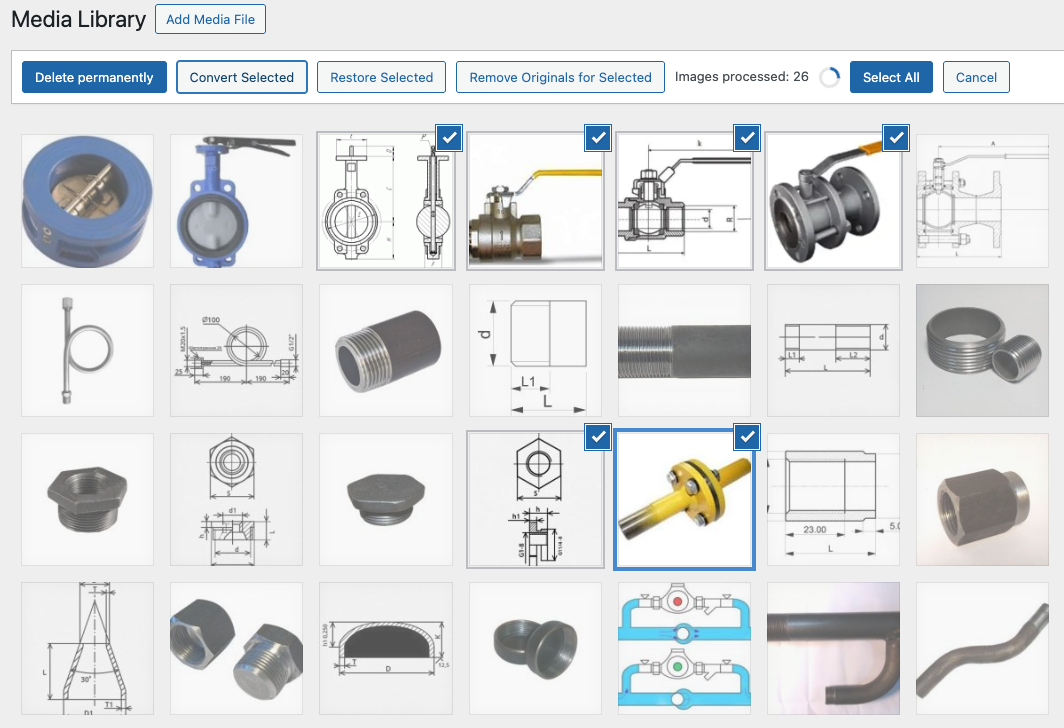
Media Library - Convert selected images in media library with real time feedback.
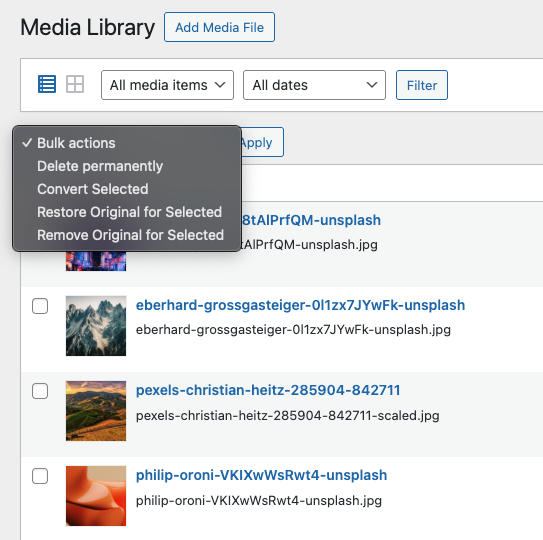
Media Library Options – Bulk actions menu in the Media Library list view that allows you to choose between multiple image processing options.
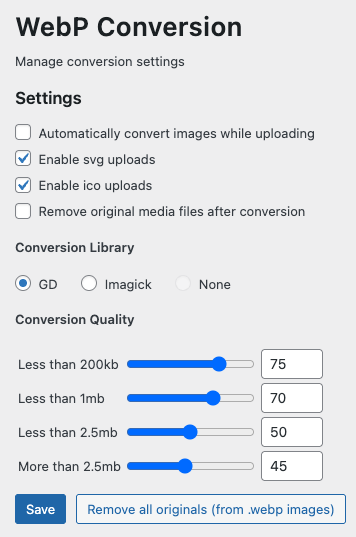
Settings Page - Manage conversion options.
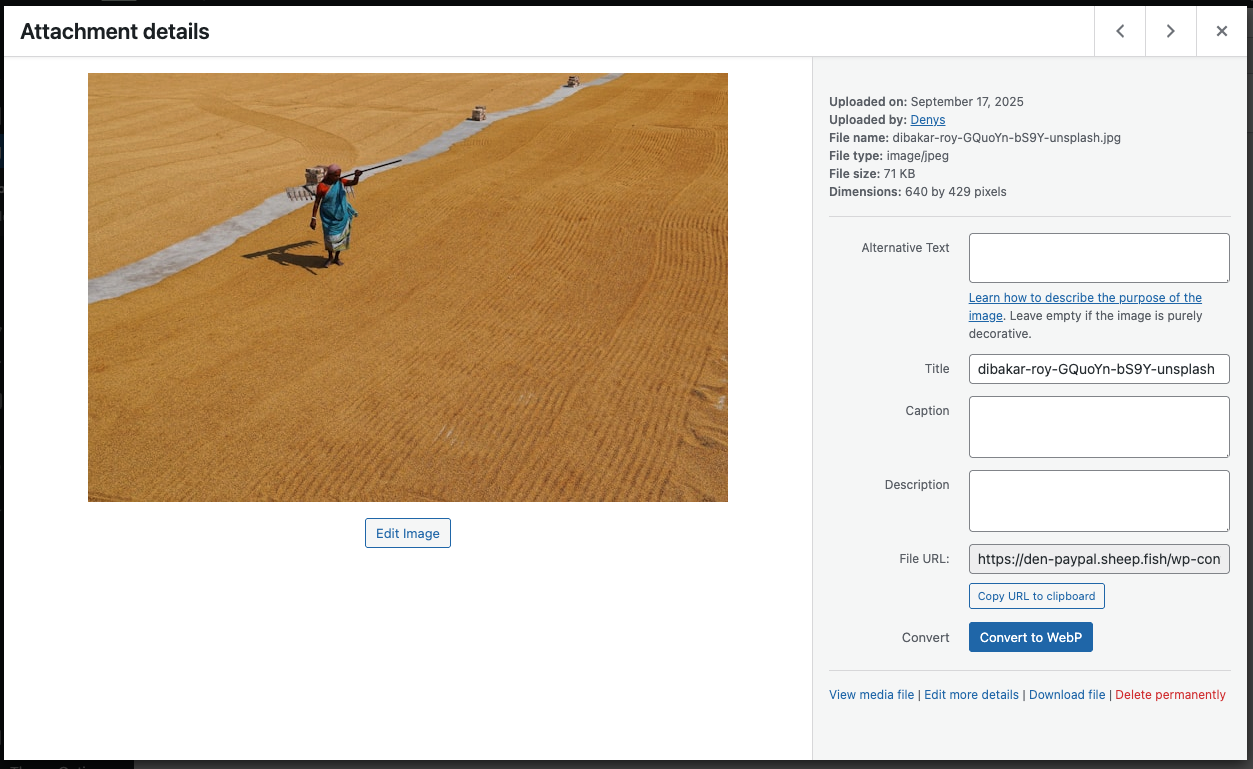
Convert Single Image – Convert individual images directly from the attachment page.
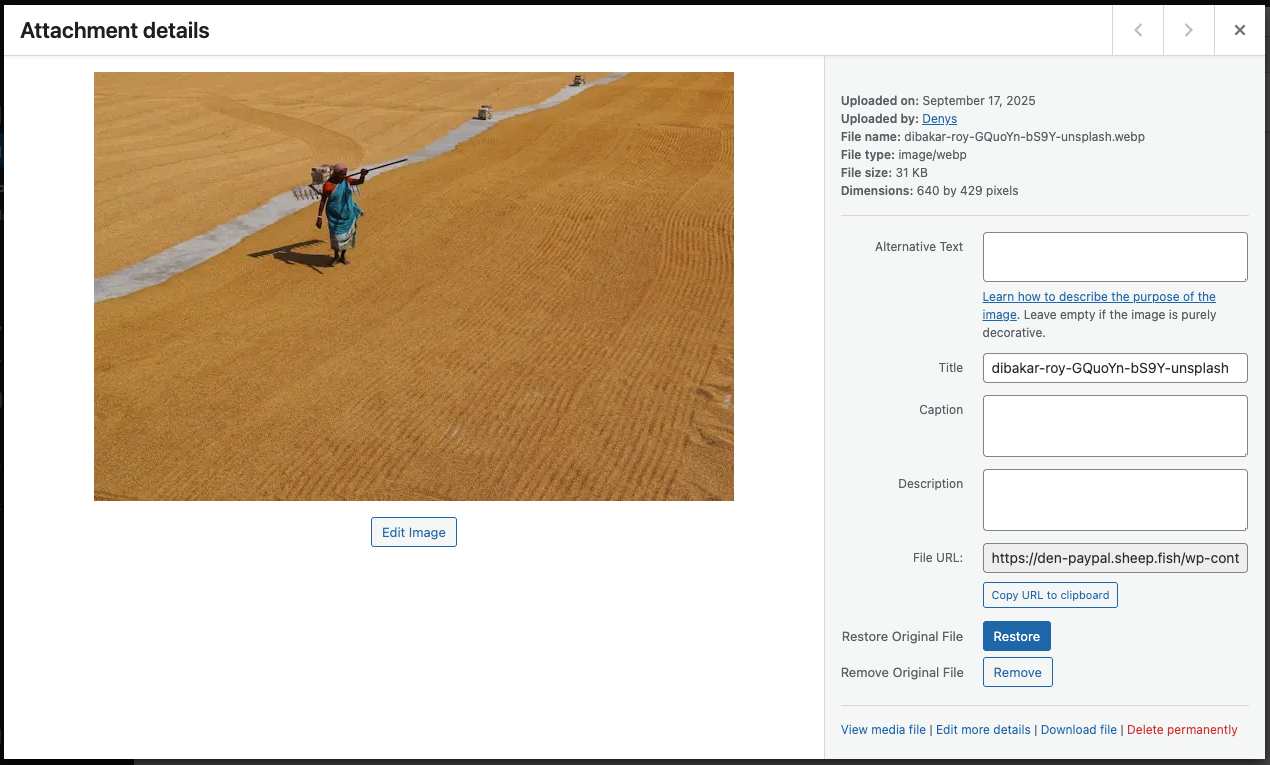
Restore or Remove Original file – Restore or remove originals for a single image from the attachment page.
Faq
The plugin supports converting .png and .jpeg files to WebP format.
No, you can convert as many images as many you want.
The plugin supports both GD and Imagick libraries.
Yes, you can enable the “Automatically convert images while uploading” option in the settings to convert images upon upload to the media library.
In the WordPress media library, use the “Bulk Select” option, choose the images you want to convert, and click the “Convert Selected” button.
Yes, the plugin works with WooCommerce and ACF. After conversion, it replaces old images in WooCommerce product galleries and ACF image fields with the new WebP versions.
Yes, starting from version 1.1 you can enable uploading of .svg and .ico in plugin settings.
Yes, you can do this in the Media Library page and on the single image page by clicking the “Restore” button.
Reviews
Top-Notch Plugin for Media Library WebP Image Conversion
By 
English Review
This plugin delivers everything it promises and more. It efficiently converts images directly in the Media Library, including all thumbnails, which is a major plus for performance optimization. The converted WebP images used on the site do not break or cause display issues, ensuring a smooth user experience. The conversion process is seamless and integrates well with WordPress, making image management hassle-free. If you're aiming to speed up your site and reduce image load times, this plugin is definitely a solid choice.
Avaliação em Português
Este plugin cumpre tudo o que promete e ainda vai além. Ele converte as imagens diretamente na Biblioteca de Mídia, incluindo as thumbnails, o que é um grande diferencial para otimização de desempenho. As imagens WebP geradas e usadas no site não apresentam quebras nem problemas de exibição, garantindo uma experiência de usuário tranquila. O processo de conversão é eficiente e se integra perfeitamente ao WordPress, facilitando o gerenciamento das imagens sem complicações. Se você deseja melhorar a velocidade do site e reduzir o tempo de carregamento das imagens, este plugin é uma excelente opção.
This plugin is too good!
By 
I have tried dozens of image compressor plugins and most of them had fallen to the subscription model. That's strange given that compression is not a resource-intensive task. This plugin brings back the true spirit of WordPress. It's simple, intuitive, and free for everyone.
It's so good, I even made a video for this plugin.
Changelog
2.1
- Added confirm message when clicking the button “Remove all originals”.
2.0
- Added GD Library. From now on, you can choose between Imagick and GD libraries for .webp conversion.
- Added restore functionality:
- “Restore” button for individual images on the attachment page.
- “Restore Selected” option in the Media Library.
- Added remove originals functionality (for converted to .webp images):
- “Remove” button for individual images on the attachment page.
- “Remove Originals for Selected” option in the Media Library.
- “Remove all originals” button on the plugin settings page.
- Improved workflow: converted images now update the existing attachment instead of creating a new one, ensuring the attachment ID remains the same.
- Updated translations for English and Ukrainian.
1.1.2
- Added translations for different languages.
1.1
- Added ability to upload .svg and .ico images to WordPress Media.
- Conversion of multiple images now working by batches of 5 images (10 before).
- For efficiency reason, from this version, there is no longer ability to convert individual images over 10MB.
- Updated screenshots and plugin icon.
1.0.1
- Updated list of plugin tags.
1.0
- Initial release of the WebP Conversion plugin.
- Added automatic conversion on upload.
- Added single and bulk image conversion.
- Introduced settings for managing conversion quality for different image sizes.
- Full compatibility with WooCommerce and ACF for image replacement.