wiseCampaign – WooCommerce Flash Sale, Countdown Timer, Discount Rules & Sales Notification

wiseCampaign – WooCommerce Flash Sale, Countdown Timer, Discount Rules & Sales Notification
Description
Turn your store visitors into buyers with wiseCampaign, the all-in-one WooCommerce marketing and conversion booster plugin. Create urgency, run scheduled flash sales, automate dynamic discounts, and reduce cart abandonment, all without writing a single line of code.
Whether you run Black Friday sales, seasonal promotions, or daily flash deals, wiseCampaign equips your WooCommerce store with battle-tested conversion tools.
Watch Quick Overview
Key Features at a Glance
- wiseBanner (Top Bar Campaign) – Sticky top/bottom promotional banners with real-time countdown timers, coupon copy triggers, CTA buttons, seasonal templates and built-in analytics.
- StockBar (Scarcity Trigger) – Dynamic stock progress bar on single product pages to create purchase urgency and FOMO.
- Direct Checkout – Skip the cart page and route shoppers directly to checkout to reduce cart drop-offs.
- Live Sales Notifications – Real-time social proof popups showing recent customer orders to build instant buyer trust.
- wiseCart (Side Mini-Cart) – Fast slide-out mini-cart for an instant and seamless checkout experience.
- WiseVideo Commerce – Engage shoppers with interactive video galleries and shoppable product video widgets.
- Wise Product Table – Display products in responsive, filterable tables with bulk add-to-cart functionality.
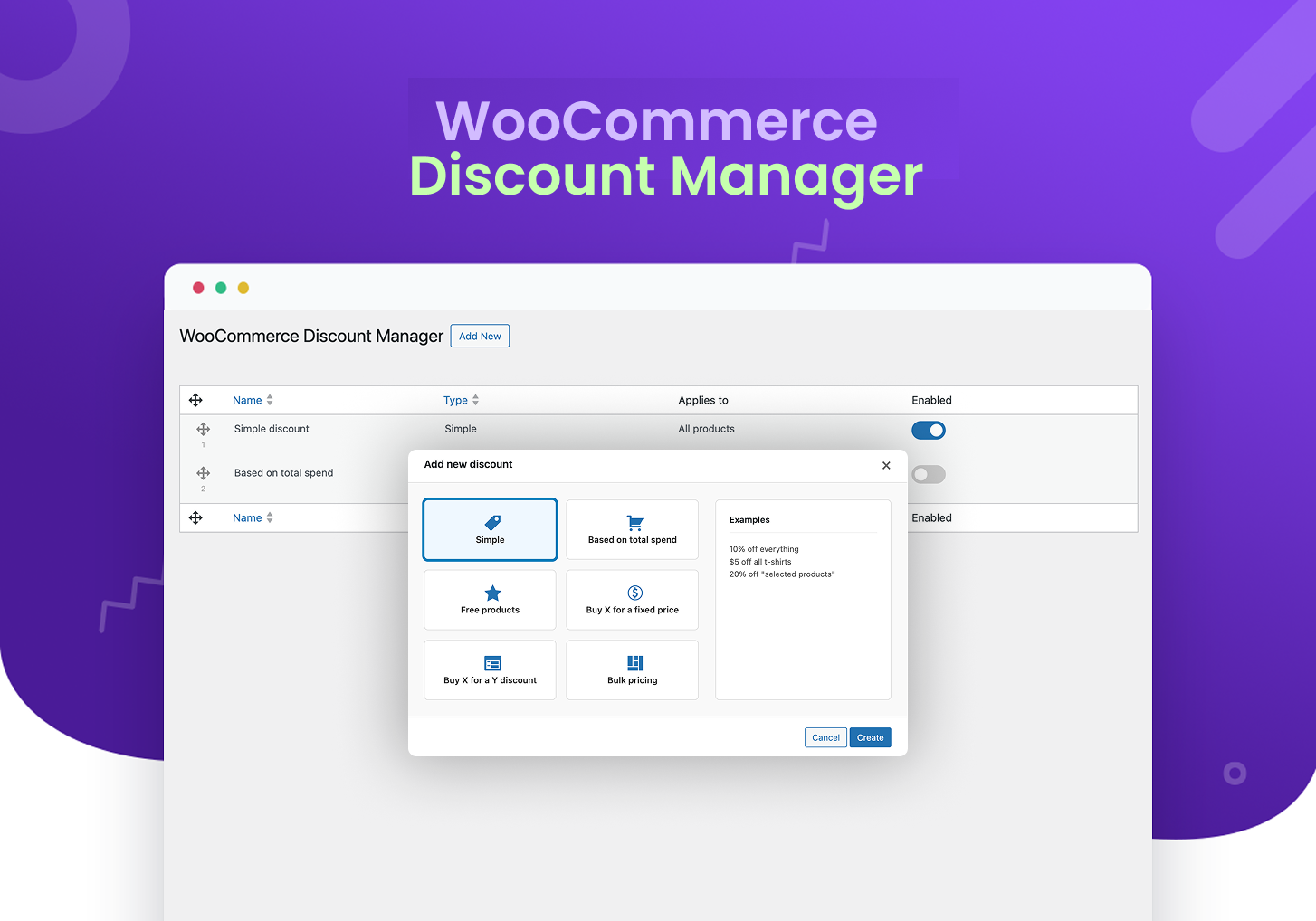
- Dynamic WooCommerce Discount Rules (Pro) – Automate tiered discounts, BOGO, bulk pricing, and spend-based offers.
Useful Links
Docs | Videos | Support | Idea Sharing | Facebook Group | Get Pro
Why Choose wiseCampaign Over Other Plugins?
- All-in-One Marketing Suite: Replace 4 to 5 separate plugins (Notification Popup, Countdown Bar, Stock Scarcity, Direct Checkout) with one clean plugin.
- Zero Speed Impact: Ultra-lightweight codebase built with scoped styling to ensure zero theme conflicts and blazing-fast site speed.
- Granular Display Rules: Show specific campaigns based on device (Mobile/Desktop), specific pages, or target user roles.
- Easy Customizer Integration: Real-time visual customizer to match your store branding in seconds.
Deep Dive into Core Modules
1. wiseBanner – Smart Announcement & Flash Sale Bar
- Customizable top or bottom notification bars.
- Built-in urgency countdown timer for limited-time offers.
- “Click-to-Copy” coupon code functionality with toast feedback.
- Targeted display on specific products, shop pages, or sitewide.
- Template gallery with live previews, including animated Halloween, Black Friday and New Year collections (Pro).
- Built-in banner analytics: impressions, clicks, click-through rate, coupon copies and dismissals, plus attributed orders and revenue (Pro).
2. StockBar – Real-Time Inventory Urgency
- Visual progress bar displaying remaining stock levels.
- Triggers urgency for low-stock products to drive faster purchase decisions.
- Clean fallback logic that hides default stock text automatically.
3. Direct Checkout – Frictionless Buying Journey
- 1-Click direct checkout button on shop and product pages.
- Reduces funnel friction and increases checkout completion rates.
4. Live Sales Notifications – Automated Social Proof
- Realistic, non-intrusive recent sales alert popups.
- Highly customizable display timing, positions, and mobile visibility.
- Simulated orders (Pro) can show product photos, your own uploaded photos and logos, or friendly cartoon buyer avatars.
5. wiseCart – Modern Interactive Mini-Cart
- Floating side-cart drawer that lets shoppers review items instantly.
- Quick quantity adjustments without full page reloads.
6. WiseVideo Commerce – Shoppable Video Reels
- Interactive video widgets and shoppable product video embeds.
- Engage buyers with video demonstrations directly on product pages.
- Boosts user engagement, watch time, and conversion rates.
7. Wise Product Table – Interactive Product Catalog
- Responsive, searchable, and filterable product table layouts.
- Bulk add-to-cart actions for fast wholesale and multi-item orders.
- Perfect for B2B catalogs, restaurant menus, and large product inventories.
🔥 Pro Version: Advanced Discount Rules
Take your promotion strategy to the next level with advanced discount rules that go beyond simple coupons:
- ✅ Spend-Based Discounts: e.g., “Spend $100, Get 15% Off”.
- ✅ BOGO & Buy X Get Y: Automated free or discounted companion items.
- ✅ Tiered & Bulk Pricing: Quantity-based discount tables on product pages.
- ✅ Free Gift Rules: Automatically append gifts to cart when rules are met.
- ✅ Next Order Coupon Generator: Keep customers returning with automated loyalty discounts.
👉 Explore All Pro Features & Pricing
24/7 Support & Documentation
All wiseCampaign users get access to expert support and an extensive knowledge base for setup and configuration help.
* Documentation
* Help & Technical Support
Compatibilities
wiseCampaign integrates seamlessly with standard WooCommerce hooks, popular WordPress themes (Astra, OceanWP, GeneratePress, Storefront), and modern page builders.
Usage Instructions
- Go to WiseCampaign -> Settings, toggle the status to Active to enable the banner, and select a template from the list of views. Click Save.
- Go to Appearance -> Customize -> wiseCampaign to adjust colors, typography, timers, and layout settings.
Privacy Policy
wiseCampaign uses the Appsero SDK to collect basic telemetry data only upon explicit user opt-in via admin notice to help diagnose issues and improve features.
Appsero SDK does not gather any data by default and will not transmit information without your consent. Learn more at Appsero Privacy Policy.
wiseBanner analytics are stored only in your own WordPress database as daily totals (impressions, clicks, coupon copies and dismissals per banner template and device type). No IP addresses, personal data or per-visitor records are stored, and nothing is sent to third-party services. When a visitor clicks the banner button, a first-party cookie (wise_banner_ref, valid for 7 days) records the banner and the click time so that a resulting WooCommerce order can be attributed to the banner; the cookie is removed once an order is attributed.
Credits
- Buyer avatars: “Open Peeps” by Pablo Stanley, CC0 1.0 (public domain), generated with DiceBear.
- Fonts bundled with the seasonal banner templates: Luckiest Guy (Apache License 2.0), Anton and Playfair Display (SIL Open Font License 1.1).
Join Our Community
Installation
From Your WordPress Dashboard
- Go to Plugins > Add New.
- Search for wiseCampaign.
- Click on the Install Now button.
- Click Activate after installation completes.
Manual Installation
- Download wiseCampaign.
- Upload the
wisecampaignfolder to the/wp-content/plugins/directory. - Activate wiseCampaign from your WordPress Plugins page.
Screenshots
Dynamic top-bar banner with live countdown timer and CTA button.
Stock scarcity progress bar on product detail page.

Automated recent sales notification popups.

One-click direct checkout flow.

Floating mini-cart drawer.

WiseVideo Commerce shoppable video reels and product video widgets.

Wise Product Table responsive catalog order sheet.

Pro dynamic discount rule builder dashboard.

Mobile vs. desktop display targeting controls.
Faq
A. Any WooCommerce store owner looking to boost conversion rates, run scheduled flash sales, reduce cart abandonment, and add social proof.
A. You need WordPress 5.4+ and WooCommerce active on your website. PHP 7.4 or higher is required.
A. Yes. You can target campaigns sitewide, restrict them to specific products/pages, or target devices (desktop or mobile).
A. The free version includes wiseBanner, StockBar, Direct Checkout, Sales Notifications, and wiseCart.
A. Pro unlocks the WooCommerce Dynamic Discount Manager (BOGO, bulk pricing, tiered discounts, spend-based rules), advanced targeting filters, premium pre-built templates, and deeper styling controls.
A. No. wiseCampaign is performance-optimized and utilizes modular asset loading with scoped CSS resets to keep page load times fast.
A. None at all. Everything is managed through an intuitive WordPress dashboard and visual settings.
Reviews
Must-Have Plugin!
By 
wiseCampaign makes creating banners and managing campaigns so easy! Great features, simple setup, and excellent targeting options.
Good for banners with countdowns
By 
Looks cool. Easy to use for promotional banners with countdown.
Great
By 
- Great Tool for Marketers!
- wiseCampaign made adding banners and promotions to my site effortless. Simple, effective, and highly recommended!
A brilliant product
By 
The name of the plugin is self explanatory, looks cool. Still there are lots of room to improve. All the best
Changelog
v2.0.0
- Added: Analytics dashboard (wiseCampaign > Analytics) that shows how each module helps your sales: views, clicks and adds to cart per module, the orders and revenue wiseCampaign took part in, average order value compared with other orders, a daily revenue chart, and numbers per product table and per Discount Manager rule. Orders and revenue are part of Pro. Only daily totals are stored, on your own server.
- Added: A performance card in every module dashboard with that module’s last 30 days.
- Added: Turn modules on or off on the Getting Started page. A module that is off leaves the menu and no longer loads on your store.
- Added: Product Table (Pro) rebuilt: save several tables, each with its own shortcode; choose products by category, tag or one by one; pick and order columns; variation choices, quantity and “add selected” buttons; search and filters; 5 design templates; cards on narrow screens. The editor warns when a table would show no products.
- Added: Direct Checkout button templates, animations, hover effects and icons (Pro).
- Added: StockBar placement setting for product pages, and an option to hide WooCommerce’s “X in stock” text where the bar shows the count (on by default).
- Added: wiseCart works with Discount Manager: spend targets on the progress bar, discounted prices and your savings in the cart.
- Improved: New dashboards with a live preview for Direct Checkout, Sales Notification, wiseCart, StockBar, WiseVideo Commerce and Product Table.
- Improved: Redesigned StockBar templates.
- Improved: wiseBanner revenue now goes down when an order is refunded, and is removed when the order is cancelled or deleted.
- Fixed: The copy shortcode button did not work on sites without HTTPS.
- Fixed: The WordPress admin menu could not scroll on the WiseVideo Commerce, Product Table and Analytics pages.
- Fixed: Some scripts and styles kept loading old cached copies after an update.
- Fixed: When wiseCart replaces the checkout page, Buy Now and other checkout links now open the cart straight on its checkout form instead of only landing on the shop page.
- Fixed: Uninstalling now also removes the Analytics data, and reinstalling creates the wiseBanner table again.
- Fixed (Pro): The banner settings and license status endpoints now require an administrator.
- Fixed (Pro): A database error was logged when Pro was activated again.
v1.3.1
- Added: Sales Notification now works without WooCommerce. Sites without a store can show simulated purchase notifications (Pro) with their own buyer names, locations and products.
- Added: Sales Notification “Custom Products” option – type in the products or services to promote, one per line, with an optional link (for example “Pro Plan | https://example.com/pricing”). Works with or without WooCommerce.
- Improved: Simulated notifications for products without a photo now show the buyer’s avatar instead of a placeholder image.
- Fixed: Critical error on sites with WooCommerce active on Linux servers, caused by a wrong letter case in a file path.
- Fixed: Sales Notification popups now escape buyer names, product names and locations before showing them.
v1.3.0
- Added: wiseBanner seasonal template collections (Pro) – Halloween (Haunted Night, Pumpkin Patch, Witching Hour), Black Friday (Gold Rush, Red Alert, Cyber Monday) and New Year (Midnight Fireworks, Golden Countdown, Champagne Toast) with animated scenes, offer badges and countdowns that update their dates every year.
- Added: wiseBanner template gallery redesign with live previews of every design, category tabs and lazy loading.
- Added: wiseBanner Analytics dashboard – impressions, unique visitors, clicks, click-through rate, coupon copies and dismissals with a daily trend chart, table view, template comparison and device breakdown. Orders, revenue and conversion funnel in Pro (requires WooCommerce). Privacy-friendly: only daily totals are stored, on your own server.
- Added: wiseBanner close button so visitors can dismiss the banner for their session.
- Added: wiseBanner highlighted headline words with their own color, scene picker for seasonal templates, coupon code chip in seasonal templates and a seconds label field.
- Added: Sales Notification image options for simulated orders (Pro) – product photo, your own uploaded product photos and logos, or cartoon buyer avatars.
- Added: New Getting Started tutorial video with chapter shortcuts.
- Fixed: “Translation loading triggered too early” notice from wiseCart when WooCommerce is active, which could break plugin installs and the WooCommerce setup wizard on sites that display debug notices.
- Fixed: wiseBanner countdown ignored the custom minutes label.
- Fixed: wiseBanner editor styling for centering, gradients, rings and hover effects.
- Fixed: Bundled wiseBanner fonts and assets now load correctly from the plugin folder.
- Fixed: wiseBanner Pro templates could stay locked after activating a license on hosts that let browsers cache REST responses. The editor now always loads fresh settings and license status.
- Fixed: A sticky wiseBanner could cover the site header on themes that force zero body padding, such as Blockify.
- Compatibility: Tested with WordPress 7.1 and WooCommerce 11.2.
v1.2.0
- Added: wiseBanner Background Effects (Pro) – 6 dynamic background animations (Snowflakes, Confetti, Fire Embers, Light Sweep/Aurora, Floating Orbs, Dot Matrix) with opacity control.
- Added: wiseBanner CTA Button Animations (Pro) – 6 attention-grabbing animations (Pulse, Wobble/Shake, Bounce, Heartbeat, Shimmer Glow, Radiant Glow).
- Added: wiseBanner Promotional Badge full positioning controls (Horizontal: Left/Right, Vertical: Top/Middle/Bottom) with smart responsive spacing.
- Added: Sales Notification 4 new Pro templates (Frosted Glass, Minimalist Micro, Gradient Accent, Dark Mode Neo).
- Added: Sales Notification Simulated Orders generator with realistic relative time tags (e.g. 15 min ago, 2 hours ago, 22 hours ago, 2 days ago).
- Added: Sales Notification Whitelabel option to hide branding link in Pro version.
- Fixed: wiseBanner storefront header overflow fix – dynamically adjust body top offset and WordPress admin bar spacing.
- Fixed: wiseCart disabled by default on first plugin installation.
- Compatibility: Tested and verified compatibility with WordPress 6.8 and WooCommerce 9.8.
v1.1.19
- Added: Banner Position controls (Top and Bottom placement) for wiseBanner v2.
- Added: Sticky (Floating) vs. Non-Sticky mode for Top and Bottom banner positions.
- Improved: Enhanced wiseBanner editor UI with real-time live preview matching selected banner position.
- Fixed: Resolved Pro Upgrade modal button text contrast and visibility across theme styles.
- Fixed: Added WooCommerce endpoint function availability check in NextOrderCouponHandler.
- Fixed: Corrected Pro status synchronization on storefront for branding removal and feature gates.
- Fixed: Resolved non-sticky bottom banner container script loading priority in WordPress footer.
- Compatibility: Tested and verified compatibility with WordPress 6.7 and WooCommerce 9.6.
v1.1.17
- Security Fix: Added robust authorization checks (
manage_options) across all 22 REST API endpoints to prevent unauthorized settings modification. - Fixed: Resolved CSS isolation issues by implementing scoped
:where()resets, preventing plugin styles from bleeding into themes while allowing full control over editor UI. - UI: Fixed Stock Bar and Banner editor buttons appearing with heavy borders and invisible text colors.
- Pro Compatibility: Fixed “Discount Manager” and “License” submenus not showing in the sidebar due to slug mismatch.
- Compatibility: Ensured full compatibility with latest WordPress versions by refining admin menu registration.
v1.1.16
- Enhanced: Improved CSS architecture for React-based editor modules (Stock Bar and Banner v2).
- Fixed: Minor UI alignment and responsive layout issues in the admin dashboard.
- Performance: Optimized plugin-wide asset loading for faster admin performance.
v1.1.15
- Added “Click-to-Copy” functionality for coupon codes with dual notifications (tooltip and toast).
- Enhanced layout with increased horizontal padding for a premium, spacious appearance.
- Improved WordPress Media Library integration for background and badge image uploads.
- Reorganized display settings to integrate “Home Page” within the “Specific Pages” targeting logic.
- Extensive codebase cleanup: Removed legacy admin/build components in favor of the new modular system.
- Modernized admin menu navigation for a streamlined user experience.
- Fixed: Resolved intermittent “cURL error 28” (timeout) by replacing local loopback HTTP requests with direct filesystem access and class method calls.
- Improved performance and reliability for data loading during plugin activation and deactivation.
v1.1.14
- Added button to disable countdown, bogo and cta button.
- Fix font size after selection cta button.
- Improved stock visibilty by not showing default stock while stock bar enable.
- Improved overall plugin security and compatibility.
v1.1.13
- Added permission_callback to all REST API routes to meet WooCommerce Marketplace requirements.
- Secured all settings update endpoints with admin-only permissions.
- Fixed incorrect usage of register_uninstall_hook() causing activation warnings.
- Improved request validation and overall plugin stability.
v1.1.12
- Added smart WooCommerce dependency checks that block activation if WooCommerce isn’t installed or active.
- Gated StockBar, Direct Checkout, Sales Notification, and wiseCart screens so they’re only available when WooCommerce is active, with helpful notices otherwise.
- Improved admin notices to clearly explain WooCommerce requirements for all Woo-enabled features.
- added Help submenu.
- Added Upgrade to Pro submenu.
v1.1.11
- Fixed: WooCommerce Compatibility Declarations issue.
- Update: Security enhancements and latest compatibility.
v1.1.10
- Fixed: Wisecart related issue.
- Update: Hide advanced setting save button on free version.
v1.1.9
- Fixed: Sales nification reload issue.
- Update: Sales notification dashbaord design.
- Update: Security enhancements and latest compatibility.
v1.1.8
- Fixed: wiseBanner dashboard design.
- Fixed: wiseBanner background image field issue.
- Fixed: Advance feature license activation issue.
- Added: Security enhancements and latest compatibility.
v1.1.7
- Added Direct Checkout module.
- Added Sales Notification module.
- Added wiseCart module.
- Added security enhancements.
- Applied several fixes and improvements.
v1.1.6
- Fixed some minor bugs.
v1.1.5
- StockBar feature added.
- Fix sidebar button issue.
- Change getting started page design.
- Enhanced security and performance.
v1.1.4
- Heading and Sub Heading font family sync.
- Fix banner sticky issue.
- Bogo size fix
- Enhanced settings and customization options.
- Enhanced security and performance.
v1.1.3
- Update version and compatibility.
- Fixed minor bugs.
- Enhanced security and performance.
v1.1.2
- Redesigned with new features.
- Added new templates.
- Update version and compatibility.
- Enhanced settings and customization options.
- Fixed minor bugs.
- Enhanced security and performance.
v1.1.1
- Update version and compatibility.
- Dashboard design enhanced.
v1.1.0
- Update version and compatibility.
v1.0.0
- Initial release