Easy 3D Viewer

Easy 3D Viewer
Description
Simple WordPress/WooCommerce product 3D viewer.
Has a visual shortcode builder where you can upload the 3D model and adjust settings like color, background, reflection, light sources, shadows, etc. The shortcode can be pasted to any page or a post.
In the WooCommerce admin the plugin adds a new “Product model” box underneath “Product Image”.
Supported file types: STL, OBJ/MTL, GLTF/GLB (including textures and animation), ZIP.
Features
- Visual shortcode builder.
- WooCommerce integration.
- WooCommerce products have an option to keep the product image and show “View 3D” button
- Files supported: STL (bin,ascii), OBJ (including MTL support), GLTF (including textures and animations), WRL (PRO version), 3MF (PRO version), ZIP.
- Adjustable scene – background color, shadows, ground mirror.
- Adjustable model – color, shininess, transparency.
- Browser support: works best with WebGL enabled browsers.
- PRO version: WRL support, 3MF support.
- PRO version: Shortcodes support thumbnails.
- PRO version: Can have multiple 3D viewers on the same page (10 maximum).
- PRO version: Can convert models to PNG, animated GIF, WEBM video format to protect models from downloading or improve the customer experience on mobile.
- PRO version: Option to show a WEBM or a GIF instead of 3D model on mobile devices.
- PRO version: Model compression (for faster model loading)
- PRO version: Can load models from 3rd party sites with shortcodes.
- PRO version: Model repair feature (STL, OBJ).
- PRO version: Model polygon reduction feature (STL, OBJ).
- PRO version: Variable product support.
Demo
http://woo3dviewer.wp3dprinting.com/shortcode-test/
Installation
WordPress usage:
- Make sure you have “Load On” option set as “Everywhere” in General Settings
- In the admin navigate to Woo3DViewer page, Shortcode Builder tab
- Set model
- Click “Generate” button to generate the shortcode
- Paste the shortcode to any page or a post
WooCommerce usage:
- Make sure you have WooCommerce installed
- Create a new product or edit an existing one
- Underneath “Product Image” check “Product model” box
- Click “Set model” and upload your model
- Publish the product
- Now you can alter model settings (color, transparency, etc) in “Product model” box
- Save the product again
- If the model does not show up on the product page or you experience layout issues please go to Shortcode Builder and click “Product Shortcode”. In the popup window generate the shortcode having “Compatibility mode enabled”. Create a new page and paste the shortcode into the page body.
Screenshots
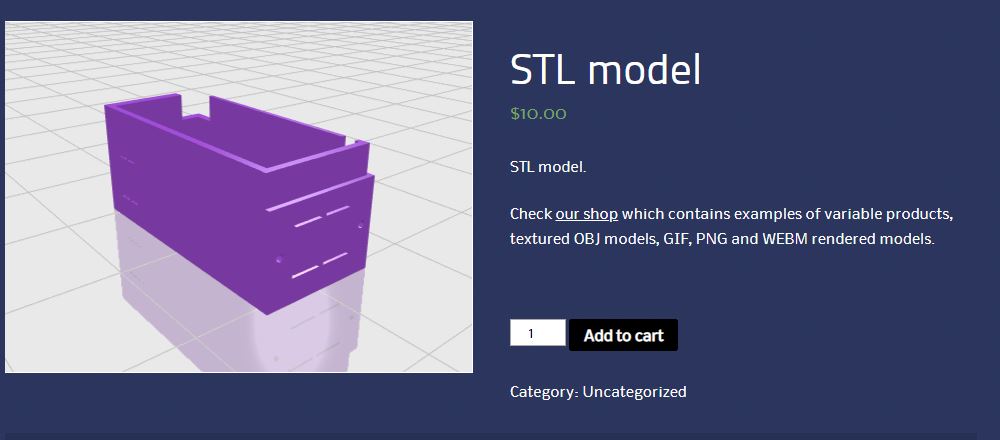
Frontend
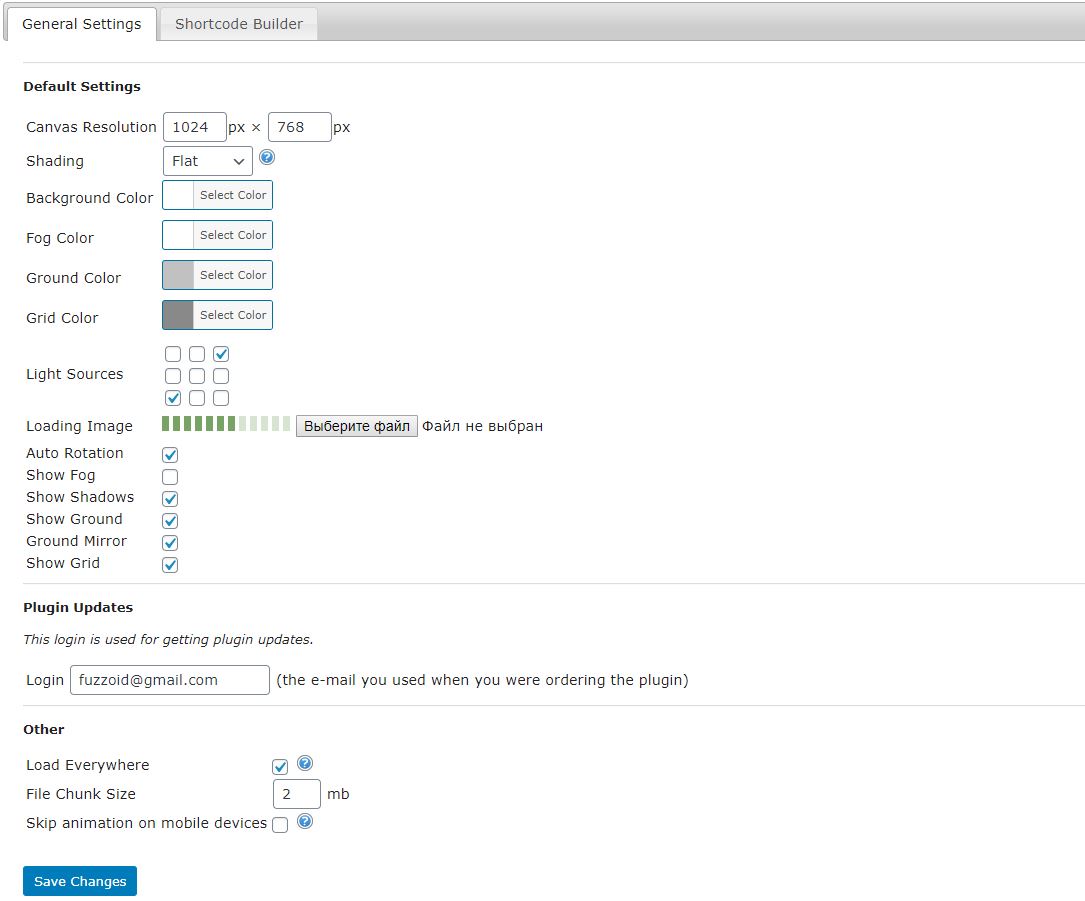
Backend - general settings
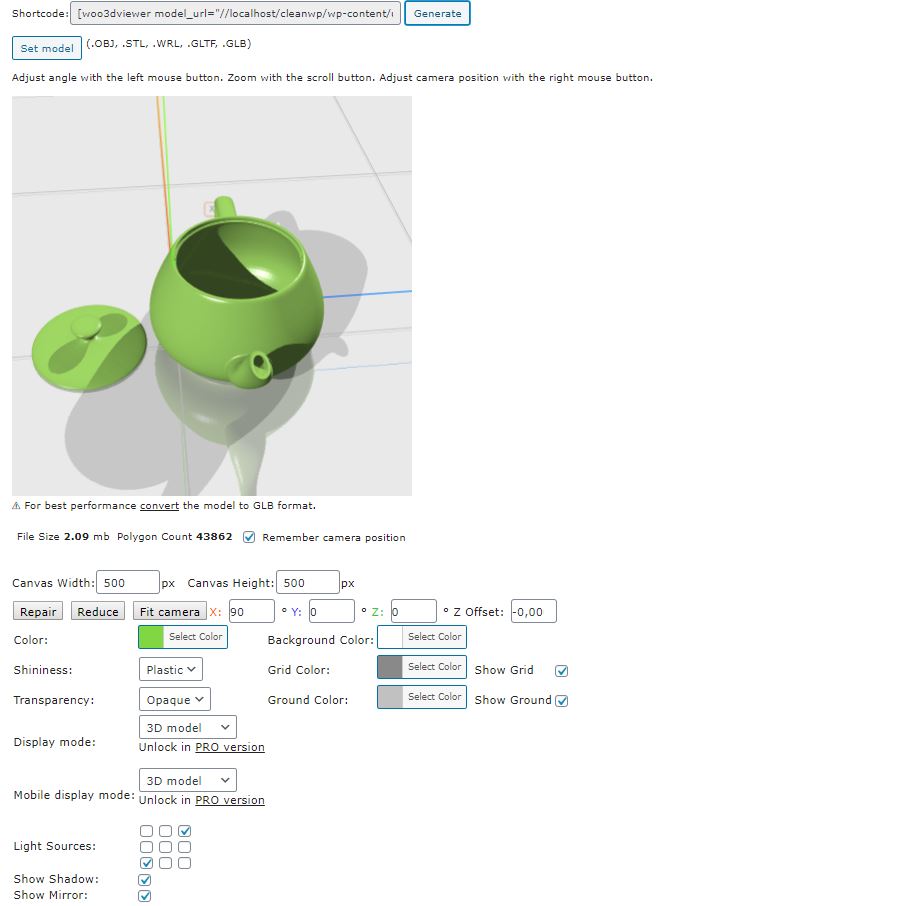
Backend - shortcode builder settings
Faq
Upload a zip file that contains obj, mtl and texture files.
Example: https://wp3dprinting.com/popcorn.zip
Either ask your tech support to increase post_max_size and upload_max_filesize values or use a specific plugin that does the job.
The plugin does not have any magic tricks to quickly load and display large models.
To provide the best experience for your site visitors try to keep models under 10mb by reducing the number of polygons.
The PRO version of the plugin has ZIP compression option which is useful for faster model downloading.
Rule of a thumb: if a model is viewable – it’s downloadable.
The only way to protect your models offered by the plugin is to convert them to GIF or WEBM.
After the conversion the source models should be removed manually through WordPress Media Library.
The easiest way is to use this plugin https://wordpress.org/plugins/loco-translate/
Reviews
Great 'n amazing plugin
By 
kind of file tested : GLB
Source Generator: ESKO ArtiosCAD -> .U3D -> aspose web app conversion to GLB
-------------------------------------------
I've tested fews weeks ago another options with 3D viewer plugins, problems usually : can't detect base panel or bad interpretations and high price.
Now I've tested this plugin and this is simply amazing: good interpretation of GLB files, GUI looks clean.
Great job guys, you made a nice plugin . Don't stop !
Does not render color of glb
By 
All GLB files are rendered without their colors. also controls are hard to use to center the camera on the object
Works Good with .gltf
By 
Хороший рабочий плагин
By 
Easy to use
By 
Good but files can be downloaded by visitors
By 
outstanding plugin and so much helping hotline from the author !!!
By 
Completely useless!
By 
Wretched! Don't download
By 
Works right of the bat
By 