Additional Terms Lite for WooCommerce

Additional Terms Lite for WooCommerce
Description
Formerly known as Woo Additional Terms, trusted by WooCommerce stores since 2017.
Make sure customers actually agree to your policies before they can place an order. Additional Terms Lite for WooCommerce adds a dedicated “I agree” checkbox to your checkout so shoppers must acknowledge your refund policy, privacy notice, age restriction, delivery terms, or any other policy that matters to your store. Every acceptance is saved with the WooCommerce order, so you have a record if a question or dispute ever comes up.
Setup takes about two minutes. Write your checkbox text, optionally link a policy page, decide whether it is required, and save. No coding, no page builder, no fuss.
This is useful when you want to:
- Get explicit agreement to a specific policy at checkout.
- Add a second agreement alongside the default WooCommerce terms checkbox.
- Link the checkbox to a policy page customers can read without leaving checkout.
- Keep a record of what each customer accepted with their order.
- Reduce refund disputes, chargebacks, and avoidable support messages.
Get explicit consent to your policies at checkout
WooCommerce ships with a single terms and conditions checkbox tied to one page. That is fine until you need customers to explicitly agree to something specific, such as a no-refund sale, a pre-order delay, an age-restricted item, a subscription renewal, or a cash-on-delivery instruction. Additional Terms gives you that dedicated, purpose-built agreement and keeps a clear record of it on the order.
You decide whether the checkbox is required, so customers cannot complete checkout until they tick the box, or you can leave it optional when you only need to surface a notice.
Link and display your terms your way
Point the checkbox at any policy page and drop it into the label with the {{additional-terms}} smart tag. The tag is replaced with a clickable link to that page at checkout.
Customers can read the linked terms without leaving checkout. Open them in a modal, embed them directly above the checkbox, or open them in a new tab, whichever suits your store.
Keep a record of every acceptance
When a customer places an order, their agreement is saved to the WooCommerce order notes. That gives you a clearer record of which checkout agreement was accepted, which helps with internal review, customer support, and dispute prevention.
Works with classic and block checkout
On classic [woocommerce_checkout] stores, the checkbox appears right beside the standard terms area. Using the WooCommerce Checkout Block? Add the dedicated Additional Terms block inside the checkout layout and position it exactly where you want it.
Built for real store situations
Additional Terms Lite for WooCommerce is designed for the agreements WooCommerce merchants actually need: refund and cancellation policies, age-restricted products, pre-orders, digital downloads, subscription terms, liability waivers, warranty acknowledgements, privacy and GDPR consent, and payment-method notices for bank transfer, cash on delivery, manual payments, or financing.
The plugin is translation-ready and includes configuration support for multilingual stores using WPML and Polylang.
Lite features
- Add an “I agree” checkbox to WooCommerce checkout.
- Make the checkbox required, or leave it optional.
- Show a custom validation message when a required checkbox is not accepted.
- Link the checkbox label to a selected terms page using the
{{additional-terms}}smart tag. - Display linked terms in a modal, embedded above the checkbox, or in a new tab.
- Enable or disable the checkbox without deleting your saved settings.
- Show the checkbox on the classic WooCommerce checkout shortcode.
- Add the dedicated Additional Terms block inside the WooCommerce Checkout Block.
- Save customer acceptance details in the WooCommerce order notes.
- HPOS compatible.
- Translation-ready with WPML and Polylang support.
Need more control? Upgrade to Additional Terms Pro
The free plugin handles a single agreement well. Additional Terms Pro is built for stores that need more than one policy, want the right terms to appear at the right moment, and need records that hold up.
Upgrade to Additional Terms Pro to unlock the full workflow.
With Additional Terms Pro, you can:
Add every agreement your store needs
- Create unlimited terms checkboxes, a dedicated agreement for every policy, product line, or scenario.
- Show a checkbox on the cart, the checkout, or both.
- Set default checkbox states for optional agreements.
- Link a checkbox to any post type, not only standard WordPress pages.
- Insert ready-made message templates for your checkbox label and error text, then edit them to taste.
Show the right terms to the right customer
- Use smart conditional display so a checkbox only appears when it is relevant.
- Match on cart contents: products, categories, tags, WooCommerce brands, product types, or shipping classes.
- Match on applied coupons, so a checkbox appears only when a specific coupon has been added to the cart.
- Match on cart totals and weight: subtotal, total, discount total, shipping total, or cart weight.
- Match on the chosen payment gateway, shipping location, or billing location.
- Match on user role or the day of the week.
- Match on URL parameters from campaign, affiliate, or custom links.
- Copy conditions from one checkbox to another so you never rebuild the same rules.
- Use Hidden Cart Matching for custom checkout layouts where a theme or builder hides or changes products.
Keep proof that holds up
- Show an acceptance summary on the WooCommerce order details screen.
- Display the accepted terms inside WooCommerce order emails.
- Attach a downloadable PDF receipt of the accepted terms to the confirmation email.
- Record the exact terms text, plus the customer’s IP address and device, at the moment of acceptance.
Set up faster and manage smarter
- Draft a structured Terms and Conditions document with the guided Terms Generator.
- Import and export your settings to move a configuration between stores.
- Receive premium updates and priority support through WooCommerce.com.
If your store needs multiple agreements, product-specific or payment-specific terms, conditional display, or clearer records of what customers accepted at checkout, Additional Terms Pro is the best upgrade path.
Installation
Minimum Requirements
- PHP version 7.4 or greater.
- MySQL version 5.6 or greater, or MariaDB version 10.0 or greater.
- WordPress version 6.5 or greater.
- WooCommerce version 5.5 or greater.
Automatic installation
Automatic installation is the easiest option. WordPress handles the file transfer, and you do not need to leave your web browser.
To install the plugin automatically, log in to your WordPress dashboard, navigate to Plugins » Add New, and search for “Additional Terms Lite for WooCommerce”.
Once you find the plugin, click “Install Now”, then activate it.
Manual installation
The manual installation method requires downloading the plugin and uploading it to your web server using your preferred FTP application.
You can also read the WordPress guide for managing plugins manually.
Updating
Automatic updates should work smoothly, but it is always recommended to back up your site before updating plugins.
Screenshots
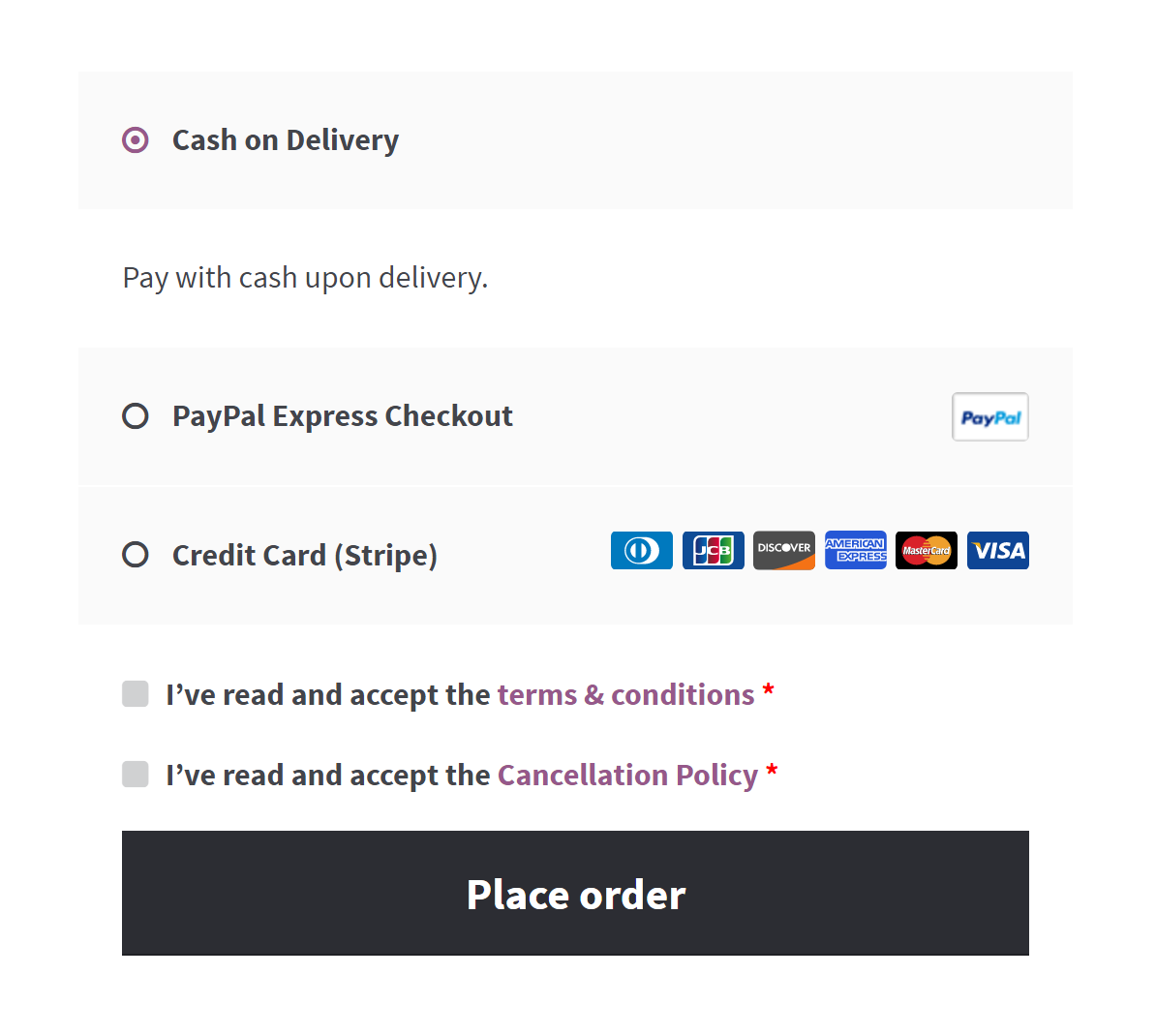
The additional terms checkbox on the WooCommerce checkout page.

The validation message shown when a required checkbox is not accepted.
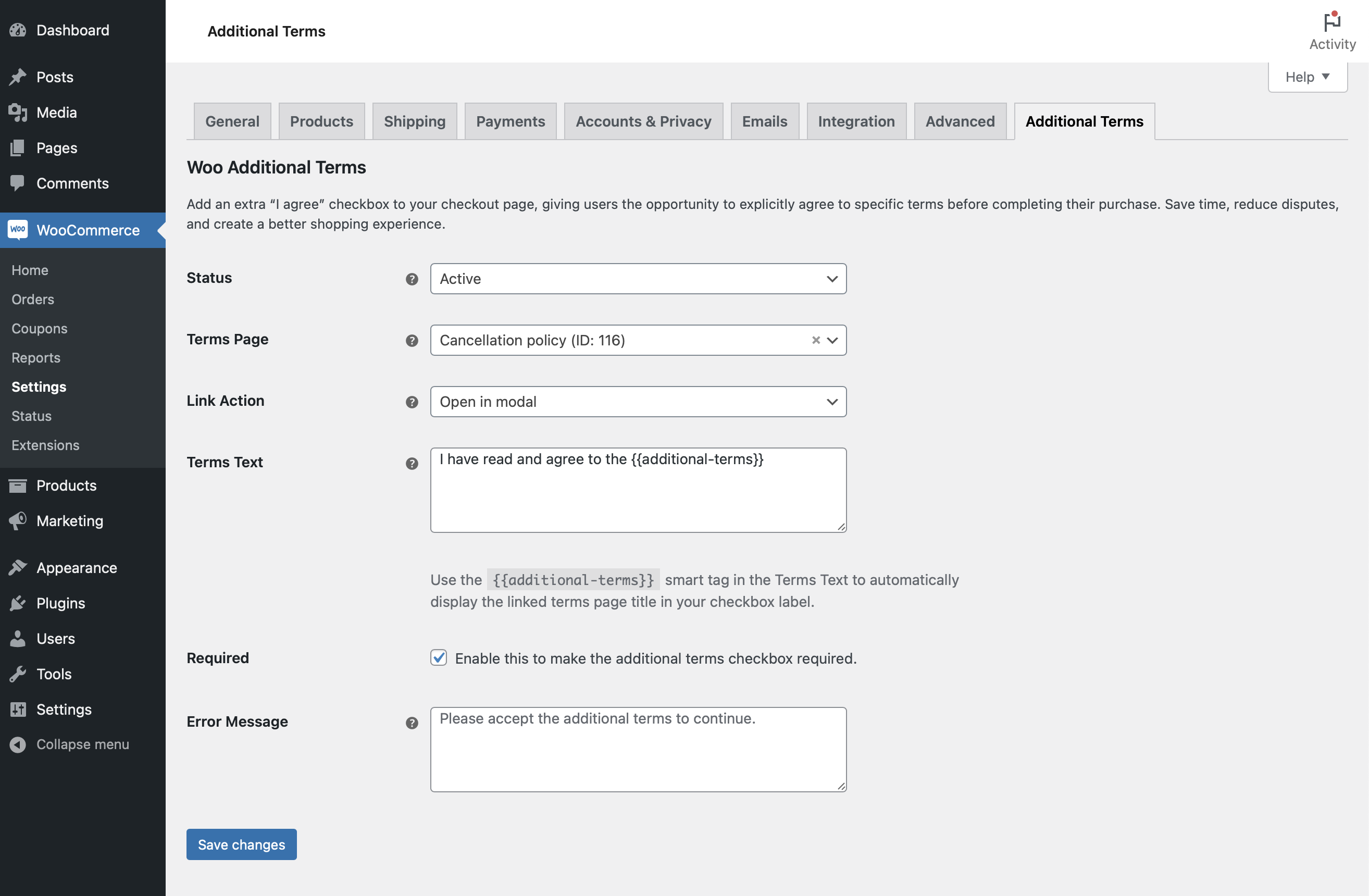
The plugin settings page.
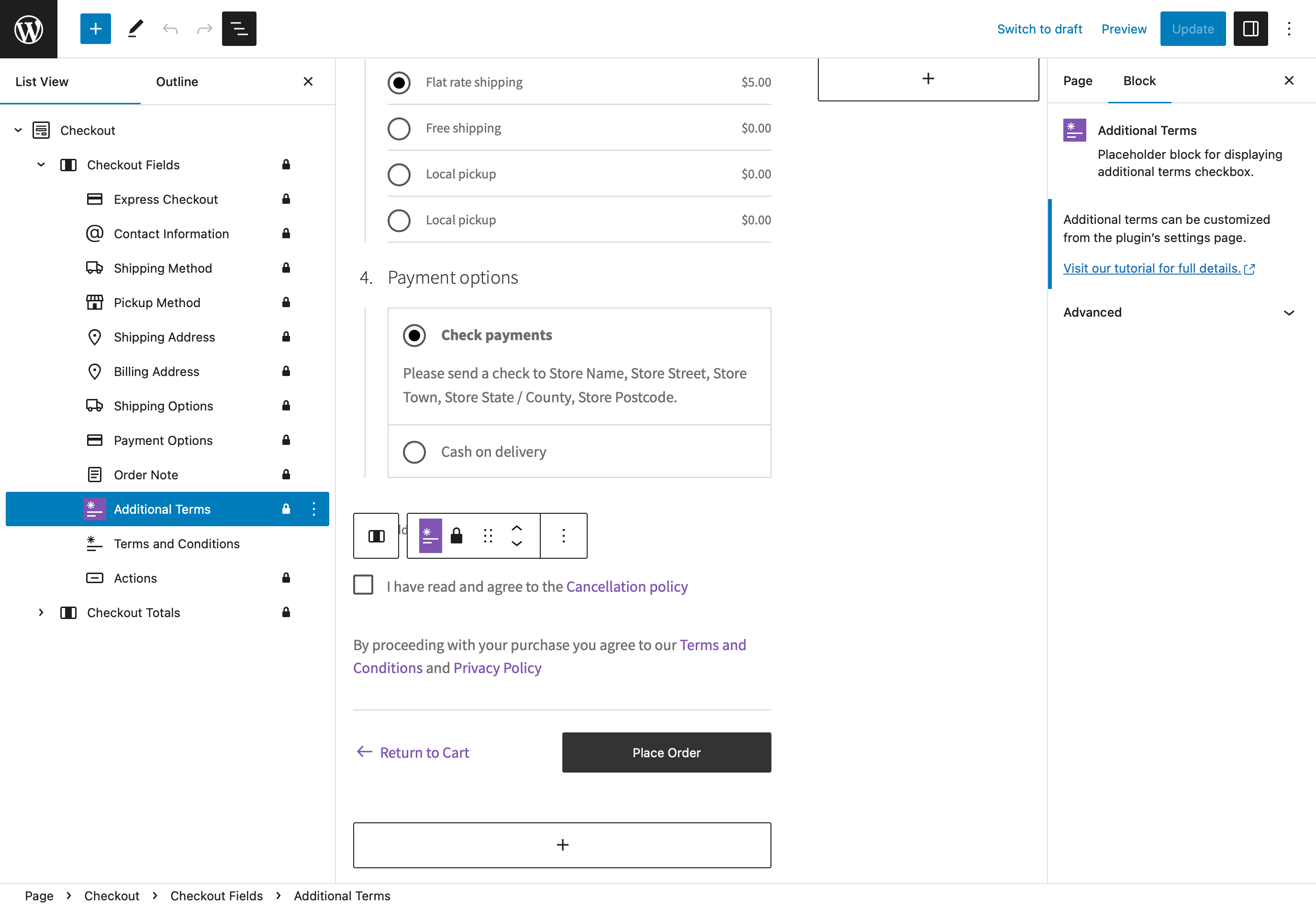
Adding the Additional Terms block inside the WooCommerce Checkout Block.
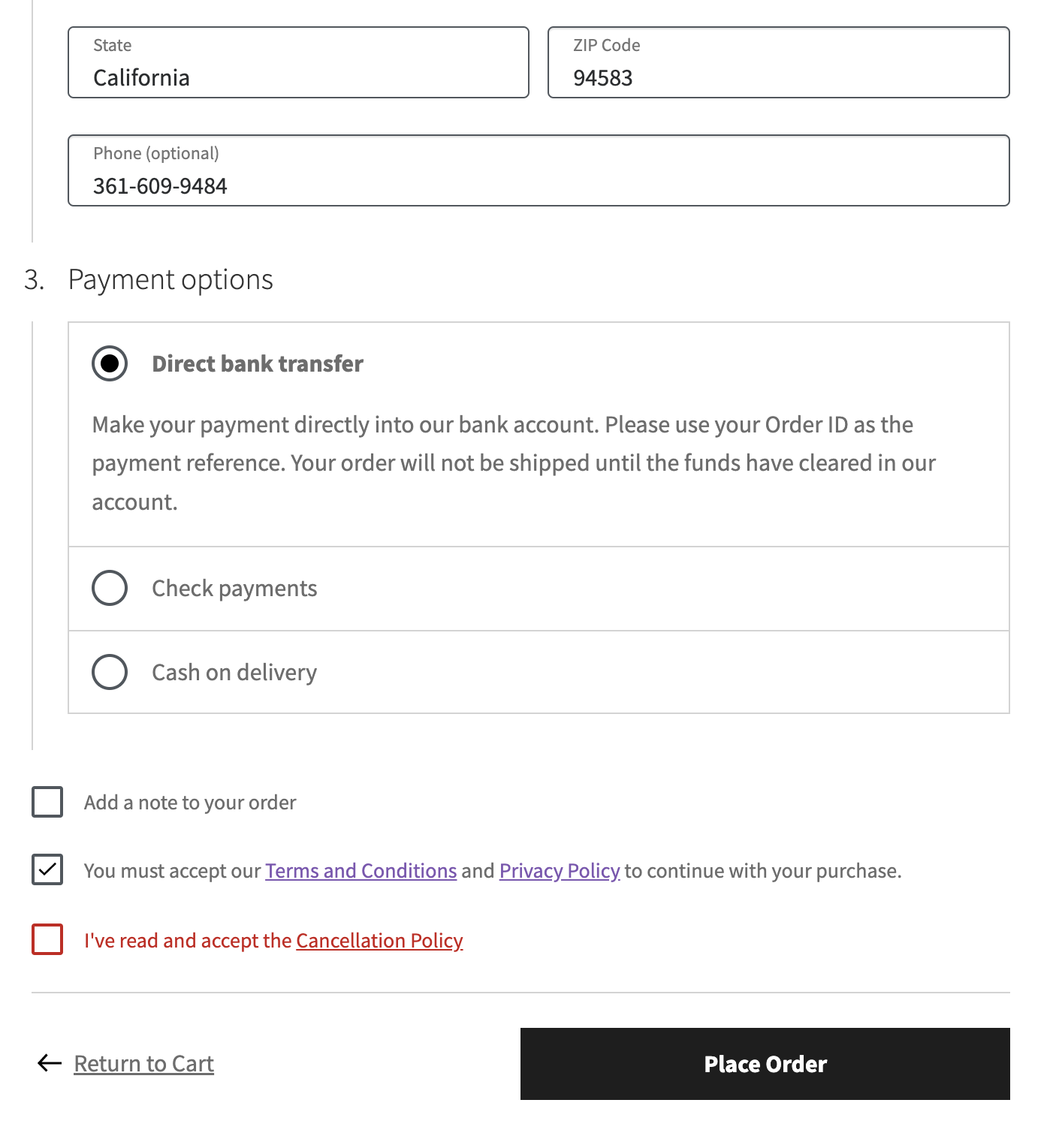
The additional terms checkbox on the WooCommerce Checkout Block.
Faq
Use it when your store needs an extra checkout agreement in addition to the default WooCommerce terms and conditions checkbox. It helps customers clearly review and accept an important policy before placing an order, and it keeps a record of that acceptance.
Yes. Woo Additional Terms has served WooCommerce stores since 2017. It was renamed to Additional Terms Lite for WooCommerce to comply with WooCommerce branding guidelines, and the underlying plugin, your settings, and your saved configuration all carry over automatically. Only the display name changed.
If you arrived here from a tutorial, video, blog post, or forum thread that references “Woo Additional Terms”, you are in the right place. No re-installation, no re-configuration, and no data migration is required.
Go to WooCommerce » Settings » Additional Terms in your WordPress dashboard.
Open WooCommerce » Settings » Additional Terms, write your checkbox text, choose a terms page if you want one, set whether the checkbox is required, then save your changes.
Select a terms page in the settings, then add the {{additional-terms}} smart tag inside the checkbox text. The smart tag is replaced with a linked page title at checkout.
Yes. Depending on your settings, linked terms can open in a modal, appear directly above the checkbox, or open in a new browser tab.
Yes. The plugin includes a dedicated Additional Terms block that can be added inside the WooCommerce Checkout Block and positioned wherever you like.
Yes. The free version saves acceptance details in the WooCommerce order notes. Additional Terms Pro adds an order details summary, accepted terms inside order emails, and a downloadable PDF receipt.
The free version is designed for one additional checkout checkbox. Additional Terms Pro allows unlimited custom terms checkboxes.
Conditional display is available in Additional Terms Pro. It can show a checkbox based on products, categories, tags, WooCommerce brands, product types, shipping classes, applied coupons, cart totals, payment gateways, shipping or billing location, user role, weekday, or URL parameters.
Yes, in Additional Terms Pro. It can display a checkout agreement based on the selected payment gateway, which is useful when a method needs extra instructions, such as bank transfer details, cash on delivery notices, financing terms, or manual payment policies.
Yes, this is available in Additional Terms Pro. It can display the accepted terms in WooCommerce order emails and attach a PDF receipt of what the customer agreed to.
Additional Terms Pro includes a guided Terms Generator that helps create a structured Terms and Conditions draft based on your business details. Always review generated content before publishing.
Yes. The plugin is translation-ready and can be used with multilingual workflows such as WPML and Polylang.
Yes. The plugin supports WooCommerce High-Performance Order Storage.
The Lite version covers a single checkout agreement with a required or optional checkbox, a linked terms page, three display styles, and acceptance saved to the order notes. It is enough for a straightforward one-off policy.
Additional Terms Pro adds unlimited checkboxes, cart and checkout placement, smart conditional display, accepted terms in emails, a PDF receipt, an order-screen acceptance summary, IP and device consent records, a guided Terms Generator, and import and export tools.
If you need more than one agreement, product-specific or payment-specific terms, or clearer records of what customers accepted, Pro pays for itself quickly.
Yes. Additional Terms Pro adds unlimited checkboxes, smart conditional display, applied coupon and payment gateway rules, accepted terms in emails, PDF terms receipts, an order acceptance summary, a guided Terms Generator, and import and export support.
You can learn more here: Additional Terms Pro
The easiest way to receive support is to visit the Community Forums page and create a new topic.
Make sure to check the “Notify me of follow-up replies via email” option so you receive updates when someone replies.
Yes. Additional Terms Lite for WooCommerce is translation-ready and localized using the GNU framework. You can help translate it through the official WordPress translation platform.
Translate Additional Terms Lite for WooCommerce
If you enjoy using Additional Terms Lite for WooCommerce, a 5-star rating would be greatly appreciated. Reviews help support continued plugin development and improvements.
Reviews
Works as advertised
By 
I really dislike the nags to write a review, but it works as advertised.
👍👍👍
By 
👍👍👍
Doesn't work at all
By 
Installed and configured, nothing appears at checkout. Waste of time.
Working as expected
By 
This Plugin working as expected (At least right now)
In Guttenberg, it adds a checkbox under the Place Order button by default, but it can easily be moved to the right place.
Plugin no longer works
By 
Used to be a great plugin, but it no longer works (FREE OR PRO).
Simples e resolve
By 
Acrescenta um segundo termo com termos adicionais e registra o aceite no pedido. Excelente para turismo de aventura e direitos de imagem.
Fácil de configurar e atende as situações mais comuns.
Remove the spammy intrusive upsell
By 
What's up with the recent spammy intrusive dashboard that the plugin developers (in general) are using? No way to opt out or remove this notice unless I go into the code.
Upgrade to Woo Additional Terms PRO
Does the job!
By 
Easy to use, even for a know-nothing like me! Perfect for my needs, no hesitation in recommending this.
Good plugin. Thanks!
By 
Good plugin. Thanks!
Easy and simple
By 
Changelog
1.7.2.1
- Fixed: Incorrect documentation page URL.
- Compatibility: Tested with WooCommerce 10.9.
1.7.2
- Update – Compatibility with WP 7.0.
- Update – Compatibility with WC 10.8.
1.7.1
- Fix – Improved compatibility with WooCommerce HPOS for order metadata storage.
- Update – Compatibility with WP 6.9.
- Update – Compatibility with WC 10.5.
1.7.0
- Fix – Added support for translating settings fields.
1.6.9
- Compatibility: WooCommerce 10.0
1.6.8.1
- Renamed the plugin to comply with WooCommerce branding guidelines.
1.6.8
- Fix empty page terms content shown in Divi theme.
1.6.7
- Improved escaping of terms page content on the checkout shortcode.
- Compatibility with WordPress 6.6
- Compatibility with WooCommerce 9.2
1.6.6
- Compatibility with WooCommerce 8.9.
1.6.5
- Fixed compatibility issues with WooCommerce checkout block.
- Compatibility with WordPress 6.5.
- Compatibility with WooCommerce 8.7.
1.6.4
- Compatibility for rendering terms page content created with Elementor.
1.6.3
- Resolved the issue that prevented the assignment of non-published pages as terms pages.
- Addressed a PHP error that occurred when retrieving order meta information for display on the order page.
1.6.2
- Isolated the dependency injection container package to prevent potential PHP fatal errors when utilized by other third-party plugins.
1.6.1
- Prevented checkout error in the checkout block when additional terms & conditions are deactivated.
- Enhanced display of additional terms acceptance below the billing address.
- Ensured compatibility with the “WooCommerce PayPal Payments” plugin.
- Verified compatibility with WordPress version 6.3.
- Verified compatibility with WooCommerce version 8.0.
1.6.0
- Added ability to define the status of the additional terms checkbox.
- Added customization option to choose how the terms page is displayed (modal, embed, or new tab).
- Added new option to make the terms and conditions checkbox skippable.
- Save the acceptance of the additional terms in the order notes.
- Optimized the underlying code structure for better performance and maintainability.
1.5.2
- Compatibility with WordPress 6.2.
- Compatibility with WooCommerce 7.5.
1.5.1
- Updated font-size for the checkout block.
- Compatibility with WooCommerce 7.4.
1.5.0
- Compatibility with WooCommerce Checkout block.
- Compatibility with WooCommerce 7.3.
1.4.1
- Improved logic in displaying admin notices.
1.4.0
- Compatibility with WooCommerce 7.2.
1.3.6
- Compatibility with WordPress 6.1.
- Compatibility with WooCommerce 7.0.
1.3.5
- Compatibility with WordPress 6.0.
- Compatibility with WooCommerce 6.9.
1.3.4
- Compatibility with WordPress 5.6.
- Compatibility with WooCommerce 4.8.
1.3.3
- Multiple code standards improvements.
- Compatibility with WordPress 5.5.
- Compatibility with WooCommerce 4.4.
1.3.2
- Compatibility with WooCommerce 4.3.
1.3.1
- Display the acceptance of terms & conditions on the order edit page.
1.3.0
- Additional terms content can now open up on the page when the link is clicked, allowing customers to review without leaving checkout.
- Compatibility with WooCommerce 4.2.0.
1.2.2
- Added language configuration file to support WPML/Polylang.
- Compatibility with WordPress 5.4.1.
- Compatibility with WooCommerce 4.1.1.
1.2.1
- Multiple code standards improvements.
- Compatibility with WordPress 5.4.0.
- Compatibility with WooCommerce 4.0.1.
1.2.0
- Updated language file.
- Refactored and re-organized underlying code in plugin settings page/controls.
- Compatibility with WordPress 5.3.1.
- Compatibility with WooCommerce 3.8.1.
1.1.0
- Compatible with WordPress 4.9.6.
- Compatible with WooCommerce 3.4.2.
1.0.2
- Compatible with WordPress 4.7.0.
- Compatible with WooCommerce 2.6.9.
1.0.1
- Added screenshots.
1.0.0
- Initial release.