Change Product Author for WooCommerce
Change Product Author for WooCommerce
Description
WooCommerce requires at least: 2.2
WooCommerce tested up to: 2.4.12
While working on a project there was a situation where I needed to change the author assigned to a WooCommerce product. The product author was receiving unwanted notifications when reviews for the product were being left. We did not want to turn the notifications off; we just wanted them to go to a different author or user. Changing the author is easily possible with posts and pages, but the option isn’t available by default for WooCommerce products.
Adding the functionality is very simple – it involves adding author support to the product post type which can be accomplished by adding the following to your theme’s functions.php file:
if ( post_type_exists( 'product' ) ) {
    add_post_type_support( 'product', 'author' );
}
However, for users who don’t want to touch the functions.php file, or would prefer a solution that is not restricted to a theme, I created this simple plugin. Just activate the plugin with WooCommerce also installed and you will be able to change the author of a product as if it were a standard post or page.
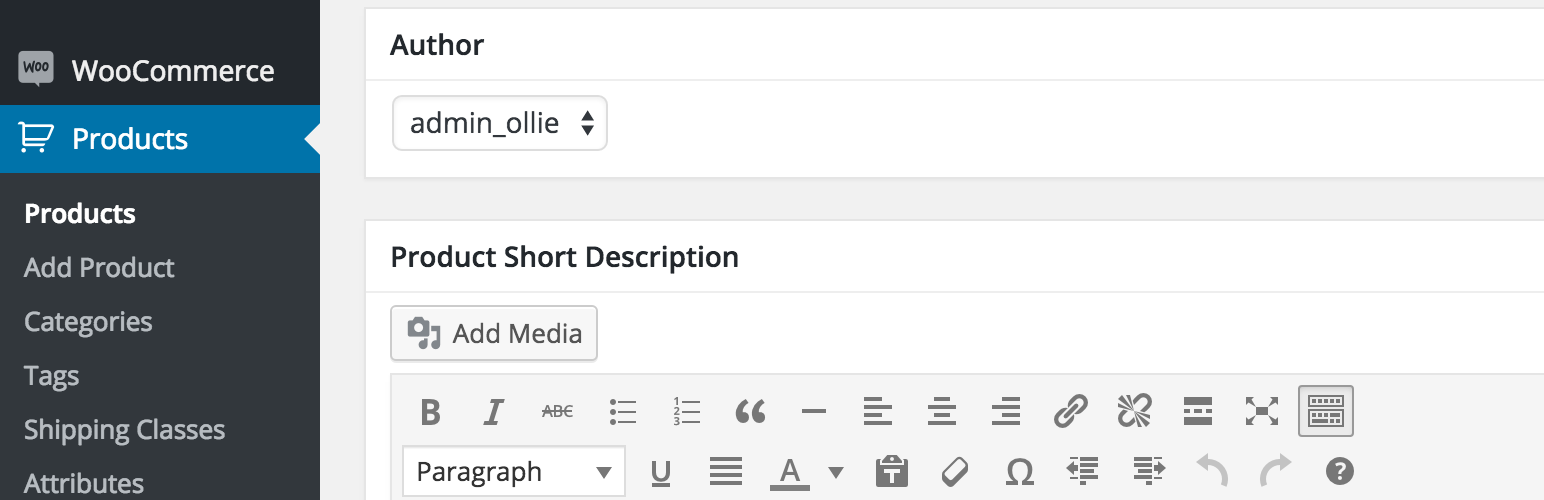
After activating the plugin you will be able to change the author assigned to a WooCommerce product by editing the product in the WP dashboard. See screenshot for details.
If you do not see a place to change the author, check the screen options and make sure that ‘Author’ is checked. See screenshot for details.
Please note that WooCommerce must be installed and activated for the plugin to work.
Installation
Automatic Installation
Installing this plugin automatically is the easiest option. You can install the plugin automatically by going to the plugins section in WordPress and clicking Add New. Type “WooCommerce Change Product Author” in the search bar and install the plugin by clicking the Install Now button.
Manual Installation
To manually install the plugin you’ll need to download the plugin to your computer and upload it to your server via FTP or another method. The plugin needs to be extracted in the wp-content/plugins folder. Once done you should be able to activate it as usual.
If you are having trouble, take a look at the Managing Plugins section in the WordPress Codex, it has more information on this topic.
Screenshots

Where to edit the product

Where to change the author

Make sure the 'author' option is checked in the screen options
Reviews
Works just fine
By 
Just what it says it does.
By 
Great Job
By 
Perfect, as described
By 
Works great!
By 
Useful Plugin
By 
thanks a lot for the amazing plugin. I saved a lot of time using this amazing plugin.
Nice Plugin
By 
i'm using this plugin. awesome.
Changelog
1.0.0
- Initial Release