Digital Goods for WooCommerce Checkout

Digital Goods for WooCommerce Checkout
Description
Digital Download Goods Checkout for WooCommerce, Plugin helps to remove unnecessary fields from the checkout page and make the process smooth and easy for customers.
👉 If you are selling downloadable digital products then you might not need customer’s billing and shipping address and customers expect to get the product as quickly as possible.
👉 This is ideal for selling file downloads and virtual products
👉 You can sell various types of downloads. For example pdf, ebook, photo, music, video, audio, mp3, etc
Key Benefit for WooCommerce store owner
🔑 Increased Sales
🔑 improves conversion rates
🔑 Checkout process easier and faster.
🔑 Reduce Cart Abandonment Rate
Plugin – VIEW LIVE DEMO
Free plugin: Need Technical Help? – Click here
Pro Plugin: PRE-SALE Questions – Click here or Review Help Document
💁 Key features Digital Goods for Checkout – Free Version
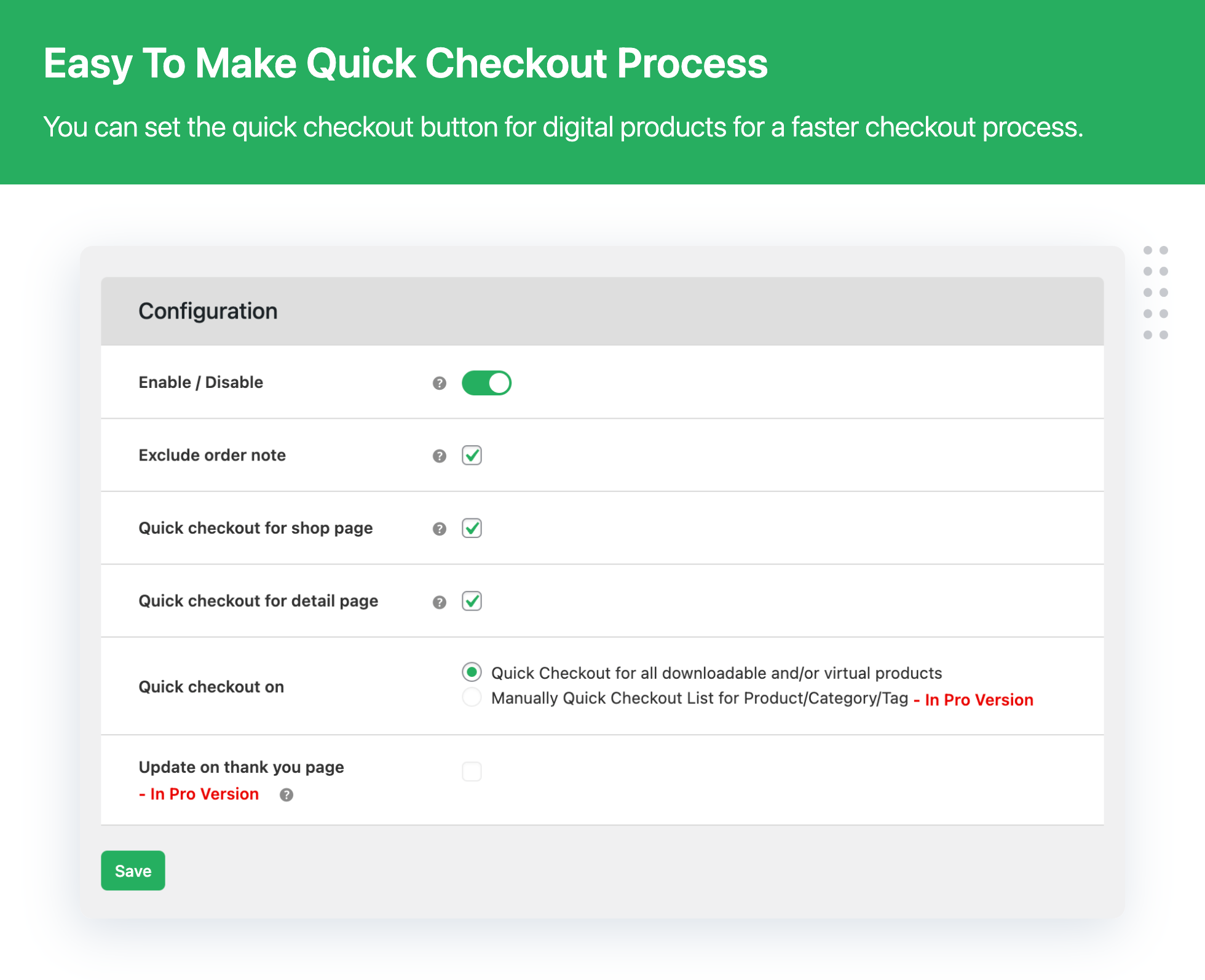
- Set quick checkout on All downloadable and/or virtual products
- Enable / Disable – Quick checkout button
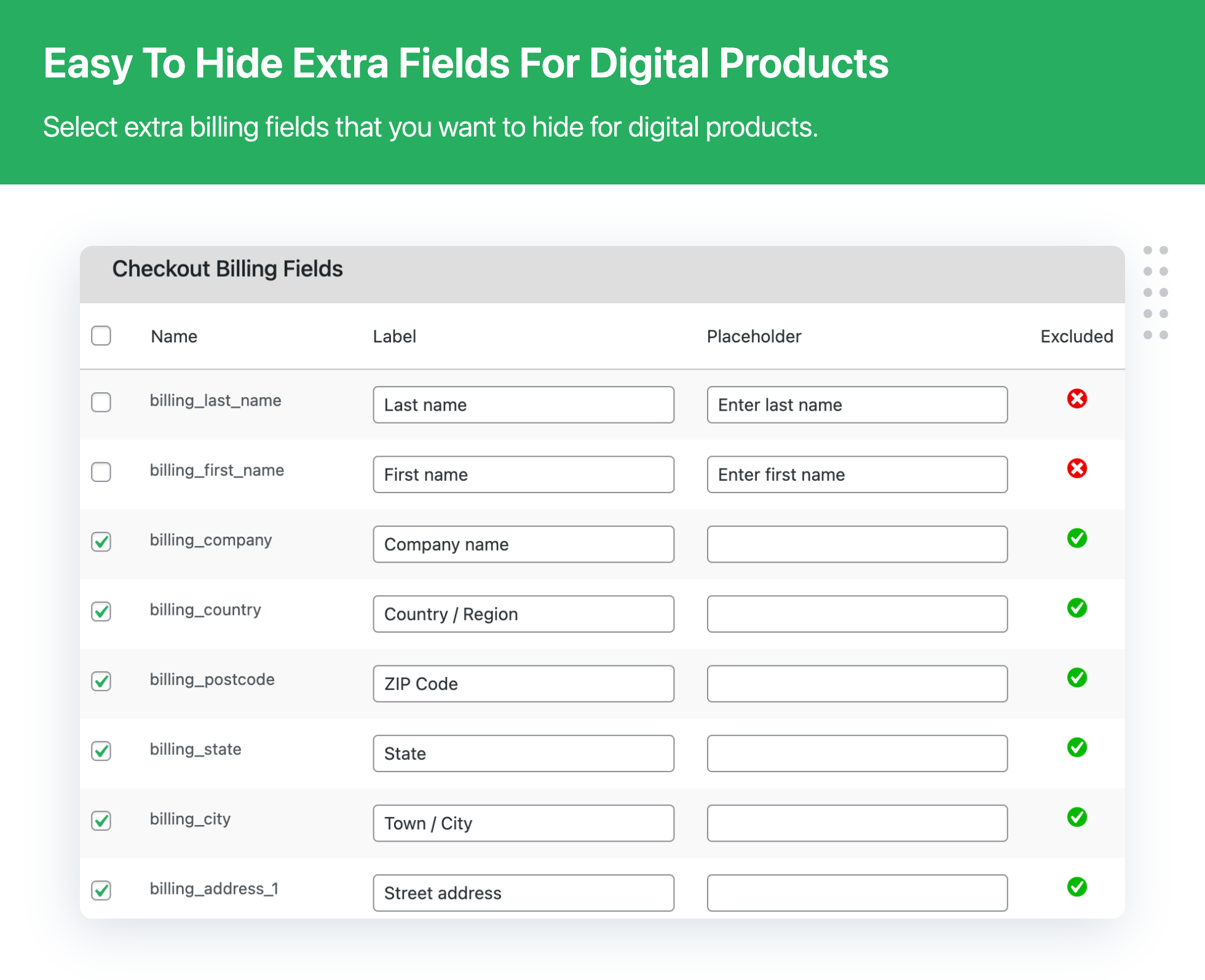
- Exclude multiple fields on checkout
- Set quick checkout button on the Shop page
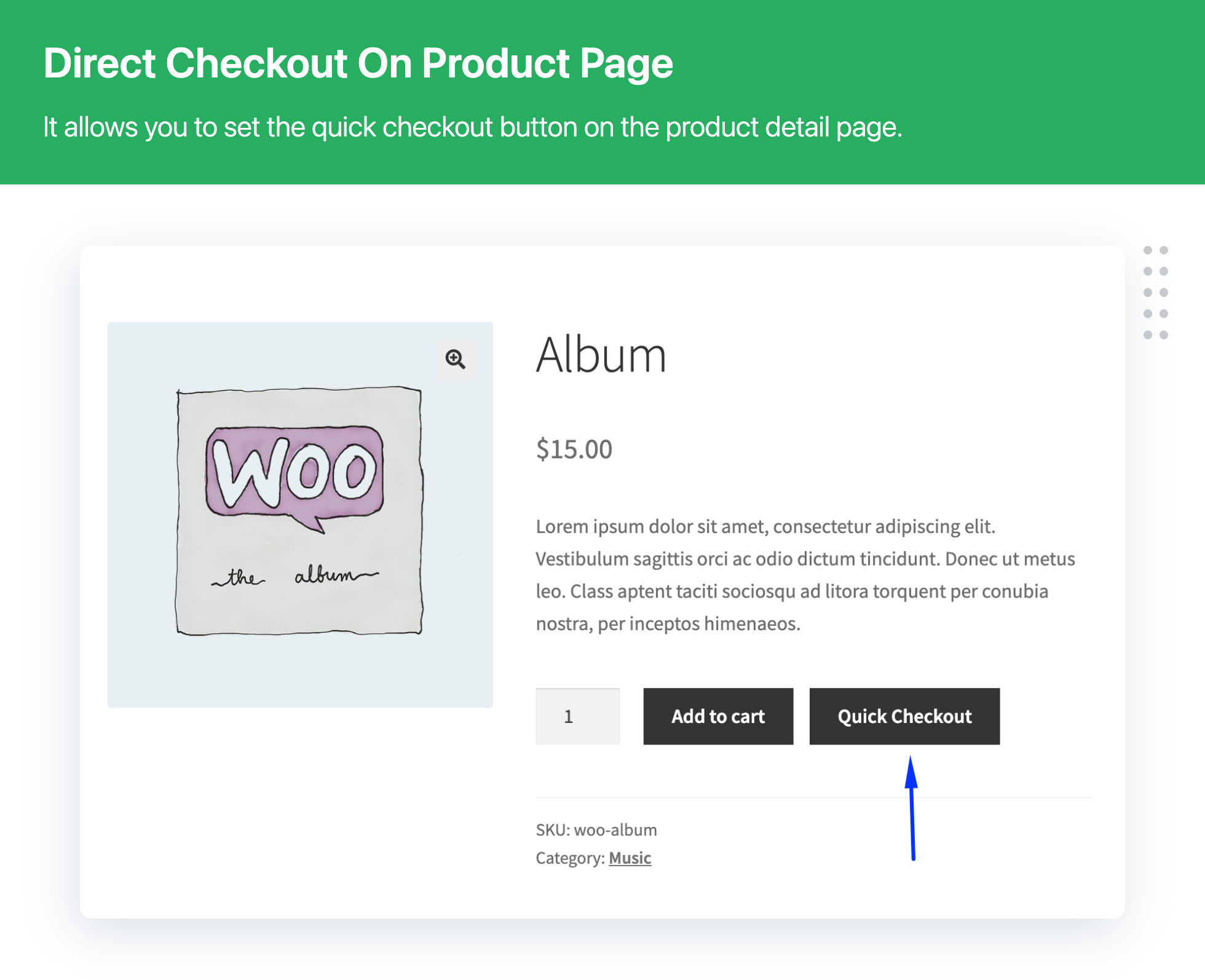
- Set quick checkout button on the Product Details page
- Enable or disable exclude order note on checkout
- Quick Checkout for all downloadable and All virtual products
- Insert the checkout process directly in the product page
- Quick checkout button display on single product page
- Plugin compatible with WooCommerce downloads and virtual products
- Allows to remove Unnecessary checkout fields from the checkout page
- Remove Unnecessary fields based on download products, categories, and tags
💁 Plugin will ideal for if you are selling below the item
- eBooks
- Audio files
- Video files
- Image files
- Excel documents
- PDF documents
- MS Word documents
- All downloads products
- All virtual products
💁 Here are the Featured Customer Reviews
🎉 Great Plugin & Great support service
🎉 Great Plugin, Prompt Response
🎉 Finally! Exactly what I needed! Thank you, So much for this clean, simple plugin.
🎉 Simply plug and play… This Plugin Rocks!
🎉 Awesome plugin..!!
➡️ Read All Review ⬅️
👉 Difference Between Lite and Pro plugin version
Check the detailed difference between Pro and Lite version – Click here
📣 PREMIUM: Digital Download Goods Checkout for WooCommerce
Need even more features? upgrade the premium plugin version to get all the advanced features.
- All free plugin features.
- Pro – Apply the “quick checkout” to all the digital products
- Pro – Apply the “quick checkout” to just selected categories or tags
- Pro – Customers fill in the additional fields after the payment
- Pro – Delayed account creation
- Pro – Set restricts with user role for the quick checkout button
Feature and Usage Guide for plugin Click below link
➡️ UPGRADE TO PRO NOW ⬅️
💁 Benefit of Using Plugin
👉 Significant Decrease in Time Taken in Checkout
With the lesser amount of information to fill and only essential steps to be taken for checkout, you reduce the time taken in the checkout process by your customers to a bare minimum. Sure, it will make them happy!
👉 Lesser Frustration and Easy Checkout
Though physical product deliveries require a significant amount of data from the customer, things are not the same in the case of digital products. So, just ask for information that is necessary and let the buyers download/use the product.
👉 Reduced Cart Abandonment Rate
By putting dozens of information fields on checkout form for digital products, you’re just making sure that your buyer gets frustrated and discards the process. Do not do that. Reduce their hassles and avoid order abandoning.
👉 Increased Sales of your Digital Goods
Quick checkouts and better user experience encourage people to purchase digital goods from you. So whenever you are selling a virtual or downloadable product, do not push your buyers to follow the same process as physical products.
💁 Contact Us
- Free plugin: Need Technical Help? – Click here
- Pro Plugin: PRE-SALE Questions – Click here or Help Document
EXPLORE OUR OTHER PLUGINS TO SUPERCHARGE YOUR WEBSITE:
👉 Premium WooCommerce Plugins list
- WPBricks Manager – Readymade Custom Gutenberg Blocks
- WooCommerce Extra Fees Plugin
- WooCommerce Extra Fees Plugin
- Hide Shipping Method For WooCommerce
- Product Attachment For WooCommerce
- Blocker – Prevent Fake Orders And Blacklist Fraud Customers
- Enhanced Ecommerce Google Analytics for WooCommerce
- Category Banner Management for Woocommerce
- Product Finder For WooCommerce
- Mass Pages Posts Creator For WordPress
- Conditional Discount Rules For WooCommerce Checkout
- WooCommerce Checkout For Digital Goods
- Advance Menu Manager For WordPress
- Page Visit Counter For WordPress
👉 Some of our other free WooCommerce plugins:
- Advance Search for WooCommerce
- Custom Order Status Per Product for WooCommerce
- Multipurpose Gutenberg Block
- Convert Classic Editor to Gutenberg Blocks
- Highlight Gutenberg Blocks
- Quick Bulk Variations Checkout for WooCommerce
- Quick Reports for Woocommerce
- Shipping Method Display Style for WooCommerce
- Template Manager for Gutenberg Block
- WP Custom field for Gutenberg Editor
Installation
Minimum Requirements
- WooCommerce 3.0 or higher
Automatic installation
Automatic installation is the easiest option as WordPress handles the file transfers itself and you don’t need to leave your web browser. To do an automatic install of Digital Goods for WooCommerce Checkout, log in to your WordPress dashboard, navigate to the Plugins menu and click Add New.
In the search field type Digital Goods for WooCommerce Checkout and click Search Plugins. Once you’ve found our plugin you can view details about it such as the the rating and description. Most importantly, of course, you can install it by simply clicking Install Now?.
Manual Installation
- Unzip the files and upload the folder into your plugins folder (/wp-content/plugins/) overwriting older versions if they exist
- Activate the plugin in your WordPress admin area.
Screenshots
Faq
Ans: Remove or hide below of checkout fields:
- Company Name
- Last Name
- Billing Address
- Country
- Address line 1 and 2
- Town / City
- State / County
- Postcode / ZIP
- Phone
Ans: The fields will be hidden when the cart has only virtual products or download products.
Ans: No, the plugin was specifically designed for digital products like downloads products and virtual products only.
Ans: Yes, this plugin is useful. who want to sell both types of products like Digital products and physical products then they can use this plugin. If your cart has both products then it works default WooCommerce flow. But if your cart has an only digital product then it will remove an unnecessary field from the checkout page as per plugin setting.
Ans: Yes. If you will enable the plugin for all the digital goods, it will be deployed for all virtual and downloadable products that do not involve shipping.
Ans: As of now, the plugin is not WPML-ready.
Ans: We understand that different sellers have different requirements. So, we have not kept any limit on the number of fields. You can exclude as many form fields from the checkout process, according to your store’s needs.
Ans: Yes, you can set the Quick checkout button on the Product details page for Digital Download product and virtual product in WooCommerce
Ans: Yes, you can set the Quick checkout button on the shop page for Digital Download product and virtual product in WooCommerce
Ans: Yes, you can remove unnecessary fields from download products of categories, products, and tags?
Ans: It is compatible with WordPress versions 3.8 and higher.
Ans: It is compatible with WooCommerce versions 2.6 and higher.
Reviews
Great For Non-Physical Items
By 
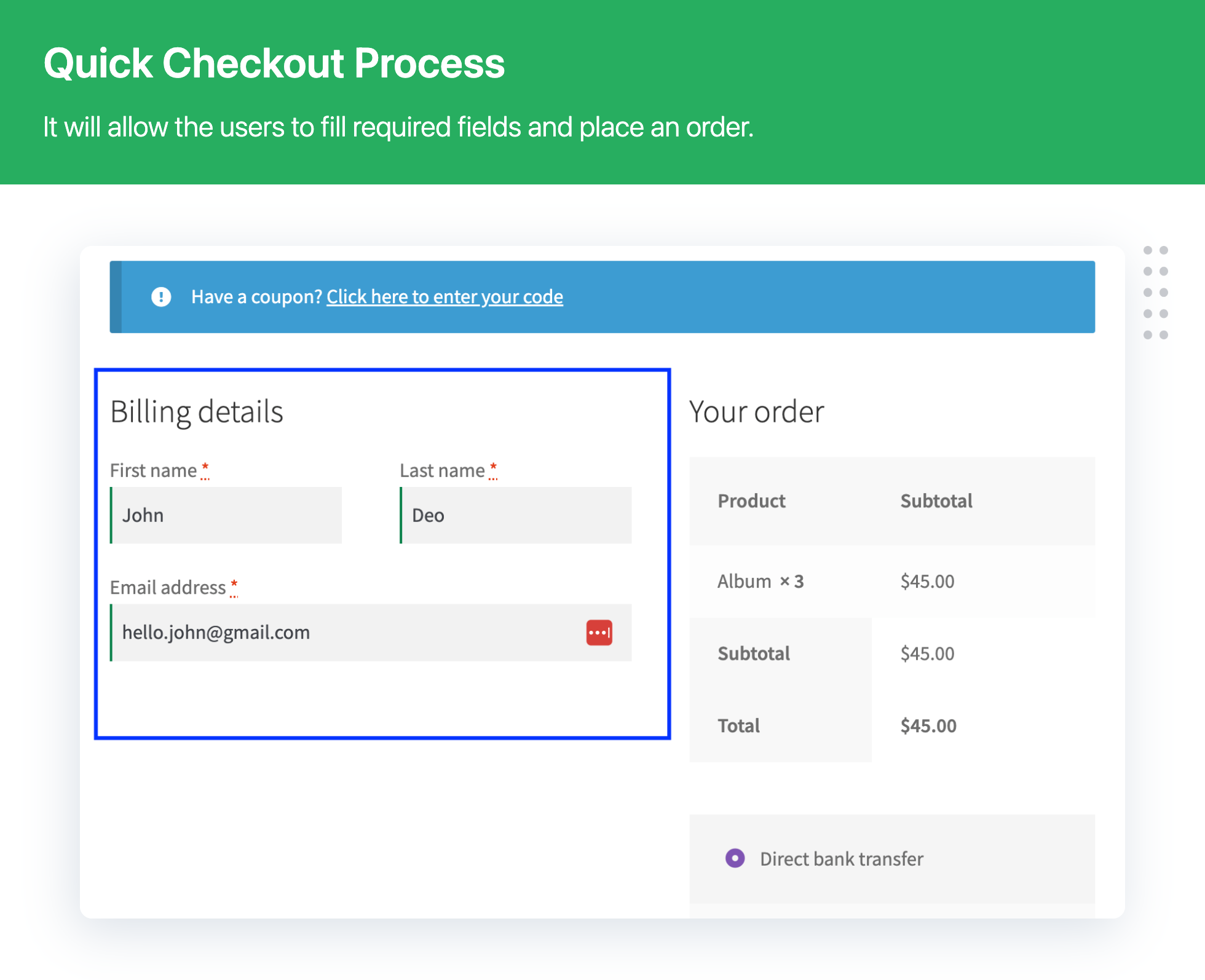
This plugin is what I needed for the many digital delivery items and services I have on my Web site. I do sell physical products too, so it is great that installing this plugin only affects the products I marked as "Virtual." If you have both physical and digital products in your cart, it will show the billing details and stuff the same as only having physical products. Basically, this plugin can get rid of the address fields and keep your checkout page fields simple with only E-mail and Order Notes if the cart items are all digital items.
It is a great plugin for non-physical items because customers don't need to fill in their address if they are just buying an unrelated digital download or online service, and there are people out there who can be hesitant to order an online service if they have to provide their address. I think it is smart to have this plugin for more simplicity and potential sales.
Works great and quick support
By 
The plugin solves your problem while selling digital products. I was facing issue while using the plugin. I wrote an email to the support team and they replied within a day. Now my website is working exactly I want. Thanks to the support team and their plugin.
Best digital checkout plugin. It is perfect
By 
Incompatible with FluentCRM
By 
funktioniert sehr gut
By 
Awesome Plugin!
By 
Works, Simple to Use
By 
best
By 
Digital Goods for WooCommerce Checkout Plugin
By 
Thoroughly Confused!!
By 
Changelog
3.8.5
- [Enhancement] – Full Checkout Block compatibility: hide/exclude country, custom fields, and field sorting on block checkout.
- [Enhancement] – Removed Checkout Block limitation notices after compatibility support.
- [Bug Fix] – Fixed PHP 8+ deprecation: automatic conversion of false to array in Quick Checkout settings.
- [Enhancement] – Compatible with WooCommerce 11.0.x
- [Enhancement] – Compatible with WordPress 7.1.x
3.8.4
- [Bug Fix] – Fixed empty checkout fields in plugin settings on first installation.
- [Enhancement] – Added a filter to customize the position and hook of the Quick Checkout button.
- [Enhancement] – Improved compatibility with Multi-Step Checkout setups.
- [Enhancement] – Compatible with WooCommerce 10.7.x
- [Enhancement] – Compatible with WordPress 6.9.x
3.8.3
- [New] – Reset checkout fields settings
- [Bug Fix] – Billing info not showing in order details (for physical products)
- [Bug Fix] – WooCommerce strings were altered when plugin active – fixed
- [Enhancement] – Optimized plugin user interface for better customer experience
- [Enhancement] – Compatible with WooCommerce 9.9.x
- [Enhancement] – Compatible with WordPress 6.8.x
3.8.2
- [Bug Fix] Quick fix related to the PHP Fatal error: Cannot access offset of type string on string
3.8.1
- [New] – Added a new option to change the “Add to Cart” button label
- [New] – Added a new option to change the “Quick Checkout” button label
- [Enhancement] – Tested plugin compatibility with Bricks Builder theme
- [Enhancement] – Plugin compatibility with WooCommerce Cart and Checkout blocks
- [Enhancement] – Compatible with WooCommerce 9.7.x
- [Enhancement] – Compatible with WordPress 6.7.x
3.8.0
- [Enhancement] – Plugin UI enhancement
- [Enhancement] – Compatible with WooCommerce 9.2.x
- [Enhancement] – Compatible with WordPress 6.6.x
3.7.4
- [Enhancement] – Security patch
- [Enhancement] – Compatible with WooCommerce 8.8.x
- [Enhancement] – Compatible with WordPress 6.5.x
3.7.3
- [Enhancement] – Plugin UI enhancement
- [Enhancement] – Fixed conflict with wp_mail causing functionality issues.
- [Enhancement] – Resolved “check all” checkbox in column not functioning properly.
- [Enhancement] – Compatible with WooCommerce 8.8.x
- [Enhancement] – Compatible with WordPress 6.5.x
3.7.2
- [Enhancement] – Introduced plugin setup wizard
- [Enhancement] – Plugin UI enhancement
- [Enhancement] – Plugin compatibility with WooCommerce High-Performance Order Storage (HPOS)
- [Enhancement] – Plugin compatibility with PHP 8.2.x
- [Enhancement] – Compatible with WooCommerce 8.2.x
- [Enhancement] – Compatible with WordPress 6.3.x
3.7.1
- [Enhancement] Corrected plugin wrong links
- [Enhancement] Quick fix related to the Cross Site Scripting (XSS) vulnerability
- [Enhancement] Compatible with WooCommerce 7.9.x
- [Enhancement] Compatible with WordPress 6.2.x
3.7.0
- Enhancement – New UI introduce
- Enhancement – Security patch
- Update – Compatible with WooCommerce 7.1.x
- Update – Compatible with WordPress 6.1.x
3.6.4
- Enhancement – Security patch
- Update – Review block design
- Update – Compatible with WooCommerce 6.3.x
- Update – Compatible with WordPress 5.9.x
3.6.3
- Compatible with WooCommerce 5.9.x
- Compatible with WordPress 5.6.x
3.6.2
- Fixed – Disabled account creation issue
- Compatible with WooCommerce 5.9.x
- Compatible with WordPress 5.8.x
3.6.1
- Enhancement – UI Enhancement
- Fixed – Minor bug fixed related to Loco Translate
- Compatible with WooCommerce 5.8.x
- Compatible with WordPress 5.8.x
3.6
- Compatible with WooCommerce 5.5.2
- Compatible with WordPress 5.8
3.5.7
- Compatible with WooCommerce 5.4.1
- Compatible with WordPress 5.7.2
3.5.6
- Compatible with WooCommerce 5.1
- Compatible with WordPress 5.7
3.5.5 – 07-01-2021
- Minor bug fixed
3.5.4
- Compatible with WooCommerce 4.7.1
- Compatible with WordPress 5.5.3
3.5.3 – 25-11-2020
- Minor bug fixed
3.5.2 – 20-11-2020
- Maintenance Releases
3.5.1 – 12-11-2020
- Compatible with WordPress 5.5.3
- Compatible with WooCommerce 4.7.x
3.5 – 20-08-2020
- Compatible with WordPress 5.5.x
- Compatible with WooCommerce 4.4.x
3.4 – 27-05-2020
- Compatible with WordPress 5.4.x
- Compatible with WooCommerce 4.1.x
3.3 – 04-02-2020
- Compatible with WooCommerce 3.9.x
3.2 – 10-01-2020
- Fixed – Ship to a different address” form is not displaying.
3.1 – 20-12-2019
- Fixed – Additional Information” title display issue.
3.0 – 10-12-2019
- New – Quick checkout button display on Shop page
- New – Quick checkout button display on Single Product Page
- New – Quick checkout on : All downloadable and/or virtual products
- New – Layout Structure
- Update – VIP minimum
2.9 – 19-11-2019
- Compatible with WordPress 5.3.x
- Compatible with WooCommerce 3.8.x
2.8 – 20-09-2019
- Maintenance Releases
2.7 – 28-04-2019
- Compatible with WordPress Version 5.2.x and WooCommerce version 3.6.x
2.6 – 27-03-2019
- Normal bug fixed.
2.5 – 15-03-2019
- Only virtual products then not apply issue fixed.
2.4 – 28-01-2019
- Normal bug fixed.
2.3 – 06-08-2018
- Normal bug fixed.
2.2 – 28-05-2018
- Fixed vulnerable code issue
- Compatible with WordPress 4.9.x and WooCommerce 3.4.x
2.1 – 25-05-2018
- Normal bug fix.
- Check WordPress 4.9.6 compatibility
2.0 – 19-04-2018
- Normal bug fixed.
1.9 – 13-06-2017
- FIX:Variable Digital Product Issue resolved.
- Check WordPress 4.8 compatibility
1.8 – 11-05-2017
- FIX:both product available that time required shipping info issue resolved.
1.7 – 14-04-2017
- Normal bug fix.
- Check WordPress and WooCommerce 3.0.x compatibility
1.6 – 04-04-2017
- Normal bug fix.
1.5 – 23-03-2017
- Normal bug fix.
- Downloadable Product functionality issue resolve.
1.4 – 24-12-2016
- Check WordPress and WooCommerce compatibility
1.3 – 26-08-2016
- Check WordPress and WooCommerce compatibility
1.2 – 11.07.2016
- Fix – Fixed minor bug.
- New – Subscription form added.
1.1.1 – 04.05.2016
- Fix – Fixed PHP error notice.
1.1 – 02.05.2016
- New – Settings page added for select fields which you want to exclude from checkout page.
1.0.1 – 30.11.2015
- Tweak – Remote request handles on activate.