Friendly User Agent for WooCommerce

Friendly User Agent for WooCommerce
Description
Unknown to many, WooCommerce captures the device/platform, browser and browser version used by a customer when an order is placed, this is known as the user agent string. This useful information is currently not shown anywhere in the WooCommerce plugin.
**Friendly User Agent for WooCommerce* simply displays this information as a new column on the Orders page and within the Edit Order page. You can then see what customers are using what devices and browsers.
Currently Detected Platforms
Desktop
- Windows
- Linux
- Macintosh
- Chrome OS
- FreeBSD
- NetBSD
- OpenBSD
Mobile
- Android
- iPhone
- iPad
- iPod
- Windows Phone
- Kindle
- Kindle Fire
- BlackBerry
- Playbook
- Tizen
- Sailfish
- Symbian
Console
- Nintendo 3DS
- New Nintendo 3DS
- Nintendo DS
- Nintendo Switch
- Nintendo Wii
- Nintendo WiiU
- PlayStation 3
- PlayStation 4
- PlayStation 5
- PlayStation Vita
- Xbox
- Xbox One
Currently Detected Browsers
- AdsBot-Google
- Android Browser
- Applebot
- Baiduspider
- bingbot
- BlackBerry Browser
- Bunjalloo
- Camino
- Chrome
- curl
- Edge
- facebookexternalhit
- FeedValidator
- Firefox
- Googlebot
- Googlebot-Image
- Googlebot-Video
- HeadlessChrome
- IEMobile
- iMessageBot
- Kindle
- Lynx
- Midori
- MiuiBrowser
- MSIE
- msnbot-media
- NetFront
- NintendoBrowser
- OculusBrowser
- Opera
- Puffin
- Safari
- SailfishBrowser
- SamsungBrowser
- Silk
- TelegramBot
- TizenBrowser
- Twitterbot
- UC Browser
- Valve Steam Tenfoot
- Vivaldi
- Wget
- WordPress
- Yandex
- YandexBot
If you find a missing platform or browser, please let us know in the support forum and we’ll add it in our next version.
Using the simple, streamlined PHP user-agent parser. Credit: https://github.com/donatj/PhpUserAgent
PhpUserAgent license: https://github.com/donatj/PhpUserAgent/blob/master/LICENSE.md
Installation
Friendly User Agent for WooCommerce requires the WooCommerce plugin (at least version 2.5.5) to be installed. Tested from WooCommerce 2.5.5 to 3.5.5.
Via WordPress
- From the WordPress Dashboard, go to Plugins > Add New
- Search for ‘Friendly User Agent for WooCommerce’ and click Install. Then click Activate.
- Click ‘Orders’ in the Admin sidebar to see the new ‘User Agent’ column.
- Click on a single order view/edit page link and the ‘Customer User Agent’ information will be displayed below the billing address.
Manual
- Upload the folder /woo-friendly-user-agent/ to the /wp-content/plugins/ directory.
- Activate the plugin through the ‘Plugins’ menu in WordPress.
- Click ‘Orders’ in the Admin sidebar to see the new ‘User Agent’ column.
- Click on a single order view/edit page link and the ‘Customer User Agent’ information will be displayed below the billing address.
Screenshots

Orders page
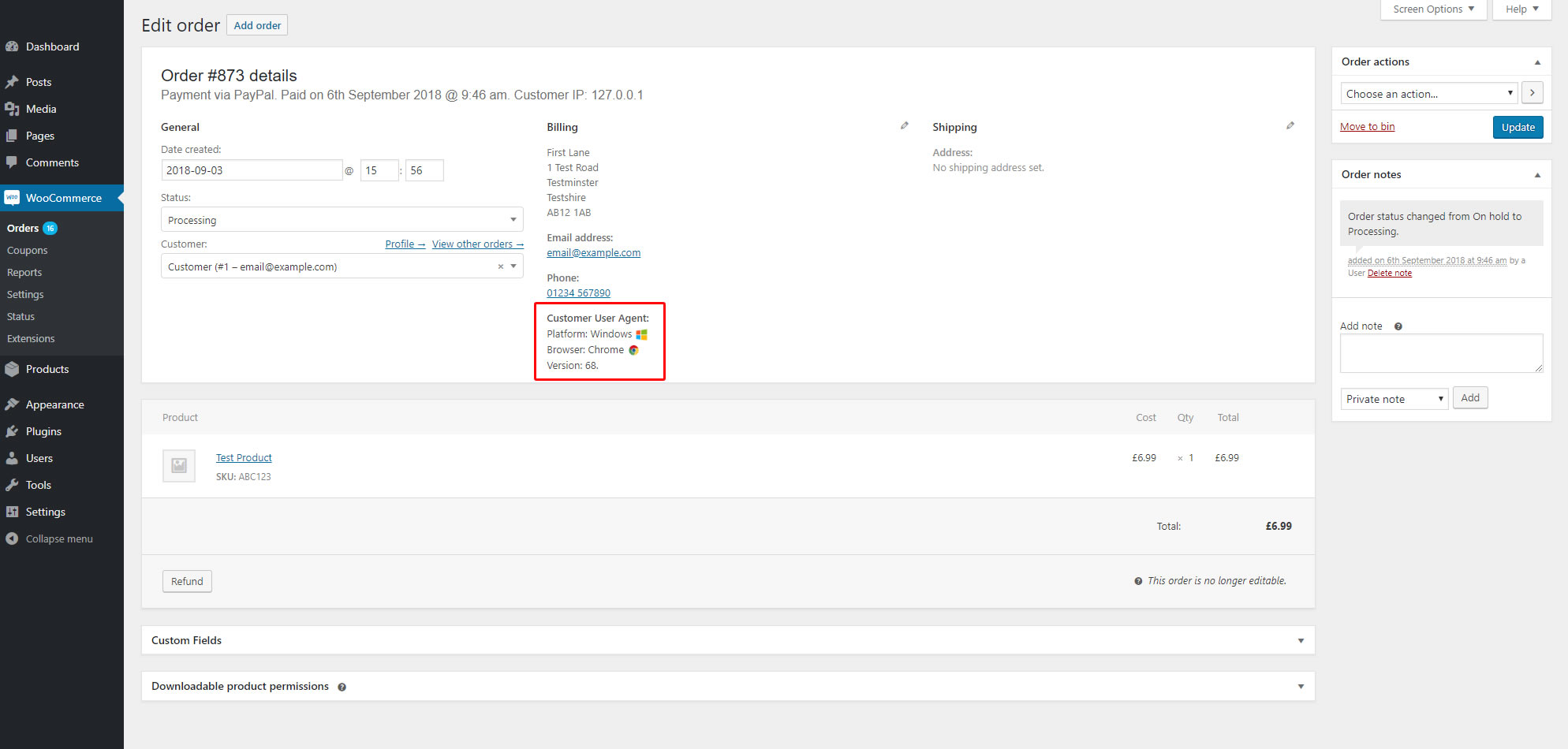
Single order view/edit page
Faq
- When viewing the ‘Orders’ screen click the ‘Screen Options’ tab at the right top of the screen.
- Uncheck the ‘User Agent’ checkbox.
- Click ‘Apply’.
Reviews
Simple and efficient
By 
Very usefull , gives information about platform and agent
Simple and effective!
By 
Perfect
By 
Perfect for displaying Customer User Agents
By 
Very useful plugin!
By 
Fantastic plugin
By 
perfect
By 
Simple and effective
By 
simple and great
By 
Great Plugin. Does just what I needed.
By 
Changelog
1.0
- Initial release
1.1.0
- Version updates
1.2.0
- New supported browsers/OS’s
- Version updates
- Name change
1.3.0
- New supported browsers/OS’s
- Version updates
- Better commenting