MultiStep Checkout for WooCommerce
MultiStep Checkout for WooCommerce
Description
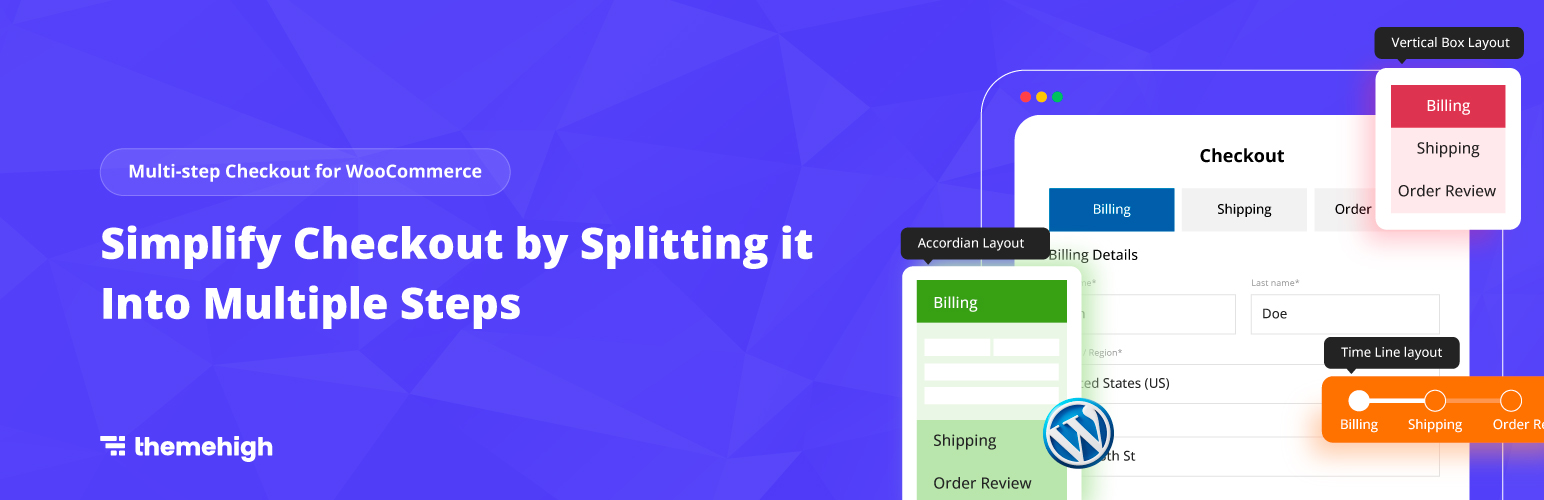
Multistep Checkout for WooCommerce plugin splits the default WooCommerce Checkout process into simpler steps for your ecommerce store.
🔥 Simplify your WooCommerce checkout with a clean step-by-step flow
Instead of showing all checkout fields at once, splitting the process into clear sections like login, billing, shipping, and payment makes the checkout flow easier to follow and manage. MultiStep Checkout for WooCommerce by ThemeHigh helps you turn your classic WooCommerce checkout into a more organized, easy-to-follow multi-step experience
Why Use MultiStep Checkout for WooCommerce?
Default checkout can feel long and cluttered, especially for stores with additional or custom fields. MultiStep Checkout organizes the process into clear steps, making it easier for customers to complete.
Useful for:
✳️ Stores with longer checkout forms
✳️ Stores using custom checkout fields
✳️ Stores that want a cleaner checkout flow
✳️ Stores looking for a simple multi-step checkout setup
Try Demo | Documentation | Get Pro
🔥 SEE HOW IT WORKS
✅ SPLIT YOUR WOOCOMMERCE CHECKOUT INTO SIMPLE STEPS
Break down the classic WooCommerce checkout into clear steps like login, billing, shipping, and order review for a more organized and easy-to-follow checkout flow using MultiStep Checkout for WooCommerce plugin. To add and manage fields or sections within these steps, you can use the WooCommerce Checkout Field Editor plugin.
✅ VALIDATE EACH STEP BEFORE MOVING FORWARD
Ensure customers complete all required fields in a step before proceeding to the next one.
✅ CHOOSE FROM 4 MULTISTEP CHECKOUT LAYOUTS
Select a checkout layout that best matches your store design and checkout experience.
- Time Line Layout
- Horizontal Box Layout
- Vertical Box Layout
- Accordion Layout
✅ COMBINE BILLING AND SHIPPING INTO ONE STEP
Merge billing and shipping details into a single step for a shorter and more streamlined checkout flow.
✅ SPLIT ORDER REVIEW AND PAYMENT INTO SEPARATE STEPS
Split Order Review and Payment into separate steps for a clearer checkout flow. By default, both appear on the right side and can also be shown across other steps for better visibility.
✅ CHANGE THE COUPON FORM POSITION
Move the coupon form from its default position and place it above the payment section.
✅ CUSTOMIZE THE DISPLAY OF CHECKOUT STEPS
The plugin offers flexible customization options for displaying checkout steps. You can set different background colors for active and inactive steps, define custom step titles, and adjust the overall appearance to match your store’s design.
✅ LET CUSTOMERS RETURN TO CART EASILY
Add a Back to Cart option so customers can quickly return to their cart page when needed.
✅ COMPATIBLE WITH POPULAR WOOCOMMERCE THEMES
- Astra
- Avada
- Divi builders
- Storefront
- OceanWP
- Flatsome
- Sydney
- Hestia
🔥 SEE OUR PREMIUM FEATURES
Upgrade to the premium version of MultiStep Checkout for WooCommerce to get advanced layouts, custom steps, and deeper checkout customization for a more flexible checkout experience.
Try Demo | Documentation | Get Pro
✅ UPGRADE FROM 4 TO 14 CHECKOUT LAYOUTS
Horizontal Layouts
1. Horizontal Box Layout
2. Horizontal Arrow Layout
3. Closed Arrow Layout
4. Timeline Layout
5. Simple Dot Format Layout
6. Looped Box Layout
7. Tab Format Layout
8. Custom Separator Layout
Vertical Layouts
1. Vertical Box Layout
2. Vertical Arrow Layout
3. Vertical Box with Border Layout
4. Vertical Arrow with Border Layout
Accordion Layouts
1. Classic Accordion Layout
2. Accordion with Icons Layout
✅ ADD CUSTOM CONTENT TO STEPS
Display custom text, instructions, or helpful content inside checkout steps for a more guided customer experience.
✅ REARRANGE, ENABLE, OR DISABLE STEPS
Control the checkout flow by changing step order and enabling or disabling steps as needed.
✅ SHOW CHECKOUT PROGRESS MORE CLEARLY
Add a progress bar below the multistep layout to help customers follow each stage of checkout. Choose a style and customize it to match your store design.
✅ SHOW ORDER REVIEW ON RIGHT & PAYMENT AS SEPARATE STEP
Keep the Order Review visible on the right side while separating Payment into its own step for a clearer and more structured checkout flow
✅ MAKE CHECKOUT STEPS CLEARER AND MORE VISUAL
Show login as part of the checkout flow, with options to include My Account and open the login form by default.
✅ ADD LOGIN AS A CHECKOUT STEP
Add login as a checkout step, with options to show the My Account as in the same step and also display the login form on load.
✅ ADD COUPONS FORM INTO THE CHECKOUT FLOW
Add coupon as a checkout step with options to show the coupon form by default or above the payment section.
✅ ADD CART DETAILS AS A STEP
Let customers review cart details inside the checkout flow without leaving the checkout page.
✅ ADD A CLEAR FINAL REVIEW BEFORE PLACE ORDER
Show a dedicated review step where customers can verify key checkout details before completing the order.
✅ MOBILE ACCORDION STEP VIEW
Improve the checkout experience on smaller screens with a mobile-friendly accordion step layout.
✅ MAKE CHECKOUT BUTTONS MATCH YOUR STORE DESIGN
Customize checkout buttons to fit your store style, control how they appear across steps, and label them the way you want
✅ COMPACTIBLE WITH
👉 PLUGINS
- Checkout Field Editor for WooCommerce
- Extra Product Options for WooCommerce
- Multiple shipping addresses for WooCommerce
- Multi-language Support
👉 THEMES
- Astra
- Divi builders
- Flatsome
- OceanWP
- Storefront
GET FULL ACCESS WITH PREMIUM NOW !
Why ThemeHigh
At themehigh, we specialize in providing thoughtful solutions to help you create your store in the easiest and simplest way possible, providing you with a smooth and enjoyable customization experience.
🏆 2 Million+ Customers
🏆 Quickest Turn-around Support
🏆 Most Lightweight Plugins
🔥 Explore More
If you like the MultiStep Checkout for WooCommerce, then consider checking out our other WordPress Plugins:
👉 Checkout Field Editor (Checkout Manager) for WooCommerce:
This Checkout Plugin lets you add 20 different types of custom checkout fields to help you customise and organise your WooCommerce Checkout Page
👉Extra Product Options For WooCommerce:
This Custom Product addons plugin lets you quickly add additional fields (19 custom field types) and sections to your WooCommerce Product page.
👉 Variation Swatches for WooCommerce:
Using the WooCommerce Variation Swatches plugin, you can easily convert default WooCommerce product attribute drop-downs into customizable swatches and display customized product variations.
👉 Email Customizer for WooCommerce | Drag and Drop Email Templates Builder:
Email Customizer is a plugin that helps you effortlessly customise your WooCommerce transactional emails using its intuitive drag-and-drop builder.
Happy Users of Checkout Manager Plugin
Julien Rondeau (@jufreaks)⭐⭐⭐⭐⭐
I give a 10 stars for the client support which help me those days to correct issues I had and to find solutions for my custom needs. They absolutely nailed it by providing custom snippets that are really useful!redkite (@redkite)⭐⭐⭐⭐
My client was super-happy with this plugin for making their complex checkout process multi-step. Support for the pro version has been exceptional. Highly recommended.jiripazler89 (@jiripazler89) ⭐⭐⭐⭐⭐
I am really satisfied with this plugin. I was looking for the plugin like this for a long time. There are many options and the team still works on improvements, which is perfect.
If there is any problem, the support is willing and fast. I really appreciate it!
Thank you and keep up your great work!skigirl1369 (@skigirl1369) ⭐⭐⭐⭐⭐
I’ve been using this plugin along with their custom checkout fields plugin on several ecommerce sites and it has been great for getting the information we need and helping the customer through the checkout process. And on the rare occasion I’ve needed a little help, their support has been very responsive!
OTHER USEFUL LINKS
👉 VIEW ALL FEATURES
👉 GET DOCUMENTATION
👉 GET THEMEHIGH SUPPORT
👉 JOIN COMMUNITY
👉 FOLLOW US ON Facebook, LinkedIn, Twitter , YouTube & Reddit.
Installation
Minimum Requirements
- WooCommerce 5.0 or greater
- WordPress 5.3 or greater
Automatic installation
- Log in to your WordPress dashboard.
- Navigate to the Plugins menu, and click “Add New”.
- Search and locate ‘MultiStep Checkout for WooCommerce’ plugin.
- Click ‘Install Now’, and WordPress will take it from there.
Manual installation
Manual installation method requires downloading the ‘MultiStep Checkout for WooCommerce’ plugin and uploading it to your web server via your FTP application. The WordPress codex contains instructions on how to do this here.
Screenshots
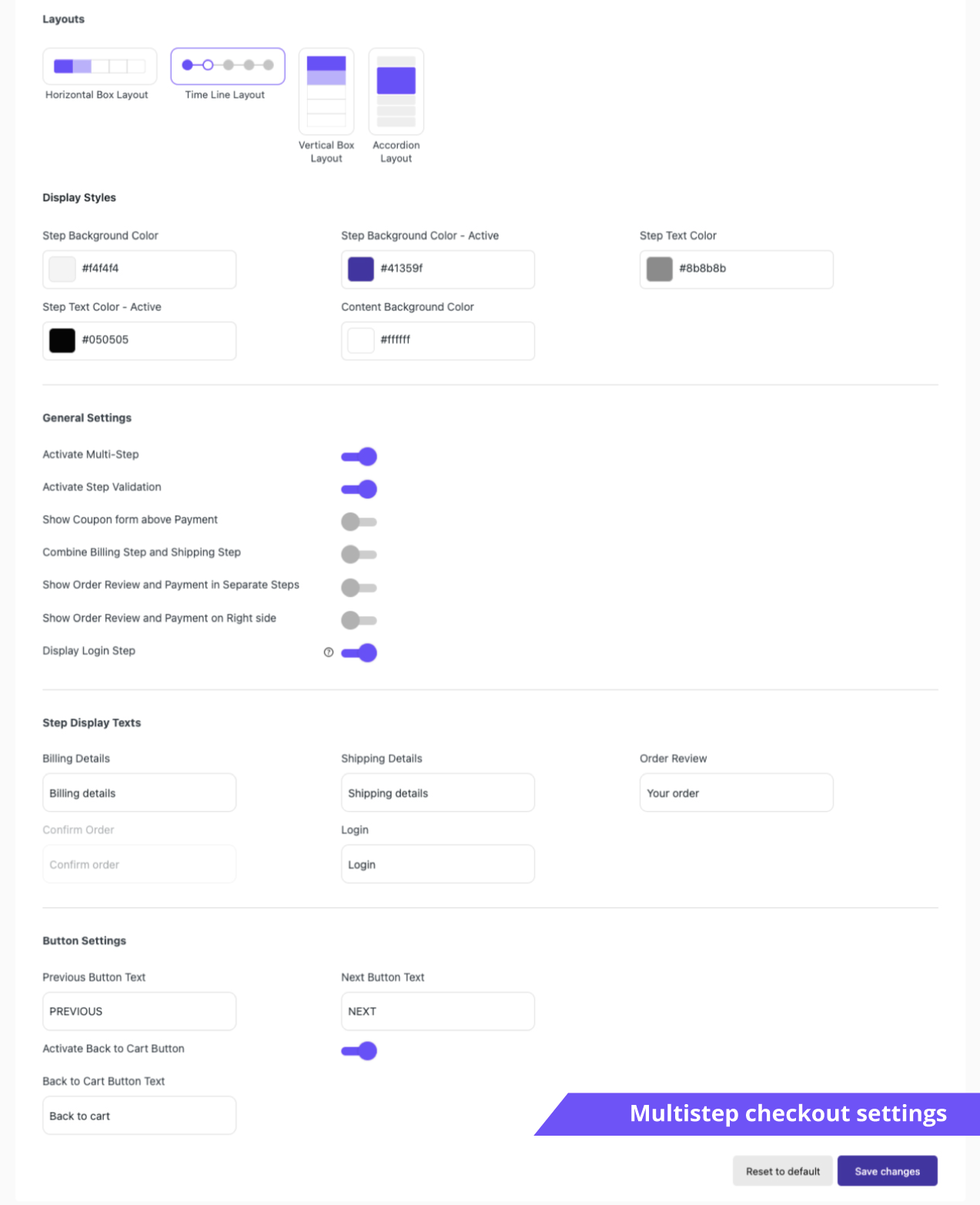
Multistep checkout settings.

Login details step.
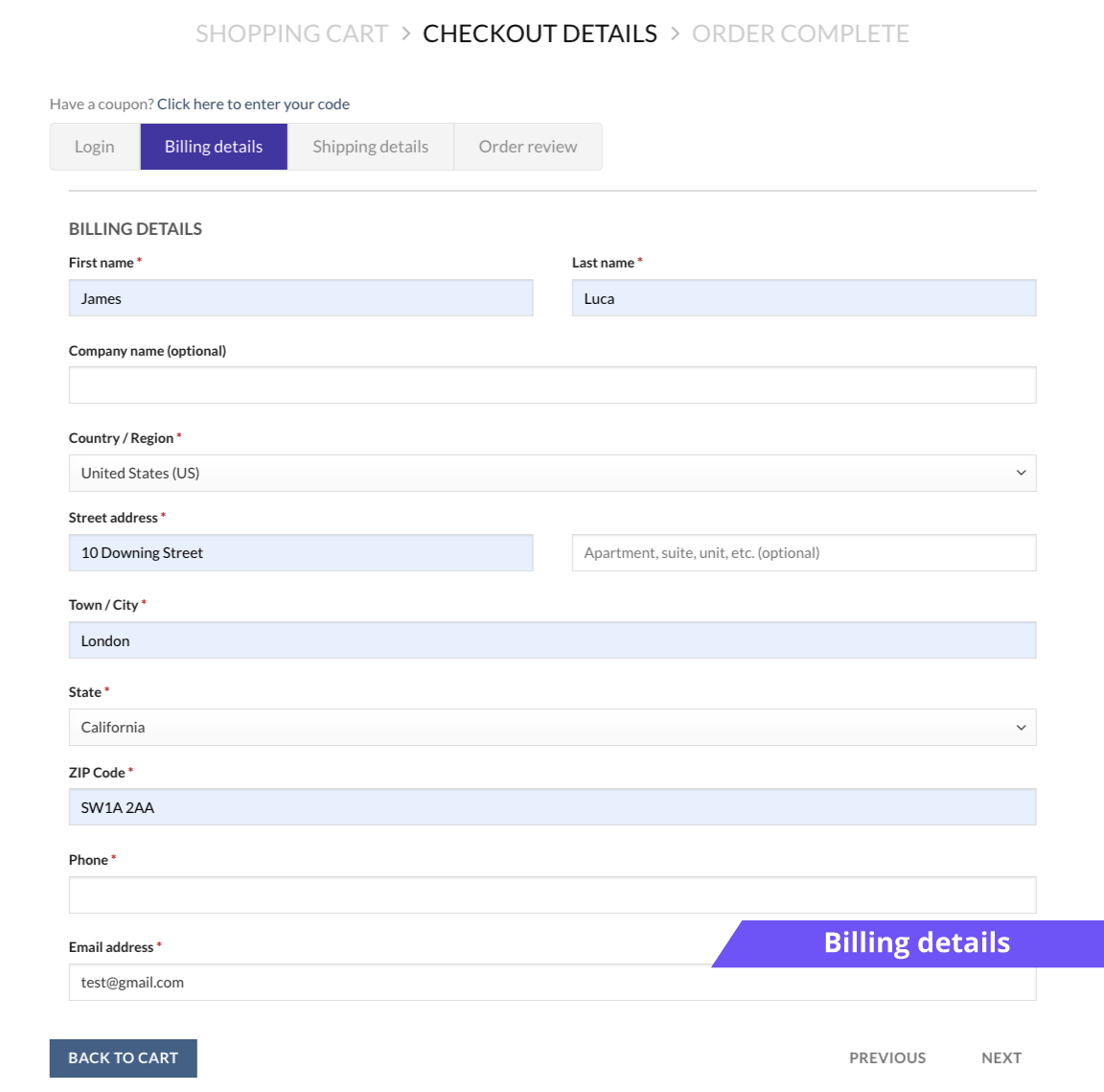
Billing details step.
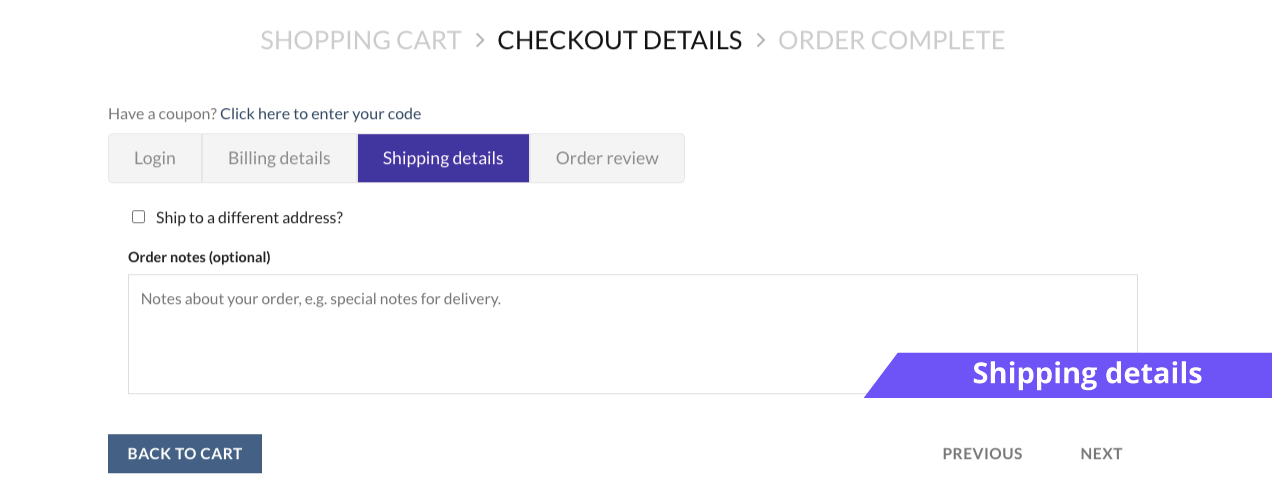
Shipping details step.
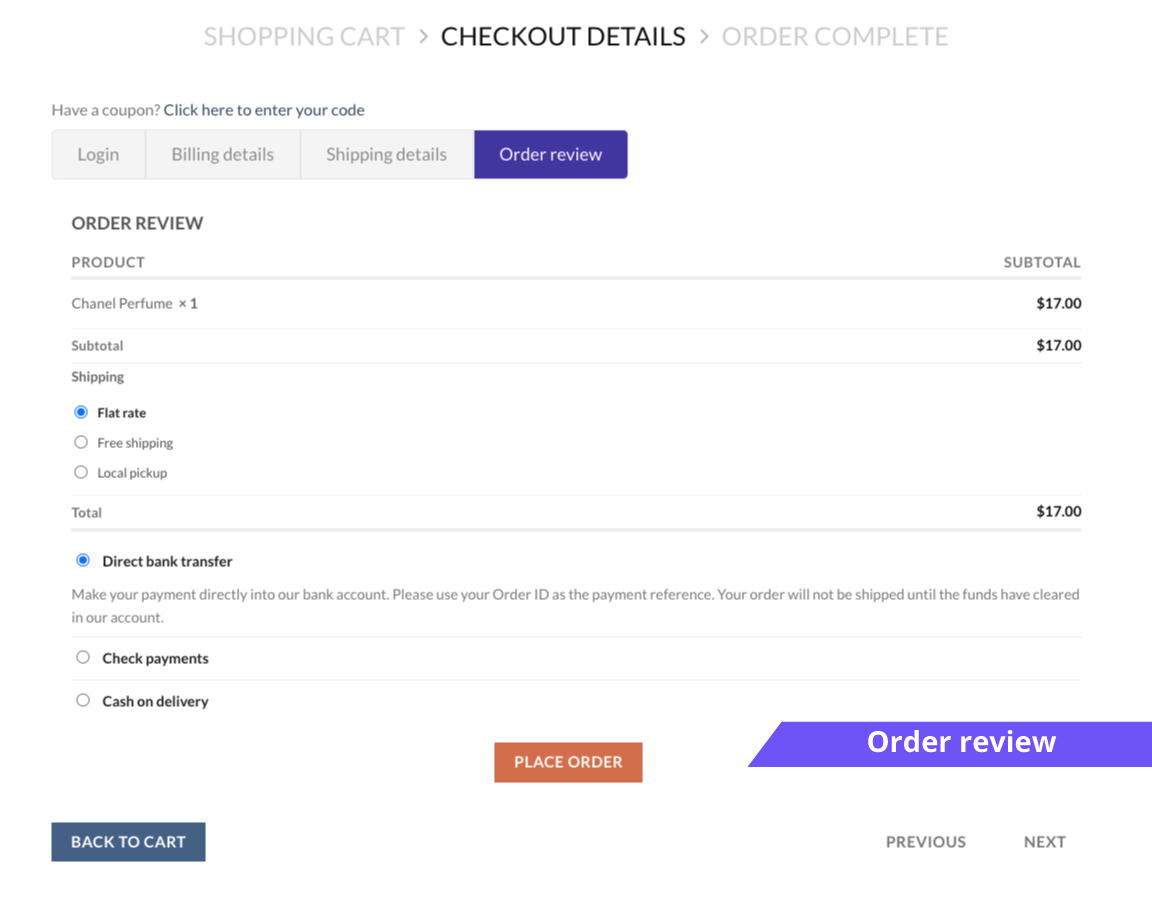
Your order details step.
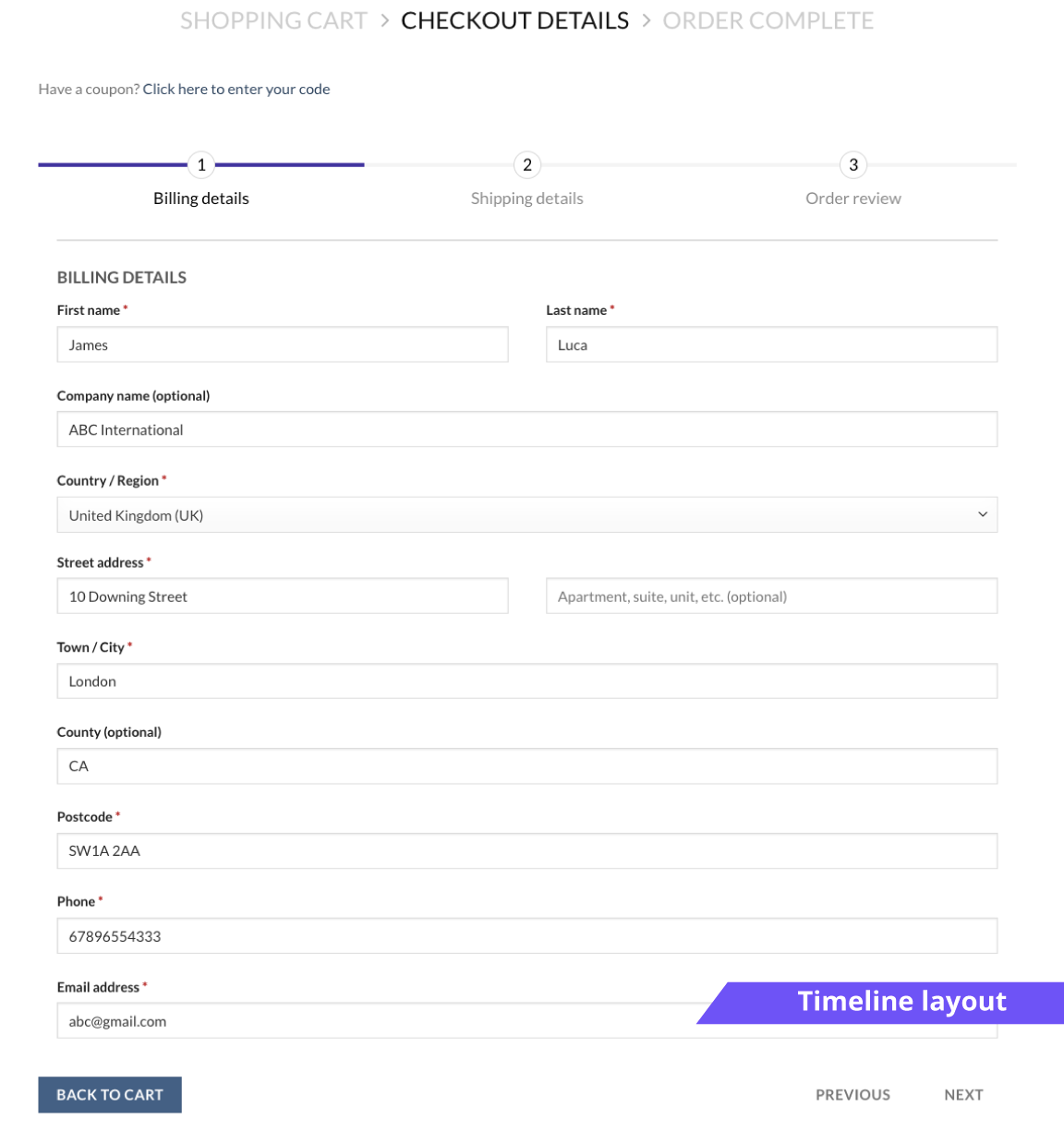
Timeline layout.
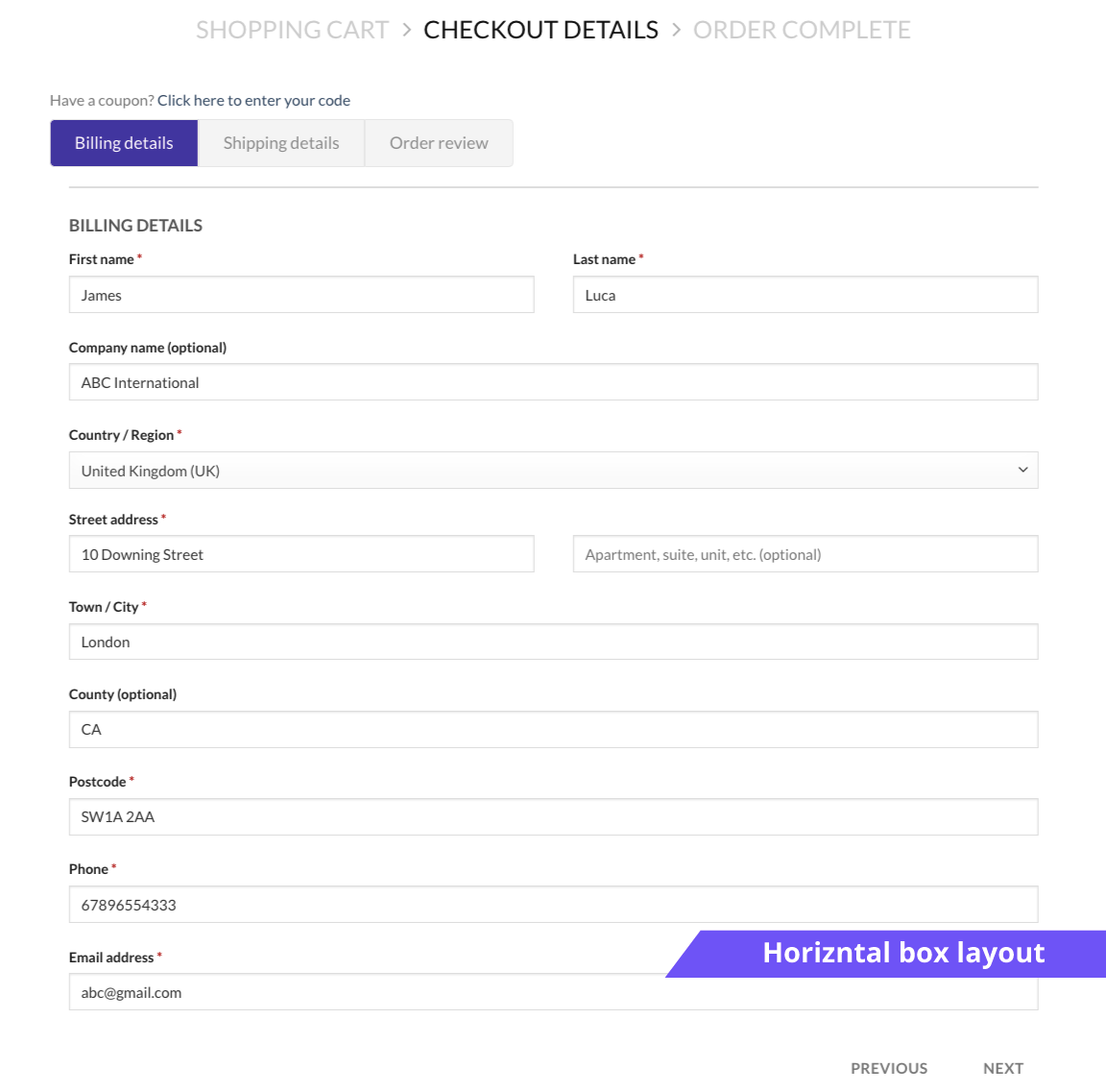
Horizontal Box layout.
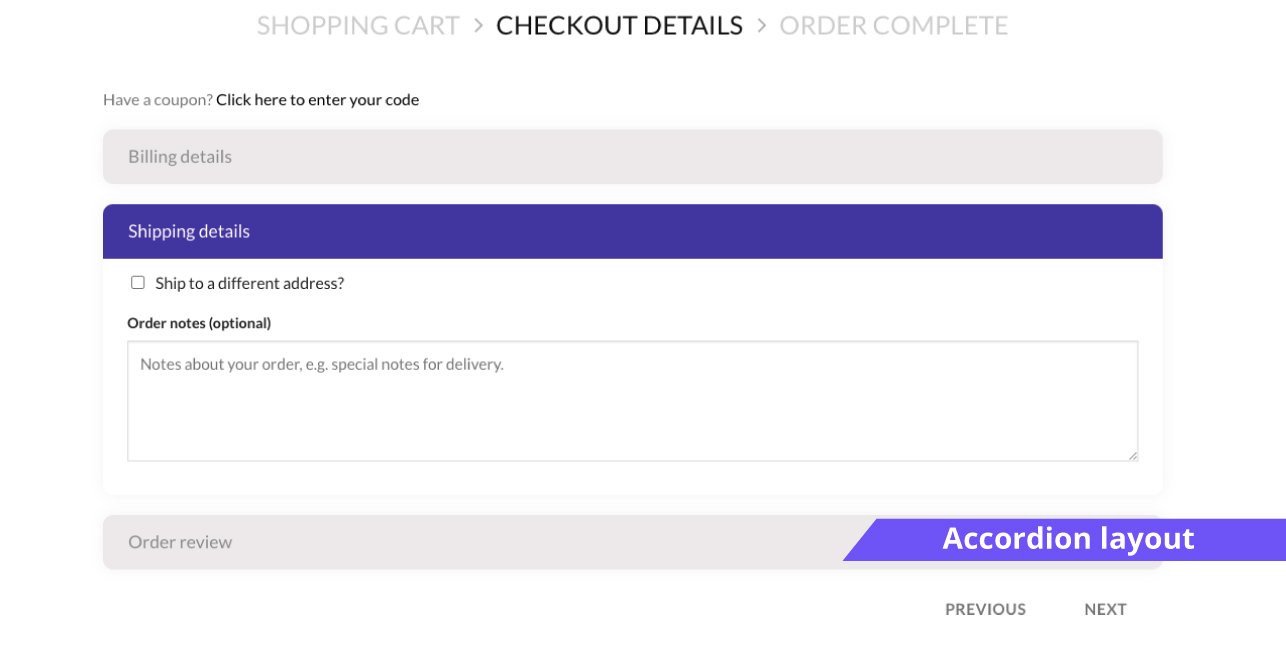
Accordion layout.
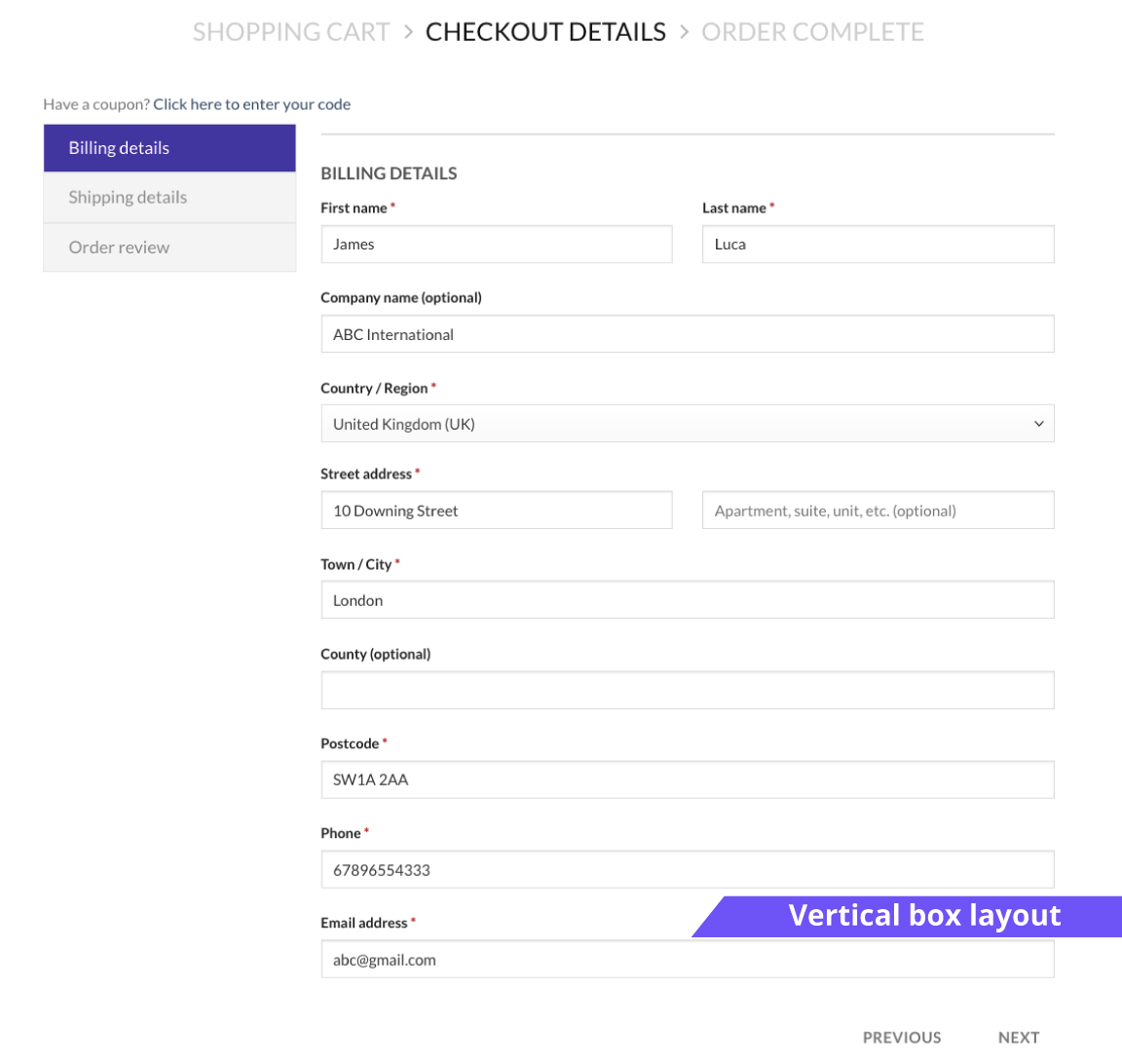
Vertical Box layout.
Faq
The free version does not support the addition of custom steps. However, sections created using checkout form editors are displayed, but just as part of the existing steps. Based on the display position of the section, it will be displayed in one of the steps.
Yes! The Multi Step Checkout Editor for WooCommerce follows coding, WordPress and WooCommerce best practices to make sure that it is compatible with other checkout field editors.
Go to Woocommerce > MultiStep Checkout and enable MultiStep Checkout. You can now make any changes you want. Save changes.
Reviews
Superschnelle Hilfe
By 
Innerhalb einer Stunde kam ein Snippet und das Problem war gelöst. Vielen Dank
Amazing and efficient client support !
By 
I give a 10 stars for the client support which help me those days to correct issues I had and to find solutions for my custom needs.
They absolutely nailed it by providing custom snippets that are really useful!
Great customer support
By 
My client was super-happy with this plugin for making their complex checkout process multi-step. Support for the pro version has been exceptional. Highly recommended.
Customer support, very helpful
By 
Even though the issue was not caused by their plugin but by my blocks, they were incredibly kind and helpful in resolving it. Thank you so much, Akhil! - Anja
Fine customer support
By 
Thank you Rinsha for keeping calm and friendly!
Good customer support
By 
I'm very happy with the help from customer support. They helped me very well with setting up the plugin.
Keep up the good work.
Good Plugin, Amazing Support
By 
Anuram gave me incredible customer support to help me use and improve the experience with Themehigh. As well the plugin was incredibly useful.
Perfect plugin and support
By 
I am really satisfied with this plugin. I was looking for the plugin like this for a long time. There are many options and the team still works on improvements, which is perfect.
If there is any problem, the support is willing and fast. I really appreciate it!
Thank you and keep up your great work! 🙂
Awesome support
By 
The guys at themehigh give you great support! There will be a solution always.
Marco
Awesome!
By 
Awesome and great support!
Changelog
2.3.5
- Added WooCommerce 11.0 compatibility.
- Added WordPress 7.1 compatibility.
2.3.4
- Added WooCommerce 10.8 compatibility.
- Added WordPress 7.0 compatibility.