WebDig.DEV Price From for WooCommerce

WebDig.DEV Price From for WooCommerce
Description
WebDig.DEV Price From for WooCommerce replaces the default price range (for example “€10.00 – €50.00”) shown on variable and grouped products with a single “From” price, based on the cheapest option available.
Features
- Shows “From” followed by the lowest price on variable products whose variations have different prices.
- No confusing crossed-out price inside a “From” price. When all variations share the same price, the standard WooCommerce sale display is kept.
- Shows “From” followed by the lowest price on grouped products.
- Keeps the WooCommerce price suffix (for example “VAT included”) and the store tax display settings.
- Works with standard WooCommerce shop, category and single product price displays.
- Adds the
pricefromCSS class to the “From” label for custom styling. - Compatible with High-Performance Order Storage (HPOS).
- No settings required. Includes a status page under WebDig.DEV > Price From.
- Shared WebDig.DEV dashboard with cards for installed plugins.
- No telemetry, external requests or account required.
Translations
Included: Portuguese (Portugal), Spanish (Spain), French (France), German (Germany) and Italian (Italy). Additional translations are welcome at translate.wordpress.org.
Privacy
This plugin works locally. It does not send data to WebDig.DEV or any external service, load external assets, or create public links.
Compatibility
The price filters use the WooCommerce product API and do not read or write orders. HPOS is supported. Displays that bypass WooCommerce PHP price HTML filters, including some Store API or custom block implementations, may retain their original price format.
Installation
- Upload the plugin files to the
/wp-content/plugins/woo-price-from-in-variable-productsdirectory, or install the plugin through the WordPress plugins screen directly. - Activate the plugin through the ‘Plugins’ screen in WordPress.
- WooCommerce must be installed and active.
- No additional configuration is required. The plugin will automatically adjust price display for variable and grouped products.
Screenshots

Default WooCommerce price display for variable products (before plugin activation).
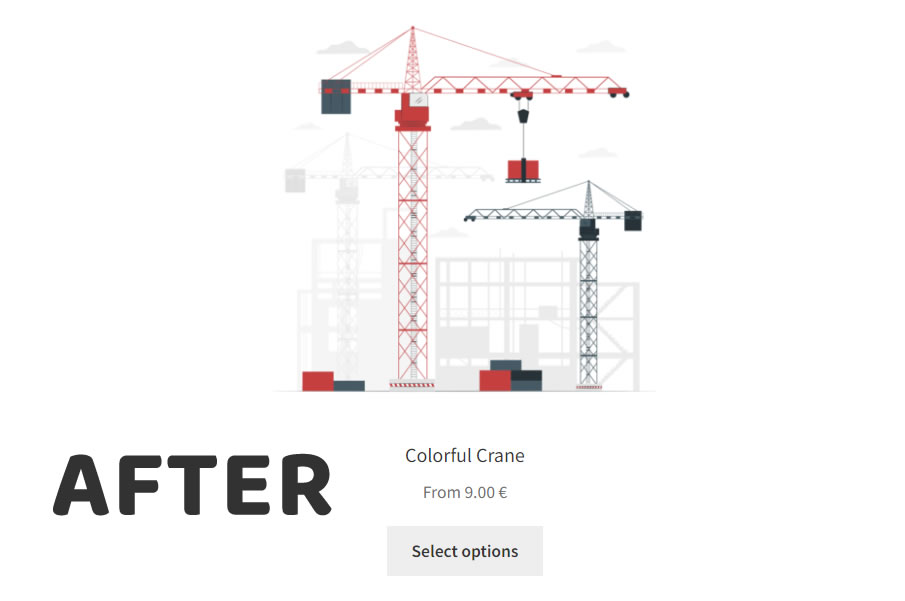
Modified price display after activating the plugin.
Faq
No. The plugin only changes how the price is displayed. Cart, checkout and order totals are not affected.
Use the .pricefrom CSS class, for example: .price .pricefrom { font-size: 0.85em; }.
A “From” price summarises several variations, so a crossed-out regular price would mix two different prices in one line and is read awkwardly by screen readers. The sale badge still shows that the product is on sale, and the crossed-out price appears as soon as the customer selects a variation. If all variations have the same price, the regular WooCommerce sale display is used.
Yes. Add add_filter( 'webdig_dev_price_from_show_sale_in_range', '__return_true' ); to your theme or a code snippets plugin. The regular price is only crossed out when every variation with the lowest price is on sale.
Reviews
Changelog
1.4.1
- Changed: variable products with different prices now show only “From” and the lowest price, without a crossed-out regular price.
- Changed: when all variations have the same price, the default WooCommerce price display (including sale formatting) is kept.
- Added:
webdig_dev_price_from_show_sale_in_rangefilter to show the crossed-out regular price next to the “From” price. - Fixed: bundled translations in the
languagesfolder were not loaded (language packs from translate.wordpress.org still take precedence). - Fixed: the crossed-out price could appear or not depending on variation order when several variations shared the lowest price.
- Removed: unused fallback price calculation for grouped products.
- Changed: Portuguese (Portugal) label is now “A partir de”.
- Changed: the Plugins screen link is now labelled “Status”, as the page has no settings.
- Changed: status badges use green for active, grey for inactive and red only when WooCommerce is missing.
1.4.0
- Added the shared WebDig.DEV menu and installed-plugin dashboard.
- Added Price From status page and Settings link on the Plugins screen.
- Standardized author identity and PHP prefixes.
- Changed: PHP functions renamed from
webdig_wpf_towebdig_dev_price_from_. If you usedremove_filter()with the old names (for examplewebdig_wpf_variable_price_html), update them to the new names (for examplewebdig_dev_price_from_variable_price_html). - Included complete Portuguese, Spanish, French, German and Italian translations.
- Preserved automatic price display, HPOS support and existing plugin identity.
- Updated compatibility target: WordPress 7.1.3 and WooCommerce 11.1.2.
1.3.0
- Tested up to WordPress 7.1 and WooCommerce 11.1.
- Fixed: the crossed-out sale price could belong to a different variation than the price shown.
- Fixed: possible fatal error on grouped products without priced children (PHP 8).
- Fixed: free (0) child products were ignored on grouped products.
- Fixed: the WooCommerce price suffix (for example “VAT included”) was removed.
- Fixed: bundled translations were not loaded because of an invalid language path.
- Fixed: translated strings showed backslashes in the HTML output.
- Removed: debug messages written to the PHP error log on every page load.
- Removed: call to the deprecated
woocommerce_variable_sale_price_htmlfilter. - Changed: text domain set to
woo-price-from-in-variable-productsto match the plugin slug (translate.wordpress.org). - Changed: functions renamed with a unique
webdig_wpf_prefix to avoid conflicts with WooCommerce. - Changed: HTML removed from translatable strings.
- Added:
Requires Plugins: woocommerceheader. - Added: Portuguese (Portugal) translation; updated Spanish, French and German translations.
1.2.5
- Fixed a critical issue when verifying HPOS compatibility.
- Replaced
is_enabledmethod withwc_get_featureto check HPOS activation. - Adjusted debug logs to prevent unnecessary errors.
- Improved compatibility checks for modern WooCommerce environments.
- Tested up to WooCommerce 9.4.3 and WordPress 6.7.1.
1.2.4
- Corrected price display issue where HTML tags were rendered as plain text.
- Replaced
esc_html__with__for frontend price formatting. - Improved handling of grouped product prices.
1.2.3
- Fixed a PHP notice related to compression (
ob_end_flush). - Added configuration option to disable output compression in WordPress.
- Enhanced debugging features for compatibility testing.
1.2.2
- Improved HPOS compatibility with
FeaturesUtildeclaration. - Adjusted the code to avoid direct interactions with WooCommerce internal classes.
- Updated POT file to include new strings for compatibility logs.
1.2.1
- Added robust error handling for compatibility issues.
- Improved debugging messages for HPOS activation.
- Minor optimizations to code structure for better readability.
1.2.0
- Added compatibility with WooCommerce High-Performance Order Storage (HPOS) and Remote Logging.
- Refactored code to avoid direct interactions with
wp_postmetaandwp_posts. - Improved price display logic for grouped and variable products.
- Tested up to WordPress 6.7.1 and WooCommerce 9.4.3.
- Updated minimum PHP requirement to 7.4.
- Optimized translations and text domain handling.
1.1.0
- Updated plugin name and branding to “WebDig.DEV WooCommerce – Price From in Variable Products”.
- Improved price formatting logic for variable products.
- Added compatibility with WordPress 6.7.1 and WooCommerce 9.4.3.
- Updated minimum PHP requirement to 7.4.
- Enhanced translations and text domain loading.
- Fixed minor issues in grouped product price calculations.
1.0.2
- Fixed minor bugs.
- Tested up to WordPress 6.3.1 and WooCommerce 8.1.1.
1.0.1
- Tested up to WordPress 6.3.1 and WooCommerce 8.1.1.
1.0.0
- Initial release.
- Tested up to WordPress 5.2 and WooCommerce 3.6.1.