Export Orders for WooCommerce – CSV, Excel, XML, JSON & PDF Export

Export Orders for WooCommerce – CSV, Excel, XML, JSON & PDF Export
Description
Export Orders for WooCommerce is a WooCommerce order export plugin for store owners, administrators, and managers who need quick access to order reports, customer details, billing and shipping data, and product line item information.
Use this WooCommerce export orders tool to export orders to CSV, Excel (XLSX), PDF, XML, or JSON. You can filter WooCommerce orders by status and date range, choose the exact export fields, and drag columns into the same order you want in the final export file.
Whether you need a WooCommerce order CSV export for accounting, an Excel order report for analysis, a PDF order report for sharing, or a JSON/XML export for integrations, this plugin keeps the process simple inside the WordPress admin.
Key Features:
- Export WooCommerce orders to CSV for spreadsheets, accounting, reporting, and order archives.
- Export WooCommerce orders to Excel (XLSX) with selected order columns and customer details.
- Export WooCommerce orders to PDF for printable order reports and shareable summaries.
- Export WooCommerce orders to XML or JSON for structured data workflows and integrations.
- Filter order exports by order status and order date range.
- Export customer details, billing details, shipping details, order totals, payment details, coupon codes, and product line items.
- Select or deselect individual WooCommerce export columns.
- Drag export columns into a custom sequence so the exported file matches the admin-selected column order.
- Export product names, SKUs, quantities, and line totals from WooCommerce orders.
- Export button appears beside the WooCommerce Add order button on the orders screen.
- Review selected filters, format, and columns before starting the export.
- Batch export processing with progress feedback for smoother order exports.
- Compatible with WooCommerce HPOS / custom order tables.
- Bundled PDF support includes a reduced font set with Japanese/CJK fallback coverage.
Common Use Cases:
- Create WooCommerce order reports for accounting or bookkeeping.
- Export WooCommerce orders by date range for monthly, weekly, or custom reports.
- Export completed, processing, pending, refunded, or other WooCommerce order statuses.
- Export customer email, phone, billing address, and shipping address details.
- Export WooCommerce order items, product SKUs, quantities, and product totals.
- Generate CSV or Excel files for analysis in spreadsheet software.
- Generate PDF order reports for internal review or sharing.
- Use XML or JSON order exports for structured data handling.
Included export fields:
- Order information: Order ID, status, date, totals, discount, tax, shipping total, payment method, transaction ID, customer note, and coupon codes.
- Customer and billing information: Customer ID, email, phone, billing name, company, address, city, state, postcode, and country.
- Shipping information: Shipping name, company, address, city, state, postcode, country, and shipping method.
- Product information: Product names, SKUs, quantities, and line totals.
For support, suggestions, or customizations, reach out at info@imaginate-solutions.com.
Some of the other Pro Plugins
-
File Uploads Addon for WooCommerce – Convert your WooCommerce store into an online Print on Demand (POD) store by allowing users to upload files when adding products to cart.
-
Custom Shipping Methods for WooCommerce – Create custom shipping methods for your WooCommerce store and manage dynamic shipping with ease.
-
Custom Payment Gateways for WooCommerce – Create custom payment gateways for your WooCommerce store to add more payment options for the user to choose from.
-
Payment Gateways by User Roles for WooCommerce – Allow payment gateways to be available or not available for only particular user roles for your WooCommerce store.
-
Variations Radio Buttons for WooCommerce – Convert your WooCommerce variations dropdown to a radio button selection.
Installation
Automatic Installation
Automatic installation is the easiest option as WordPress handles the file transfers itself and you do not need to leave your web browser. To do an automatic install of Export Orders for WooCommerce, log in to your WordPress dashboard, navigate to the Plugins menu, and click Add New.
In the search field type “Export Orders for WooCommerce” and click Search Plugins. Once you have found the plugin, click Install Now and then activate it.
Manual installation
The manual installation method involves downloading the plugin and uploading it to your webserver via your preferred FTP application. The WordPress codex contains instructions on how to do this here.
Screenshots
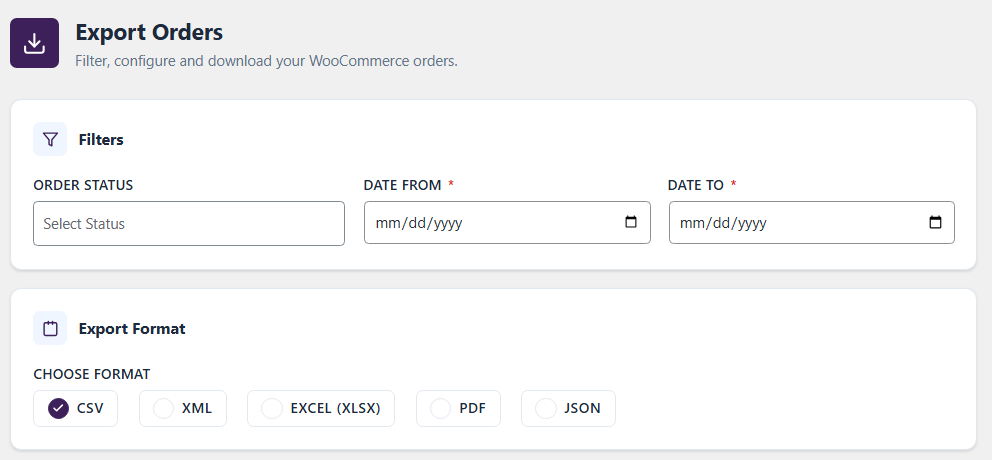
Export options with date range selection.
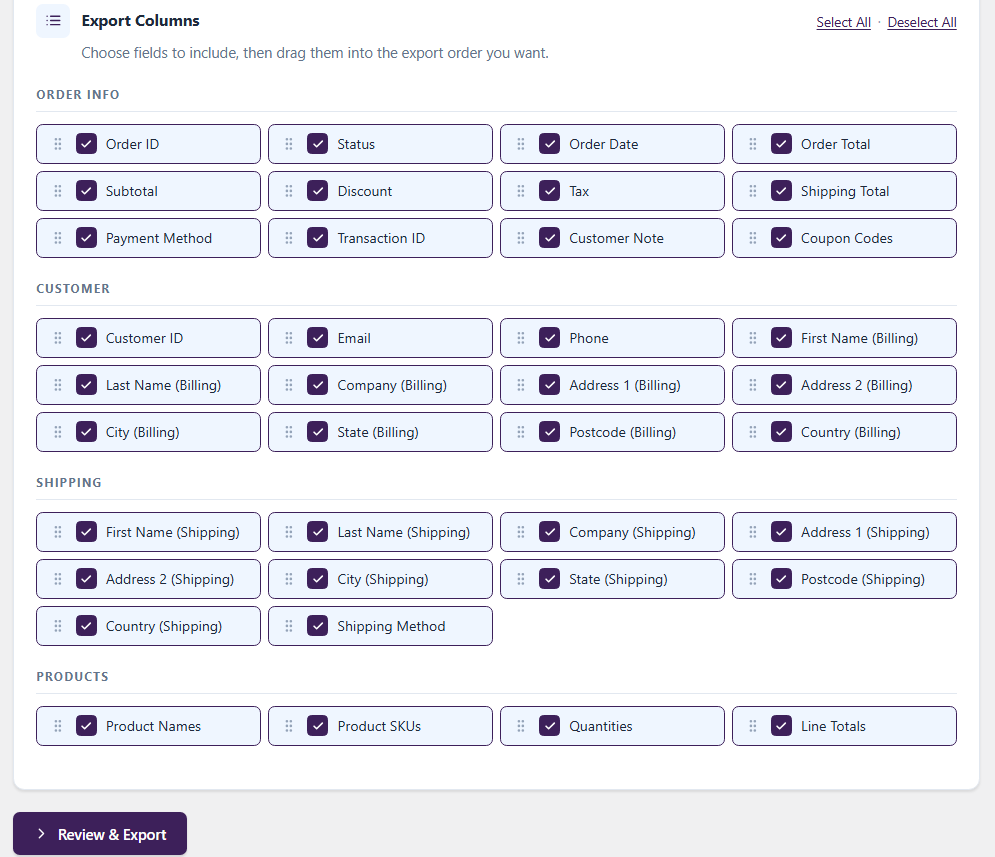
Export settings modal with status/date filters, format selection, and draggable export columns.
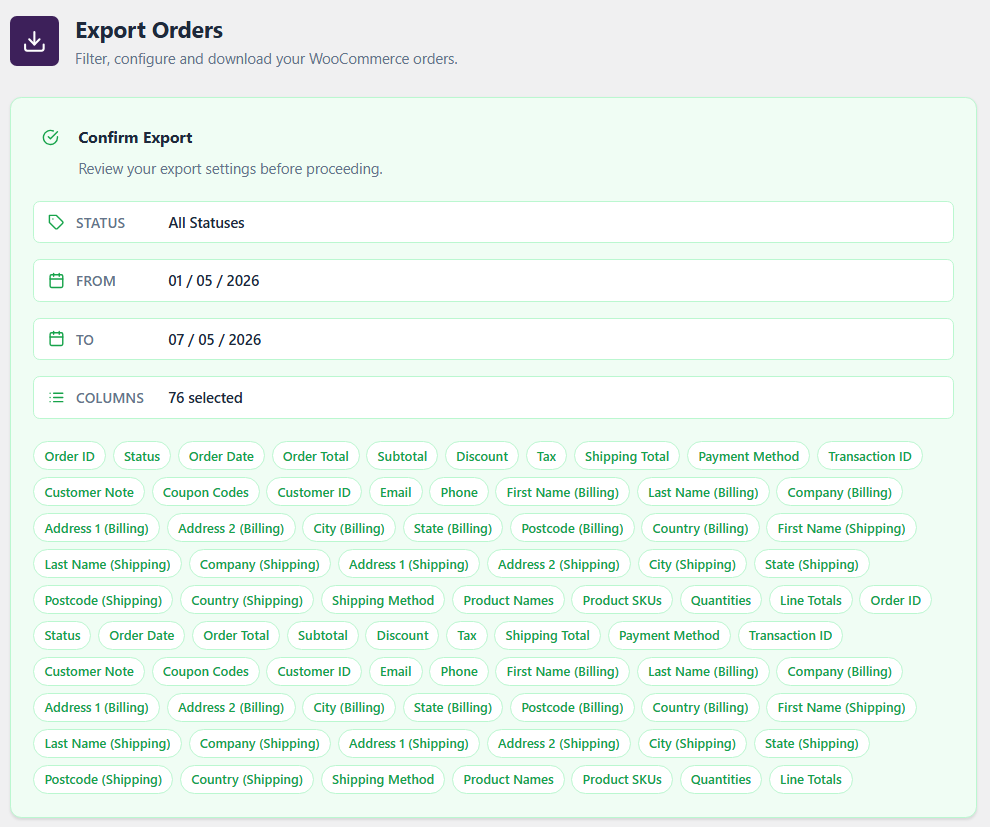
Confirmation screen showing selected filters and selected columns before export.

Export Orders button beside the WooCommerce Add order button.
Faq
Yes. You can export WooCommerce orders to CSV with selected order, customer, billing, shipping, and product columns.
Yes. The plugin supports Excel exports in XLSX format.
Yes. The plugin supports PDF order exports using the included mPDF library and a reduced DejaVu Sans Condensed font set.
Yes. You can export WooCommerce order data in XML or JSON format for structured data workflows.
Yes. You can export customer ID, customer email, customer phone, billing name, billing address, shipping name, shipping address, and related order details.
Yes. Product names, product SKUs, quantities, and line totals are available in the Products column group.
Yes. You can filter exports by WooCommerce order status and by a date-from/date-to range.
Yes. In the Export Columns section, drag the selected fields into the sequence you want. The exported file uses the same column sequence.
Yes. The plugin declares compatibility with WooCommerce HPOS / custom order tables.
No, this plugin requires WooCommerce to be installed and active.
Yes. The plugin includes DejaVu Sans Condensed plus Sun-ExtA/Sun-ExtB fallback fonts for Japanese/CJK PDF output while avoiding the full default mPDF font bundle.
Reviews
Reliable and Well-Built WooCommerce Export Solution
By 
As a WordPress developer, I found this plugin very reliable and easy to integrate into existing WooCommerce workflows. The filtering and export functionality are well designed, and the plugin performs smoothly even with larger order datasets. The plugin support and overall usability are excellent. Definitely recommended for store owners and developers alike.
Excellent WooCommerce Order Export Plugin
By 
We have been using WooCommerce Export Orders for a while and it has become an essential tool for our store. We regularly use it to export WooCommerce orders to CSV and Excel for reporting, accounting, and customer management purposes.
The recent updates have significantly improved the user interface and overall export workflow. The export process is now much easier, faster, and more intuitive compared to previous versions. The redesigned interface makes it simple to select the required fields and generate exports in just a few clicks.
We especially appreciate the ability to export customer emails, phone numbers, and detailed order information without any hassle. The plugin is lightweight, reliable, and does exactly what it promises.
If you are looking for a WooCommerce order export plugin that can export orders to CSV or Excel quickly and efficiently, this is an excellent solution. Highly recommended!
BEWARE: Loads all orders!
By 
Changelog
2.1.0
- Fixed an issue where batches would not export the data correctly.
- File handling after download improved.
- Compatibility with WooCommerce 11+
2.0.0
- Added CSV, XLSX, PDF, XML, and JSON export format options.
- Added selectable export columns grouped by Order Info, Customer, Shipping, and Products.
- Added draggable export column ordering so exported files match the admin-selected sequence.
- Moved the Export Orders button beside the WooCommerce Add order button.
- Added batch export processing with progress feedback.
- Added WooCommerce HPOS / custom order table compatibility.
- Optimized bundled PDF fonts to reduce plugin package size while keeping PDF export support.
- Updated admin UI styling and export confirmation flow.
1.2.0
- Performance improvements.
- Compatibility with WooCommerce HPOS.
- Compatibility with latest WooCommerce versions.
- Compatibility with PHP 8.2.
1.1.0
- Added Customer Email and Phone to be exported with the other information.
- Performance improvement in getting the order details. Now the plugin uses wc_get_orders instead of custom queries.
1.0
- Bug fixes related to new WooCommerce functions.
- UI changed to new semantic look.
- Removed the usage of flash for exporting data.
0.2
- Minor bug fixes.
0.1
- Initial launch version.