WP All Export – Export CSV, Excel, XML for ACF

WP All Export – Export CSV, Excel, XML for ACF
Description
Quickly export Advanced Custom Fields (ACF) data to CSV, Excel, or XML files with the ACF Export Add-On for WP All Export.
Tested for compatibility with Secure Custom Fields (SCF).
Use our intuitive Drag & Drop interface to select, rearrange, and customize your ACF field export columns with ease.
Filter your ACF export to select only the specific custom fields and post types you want to extract.
Run your ACF export on-demand or schedule it to run automatically. ACF data export to Google Sheets? No worries! Using Zapier, you can even integrate your ACF data export with 1000s of external applications.
Migrate your ACF custom field data from one WordPress site to another. Export your ACF data to a spreadsheet, bulk edit them, and then import them back into WordPress using WP All Import.
Export data of all ACF field types, including repeater fields, flexible content, and complex field groups added to any post type.
Need advanced data manipulation? Use our embedded functions to apply programming logic to your ACF export without requiring advanced coding skills.
Include ACF data from any post type, page, user, or custom entity that supports Advanced Custom Fields.
Click here to try WP All Export right now.
Easily Customize Your Advanced Custom Fields (ACF) Export Columns
Exporting ACF data shouldn’t be a complex, time-consuming process. With our ACF Export Add-On, you can export your custom field data exactly how you need it, without endless manual editing.
Use our intuitive Drag & Drop interface to select, rearrange, and customize your ACF export columns. Rename fields, combine them, and create entirely new custom fields using embedded functions that give you programming-like power without requiring actual coding skills.
Whether you’re working with simple text fields or complex repeater and flexible content fields, our plugin provides unparalleled flexibility in exporting your ACF data.
Powerful Filtering for ACF Data Exports
Need to export only specific ACF fields or data meeting certain conditions? Our plugin offers unprecedented filtering capabilities.
Filter your ACF exports using any combination of fields, including those added by 3rd-party plugins. Our filtering tool goes beyond simple AND/OR conditions, and allows you to create nested, complex filter conditions like “Condition-A OR (Condition-B AND Condition-C)”.
Want to export ACF data with granular precision? Need to filter based on field values, dates, or complex conditions? Our plugin makes it possible with just a few clicks.
Export ACF Data to CSV, Excel, and XML
Choose your preferred export format with complete freedom. Support for CSV, Excel (.xls and .xlsx), and fully customizable XML exports means you’re never limited by file format constraints.
You can export ACF data to CSV files for universal spreadsheet compatibility and Excel formats for advanced formatting.
Want to export ACF data to XML? You’re in for a treat. You can create simple XML feeds in seconds or create a fully customizable ACF XML export for complex data integrations.
Bulk Edit Your ACF Custom Field Data
Large-scale changes to your ACF data no longer require tedious manual updates. Our plugin transforms this challenging task into a simple, efficient process.
Export your ACF data, edit it in your favorite spreadsheet application using powerful features like search-and-replace, and then seamlessly import changes back into WordPress using WP All Import.
Our plugins’ tight integration ensures a smooth, error-free editing process.
Schedule Your ACF Data Exports
No one enjoys performing the same manual tasks repeatedly, especially when it comes to managing custom field data. If you need to export your ACF data on a regular basis—whether daily, weekly, or monthly—our plugin provides a seamless solution to automate this process.
You can configure your exports using traditional server cron jobs or use our convenient automatic scheduling service directly within the plugin interface.
Set up your export once, and let the plugin handle the rest, ensuring you always have up-to-date custom field data.
Integrate ACF Exports with External Applications
Our plugin integrates seamlessly with Zapier to send your ACF exports to thousands of external applications.
Want to export ACF data to Google Sheets? Want to upload data to Dropbox, Google Drive, or other file hosting services? No problem. Want to attach it to an email? Easy.
Advanced Data Manipulation Without Complex Programming
Need more than basic export capabilities? Our embedded PHP function support lets you apply conditional logic to your exports, transform and modify data on-the-fly, create custom export rules, and perform complex data manipulations – all without requiring advanced programming skills.
Free Version of ACF Export Add-On
With the free version of ACF Export Add-On, you can:
-
Export ACF data to CSV or simple XML file formats
-
Export basic ACF field data such as text, numbers, email address, URL, password and more. Support for all other ACF fields in the Pro version of the ACF Export add-on.
-
Select and customize export fields
-
Export data from any post type
-
Export ACF data, bulk edit it in a spreadsheet, then import those changes back into WordPress with WP All Import
Premium Version of WP All Export and the ACF Export Add-On
With the premium version of ACF Export Add-On, you get all the free features plus:
-
Export ACF data to Excel (.XLS and .XLSX)
-
Export ACF data to XML using advanced custom feed creation
-
Export all ACF field data, including Flexible Content, Relationships, Link, Dates, Images, Galleries, Google Maps, and more.
-
Complex filtering options
-
Filter your ACF exports
-
Export ACF data automatically on a schedule
-
Integrate your ACF exports with external applications using Zapier
-
Pass your export data through PHP functions
-
Get guaranteed technical support via e-mail (see below)
Premium Support
Upgrade to the Pro edition of WP All Export for premium support.
You can submit the support form on our website or email us at support@wpallimport.com. While we try to assist users of our free version, please note that support is not guaranteed and will depend on our capacity. For premium support, purchase WP All Export Pro.
Related Plugins
Export any WordPress data to XML/CSV
Import any XML or CSV File to WordPress
Import Products from any XML or CSV to WooCommerce
Export Products to CSV/XML for WooCommerce
Custom Product Tabs Add-on
Export Orders to CSV/XML for WooCommerce
Installation
Either: –
- Upload the plugin from the Plugins page in WordPress
- Unzip wp-all-export-acf-export-add-on.zip and upload the contents to /wp-content/plugins/, and then activate the plugin from the Plugins page in WordPress
Screenshots
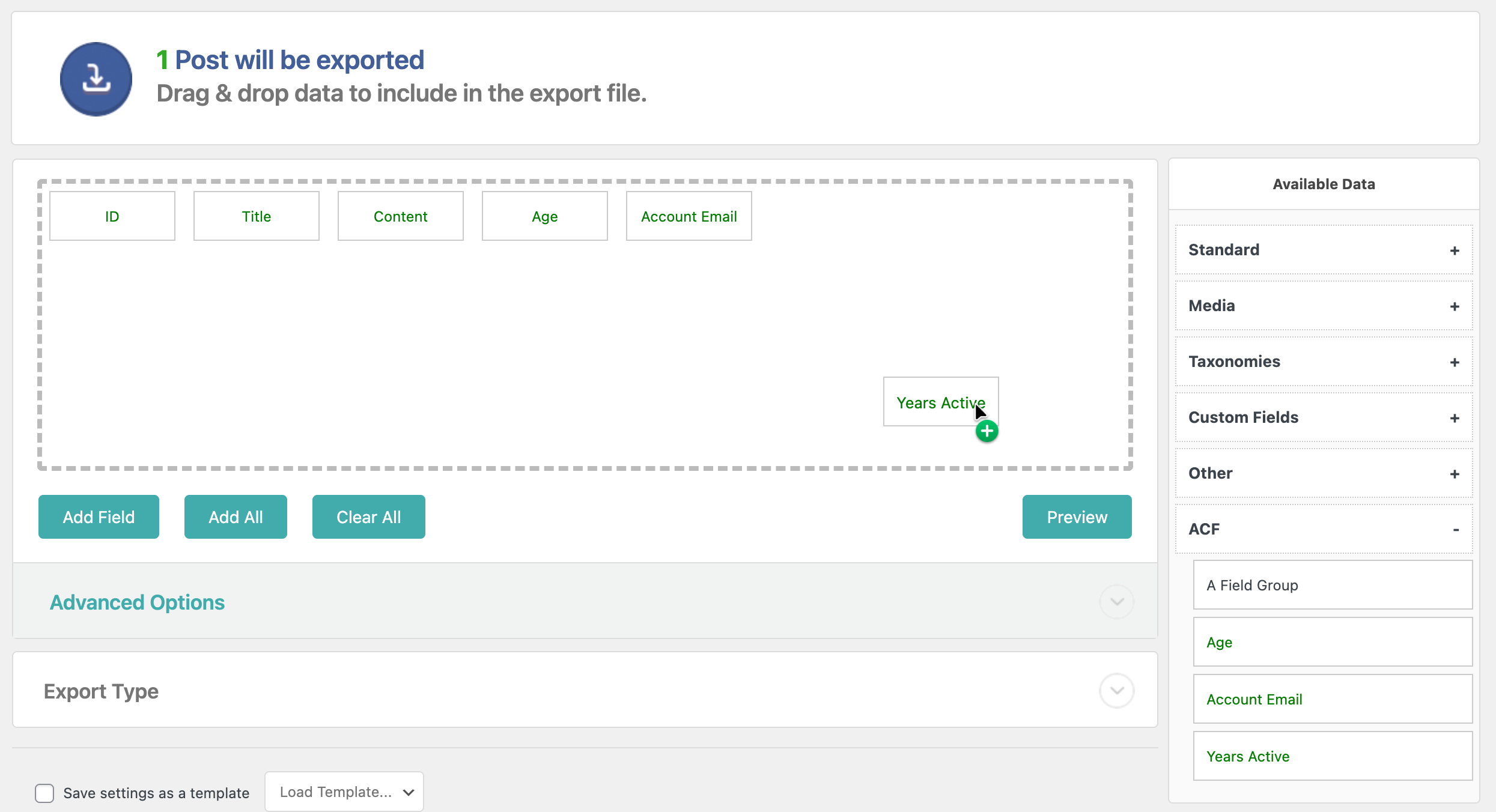
New ACF Export Add-On Free
Faq
To export Advanced Custom Fields (ACF) data, you must have the free ACF Export Add-On active on your site, along with WP All Export. If you’re using the ACF Export Pro Add-On, you must have the free ACF Export Add-On and WP All Export Pro active along with it.
- Go to All Export › New Export and select the post type with the ACF Fields.
- Use our Drag & Drop interface to select the ACF fields that you want to export.
- Select the Export Type as CSV file.
- Generate the export file and download it.
- Go to All Export › New Export and select the post type with the ACF Fields.
- Use our Drag & Drop interface to select the ACF fields that you want to export.
- Select the Export Type as Excel file.
- Generate the export file and download it.
- Go to All Export › New Export and select the post type with the ACF Fields.
- Use our Drag & Drop interface to select the ACF fields that you want to export.
- Change the Export Type to Feed > Simple XML Feed.
- Generate the export file and download it.
- Go to All Export › New Export and select the post type with the ACF Fields.
- Use our Drag & Drop interface to select your ACF export columns.
- Run the export.
- Connect to Google Sheets using Zapier.
- Export the ACF data that you want to migrate using WP All Export.
- Download the Bundle file, which contains import instructions.
- On the destination site, upload the bundle file using WP All Import.
- Finish the import to complete the migration.
- Verify that the ACF data was properly migrated.
- Export the ACF fields data that you want to edit.
- Use a spreadsheet app to modify the contents of the export file.
- When you’ve completed your edits, use the Import with WP All Import option to import the file back into WordPress.
- Once the import is finished, verify that your edits were correctly applied.
You can schedule your exports of ACF fields data directly through our interface by using our Automatic Scheduling Service. Alternatively, you can create cron jobs manually on your server. Either approach will work, though our scheduling service is definitely more convenient.
Reviews
Changelog
1.0.0
- Initial release on WordPress.org.