WP aMember Dashboard Widget

WP aMember Dashboard Widget
Description
Adds aMember account info in your WP/WPMU/WPMS dashboard. Users will be able to have some of their payment account info in their dashboard.
Features:
- Full XHTML compliancy
- Listing of members’ subscribed products (hyperlinked)
Future plans:
- More account info: registration date, expire date, next recurring payment date.
Installation
Installation:
- If you are using WPMU/WPMS, activate the plugin sitewide.
- If you are using the single user WordPress, then you would
upload the whole folder into your plugins directory: wp-content/plugins. - Visit Settings > aMember Dashboard to enter the dashboard title and url to where aMember is installed. The dashboard will not appear until you’ve filled out both settings.
Screenshots
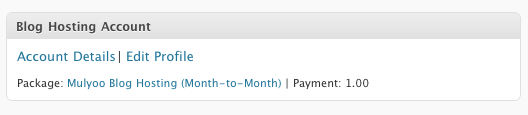
This is the way the dashboard widget looks.

Option to enter url where aMember is installed.
Reviews
Changelog
0.2.2 (2011-07-28)
- Update a function that was mis-named
- Added better multisite support
0.2.1 (2011-07-27)
- Forgot to include the .po file
0.2 (2011-07-27)
- Replaced deprecated code
- Added options page for widget title and url of aMember install
- Added .po file for internationalization
0.1 (2010-05-19)
- Initial Release