Category Dropdown by GCS Design

Category Dropdown by GCS Design
Description
WP Category Dropdown plugin displays parent and child categories in a dropdown. You can select the parent category and display a dropdown for the child categories of the selected parent. If the selected parent category does not have a child category, you will be automatically directed to the category page.
You can use the shortcode or the widget to display the dropdown categories.
You can learn more at gcsdesign.com/wp_category_dropdown
Installation
Using The WordPress Dashboard
- Navigate to the \’Add New\’ in the plugins dashboard
- Search for \’wp category dropdown\’
- Click \’Install Now\’
- Activate the plugin on the Plugin dashboard
Uploading in WordPress Dashboard
- Navigate to the \’Add New\’ in the plugins dashboard
- Navigate to the \’Upload\’ area
- Select
wp-category-dropdown.zipfrom your computer - Click \’Install Now\’
- Activate the plugin in the Plugin dashboard
Using FTP
- Download
wp-category-dropdown.zip - Extract the
wp-category-dropdowndirectory to your computer - Upload the
wp-category-dropdowndirectory to the/wp-content/plugins/directory - Activate the plugin in the Plugin dashboard
Screenshots

The dropdown widget
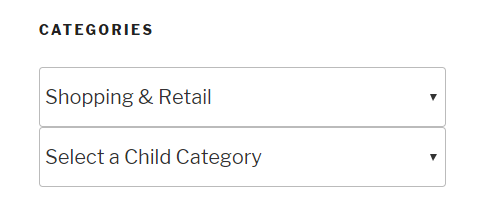
Dropdown widget display on the front end
Faq
Yes! It works with custom taxonomies.
Reviews
Works With BeaverBuilder
By 
WordPress 6.22
BeaverBuilder Pro 2.7.0.5
I've spent a considerable amount of time trying out different plugins that will give me a category dropdown with the option to choose the categories for display, that would also work with BeaverBuilder / Beaver Themer. This one does the trick! It's better than BB's own Categories Widget, and very stable. Great work!
This plug-in is a life saver.
By 
great search plugin
By 
Changelog
1.9
- FIxed the Cross-Site Scripting issue caused by the align parameter in the block
- Changed the name of the plugin to remove the ‘WP’ from the name
1.8
- Fixed the issue of default text going to 404 page
1.7
- Updated to work with WP 6.0
1.6
- Multiple dropdowns can be added on the same page
- The hide empty categories and the show count options now work for both parent and child category dropdowns
1.5
- Added align support to the category dropdown block
1.4
- Categories can be excluded from the dropdown
1.3
- Added a block to display the parent and child category dropdowns
1.2
- The plugin works with the custom category base in permalinks settings
1.1
- Fixed the issue of sub categories not showing up properly
1.0
- First release