WP Different Navigation on Each Page And Post
WP Different Navigation on Each Page And Post
Description
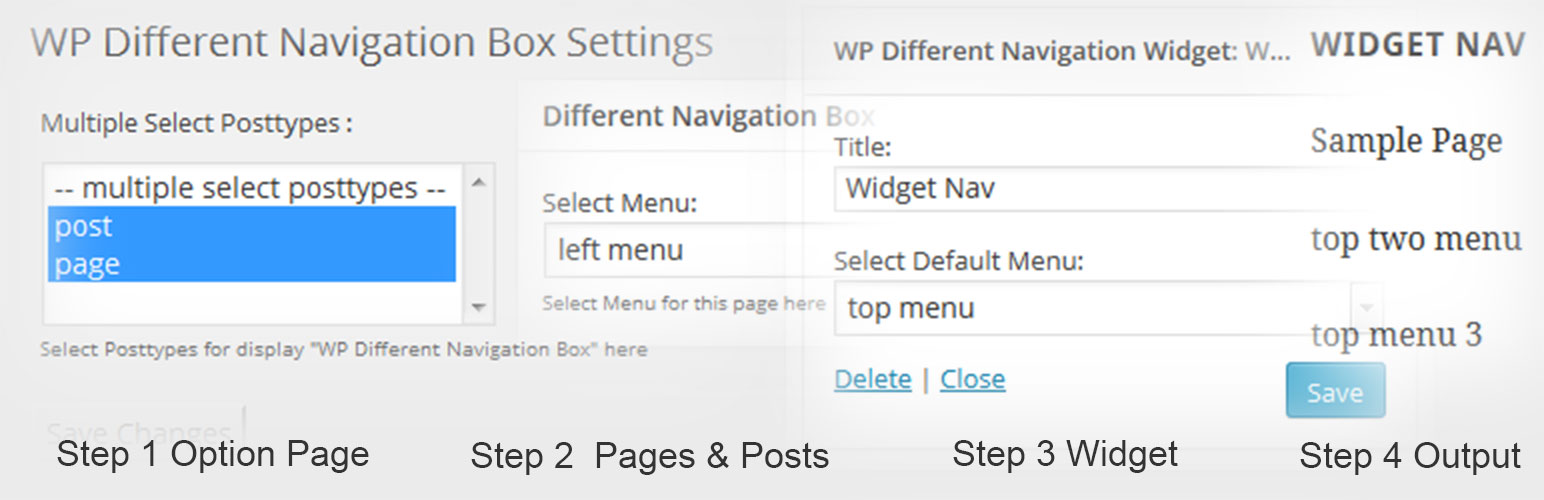
This plugin are display different-different navigation on each page and post.You Can easily setup different navigation or menu on pages and single posts. please follow these steps:
Step 1: First click on “WP Different Navigation Box Settings” sub menu in settings menu in wordpress admin section. Then select Posttypes. You want to display “Different Navigation Box” MetaBox on Posttypes.
Step 2: Select Menu in “Different Navigation Box” Metabox for Current Page/Post Display Menu.
Step 3: “WP Different Navigation Widget” put this widget you want display menu in widget area. and enter widget title and select default menu and click on save button.
Easy to use Different Menu on the page or post by shortcode “[wpdnepp_menu]” Or Use This Code in Page Template <?php echo do_shortcode('[wpdnepp_menu]'); ?>.
Installation
Automatic installation through WordPress:
- Log-in to your WordPress site.
- Hover over Plugins and click Add New.
- Under Search type in wp-different-navigation-on-each-page-and-post, then click Search Plugins.
- In the results page, click Install Now.
- Once installed, click Activate Plugin. You’re done!
- If you want to show different Menu on the page or post than you can use this shortcode “[wpdnepp_menu]” for display the Different Menu.
- Or Use This Code in Page Template
<?php echo do_shortcode('[wpdnepp_menu]'); ?>.
Manual installation:
- Upload the ‘wp-different-navigation-on-each-page-and-post’ directory to the /wp-content/plugins/ directory.
- Go to your WordPress dashboard and navigate to Plugins -> Installed Plugins.
- On the Plugin page in your WordPress Administration area, activate the wp-different-navigation-on-each-page-and-post plugin.
You can mail me at rajeshkumawat78@gmail.com for any kind of query and support.
Thanks
Screenshots

Step 1.

Step 2.

Step 3.

Step 4. The Final Output.
Reviews
Plugin No Longer Works 🙁
By 
Nice plugin
By 
Grate plugin for Navigation
Awesome and simple to config!
By 
Great plugin! You should continue it!
good
By 
this is awesome plugin for menu in each pages.
Navigation menu
By 
Good pulgin for choose Navigation on each pages
easy to work
easy to use
By 
it's really easy to use and understable, thanks
Changelog
1.1
- Add shortcode.
- Add custom css editor in option page.
1.0
- A change since the previous version.
- Another change.