WP Duplicate Page

WP Duplicate Page
Description
Clone WordPress page, post, custom post types
This plugin adds an option to duplicate a page, a post, or any custom post type items.
It’s a plug and play & super easy to use.
We hate distraction, so we created a page/post copy plugin with a simple interface. When you hover over a post or a page in the Pages or Posts list, you’ll be able to select Duplicate to create a duplicate version.
Like this plugin? Check out FileBird – a great media manager plugin to make your WordPress life much easier. Good news: it creates a folder system for pages, posts, and custom post types, too!
⚡️ FEATURES
WP Duplicate Page is built to optimize dashboard appearance and drive positive impact for your WordPress admin workflow productivity:
- Designed with clean UI/UX
- Highly compatible with all themes and plugins
- One-click to duplicate any page or post
- Set permission based on user roles
- Custom text for Duplicate button
🚀 TYPICAL USE CASES
These are good ideas on how to exploit the WP Duplicate Page plugin:
- Create a replica of that particular page/post
- Retain a specific state of the original page/post
- Enhance multiple revision works
- Copy to a new draft with selected elements
- Keep a standard template of page/post
🎉 Supported Themes and Plugins
We have done extra work to ensure compatibility with all themes, page builders, and major plugins.
📝 Documentation and Support
If you’re having issues, do let us know and we’ll try to help you out.
You can always reach us at Ninja Team Support Center.
♥️ Like this WP Duplicate Page Plugin?
- Explore FileBird Cloud addon to connect WordPress media library to Dropbox and Google Drive
- Check out our Contact Form 7 extensions
- Try the #1 free WordPress booking system plugin 🌐
Installation
- Upload the entire plugin folder to the ‘/wp-content/plugins/’ directory.
- Activate the plugin through the Plugins menu in WordPress.
Screenshots
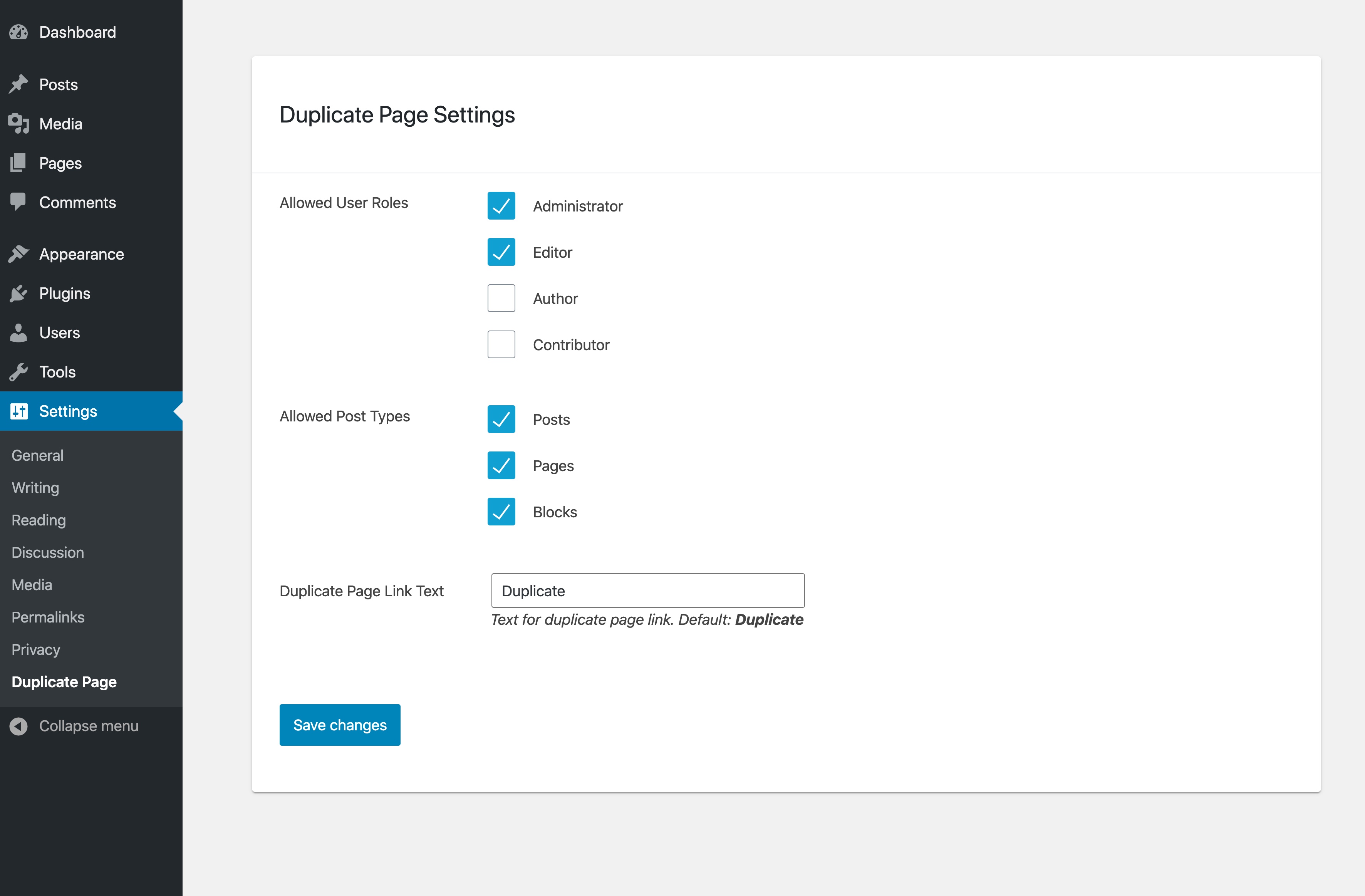
WP Duplicate Page Settings
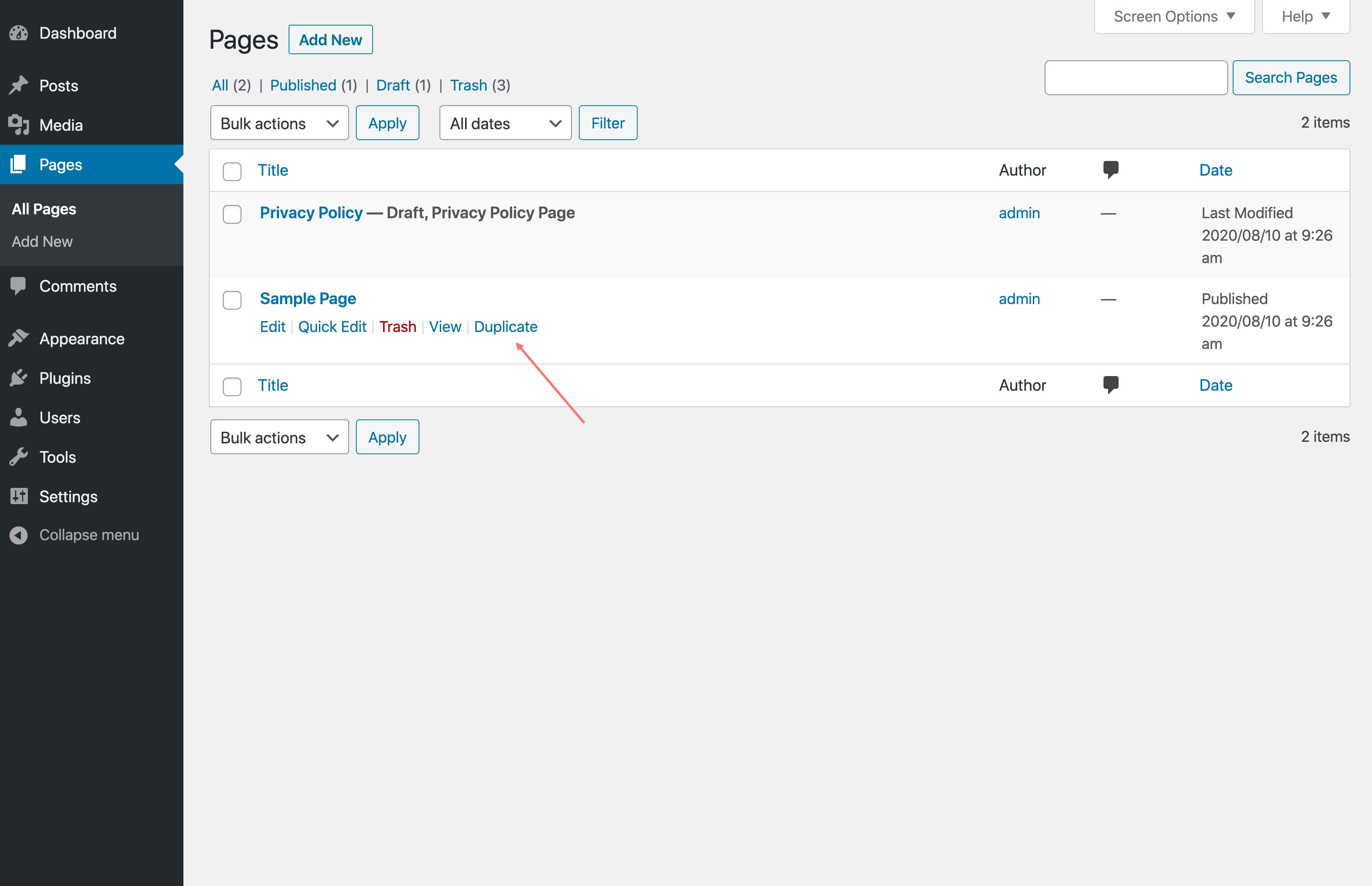
Duplicate button
Faq
Absolutely! WP Duplicate Page doesn’t collect or store any personal information. So rest assured.
Yes, you can. In addition to pages, you can clone document galleries, popups, orders, WooCommerce coupons, templates, and so on.
WP Duplicate Page clones the content of any page or post. So if you’ve built a page using an HTML block or a custom HTML template via your page builder, duplicating it will copy all of that markup as-is. It’s a quick way to reuse a carefully structured layout without rebuilding it from scratch.
That said, if you’re specifically looking to clone and customize WooCommerce email templates (the HTML emails sent to customers on order confirmation, shipping, etc.), that’s outside the scope of WP Duplicate Page. In this case, YayMail handles that as it gives you a drag-and-drop builder to design and manage the library of email templates visually.
Yes, it’s completely free of charge. WP Duplicate Page comes with all the features listed in the description above.
Reviews
Annoying ads - not worth the hassle
By 
It works just fine, but having to constantly dismiss the ads this plugin pollutes the admin area with gets very tiresome very quickly. There are plenty of alternative plugins with similar functionality, which aren't so annoying.
Great plugin to add unwanted adds to your dashboard.
By 
Junk plugin that adds surreptitious ADV panels to your dashboard promoting their other products. Deleted.
great support experience
By 
Works fine but shows ads
By 
the plugin works fine, but it promotes other plugins in the sidebar without mentioning which plugin shows the ads...
Duplicate
By 
I rarely write reviews, but this plugin truly deserves it.
WP Duplicate Page is one of those tools that immediately changes the way you work with WordPress. What used to take minutes now takes seconds. Creating multiple pages, duplicating layouts, or building structured content across languages becomes effortless.
The real strength of this plugin is its simplicity. No unnecessary complexity, no confusing settings. You install it, and it just works exactly as expected. The duplication is clean, reliable, and perfectly preserves page structure, including complex elements like galleries and layouts.
In my case, it has been incredibly useful for building a multilingual website and managing multiple sections with consistent design. It saved me a significant amount of time and eliminated repetitive work almost entirely.
If you work with WordPress regularly, this is not just a useful plugin, it is essential.
Highly recommended.
Doesn't work with Elementor
By 
Unfortunately it does not work with Elementor.
Simply duplicate without bloatet functions
By 
Perfect,
I agree with Charlie Merland @caercam. No overkill functions, no overkill user interface. Simple and clean options which user roles can duplicate and which post types will have the "duplicate" link.
Duplicates also posts that are edited with Elementor, with all styles without hustle. So you can start the Elementor editor and all is there like you would edit your original post! Nice!
Thanks for that. No need for overloaded plugins. This simply does it´s job and is a clean solution!
Great! 🙂
Best plugin for this
By 
Best solution out there for duplicating posts. Period. Does exactly what it needs to do, nothing less, nothing more. It's getting hard to find plugins that don't add loads of unnecessary options and settings and features and whatever. This one does not. It just duplicates posts. Thanks for that.
Works well
By 
a must have!
Great plugin to duplicate Woo Orders!
By 
Unlike other plugins i have used before, this not only duplicates the order, but also, their items, shipping, and order's metadata!
That's really helpful for all store owners!
Simple and clean.
Changelog
Sep 8, 2026 – Version 1.8.7
- Added: License to plugin header
- Updated: Show/hide recommended modules
- Fixed: phpcs
- Fixed: Text domain
Aug 31, 2026 – Version 1.8.6
- Fixed: Conflict with FileBird plugin
Aug 29, 2026 – Version 1.8.5
- Improved: Admin dashboard widget
Jun 2, 2026 – Version 1.8.4
- Improved: Confirmation dialog in WooCommerce email settings screen
Jun 1, 2026 – Version 1.8.3
- Improved: Check and append number to existing original-slug-copy
- Improved: Complement plugins panel
May 21, 2026 – Version 1.8.2
- Improved: Duplicate post gets a new unique slug as original-slug-copy
- Improved: Tested up to WP 7.0
Jan 05, 2026 – Version 1.8.1
- Improved: Security
Nov 13, 2025 – Version 1.8
- Added: Duplicate button in Editor
- Improved: Security
- Improved: UI
- Fixed: Small CSS issue
Oct 29, 2025 – Version 1.7
- Added: Copy directly from post edit
Dec 30, 2024 – Version 1.6
- Fixed: created_via metadata duplicated
Dec 4, 2024 – Version 1.5
- Fixed: Not duplicate order data with HPOS WooCommerce
Mar 22, 2024 – Version 1.4.1
- Fixed: Change text-domain
May 31, 2023 – Version 1.4
- Added: Duplicate in Bulk actions
Jun 16, 2022 – Version 1.3
- Fixed: Security issues
July 19, 2021 – Version 1.2
- Fixed: Bug of duplicated slug
Jun 2, 2021 – Version 1.1
- Fixed: Duplicate media in library
November 29, 2020 – Version 1.0
- Initial Release