WP Eventbrite Embedded Checkout – Ticket Checkout Block, Popup & Elementor Widget
WP Eventbrite Embedded Checkout – Ticket Checkout Block, Popup & Elementor Widget
Description
Eventbrite Plugin for WordPress
WP Eventbrite Embedded Checkout puts Eventbrite’s own ticket checkout on your WordPress site, so people buy tickets without leaving your pages. In the WordPress editor, add the Eventbrite Checkout block, paste the link to your event and click Show checkout. The real checkout appears in the editor. Then pick how to show it: right on the page, or as a button that opens the checkout in a popup.
You get an Eventbrite Checkout block with the live checkout in the editor, an Eventbrite Checkout widget for Elementor, and a [wp-eventbrite-checkout] shortcode for the classic editor, widgets, Divi, Bricks and other page builders. Every block, widget and shortcode can sell tickets for a different event, so one site can sell all of them.
Eventbrite takes the payment, sends the tickets and keeps your attendee list, exactly as on eventbrite.com. The plugin needs no API key and stores no orders.
Made for event organizers, venues, conferences, workshops, meetups, schools and nonprofits that want ticket sales on their own website.
How to add Eventbrite checkout to WordPress
- Install and activate WP Eventbrite Embedded Checkout: go to Plugins Add New, search for “Eventbrite checkout” and click Install Now, then Activate.
- Open your event on Eventbrite and copy its link from the address bar, for example
https://www.eventbrite.com/e/your-event-tickets-123456789012. The number at the end is the event ID; either works. - In the WordPress editor, add the Eventbrite Checkout block. Type “eventbrite” in the block search to find it.
- Paste the link and click Show checkout. The checkout appears in the editor.
- In the block sidebar, pick On the page or Button that opens a popup, adjust the options, and publish.
Using Elementor? Add the Eventbrite Checkout widget, paste the link and pick how to show it.
Using the classic editor or another page builder? Paste the shortcode instead: [wp-eventbrite-checkout event="123456789012"]. Go to Eventbrite Shortcode to build one with your options and copy it.
Your site needs https (an SSL certificate): Eventbrite shows its checkout only on secure pages.
Eventbrite’s embed code or this plugin?
You don’t need a plugin to embed Eventbrite. In your event dashboard on Eventbrite, choose Embedded Checkout under Marketing, copy the code and paste it into a Custom HTML block. That works for one event that rarely changes.
Use this plugin instead if you want to:
- See the checkout while you edit, instead of an empty HTML box.
- Paste a link instead of code, and change the display, button text, colour or promo code from the sidebar.
- Let Authors and Contributors add checkouts. WordPress removes scripts saved by users who aren’t allowed to add unfiltered HTML, so Eventbrite’s code disappears when they save. The block works for every user who can edit the page.
- Give phone visitors a button that opens the checkout full screen, as Eventbrite recommends, while larger screens keep the checkout on the page.
- Send ticket purchases to Google Analytics, Google Tag Manager or Meta Pixel, and send buyers to your own thank-you page.
Features
- Any number of events: every block, widget and shortcode has its own event.
- Paste the event’s link or its ID. Eventbrite’s embed code works too: the plugin finds the event in it.
- Two ways to show it: the checkout on the page, or a button that opens it in a popup over the page.
- Popup on phones: on small screens, the checkout on the page becomes a button, and the checkout opens full screen.
- Your brand colour on the checkout’s buttons and links, applied by Eventbrite.
- Promo codes: apply one of your Eventbrite promo codes when the checkout opens.
- The button matches your theme’s buttons or uses a simple dark style, in your own colours if you like. The Elementor widget has a Style tab for it.
- A shortcode builder: choose your options under Eventbrite Shortcode and copy the finished shortcode.
- Optional purchase tracking: an
eventbrite_purchaseevent for the Google Analytics, Google Tag Manager and Meta Pixel tags already on your site. - Optional thank-you page after a completed order.
- Eventbrite’s script loads only on pages with a checkout.
- A Get started page that saves your event once and creates a page with the block or widget for you, and a Settings page with defaults for every checkout.
Shortcode
[wp-eventbrite-checkout event="https://www.eventbrite.com/e/your-event-tickets-123456789012" mode="popup" button_text="Get tickets"]
Without attributes, [wp-eventbrite-checkout] shows the event set under Eventbrite Settings, as in earlier versions. See the FAQ for all attributes.
External services
This plugin shows Eventbrite’s ticket checkout (eventbrite.com), a third-party ticketing service. It does not work without it.
On every page with a checkout, the plugin loads Eventbrite’s checkout widget script from https://www.eventbrite.com/static/widgets/eb_widgets.js, which shows the checkout from https://www.eventbrite.com/checkout-external in an iframe on the page or in a popup. The visitor’s browser connects to Eventbrite directly and sends the event ID, the address of your page, the promo code and button colour you set, and standard request data such as the IP address and browser. Campaign tags (utm_*) in your page’s address are passed on by Eventbrite’s script. Ticket selection, the order form, payment and the tickets are handled by Eventbrite; nothing a buyer enters is sent to your WordPress site. Eventbrite sets its own cookies inside the checkout.
The block editor and Elementor’s editor show the live checkout from Eventbrite the same way while you edit.
In the WordPress admin, the plugin contacts Tally (tally.so), a form service, only if you click Request this feature on the Eventbrite Events page. That opens a short feedback form hosted on Tally (https://tally.so/r/M1eoWE) and loads Tally’s embed script (https://tally.so/widgets/embed.js) at that moment. The form sends what you choose or type, plus the plugin’s version number. Tally’s terms and privacy policy: https://tally.so/help/terms-and-privacy.
Optional features, all off by default (Eventbrite Advanced):
- Track ticket purchases. When Eventbrite reports a completed order, the plugin sends an
eventbrite_purchaseevent with the event ID and the order number to the Google Analytics (gtag), Google Tag Manager (dataLayer) and Meta Pixel (fbq) tags already on your page. It carries no buyer details. The plugin adds no analytics tags of its own; what your own tags send, and to whom, is governed by those services. - Thank-you page. After a completed order, the buyer is sent to the page you choose.
Eventbrite’s terms of service: https://www.eventbrite.com/help/en-us/articles/251210/eventbrite-terms-of-service/
Eventbrite’s privacy policy: https://www.eventbrite.com/help/en-us/articles/460838/eventbrite-privacy-policy/
Installation
- Upload the plugin folder to
/wp-content/plugins/or install it from the Plugins screen. - Activate the plugin. The Get started page opens: paste your event’s link and it saves itself, then create a page with the block or the Elementor widget in one click.
- Or add the Eventbrite Checkout block to any post or page (or the Eventbrite Checkout widget in Elementor) and paste the event’s link, or use the
[wp-eventbrite-checkout event="..."]shortcode. - Optionally set defaults under Eventbrite Settings.
Screenshots
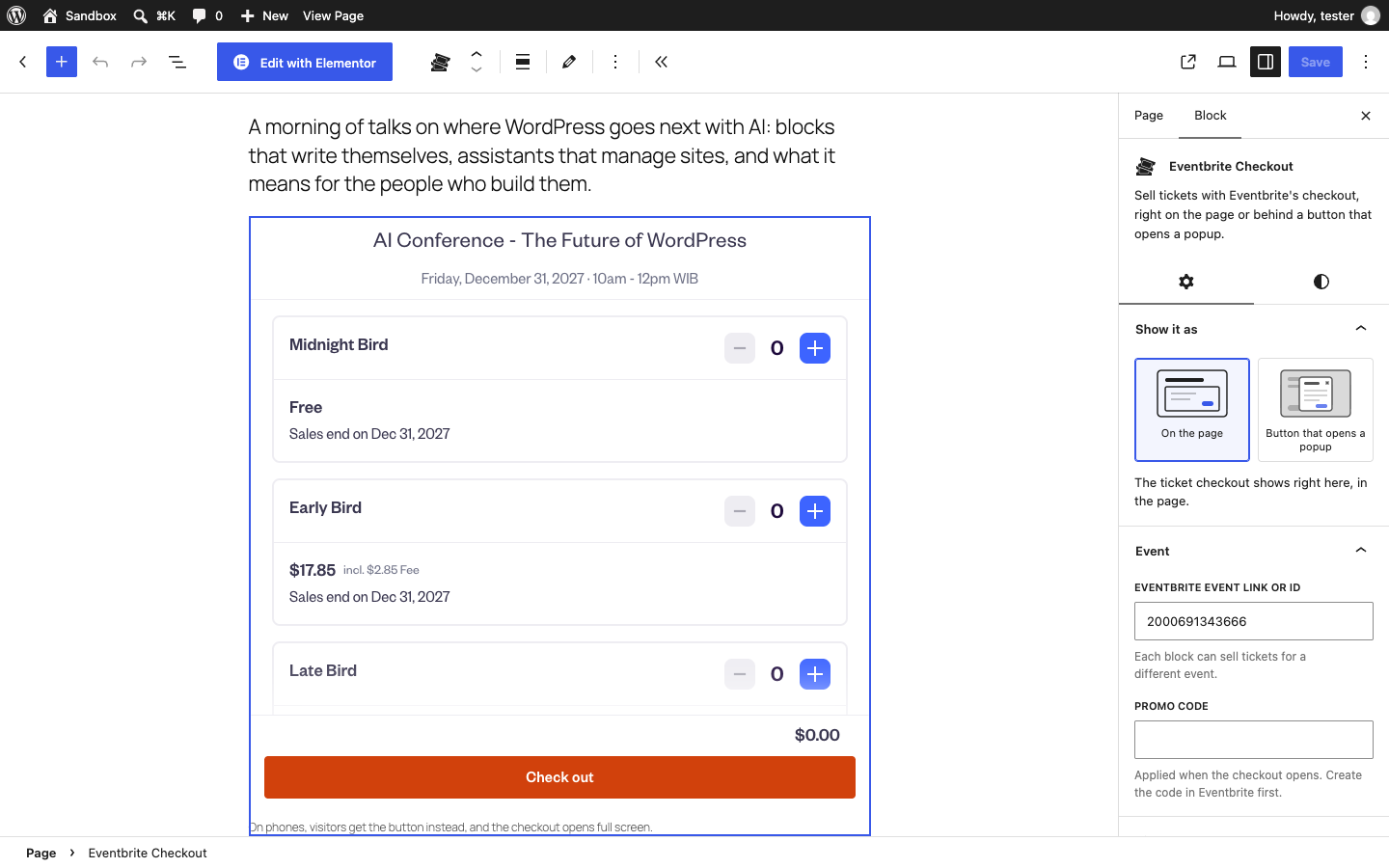
The Eventbrite Checkout block shows the live checkout in the editor. Pick how to show it in the sidebar.
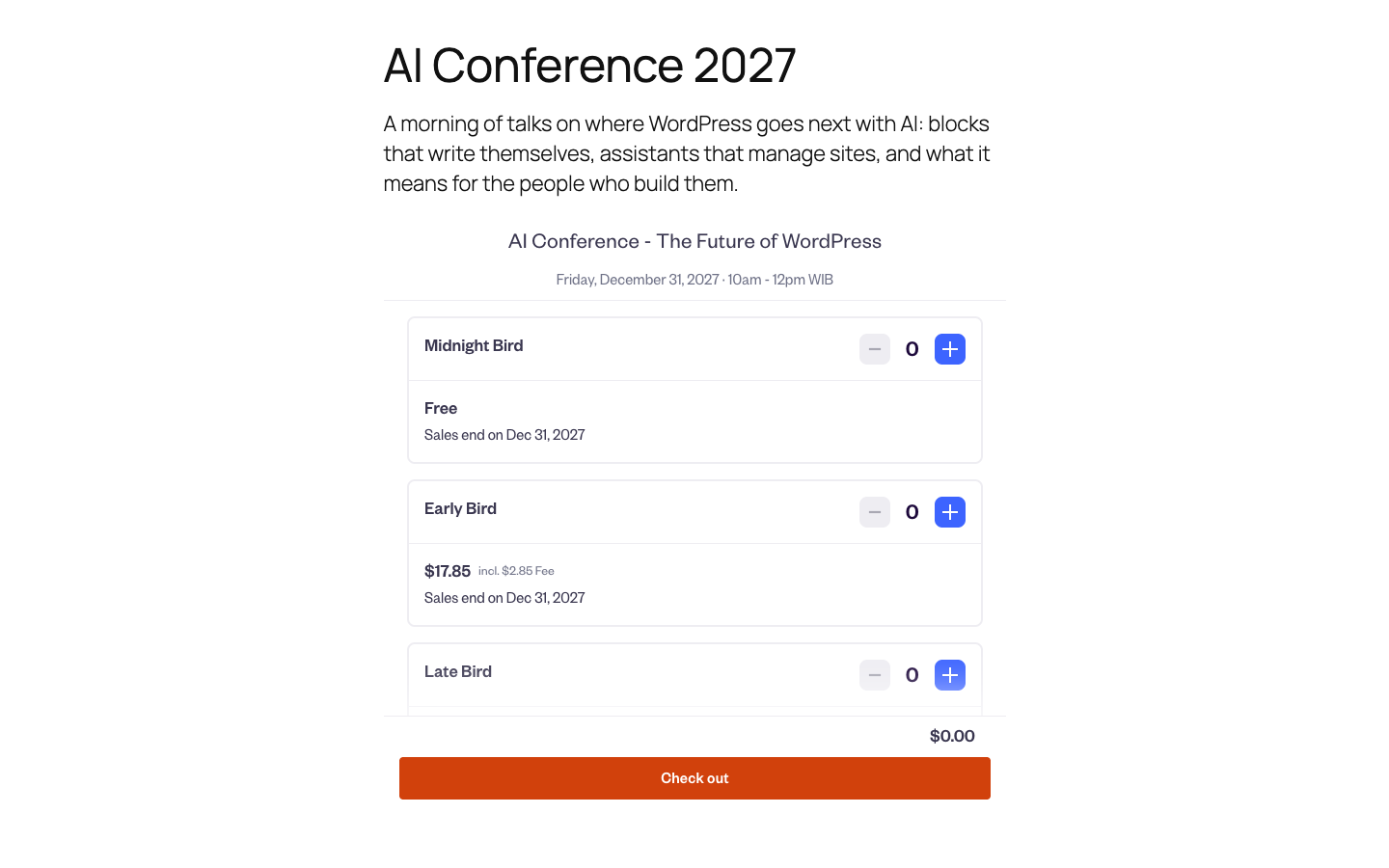
The checkout on the page, on your site.

A button that opens the checkout in a popup.
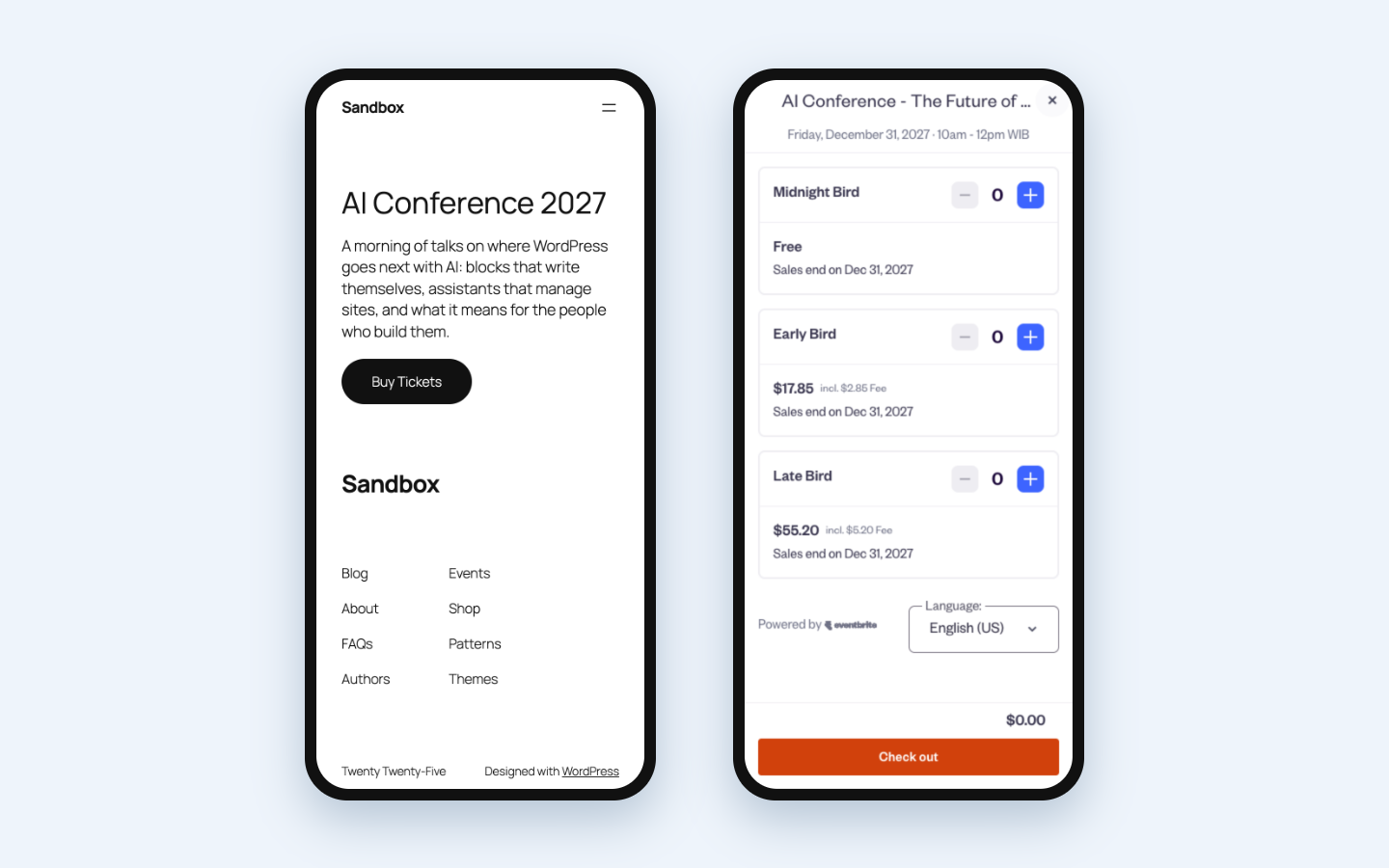
On phones, the button opens the checkout full screen.
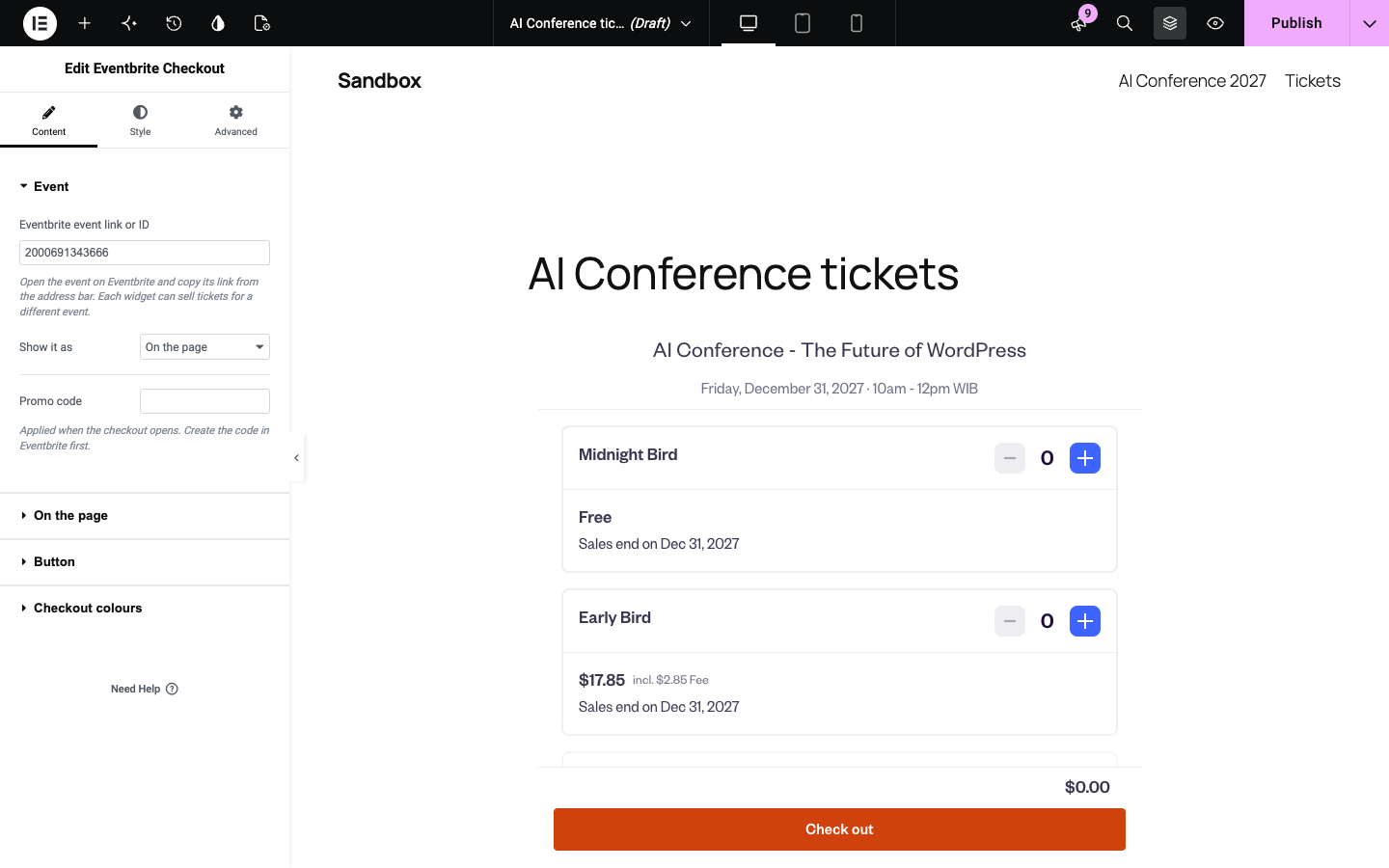
The Eventbrite Checkout widget in Elementor.

Get started: save your event once, then create a page with the block or widget in one click.
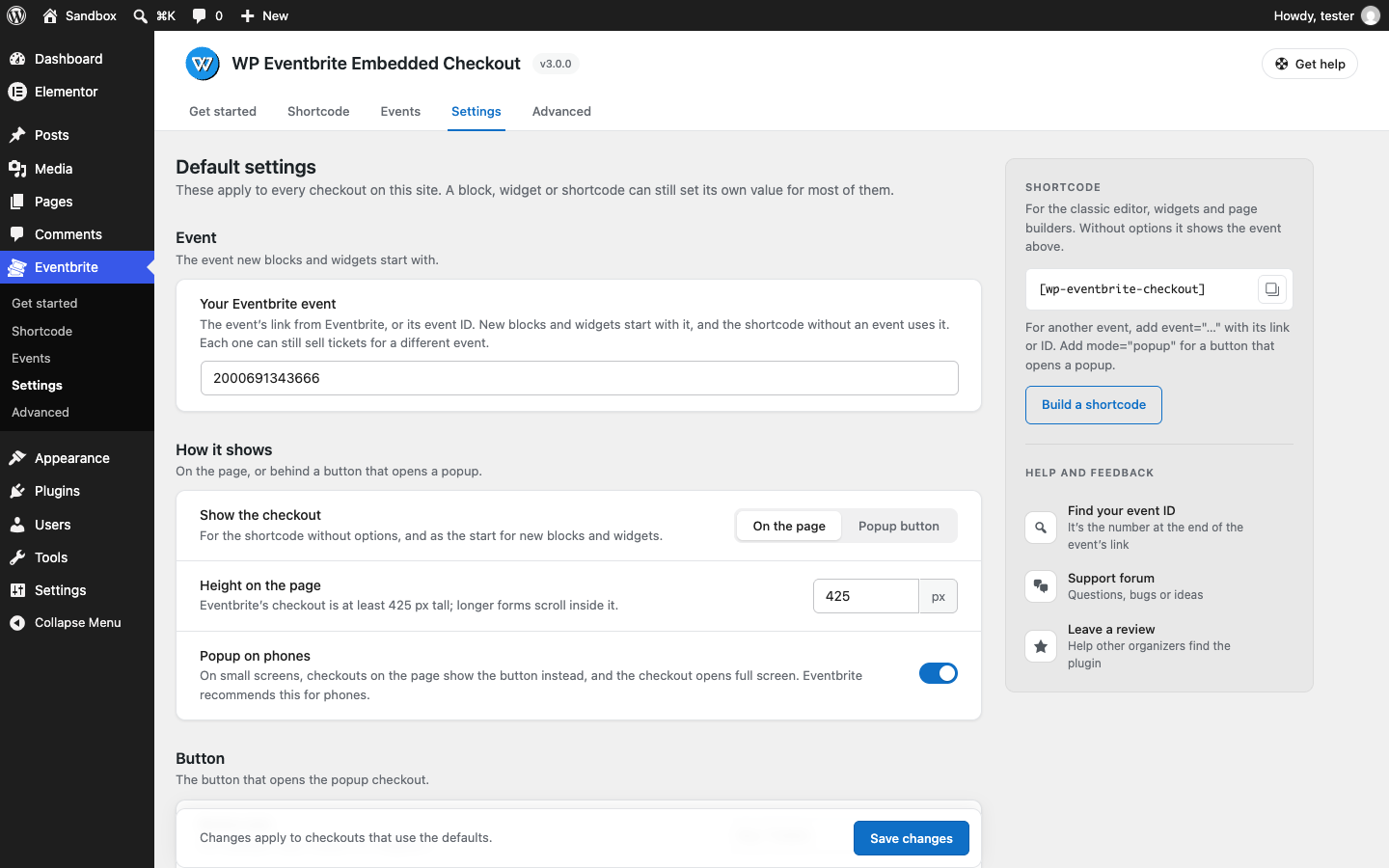
Settings: defaults for every checkout.
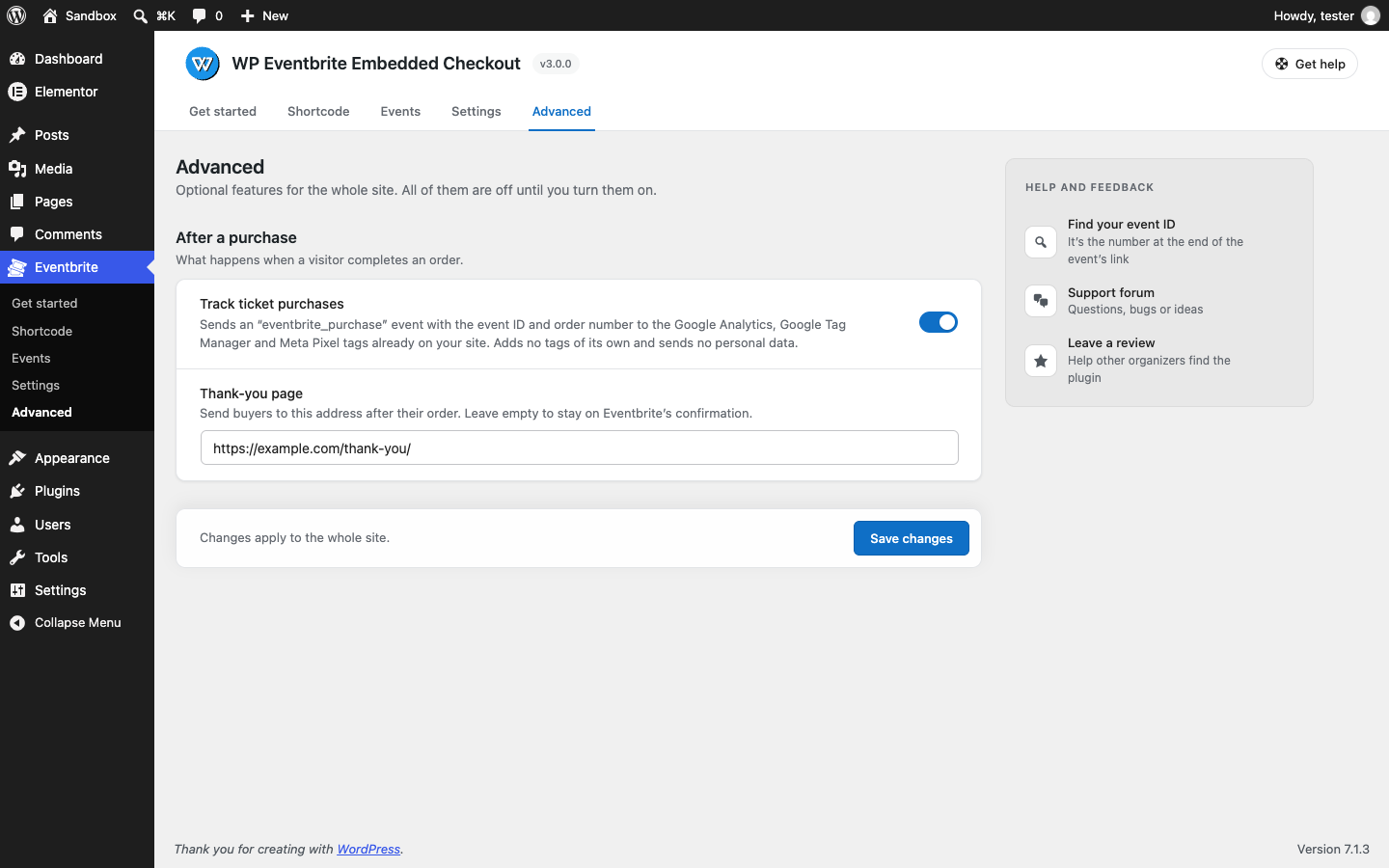
Advanced: purchase tracking and a thank-you page.
Faq
No. WP Eventbrite Embedded Checkout is an independent plugin by Hendra Setiawan and is not made by, affiliated with or endorsed by Eventbrite. “Eventbrite” is a trademark of Eventbrite, Inc. The checkout itself is Eventbrite’s own embedded checkout.
No. The plugin works with your event’s public link or ID. Nothing has to be connected or synced.
Yes. Eventbrite shows its embedded checkout only on pages served over https. On an http site the checkout shows an error from Eventbrite instead; the plugin’s settings and the block say so.
Open your event on Eventbrite (the public event page) and copy the address, for example https://www.eventbrite.com/e/summer-workshop-tickets-123456789012. The number at the end is the event ID; you can paste either. The event must be published on Eventbrite.
Yes, since version 3.0. Each block, widget and shortcode has its own event, so you can put one event on each page, or several on one page. Use one checkout per event.
Yes. Eventbrite recommends the popup on phones, because it opens full screen. Turn on Popup on phones (Eventbrite Settings, or per block and widget): checkouts on the page then show a button on small screens instead, and larger screens keep the checkout on the page. It’s on for new sites; sites that used version 2 start with it off, so nothing changes until you turn it on.
In the block sidebar, pick Button that opens a popup. With the shortcode, add mode="popup".
Yes, the colour of the checkout’s buttons and links, so they match your brand. Set it in the block, the widget or the shortcode (brand_color="#1890e8"), or for every checkout under Eventbrite Settings. Preview the popup under the button shows the result in the editor. The rest of the checkout keeps Eventbrite’s own colours, so it stays readable. Eventbrite doesn’t apply custom colours to timed-entry events.
Yes. In the block, open Button colours and pick a colour for the button and its text; the block warns when the text would be hard to read. With the shortcode, use button_color="#503aa8" button_text_color="#ffffff". Set defaults for every button under Eventbrite Settings. In Elementor, use the widget’s Style tab.
Yes. Enter one of your Eventbrite promo codes in the block, widget or shortcode (promo_code="SUMMER10"); it is applied when the checkout opens. Create the code in Eventbrite first.
In your Eventbrite account, as always. The plugin shows Eventbrite’s checkout; everything people buy is an Eventbrite order. If you would like more of your events inside WordPress, click Request this feature under Eventbrite Events, or say so in the support forum. Those requests decide what gets built next.
Yes. Turn on Track ticket purchases under Eventbrite Advanced. When a visitor completes an order, an eventbrite_purchase event is sent to the tags already on your site, with eventbrite_event_id and eventbrite_order_id. In Google Tag Manager, use a Custom Event trigger for eventbrite_purchase. Meta Pixel receives EventbritePurchase as a custom event. The plugin adds no tags of its own.
Yes. Enter the page’s address under Thank-you page on Eventbrite Advanced. After a completed order the buyer is sent there.
In Elementor, add the Eventbrite Checkout widget. It has the same options as the block and a Style tab for the button. In Divi, Bricks and other builders, put [wp-eventbrite-checkout event="..."] in the builder’s shortcode or text element. Eventbrite Shortcode builds the shortcode for you.
You don’t need to learn them: Eventbrite Shortcode writes the shortcode from the options you choose. For reference: event (event link or ID; without it, the event under Settings), mode (embed or popup), height (px, 425 to 2000), phone_popup (1 or 0), button_text, button_style (inherit or basic), button_color and button_text_color (hex colours for the button), brand_color (hex colour for the checkout’s buttons and links), promo_code.
Thank you! Multiple events were the main Pro feature, and they are now in this free plugin. Your [wpeecpro] shortcodes keep working, with the Pro plugin active and also without it. Your lifetime licence covers the next Pro version when it comes out. A note about this appears on the plugin’s pages while Pro is active.
Not unless you turn it on under Eventbrite Settings Credit. Since version 3.0 it is off by default.
Eventbrite’s checkout loads from Eventbrite and sets its own cookies, as it does on eventbrite.com, and the buyer’s details go to Eventbrite. Cover Eventbrite in your privacy policy and cookie notice. The External services section above lists what is sent where.
- Your site uses https. Eventbrite refuses http pages.
- The event is published and on sale on Eventbrite. An ended or draft event shows Eventbrite’s own message.
- The link or ID is the event’s own (the number at the end of its link).
- A caching or “delay JavaScript” plugin isn’t holding back
eb_widgets.jsor the plugin’sfrontend.js.
Still stuck? Ask in the support forum.
Reviews
Works well.
By 
Does what it says on the tin very well. Good developer support.
This plugin makes my life easier
By 
Simple Plugin
By 
Great plugin. Very Simple and Easy to Use 😊
By 
Changelog
3.0.0
Release Date – 25 October 2026
- New: any number of events. Each block, widget and shortcode has its own event; paste the event’s link or ID.
- New: Eventbrite Checkout block with the live checkout in the editor.
- New: Eventbrite Checkout widget for Elementor, with a Style tab for the button.
- New: Popup on phones. On small screens the checkout on the page becomes a button that opens it full screen. On for new sites, off on sites that used 2.x.
- New: your brand colour on the checkout’s buttons and links, a popup preview in the editor, and promo codes.
- New: button styles (match the theme, or simple) and button colours.
- New: optional purchase tracking (Google Analytics, Google Tag Manager, Meta Pixel) and thank-you page.
- New: Get started page, shortcode builder, Settings and Advanced pages under a new Eventbrite menu.
- New:
[wpeecpro]shortcodes from the Pro plugin keep working when Pro is deactivated. - Changed: the “Widget by wpevent.pro” link is off by default. Turn it on under Settings if you like.
- Changed: the error for a missing event is shown only to people who can edit the site.
[wp-eventbrite-checkout]without attributes shows the same event, mode, height and button text as before.- Requires WordPress 6.6 or newer.
2.2.0
Release Date – 12 September 2026
- Tested with WordPress 7.1 and PHP 7.4 through 8.5.
- Improved output escaping and settings validation.
- Fixed compatibility issues when no global post object is available.
- Added support for multiple checkout shortcodes on the same page.
- Load Eventbrite assets only when the checkout shortcode is rendered.
- Replaced third-party admin popup code with native WordPress notices.
- Improved admin accessibility, responsive styling, and documentation.
2.1.5
Release Date – 21 Feb 2025
- Bugs fixing and code enhancements
2.1.4
Release Date – 19 Feb 2025
- Compatibility checks with WordPress 6.7.2
2.1.3
Release Date – 11 Jan 2025
- Compatibility checks with WordPress 6.7.1
2.1.2
Release Date – 11 Jan 2024
- Bugs fixing
- Compatibility checks with WordPress 6.4.2
2.1.1
Release Date – 11 Aug 2023
- Compatibility checks with WordPress 6.3
2.1.0
Release Date – 3 June 2023
- Code refactor
- Compatibility checks with WordPress 6.2.2
2.0.10
Release Date – 10 May 2023
- Bugs fixing
- Security improvements
2.0.9
Release Date – 1 May 2023
- Bugs fixing and compatibility with WP 6.2
2.0.8
Release Date – 28 Nov 2022
- Minor bugs fixing
2.0.7
Release Date – 26 Nov 2022
- Bug fixing and security improvements
2.0.6
Release Date – 22 Nov 2022
- Compatibility check to WordPress 6.1.1
2.0.5
Release Date – 23 Sep 2022
- Compatibility check to WordPress 6.0.2
- Minor bugs fixing
2.0.4
Release Date – 08 Aug 2022
- Compatibility check to WordPress 6.0.1
- Bugs fixing
2.0.3
Release Date – 21 Feb 2022
- Compatibility check to WordPress 5.9
- Minor bugs fixing
2.0.2
Release Date – 29 Jun 2021
- Bugs fixing
2.0.1
Release Date – 7 Jun 2021
- Compatibility check to WordPress 5.7.2
2.0.0
Release Date – 10 Nov 2019
- Compatibility check to WordPress 5.3
1.0.3
Release Date – 8 Nov 2019
- Compatibility check to WordPress 5.2.4
1.0.2
Release Date – 1 May 2019
- Compatibility check to WordPress 5.2
1.0.1
Release Date – 28 February 2019
- Added functionality to set custom height on Embed mode
- Added functionality to set custom button text on Popup mode
1.0.0
Release Date – 29 January 2019
- First version