WP Hamburger
WP Hamburger
Description
-
Author: Fahad Mahmood
-
Project URI: http://androidbubble.com/blog/wordpress/plugins/wp-hamburger
-
License: GPL 3. See License below for copyright jots and titles.
WP Hamburger is a WordPress plugin with extensive customization possibility including font-size, font-weight, color, bullets, background, opacity, font-family and menu selection. Customization possibility including font-size, font-weight, color, bullets, background, opacity, font-family and menu selection. WP Hamburger is WordPress plugin to redesign the menus with different color combination, font family, bullets and custom CSS. Colors and bullets for First Level / Second Level menu items can be customized separately.
Highly Customizable
- Settings page demo preview available
- Mobile and Desktop compatibility
- Font Family
- Background Color
- Background Opacity
- Hamburger Color
- Parent Level Menu Items
- Child Level Menu Items
- Font Color
- Font Weight
- List Bullets
- FontAwesome Icons
- Custom Image Upload for Bullets
- Custom CSS section
License
This WordPress Plugin is free software: you can redistribute it and/or modify it under the terms of the GNU General Public License as published by the Free Software Foundation, either version 2 of the License, or any later version. This free software is distributed in the hope that it will be useful, but WITHOUT ANY WARRANTY; without even the implied warranty of MERCHANTABILITY or FITNESS FOR A PARTICULAR PURPOSE. See the GNU General Public License for more details. You should have received a copy of the GNU General Public License along with this software. If not, see http://www.gnu.org/licenses/gpl-2.0.html.
Installation
From the WordPress plugin menu click on Add New and search for WP Hamburger
Instead of searching for a plugin you can directly upload the plugin zip file by clicking on Upload:
Use the browse button to select the plugin zip file that was downloaded, then click on Install Now. The plugin will be uploaded to your blog and installed. It can then be activated.
“WP Hamburger” is available in left sidebar settings menu.
Screenshots

Configuration > menu selection

Customization > font family, color, bullets, font-size and opacity etc.

Customization > custom css styles

Implementation Overview

Opacity Settings & Custom Bullet Image from Media Library
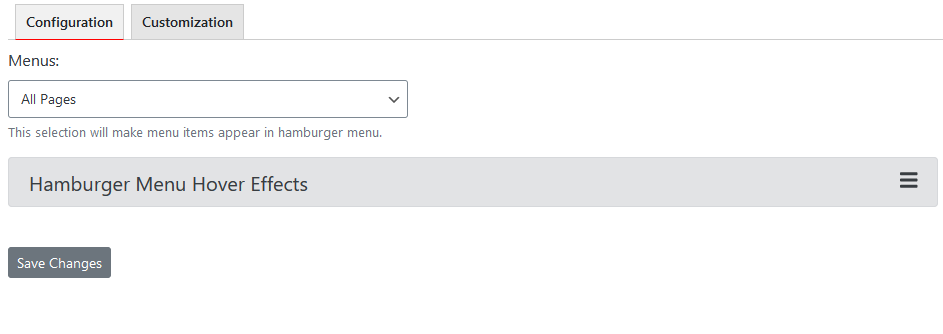
Collapsible Menu Items for Hover Effects
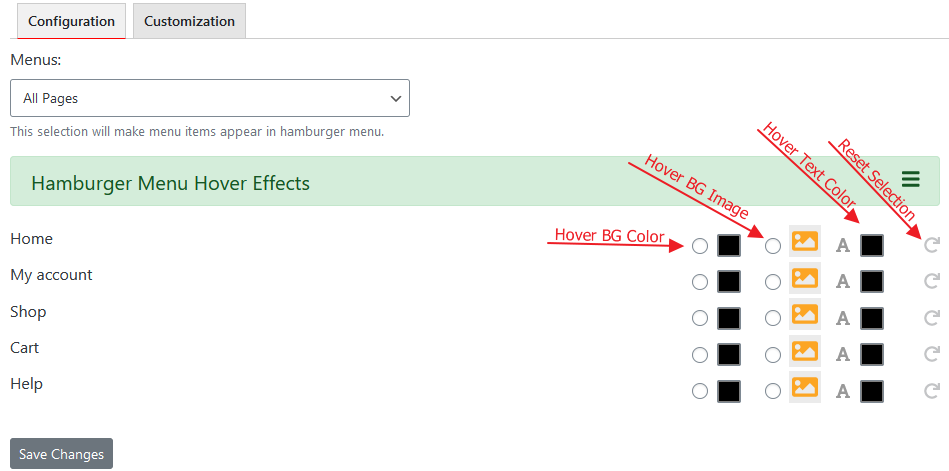
Hover BG Color, Hover BG Image, Hover Text Color, Reset Selection

Hierarchical Menu Items On Settings Page

Hover Effect Demo #1

Hover Effect Demo #2

Hover Effect Background Image Demo #1

Hover Effect Background Image Demo #2

Hover Effect Background Image - Media Library

Hover Effects
Faq
Go to settings page, select a menu and save changes.
Basic functionality is free. Customization options are available in premium version.
No, you do not need to purchase as it is fully functional as a free version. Just customization from settings page is not available in free version but still you can customize with you HTML/CSS skills.
It is always better to open a ticket on support forum. There is a help tab on settings page for your convenience.
You can turn Bootstrap and FontAwesome OFF from settings page.
You may suggest improvements, features and user friendliness. Your name will be mentioned in changelog with the respective plugin version in next release.
Yes, it is compatible with all kind of themes. If you face any compatibility issue, let us know and we will try to make it work in next version.
You will find WP Hamburger menu item under settings menu.
Use Font family name for example Arial or leave it blank for default.
Insert HTML/CSS bullets disc, circle, outsite inside etc., or choose icons from FontAwesome. Alternatively, custom image can be used from media library as well. Recommended dimensions are 32px X 32px.
Reviews
Great Help from Fahad
By 
I needed to make the Hamburger menu transparent and had made a lot of google searches for how to do it. Didn't find an answer. Finally I reached out to Fahad at support and he was very patient with me (computer communications isn't my strong point) and helped me through it. This is a great hamburger menu with lots of options. I really thank Fahad for his help.
Oops site went BOOM
By 
So, installed, selected menu, saved, and wow - my whole site was compressed into a roughly phone screen sized window in the centre of the browser window. Luckily just unselecting the menu restored things to normal.
I think it may need some work before its useable.
Broke them Main Site
By 
I installed and activated this and set it to work on the main menu. The entire site displayed narrow on screen and did not display a hamburger menu.
DO NOT INSTALL!
By 
Configuration page & plugin don't work
By 
Changelog
1.6.7
- Some CSS styles are updated. [Thanks to Al Clark][10/11/2024]
1.6.5
- Updated for WordPress. [24/05/2023]
1.6.4
- Updated for WordPress. [07/09/2022]
1.6.3
- Submenu issue resolved. [Thanks to Kickan][19/03/2022]
1.6.2
- Hide on mobile, new option added. [Thanks to yannickburky][11/12/2021]
1.6.1
- Hide on desktop, new option added. [Thanks to yannickburky][11/12/2021]
1.6
- Updated for WordPress.
1.5
- Hide on scroll revised. [Thanks to Diana]
1.4
- Custom image as bullet. [Thanks to Diana]
1.3
- PHP Notice and Warning fixed. [Thanks to Abu Usman]
1.2
- Position and DOM Position fields added.
1.1
- Elektro Skin added for WP Hamburger and Hover Effects Introduced. [Thanks to Diana & Team Ibulb Work]
1.0
- Initial Release of WP Hamburger. [Thanks to Diana from Switzerland]