WP Umbrella: Security Backup Restore & Monitoring
WP Umbrella: Security Backup Restore & Monitoring
Description
WP Umbrella empowers agencies and WordPress developers to master WordPress maintenance, and manage multiple sites effortlessly. Key features include:
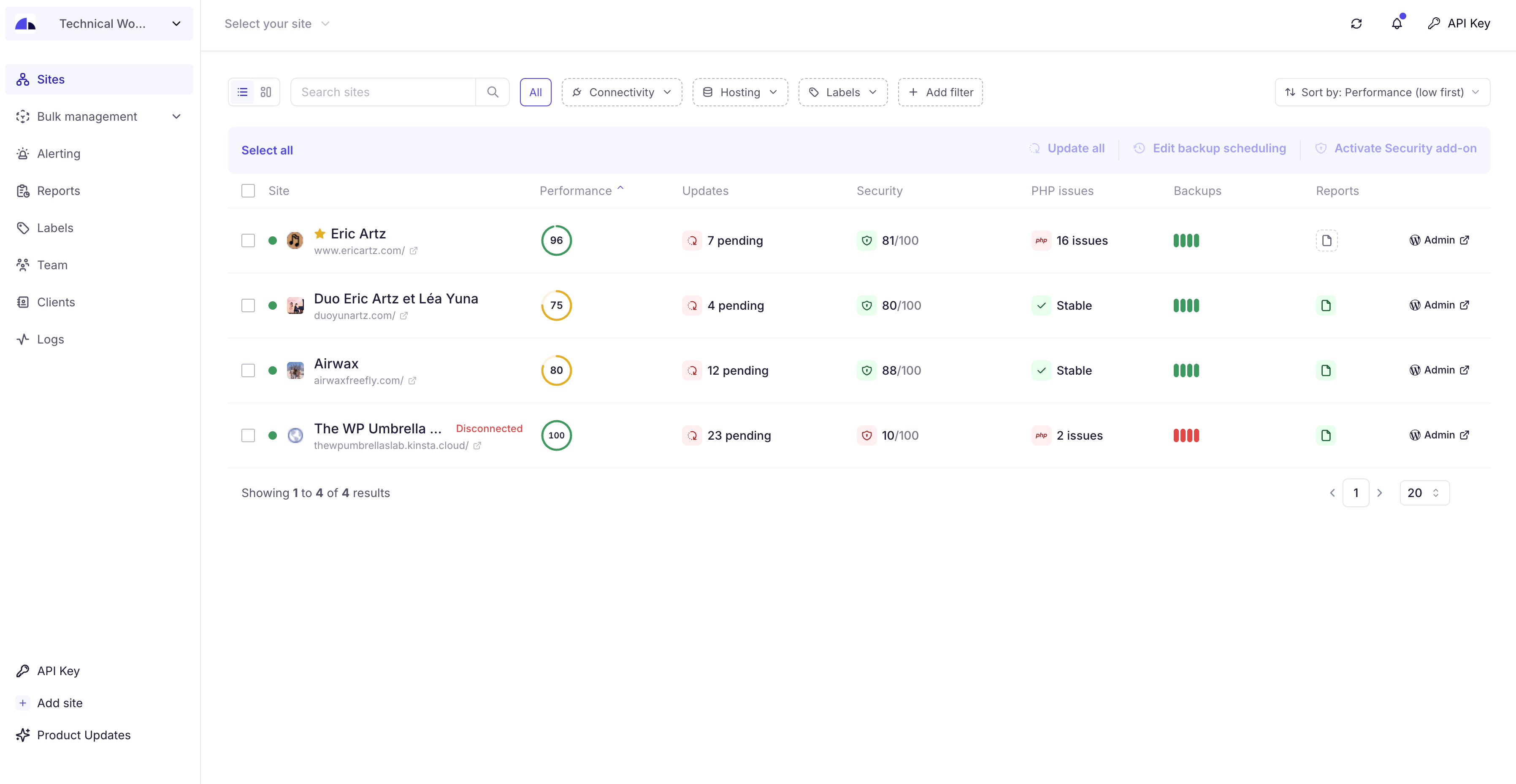
- Dashboard: Monitor, update, and backup all your sites from a single dashboard.
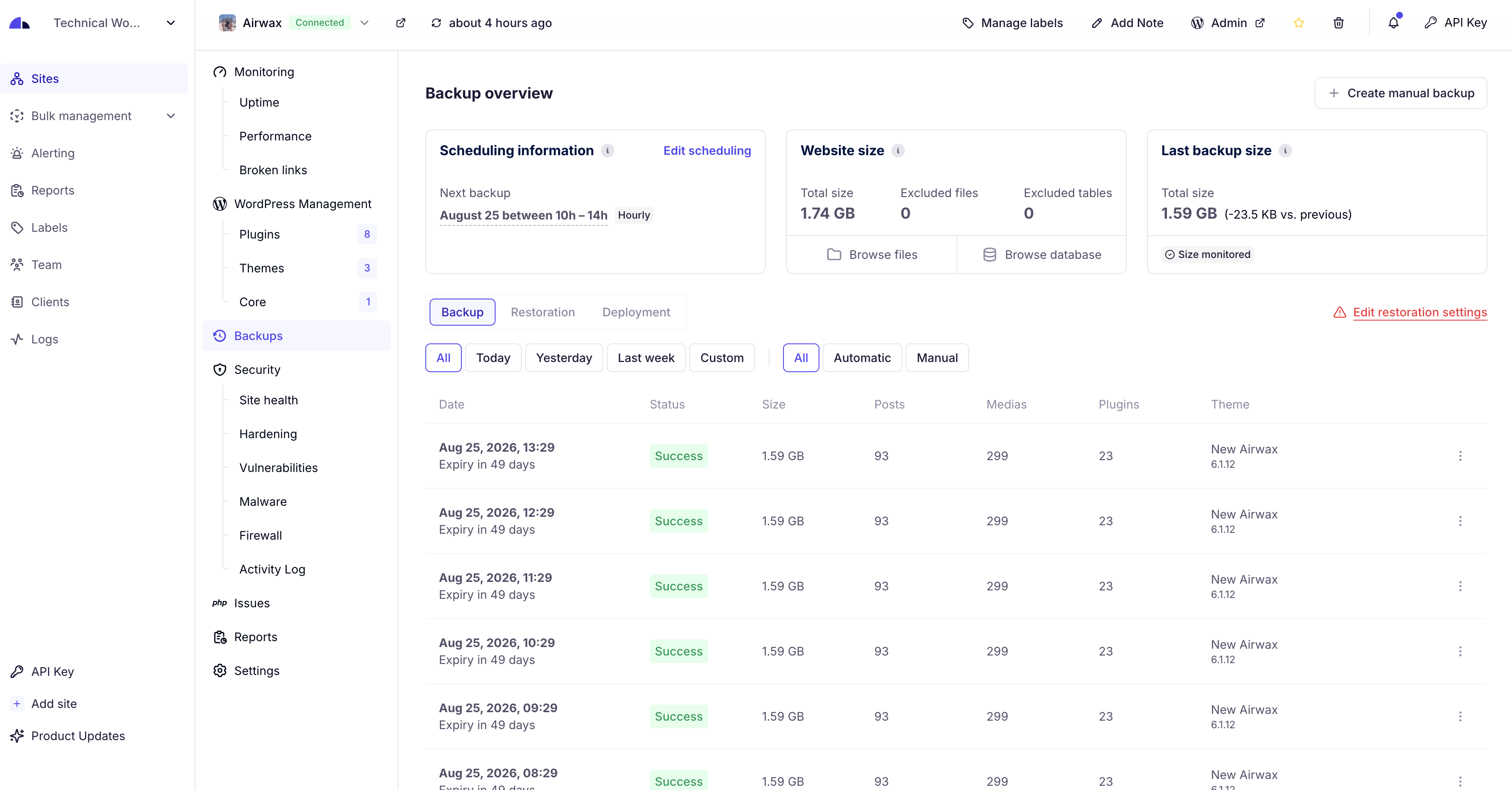
- Automated Cloud Backup: Secured, incremental backup with GDPR compliance, ensuring your data’s safety and easy backup restoration. WP Umbrella provide with GDPR Backup.
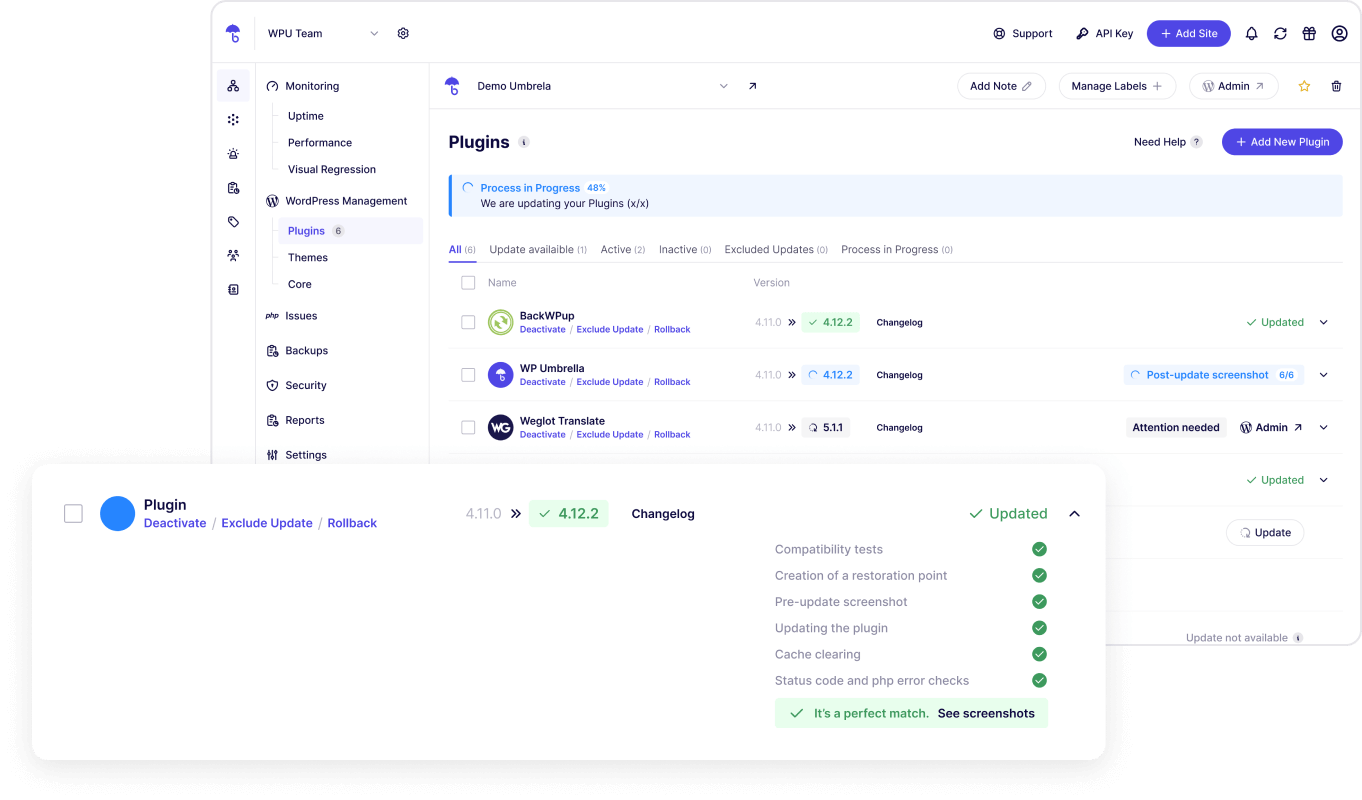
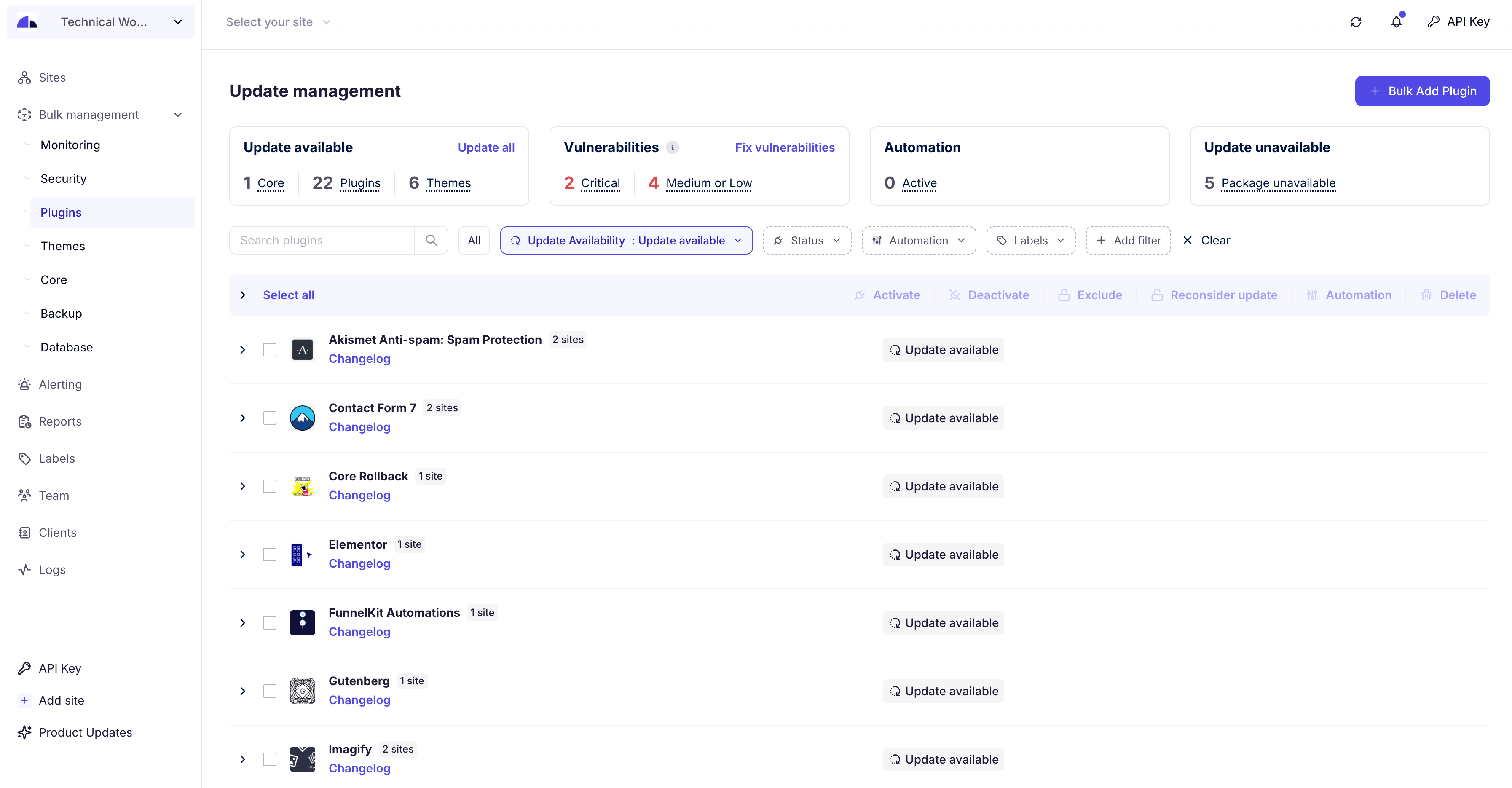
- One-Click Updates: Update core, themes, and plugins, maintaining security and performance. Update Rollback available. Exclude update and ignore updates too.
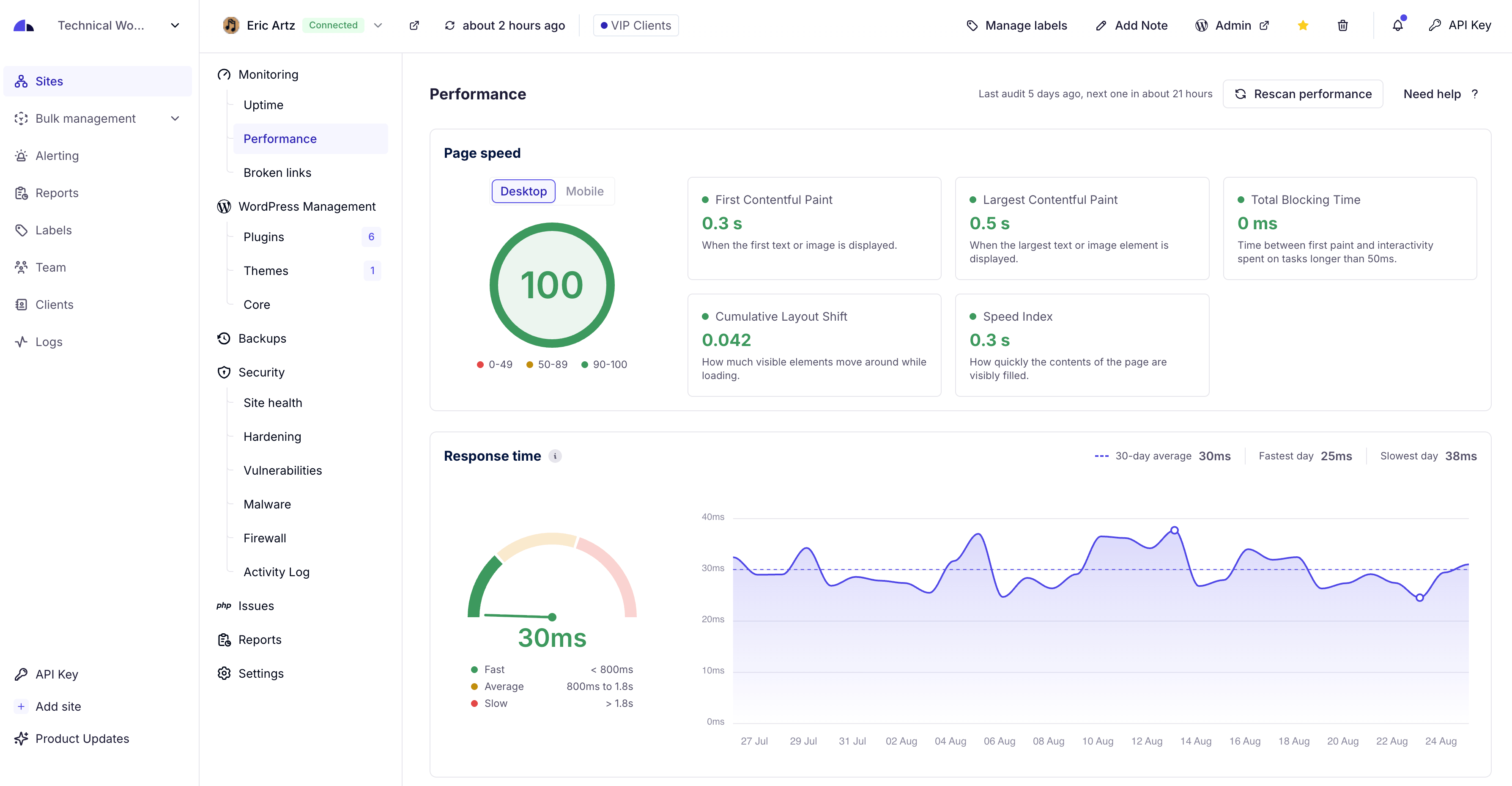
- Uptime Monitoring: Stay informed with alerts on uptime, downtime, and site performance, including Google Page Speed monitoring.
- Error Tracking: Monitor PHP errors to maintain a safe website.
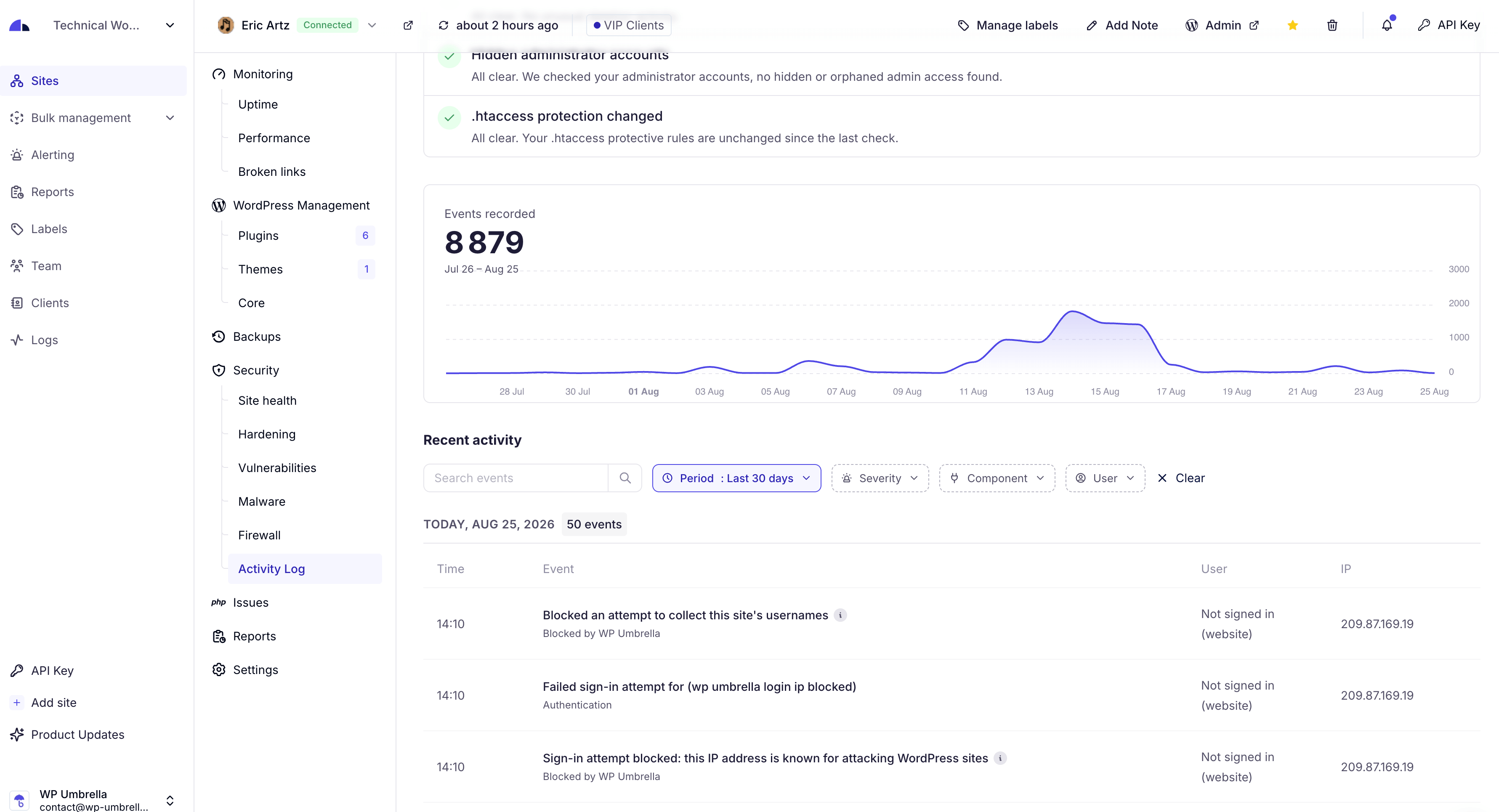
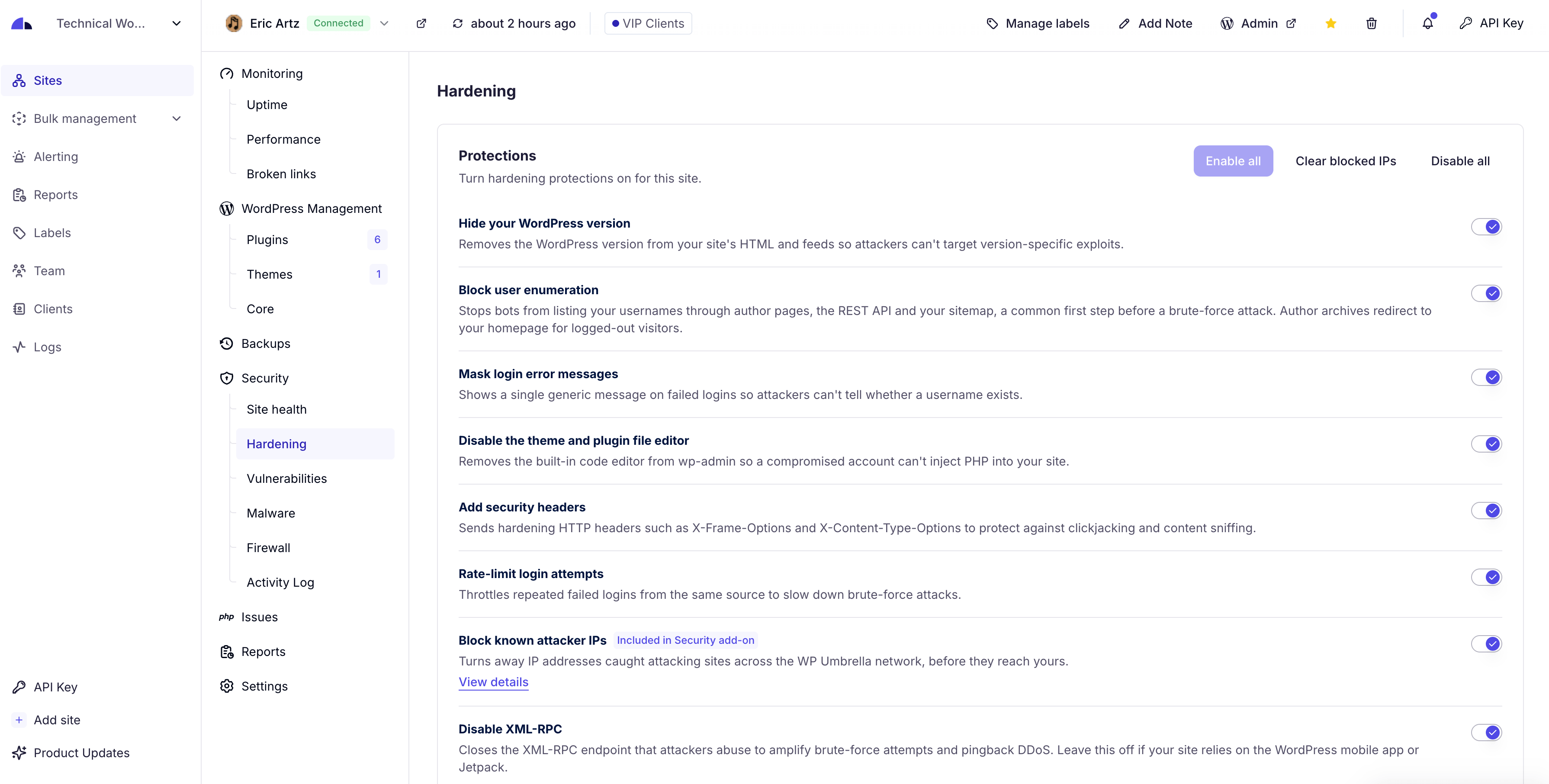
- Security monitoring: monitor vulnerabilities and security metrics.
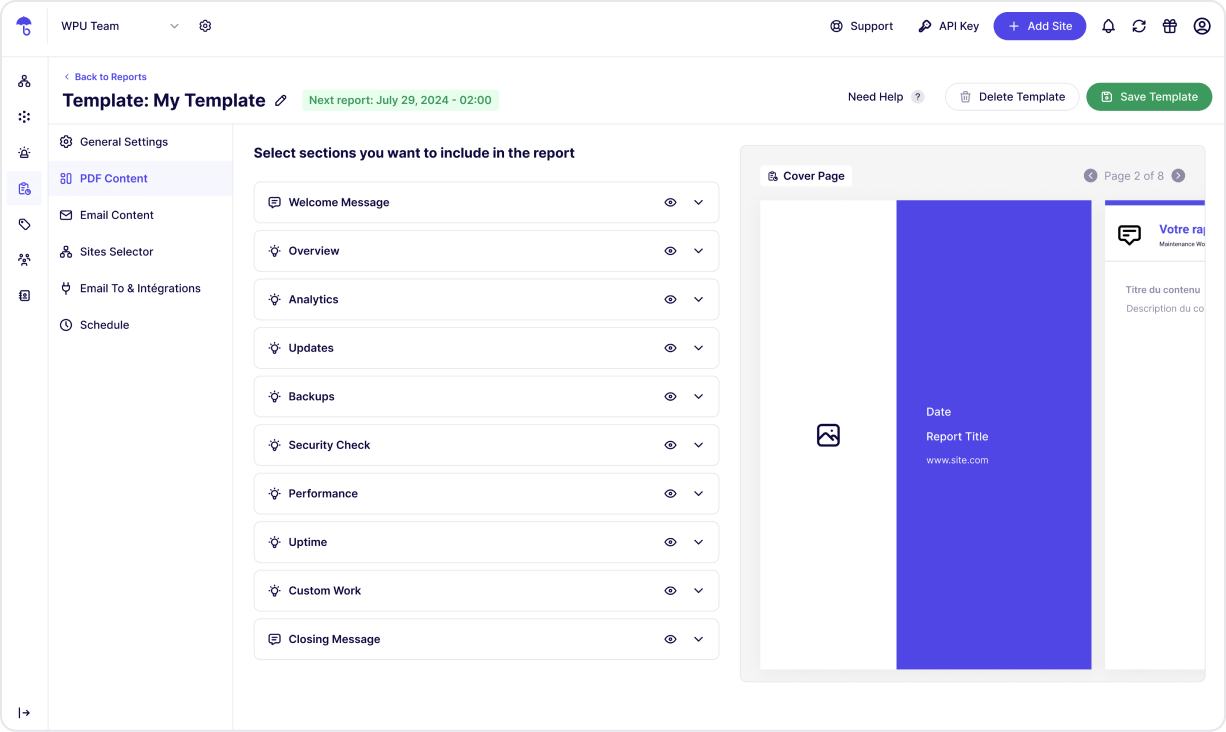
- Reports: automate your reporting on update, GDPR backup, uptime, etc.
WP Umbrella is the best alternative to ManageWP, MainWP, WP Remote, InfiniteWP and ModularDS.
WordPress Management Features
- Multiple Sites Management: manage and log into your WordPress sites with a unified dashboard.
- Update Management: Bulk update plugins, and themes in 1-click. Rollback included.
- Backup and Restoration: automated and scheduled backups. Backup WordPress now!
- Comprehensive Monitoring: From uptime to WordPress errors.
Premium / Freemium
Create an account and enjoy 14 day trial with all features (backup, uptime monitoring, safe update, etc). Then you only have access to our health check.
Installation
Minimum Requirements for WP Umbrella
- WordPress 5.8 or greater
- PHP version 7.4 or greater
Screenshots
Faq
WP Umbrella is an all-in-one tool for managing multiple WordPress sites. Save time with centralized backup, monitoring, updates, and restoration. Perfect for developers and agencies managing multiple sites.
Routine maintenance keeps WordPress sites secure, updated, and optimized. WP Umbrella makes site management simple with automated backups, uptime monitoring, and bulk updates.
WPumbrella offers GDPR-compliant backups on Google Cloud servers in Europe. Our GDPR backup system store your backups during 50 days. Our GDPR backups are incremental and the backup encrypted.
WP Umbrella’s update manager lets you update all plugins, themes, and WordPress core across multiple sites in one click. Rollback, Enable or disable automatic updates as needed.
WP Umbrella includes uptime and downtime alerts, performance checks, and Google PageSpeed insights. Get notified instantly for any site issues, allowing quick resolutions. Read our guide about WordPress monitoring! for more info.
We suggest you to read our guide about How to manage multiple WordPress sites easily
Yes, WP Umbrella fully supports Multisite networks, allowing backups, updates, and monitoring across all sites in a network.
WP Umbrella is faster, and more reliable than alternatives like ManageWP, MainWP, and WP Remote. Features include accurate monitoring (no false positives), GDPR backups, and a user-friendly dashboard.
You can report security bugs through the Patchstack Vulnerability Disclosure Program. The Patchstack team helps validate, triage and handle any security vulnerabilities. Report a security vulnerability.
Reviews
Useful set of features, reasonable price
By 
Since I support startups, nonprofits, and charities, I’ve tried many solutions over the years. WP Umbrella offers a very useful set of features at a reasonable price. It works exactly as expected, and every question I had was answered quickly by the support team. I can fully recommend it!
Smooth experience
By 
After several hiccups with ManageWP I decided to migrate to WP Umbrella.
I have about a dozen sites to maintain and the experience has been a lot smoother so far.
Très bon outil, très bon support
By 
Un excellent outil tout en un pour gérer les maintenances de dizaines de sites d'un seul coup. Les mises à jour sont régulières, les nouvelles fonctionnalités pertinentes, ça change de l'ancien outil que nous utilisions auparavant qui se reposait sur ses lauriers et devenait un peu dépassé !
Unparalleled Support
By 
I did a 30-day trial to decide whether to move from ManageWP to WP Umbrella, and I spent most of it testing their patience: endless questions, bug reports, and feature requests. They handled every one of them quickly and they took my suggestions seriously enough that several were implemented before the trial was even over. The bugs I reported were also generally fixed within a few days. And they always seemed genuinely happy to help. I honestly wasn't expecting support that good.
The features impressed me too. There's very little ManageWP did that WP Umbrella doesn't, and where the two overlap, WP Umbrella is simply nicer to use. The reporting templates are better looking, and the interface as a whole appeals to my design sense in a way ManageWP never did.
Could they do some things better? Probably. But they maintain a public roadmap and they're actively improving the product.
I've switched, I'm happy, and I'm looking forward to being able to better support my clients with their help.
Smooth migration from ManageWP - dozens of sites, excellent support
By 
I migrated dozens of client sites from ManageWP to WP Umbrella after an
update broke my old setup, and the experience exceeded my expectations.
Their free migration service did the heavy lifting: the support team moved
all my sites, clients and tags within a day, and communication was fast,
personal and to the point. When a coupon code didn't work at checkout, they
fixed it on their end within hours.
The dashboard is modern and fast, a big step up from what I was used to.
Uptime monitoring, vulnerability scans, safe updates with automatic
rollback and white-label client reports are all included, and the plugin
itself is lightweight with just an API key to set up.
A pleasant surprise: sites hosted on certain partner hosts are excluded
from billing entirely, which cut my monthly cost noticeably. Pay-as-you-go
pricing means I only pay for what I actually manage.
Running an agency with a large WordPress portfolio, this is
exactly the maintenance layer I needed. Highly recommended.
Great platform
By 
I moved to WP-U from ManageWP which went downhill. WP-U is a great platform and keeps being developed to add new features. I'd recommend giving it a try.
This makes sense!
By 
The best thing about WP Umbrella isn't its ease of use, the great admin interface, or the peace of mind you feel knowing that all your websites are secure—it's the friendly and helpful team that goes above and beyond to answer any questions and guides you all the way to a solution.
A Game-Changer for Our Agency’s WordPress Maintenance!
By 
We’ve been using WP Umbrella for our agency, and it has made our daily workflow significantly easier and much more efficient. Managing multiple client sites used to be a time-consuming hassle, but WP Umbrella brings everything together into a clean, intuitive dashboard.
The automated backups, uptime monitoring, and bulk update features save us hours every week. What really gives us total peace of mind, though, is pairing WP Umbrella with Patchstack. Together, they form the ultimate dynamic duo: WP Umbrella handles smooth management and backups, while Patchstack keeps security locked down tight. We know our client sites are fully protected and running smoothly 24/7.
On top of that, their customer support is absolutely top-tier! Whenever we have a question, the response is lightning-fast, super helpful, and friendly.
If you run an agency or manage multiple WordPress sites, WP Umbrella is an absolute must-have tool. Highly recommended!
Great tool
By 
I'm very happy with WP Umbrella, it's a great tool for my webdesign business. The support team is very helpful and prompt to reply which is a big help!
Great platform
By 
2–3 years ago, we migrated from ManageWP to WP Umbrella, and it was one of the best decisions we've made. We're more than happy with the platform. It's stable, packed with useful features, and the support team is fantastic, always quick to respond and genuinely helpful. Highly recommended!
Changelog
2.28.0 (10-06-2026)
- New: WP Umbrella can now detect and install your translation updates, for every language or for one language at a time.
- New: a WordPress core update can now install the security release of your current branch instead of the latest major version.
- New: the WP Umbrella onboarding and settings screens are now available in French.
- New: WP Umbrella now recognizes every site of your WordPress Multisite network.
- Improved: backups send your files much faster.
- Improved: the FlyingPress cache is now cleared after an update.
- Fixed: available updates of some premium plugins, such as PixelYourSite Pro and SeedProd Pro, were not shown in your dashboard.
- Fixed: a plugin update that WordPress refused before changing anything no longer triggers a rollback and now shows the real reason.
- Fixed: an update that WordPress did not offer at that moment could be reported as already done.
- Fixed: a slow plugin update could be rolled back while it was still being installed.
- Fixed: a WordPress core update now stops with a clear message when your server cannot run the new version.
- Fixed: a redirect rule pointing to its own source could send your whole site into a redirect loop.
- Fixed: a redirect rule leading to the login page was deleted at the next sync.
- Fixed: the two-factor authentication section could stop your profile from saving.
- Fixed: clearing the cache ended on a fatal error when LiteSpeed Cache was deactivated but its object cache was still in place.
- Fixed: a fatal error could occur alongside plugins that ship their own copy of Action Scheduler, such as Popup Maker Pro.
2.27.4 (09-18-2026)
- Fixed: the white label settings could stay on an outdated value and keep showing the plugin in your admin.
- Fixed: a site whose WordPress folder layout changed could no longer be reconnected.
- Fixed: the file editor was reported as protected on a host that locks the setting itself.
- Fixed: deleting WP Umbrella now removes everything it leaves behind, on every site of a network.
- Fixed: the activity log could stop updating on some sites.
- Fixed: the connection form now tells you when the page has been left open too long, instead of doing nothing.
- Fixed: two-factor authentication stayed off on sites running Wordfence, Defender or Really Simple Security, even when those plugins were installed but not asking anyone for a code.
- Improved: backups run faster, and an interrupted backup resumes faster.
- Improved: a restoration checks the free disk space before it starts.
- Improved: WP Umbrella now tells you, in your dashboard and in your WordPress admin, when another plugin already handles two-factor authentication and ours is standing aside.
2.27.3 (09-04-2026)
- New: the page cache is now cleared after an update on WP Engine.
- Fixed: a WordPress core update could report success without updating the site.
- Fixed: a site could report itself up to date while a new WordPress version was available.
- Fixed: a failed core update now tells you why.
- Fixed: updates failed on a WordPress Multisite hosted on WP Engine.
- Fixed: a PHP notice could turn a request into a fatal error on a site using a Redis object cache.
- Fixed: PHP warnings written to your logs on hosts that restrict the OPcache API.
- Fixed: deleting WP Umbrella could stop on a critical error and leave its settings and tables behind.
- Improved: PHP errors are sent in batches by a background task, and no longer weigh on every page of your site.
2.27.2 (08-25-2026)
- Security: hardening across the login protections, the two-factor requirement and the plugin’s internal requests.
- Changed: the login protections now follow the account that logged in rather than the address it came from. You can clear a block from WP Umbrella.
- Improved: expired transients are cleaned in batches, and a burst of XML-RPC calls is recorded as a single activity log entry.
- New: two-factor authentication for administrators, free and built in. Turn it on from WP Umbrella or from the plugin settings: each administrator scans a QR code at their next login, then enters a six-digit code. Ten single-use recovery codes are issued during setup and can be regenerated from the WordPress profile.
- New: an administrator can reset someone else’s second factor from that user’s profile screen, or on the command line with: wp wp-umbrella 2fa-reset jane@example.com
- Note: while the requirement is on, administrators can no longer log in through XML-RPC or with an application password, since neither can ask for a code. One-click access keeps working, turn off 1-Click Access if you want the code to be the only way in. If another two-factor plugin is active, WP Umbrella stands down and says so.
- New: clear the blocked IP addresses your site is holding, straight from WP Umbrella.
- Fixed: the changelog of a premium plugin bought on WooCommerce.com is now found, instead of being reported as never published.
- Improved: a changelog opens on the most recent releases rather than the plugin’s entire history, and a short release note is shown when there is no full changelog.
2.27.1 (08-14-2026)
- Improved: the “Disable XML-RPC” option now rejects every XML-RPC request, and the “Block user enumeration” option now also covers author archives, feeds and oEmbed responses.
- Fixed: a hardening option could switch itself back off shortly after you enabled it, on a site that was working perfectly well. When your server only accepts part of the rules, the option now stays on and tells you it is partially applied.
- Fixed: behind a CDN, comment protection was checking the address of the CDN instead of the visitor.
- Improved: a backup now reports an error right away when the server refuses to write a database table, instead of carrying on.
- Fixed: a restoration could finish without telling you that a database table had not been written.
- Fixed: cloning a site to a destination hosted on WP Engine could fail to write files.
- Improved: the hosting provider displayed for your site is now checked against your server name, so a site moved to another host no longer keeps its previous provider.
- Improved: code quality improvements under the hood.
2.27.0 (08-10-2026)
- Security: fixed a cross-site request forgery vulnerability.
- Added: WP Umbrella now reports the code that runs on your site without ever showing up in your plugin list: must-use plugins, drop-ins, and plugin folders hidden from the plugins screen.
- Added: files edited from the WordPress plugin editor are now recorded in your Activity Log.
- Improved: suspicious administrator accounts are now reported with a confidence level, so a single weak signal no longer raises an alert.
- Improved: the protection of your uploads folder is now verified on your live site, so sites served behind a reverse proxy no longer show protections that were not actually applied.
- Fixed: on sites where WordPress is installed in a subfolder, the .htaccess hardening could not be turned on and wrongly reported the file as not writable.
- Improved: the security headers are now set by your server, so they still apply on pages delivered by a cache plugin.
- Improved: code quality improvements under the hood.
2.26.2 (08-07-2026)
- Fixed: some sites stopped syncing with WP Umbrella and appeared as disconnected when another plugin reported its update information in an unexpected format.
- Fixed: on sites where the uploads folder is a symbolic link, media files were missing from backups. Those sites are now backed up in full.
- Added: backups now work on Pantheon, whose read-only file system previously prevented them from running.
- Fixed: some plugins caused PHP fatal errors during our sync because our plugin loaded the admin screens too early.
- Fixed: a recurring PHP error was reported once and then went unnoticed. Recurring errors are now reported again.
- Improved: clearer message when your site cannot reach WP Umbrella while connecting it.
2.26.1 (07-30-2026)
- Added: new security checks that detect suspicious administrator accounts and list their active application passwords.
- Improved: the uploads folder is now protected against running malicious files.
- Improved: comment spam from known attacker IP addresses is blocked before it reaches your site.
- Improved: repeated failed login attempts now trigger progressively longer lockouts.
- Fixed: some files could be wrongly excluded from backups because of their file name.
- Fixed: updates no longer leave temporary backup folders behind, and updates that require a newer WordPress or PHP version are clearly identified instead of failing.
- Improved: smaller fixes to the Activity Log, database optimization, and PHP warnings.
2.26.0 (07-24-2026)
- Improved: security protections now record the attacks they stop (blocked login attempts, XML-RPC calls, and user enumeration scans) in your Activity Log, so you can see what WP Umbrella blocked for you.
- Improved: strengthened the security of the connection between your site and WP Umbrella.
- Added: an expanded .htaccess hardening option, validated safely before it is applied to your site.
- Fixed: a restoration that only partially imported the database is no longer reported as successful.
- Improved: backups now gather more information while building the backup script, so we can detect upfront what would prevent a backup from completing.
2.25.1 (07-15-2026)
- Added: a security option to block installing, updating, and editing plugins and themes from the WordPress admin.
- Added: a security option to disable XML-RPC, reducing a common attack surface on your site.
- Added: security checks.
- Fixed: updated the bundled task scheduler so it no longer triggers PHP 8.4 and 8.5 deprecation notices, keeping your debug log clean and preparing for future PHP versions.
2.25.0 (07-07-2026)
- Added: security hardening options you can enable per site from the dashboard: hide the WordPress version, block user enumeration, mask login error details, disable the file editor, and add recommended security headers.
- Fixed: updates for some premium plugins could fail silently even with a valid license; they now install reliably.
- Fixed: reconnecting an already-paired site no longer creates a duplicate in your dashboard.
- Fixed: improved interrupted backups.
- Improved: backups adapt their pace to your server and stuck backups are detected sooner.
- Improved: the Activity Log now tracks WordPress 7.0 AI configuration changes.
2.24.4 (06-23-2026)
- Added: a pre-restore check that warns you when the saved database settings do not match your site’s current database, so a restoration cannot silently target the wrong database.
- Fixed: one-click plugin and theme updates now go through reliably on sites protected by HTTP Basic Authentication, behind LiteSpeed, or with a strict maintenance setup, where they could previously stall.
- Fixed: restoring or cloning a site no longer fails when the database uses a newer MySQL 8 collation.
- Fixed: backups now locate your site’s content correctly on installations that use a custom content directory.
- Fixed: during bulk updates, one plugin’s update can no longer be matched against another plugin’s version.
- Improved: SiteGround integration
2.24.3 (06-10-2026)
- Fixed: updating several plugins in a row no longer fails after the first one on some hosting setups.
- Fixed: updates are no longer reported as failed when the plugin or theme was already at the latest version.
- Fixed: broken link highlighting now works on sites served from a page cache.
- Improved: premium plugin and theme updates are more reliable.
- Improved: when no update is actually available for a plugin or theme, the task now ends quickly with a clear explanation.
- Improved: a working site is no longer rolled back when an update finishes without changing the version.
- Improved: failed updates are reported faster, with a clearer explanation of the most likely cause.
- Improved: connecting a site now surfaces PHP errors detected on it, to make troubleshooting easier.
- Improved: clearing the cache from WP Umbrella now also flushes Redis and Memcached object caches.
Full changelog available Here!