WP Keap/Infusionsoft WooCommerce Plugin

WP Keap/Infusionsoft WooCommerce Plugin
Description
Easily create contact, company, Order in Keap/Infusionsoft when an order is placed via WooCommerce. Learn more at crmperks.com
Keap/Infusionsoft WooCommerce Plugin Setup
- Go to WooCommerce -> Settings -> Keap/Infusionsoft tab then add new account. View ScreenShots for Connecting Keap/Infusionsoft.
- Go to WooCommerce -> Keap/Infusionsoft Feeds tab then create new feed. View ScreenShots for Creating feeds
- Map required Keap/Infusionsoft fields to WooCommerce Order fields.
- Send your test entry to Keap/Infusionsoft.
- Go to WooCommerce -> Keap/Infusionsoft Logs and verify, if entry was sent to Keap/Infusionsoft.
Connect Keap/Infusionsoft Account
Connect Keap/Infusionsoft Account to WooCommerce by simply oauth 2.0 authentication. Also you can connect multiple Keap/Infusionsoft-keap accounts.
Fields Mapping
Simply Select Keap/Infusionsoft Object then map WooCommerce Order fields to Keap/Infusionsoft Object(Contact, Comapny etc) fields.
Export Event
Choose event, when WooCommerce Order data should be sent to Keap/Infusionsoft. For example , send WooCommerce Order to Keap/Infusionsoft when Order status changes to “Complete”.
CRM Logs
Plugin saves detailed log of each WooCommerce Order whether sent or not sent to Keap/Infusionsoft and easily resend any Order to Keap/Infusionsoft.
Keap/Infusionsoft Primary Key
Instead of creating new Object(Contact, Company etc) in infusionsoft/Keap, you can update old object by setting Primary Key field.
Error Reporting
If there is an error while sending data to Keap/Infusionsoft, an email containing the error details will be sent to the specified email address.
Filter orders
By default all Woocommerce orders are sent to Keap/Infusionsoft, but you can apply filters and setup rules to limit the orders sent to Keap/Infusionsoft. For example sending Orders from specific city to Keap/Infusionsoft.
Send Data As Notes
Send one to many WooCommerce Order fields data as Contact Note in infusionsoft/Keap.
Premium Version.
Following features are available in Premium version only.Keap/Infusionsoft WooCommerce Plugin Pro
- Send WooCommerce Orders to Keap/Infusionsoft Orders.
- Send WooCommerce Users to Keap/Infusionsoft.
- Keap/Infusionsoft Custom fields.
- Assign Tags to Contacts based on different conditions.
- Keap/Infusionsoft Phone Number fields.
- Assign Lead Source to Contact in Keap/Infusionsoft.
- Affiliates tracking in Keap/Infusionsoft.
- Track Google Analytics Parameters and Geolocation of a WooCommerce customer.
- Lookup lead’s email and phone number using popular email and phone lookup services.
Premium Addons
We have 20+ premium addons and new ones being added regularly, it’s likely we have everything you’ll ever need.View All Add-ons
Want to send data to other crm
We have Premium Extensions for 20+ CRMs.View All CRM Extensions
Our free Keap/Infusionsoft Plugins
Screenshots

Connect Keap/Infusionsoft Account.

Map Keap/Infusionsoft Fields to WooCommerce Order fields.
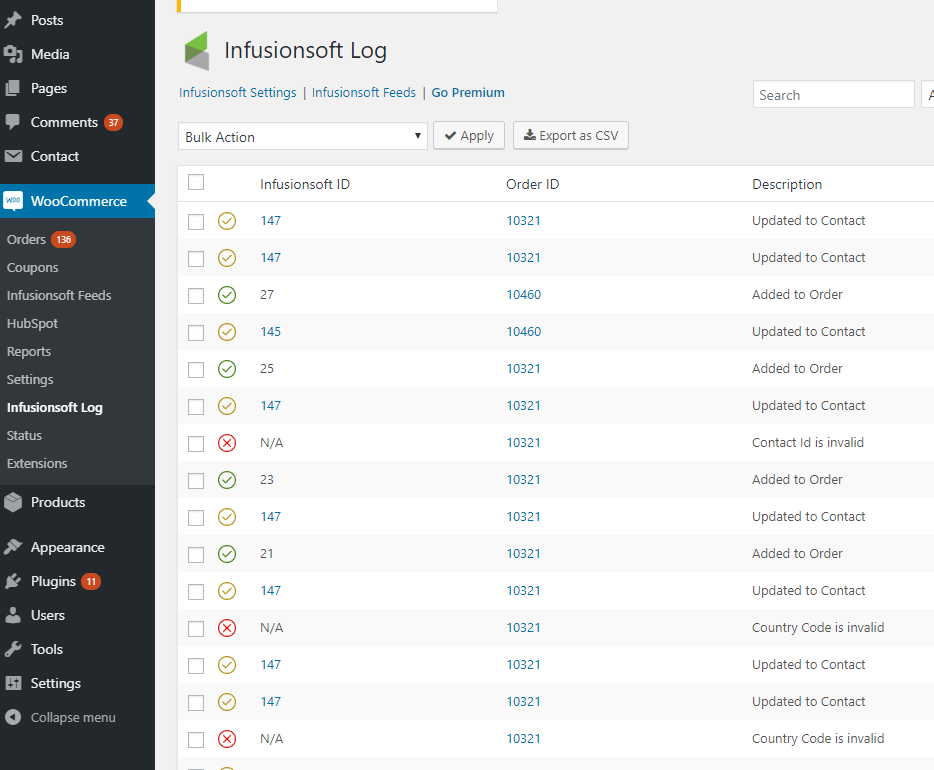
Keap/Infusionsoft logs.

Send WooCommerce Order to Keap/Infusionsoft.

Get Customer's email infomation from Full Contact(Premium feature).

Get Customer's geolocation, browser and OS (Premium feature).
Faq
Our team provides free support at https://www.crmperks.com/contact-us/.
WooCommerce integration with Keap/Keap/Infusionsoft is very easy. Connect Keap/Keap/Infusionsoft account, Select Keap/Infusionsoft Object(Contact, Company, Order) then map WooCommerce Orders fields to Keap/Infusionsoft object fields.
WooCommerce is a free ecommerce store for wordpress and Keap/Keap/Infusionsoft is a popuplar crm, you can integrate your Woocommerce Store and Keap/Keap/Infusionsoft account with this free Keap/Keap/Infusionsoft WooCommerce Plugin.
- Go to Woocommerce Settings then select “Keap/Infusionsoft” Tab.
- Click “Add new account” then connect your infusionsoft account.
- Go to Keap/Infusionsoft feeds, create new feed , select infusionsoft account and Object then map Keap/Infusionsoft fields to Woocommerce fields.
- Save feed then open any Woocommerce Order and click “Send to Keap/Infusionsoft” button.
- Go to infusionsoft Logs and verify if order was sent to infusionsoft.
Reviews
Great Plugin!
By 
The plugin works great in sending all the data you need from WooCommerce to Keap, and support is helpful when issues arise.
Very helpful team
By 
Team was extremely helpful in the final setup and configuration of the plugin. Corrected issues with my system that I would never have been able to correct. Bravo!
Great Customer Support
By 
The support team for the plugin demonstrates remarkable responsiveness and expertise. Whenever I faced a question or encountered an issue, their assistance and solutions were swiftly provided, ensuring that I could fully leverage the plugin's features.
Amazing plugin and customer service.
By 
Awful
By 
Excellent customer service, and plugin works as expected
By 
Great Plugin, Great Service
By 
thanks
By 
Amazing support
By 
Changelog
1.2.1
- fixed “sanitize sql orderby” issue.
1.2.0
- fixed “recreate missing db tables and permissions” issue.
1.1.9
- fixed “CSRF issue with logs page”.
1.1.8
- fixed “tags conditions not saving” issue.
1.1.7
- added “phone and product ID” fields.
1.1.6
- fixed “htmlentity error when creating product” issue.
1.1.5
- fixed company field issue.
1.1.4
- fixed tags issue in feed.
- fixed “order fee empty” issue.
1.1.3
- fixed “undefined order_total” issue.
1.1.2
- fixed “fatal error in search”.
- fixed “product fatal error” issue.
1.1.1
- fixed “tags conditions” issue.
1.1.0
- fixed “woo and infusionsoft Order Total missmatch issue”.
1.0.9
- fixed developer app issue.
1.0.8
- fixed product cost issue.
1.0.7
- fixed php8 issues.
1.0.6
- fixed “float as string in mysql” issue.
1.0.5
- fixed variation title issue.
1.0.4
- fixed affiliate Order field.
1.0.3
- fixed user_id issue for Note.
- added Primary Key for Keap/Infusionsoft Order.
1.0.2
- added owner_id field.
- fixed “CompanyName” field as primary key in “Company” object.
1.0.1
- append notes to person notes field instead of notes list.
1.0.0
- Initial release.