WP Job Manager

WP Job Manager
Description
WP Job Manager is a lightweight job listing plugin for adding job board functionality to your WordPress site. Being shortcode based, it can work with any theme (given a bit of CSS styling) and is really simple to setup.
Features
- Add, manage, and categorize job listings using the familiar WordPress UI.
- Searchable & filterable ajax powered job listings added to your pages via shortcodes.
- Frontend forms for guests and registered users to submit & manage job listings.
- Allow job listers to preview their listing before it goes live. The preview matches the appearance of a live job listing.
- Each listing can be tied to an email or website address so that job seekers can apply to the jobs.
- Searches also display RSS links to allow job seekers to be alerted to new jobs matching their search.
- Allow logged in employers to view, edit, mark filled, or delete their active job listings.
- Job statistics for employers about job listing views and search impressions.
- Developer friendly code – Custom post types, endpoints & template files.
The plugin comes with several shortcodes to output jobs in various formats, and since its built with Custom Post Types you are free to extend it further through themes.
Read more about WP Job Manager.
Documentation
Documentation for the core plugin and extensions can be found on the docs site here. Please take a look before requesting support because it covers all frequently asked questions!
Demo
For a real-life example site, check out jobs.blog, built by the WP Job Manager team! To try out the plugin in an expendable demo site, click the Live Preview button above.
Extensions
The core WP Job Manager plugin is free and always will be. It covers all functionality we consider ‘core’ to running a simple job board site.
Additional, advanced functionality is available through extensions. Not only do these extend the usefulness of the core plugin, they also help fund the development and support of core.
You can browse available extensions after installing the plugin by going to Job Manager > Marketplace. Our popular extensions include:
Allow candidates to apply to jobs using a form & employers to view and manage the applications from their job dashboard.
Paid listing functionality powered by WooCommerce. Create custom job packages which can be purchased or redeemed during job submission. Requires the WooCommerce plugin.
Resume Manager is a plugin built on top of WP Job Manager which adds a resume submission form to your site and resume listings, all manageable from WordPress admin.
Allow registered users to save their job searches and create alerts which send new jobs via email daily, weekly or fortnightly.
You can get the above extensions and several others at discount with our WPJM Pro Bundle. Take a look!
Contributing and reporting bugs
You can contribute code to this plugin via GitHub: https://github.com/Automattic/WP-Job-Manager and localizations via https://translate.wordpress.org/projects/wp-plugins/wp-job-manager
Thanks to all of our contributors.
Support
Use the WordPress.org forums for community support where we try to help all users. If you spot a bug, you can log it (or fix it) on Github where we can act upon them more efficiently.
If you need help with one of our extensions, please raise a ticket in our help desk.
If you want help with a customization, please consider hiring a developer! http://jobs.wordpress.net/ is a good place to start.
Installation
Automatic installation
Automatic installation is the easiest option as WordPress handles the file transfers itself and you don’t even need to leave your web browser. To do an automatic install, log in to your WordPress admin panel, navigate to the Plugins menu and click Add New.
In the search field type “WP Job Manager” and click Search Plugins. Once you’ve found the plugin you can view details about it such as the point release, rating and description. Most importantly of course, you can install it by clicking Install Now.
Manual installation
The manual installation method involves downloading the plugin and uploading it to your web server via your favorite FTP application.
- Download the plugin file to your computer and unzip it
- Using an FTP program, or your hosting control panel, upload the unzipped plugin folder to your WordPress installation’s
wp-content/plugins/directory. - Activate the plugin from the Plugins menu within the WordPress admin.
Getting started
Once installed:
- Create a page called “jobs” and inside place the
[jobs]shortcode. This will list your jobs. - Create a page called “submit job” and inside place the
[submit_job_form]shortcode if you want front-end submissions. - Create a page called “job dashboard” and inside place the
[job_dashboard]shortcode for logged in users to manage their listings.
Note when using shortcodes, if the content looks blown up/spaced out/poorly styled, edit your page and above the visual editor click on the ‘text’ tab. Then remove any ‘pre’ or ‘code’ tags wrapping your shortcode.
For more information, read the documentation.
Screenshots

The submit job form.

Submit job preview.

A single job listing.
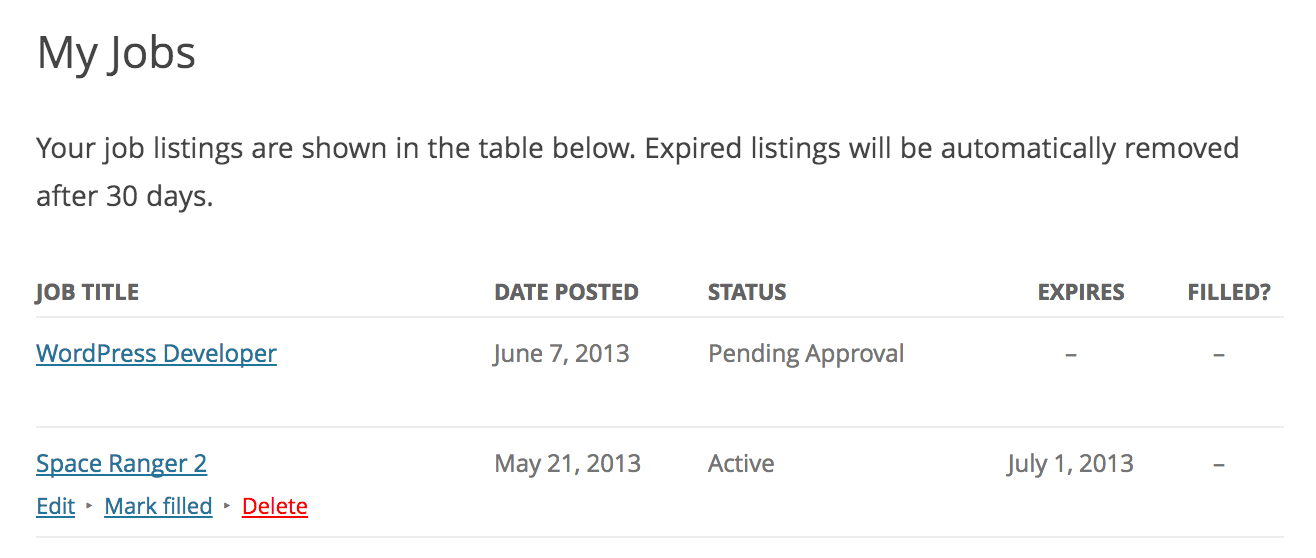
Job dashboard.

Job listings and filters.

Job listings in admin.
Faq
View the getting installation and setup guide for advice getting started with the plugin. In most cases it’s just a case of adding some shortcodes to your pages!
Yes! If you don’t setup the [submit_job_form] shortcode, you can just post from the admin backend.
There are several ways to customize the job application process in WP Job Manager, including using some extra plugins (some are free on WordPress.org).
See: Customizing the Job Application Process
There are three ways to customize the fields in WP Job Manager;
- For simple text changes, using a localisation file or a plugin such as https://wordpress.org/plugins/say-what/
- For field changes, or adding new fields, using functions/filters inside your theme’s functions.php file: https://wpjobmanager.com/document/editing-job-submission-fields/
- Use a 3rd party plugin such as https://plugins.smyl.es/wp-job-manager-field-editor/ which has a UI for field editing.
If you’d like to learn about WordPress filters, here is a great place to start: https://developer.wordpress.org/plugins/hooks/filters/
If you wish to be notified of new postings on your site you can use a plugin such as Post Status Notifier.
You can view (and contribute) translations via the translate.wordpress.org.
Block themes have no classic Widgets screen, but you can still add the Recent Jobs and Featured Jobs widgets through the Site Editor. Go to Appearance Editor, open a template or template part, add the Legacy Widget block from the inserter, and choose Recent Jobs or Featured Jobs. The widget’s settings and preview appear right in the editor, just as they do on a classic theme.
Reviews
Please Allow Button Label Edits & More Customizations
By 
Overall, this is a good plug-in and very helpful. I just wish there was more customizations that can be done specifically one thing I would like to do is be able to edit with the button text throughout the system. Some of them don't really make any sense. Like for example, when someone submitting a job it says preview, but that makes the user think that all they're doing is previewing it and they're not taking the next step towards submission. I would like to change that button into Preview and submit job to make it more clear. Another example would be allowing for making the link opening a new tab, changing link colors and a variety of other things. Adding more options in settings like this would be helpful.
Also having more common page builder support like the Elementor theme builder to allow for custom page design would be helpful. I could also see ACF/SCF integration being really helpful as well.
THis app is a shirt show
By 
Formatting and style is a mess. You're going to have to do a lot of work to get it to display correctly. It's not plug and play. I did a TON of work and code correction. When I finnaly got a job posted and tested it. I clicked a job listing to apply and thse giant black mushroom type graphics spread accross the full width of the page displayed. You had to scroll down 3 pages worth to see the job listing - which was also full PC screen width.
Excellent
By 
That was very helpful
A MESS.
By 
Are these developers kidding me? I can't log into my account on their site, I can't post in their stupid support forum, and immediately out of the gate after installing this software my clients are having ridiculous tech issues that make us look unprofessional, but I can't even get support for it! I even tried the support form on the Gravatar site and it's fake — when you hit submit it says you're not connected to the internet. Is this even a real app???
A good start
By 
WPJM will give you a good starting point for your site but requires a bit of custom development to make things the way you want.
I'm glad the project is open source, I will make some suggestions and PRs soon.
Disappointment and time lost
By 
WP Job Manager is a total disaster for any website aiming for a modern and professional look. The outdated, unattractive design of the job listings is a major turn-off for visitors. After trying to integrate it into popular WordPress themes like Avada, Astra, and Divi, I was met with a terrible result: the site looked cheap and unprofessional. To fix it to a decent standard, I would have to spend a fortune on a designer and developer.
The plugin developers must be living in the past because they've failed to update the design to meet current standards.This has led to a surge of scammers selling their 'premium' themes for WP Job Manager on platforms like ThemeForest. I personally bought Cariera, Jobify, and WorkScout - all of which turned out to be empty promises. These themes are unstable, display inconsistently across different browsers, and conflict with other essential WordPress plugins. Reaching out to the developers is like shouting into the void.
But the biggest issue is that WP Job Manager is completely unsuitable for niche-specific job boards. The lack of ability to add custom fields and filters is a crime for a plugin like this. I've had to resort to using additional plugins like WP Job Manager Field Editor and Search and Filtering for WP Job Manager, but they're just as buggy as the main plugin. And their developer never responds to support tickets. Developers, wake up! You've created a product that nobody needs in this state.
Can't log into account so can't get support
By 
The ridiculous requirement to log in with Gravatar has caused us to lose access to our account. Without account access, it's impossible to reach a human in support. Password reset links don't work, so you can't reset your password either. The whole system is a complete mess. This is a paid plugin and should include support, but if you get logged out, you're left with no support at all. Will find another pluging with proper support.
Solid Support
By 
Answered all of our questions in great detail and pointed us in the right direction on how to customize things.
A decent job listings plugin
By 
It's one of the best job listing plugins, and many job board themes are relying on it. However, you really need to have some dev experience to make it work for your specific case. That's where the premium plugins come into play.
Very Limited functionality
By 
The free version is limited to posting simple job board ads. Visitors can then click to email you to apply. The job application form is a paid add-on, but it is very limited to only hosting one form for all jobs. The back-end view for managers looking at job applicants is very limited as well. I expected more from Automatic.
Changelog
2.4.7 – 2026-09-03
- Fix company logo rendering at full size in the Job Listings admin table on WordPress 7.1. (#3099)
- Indicate WordPress 7.1 compatibility. (#3097)
- Fix JobPosting structured data (JSON-LD) being HTML-escaped, so job titles and descriptions are read correctly by search engines. (#3101)
- Fix a race condition that could allow the job submission limit to be exceeded. (#3013)
- Apply the View Job Capability to the promoted-jobs REST endpoints.
- Apply the View Job Capability to sitemaps.
- Restrict frontend logo attachments to the uploads directory.
- Clear unusable attachment values before re-rendering the job submission form.
- Update developer dependencies.
2.4.6 – 2026-08-19
- Allow reusing a submitter’s saved company logo on a new listing (#3082)
- Allow reusing a listing’s existing logo on edit when authored by another user (#3060)
- Fix notice dismiss button colliding with core styles (#3036)
- Fix unreadable notice-banner button text on Settings (#3029)
- Decode HTML entities in plain-text job title contexts (#3026)
- Indicate WordPress 7.0 compatibility (#3015)
- Verify the TLS certificate on the geocoding request (#3014)
- Exclude password-protected listings from the promoted jobs feed (#3012)
- Only accept a manual listing expiry from the gated admin edit (#3011)
-
Prevent the edit-job form from creating a new listing for an unauthorized or logged-out request.
-
Enforce company-logo attachment ownership when saving a job listing as a draft.
-
Apply the post-password check to the
[job]and[job_apply]shortcodes.
2.4.5 – 2026-07-01
- Escape URLs in two sprintf href templates with esc_url() (#2996)
- Validate attachment ownership when reusing a company logo by ID (#2995)
- Honor restrictive filter_post_status=publish for logged-out visitors (#2994)
2.4.4 – 2026-06-24
- Fix: Restore the frontend styles and scripts that were missing from the 2.4.3 package. The 2.4.3 release was built without its compiled CSS and JavaScript, leaving the employer job dashboard unstyled and breaking frontend features such as the job application form. (#2990)
2.4.3 – 2026-06-24
- Apply the View Job Capability to WordPress search and oEmbed output.
- Apply the View Job Capability to the REST search endpoint (#2984)
- Fail closed correctly when an author filter resolves to no valid IDs (#2983)
- Apply the View Job Capability to job listing feeds (#2982)
- Enforce listing submission limit when publishing a previewed listing (#2981)
- Restore PHP 8.4 test coverage — modernise bootstrap error handler (#2970)
- Fix: Promote button
data-hrefattribute now correctly quoted in job listings table. - Fix: Promote URL in inline script now escaped with
esc_js(). - Author filter follow-up: centralize parsing, close AJAX array bypass (#2958)
- Add square-format hint and configurable max size for company logo uploads (#2957)
- “Remove “See what’s new in 2.3″ from Job Statistics Banner”
- New: The
[jobs]shortcode now supports anauthorattribute to filter listings by user ID (e.g.[jobs author="42"]or[jobs author="1,2,3"])