WP Multi Network

WP Multi Network
Description
Turn your WordPress Multisite installation into many multisite networks, surrounding one global set of users.
- Reveals hidden WordPress Multisite functionality.
- Includes a “Networks” top-level Network-Admin menu.
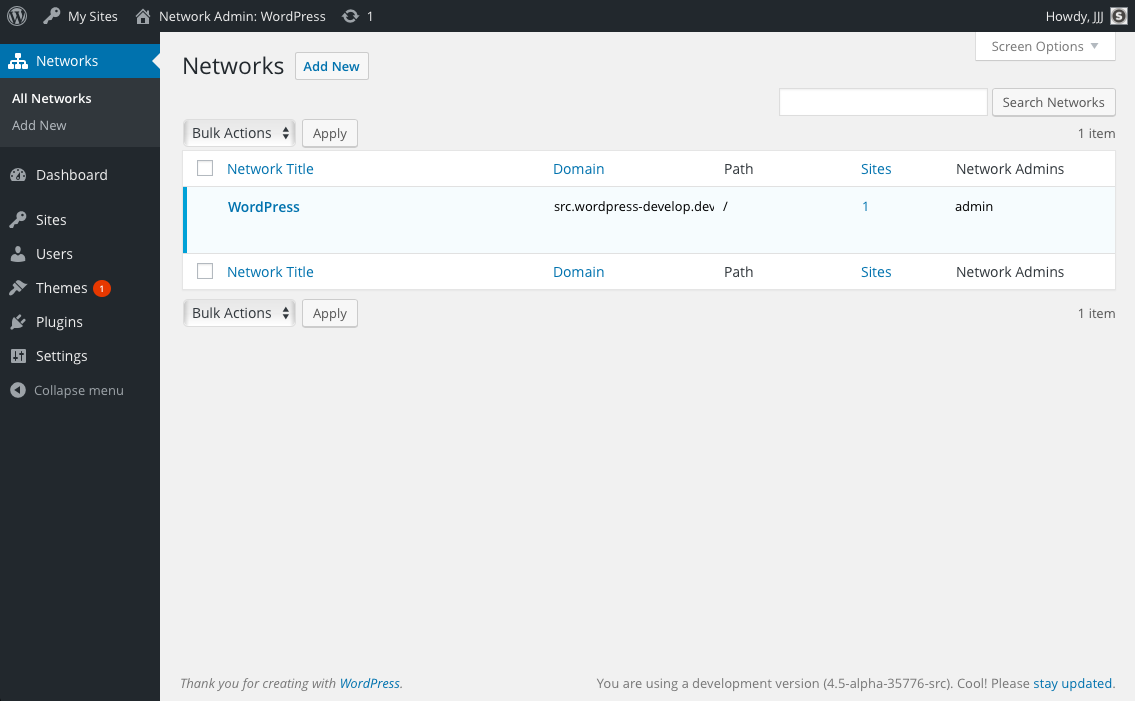
- Includes a List Table for viewing available networks.
- Allows moving subsites between networks.
- Allows global administrators to create new networks with their own sites and domain arrangements.
- Group sites into logical networks using nearly any combination of domain (example.org) and path (/site/).
Installation
- Download and install using the built in WordPress plugin installer.
- Activate in the “Plugins” network admin panel using the “Network Activate” link.
- Comment out the
DOMAIN_CURRENT_SITEline in yourwp-config.phpfile. If you don’t have this line, you probably need to enable multisite. - Start planning and creating your networks.
Screenshots


Faq
Yes you can. That is what this plugin does best!
Think of how WordPress.org works:
- wordpress.org
- make.wordpress.org/core
- buddypress.org
- codex.buddypress.org
- bbpress.org
- codex.bbpress.org
- wordcamp.org
- us.wordcamp.org/2021
Users are global, and they can login to any of those domains with the same login and password. Each of those domains has their own subdomains and subdirectories, many of which are sites or (networks of them).
You can activate it, but it won’t do anything. You need to have the multisite functionality enabled and working first.
Create a GitHub issue: https://github.com/stuttter/wp-multi-network/issues/new
For maximum flexibility, use something like…
// Multisite
define( 'MULTISITE',           true                  );
define( 'SUBDOMAIN_INSTALL',   false                 );
define( 'PATH_CURRENT_SITE',   '/'                   );
define( 'DOMAIN_CURRENT_SITE', $_SERVER['HTTP_HOST'] );

// Likely not needed anymore (your config may vary)
//define( 'SITE_ID_CURRENT_SITE', 1 );
//define( 'BLOG_ID_CURRENT_SITE', 1 );

// Un-comment and change to a URL to funnel no-site-found requests to
//define( 'NOBLOGREDIRECT', '/404/' );

/**
 * These are purposely set for maximum compatibility with multisite and
 * multi-network. Your config may vary.
 */
define( 'WP_HOME',    'https://' . $_SERVER['HTTP_HOST'] );
define( 'WP_SITEURL', 'https://' . $_SERVER['HTTP_HOST'] );
Use something like this to allow cookies to work across networks…
// Cookies
define( 'COOKIEHASH',         md5( 'yourrootdomain.com' ) );
define( 'COOKIE_DOMAIN',      'yourrootdomain.com'        );
define( 'ADMIN_COOKIE_PATH',  '/' );
define( 'COOKIEPATH',         '/' );
define( 'SITECOOKIEPATH',     '/' );
define( 'TEST_COOKIE',        'thing_test_cookie' );
define( 'AUTH_COOKIE',        'thing_'          . COOKIEHASH );
define( 'USER_COOKIE',        'thing_user_'     . COOKIEHASH );
define( 'PASS_COOKIE',        'thing_pass_'     . COOKIEHASH );
define( 'SECURE_AUTH_COOKIE', 'thing_sec_'      . COOKIEHASH );
define( 'LOGGED_IN_COOKIE',   'thing_logged_in' . COOKIEHASH );
As of version 3.5, new WordPress multisite installs use a more efficient way to serve uploaded files.
Unfortunately, this doesn’t play well with multiple networks (yet). Installs that upgraded from 3.4 or below are not affected.
WP Multi-Network needs to be running to help set the upload path for new sites, so all networks created with this plugin will have it network activated.
If you disable it on one of your networks, any new site you create on that network will store its uploaded files under that network’s main site’s uploads folder. It’s not pretty.
Just leave this plugin network-activated (or in mu-plugins) and it will take care of everything.
To achieve nested folder paths in this fashion network1/site1, network1/site2 etc,
please follow the steps in https://paulund.co.uk/wordpress-multisite-nested-paths to construct a custom sunrise.php (Thanks to https://paulund.co.uk for providing these steps).
Not much to talk about really. Check the code for details!
Reviews
Nice!
By 
I just started playing with Multi Networks and having all my projects (subfolders and different domains together) is just brilliant.
not ready for primetime
By 
Simple is Beautifull
By 
Use this for staging
By 
Really great but need Update !
By 
really great
By 
Great Plugin
By 
amazing plugin!
By 
Latest Update
By 
Works great, strong community & support
By 
WP Multi Network is a great toolset for managing multiple unique domain websites in wordpress under a common install.
The only hiccup I've run into is needing to download and perform manual install of plugin after attempting an admittedly sloppy WP upgrade to 4.6, but nobody's fault but mine for not following the wordpress basics of upgrading
This toolset has been working great for us to centralize wordpress publishing for our team from a number of different hosting providers to a centrally managed one.
Thanks to the WP Multi Network team for your work maintaining all this for us.
Changelog
3.0.0
- Add RTL and minified assets
- Add WordPress 6.8, 6.9, and trunk to PHPUnit test matrix
- Fix PHP 8 deprecated warnings
- Fix upload paths for older installations
- Fix sticky cache after changing a network’s domain/path
- Fix possible fatal error when switching networks
- Fix plugin not being activated on new networks when created via WP-CLI
2.5.3
- Remove filter_input usages
2.5.2
- Use get_main_site_id function instead of get_main_site_for_network.
- Tested against WordPress 6.1.
2.5.1
- Save main site on network as network option.
2.5.0
- Fix new networks sometimes not being created.
- Fix moving sites sometimes not working.
- Fix network name always being “New Network”.
- Fix several debug notices related to filter_input().
- Fix several redirection & admin-notice issues.
- Allow networks to be created with empty network name & site name.
- Update author link & plugin meta data.
2.4.2
- Update code for WordPress coding standards.
- Other small bug fixes.
2.4.1
- Update required PHP / wordpress versions.
2.4.0
- Add networks REST API endpoint.
2.3.0
- Add network capability mapping.
- Add WP CLI command.
- Other improvements.
2.2.1
- Fix upload paths still using blogs.dir.
2.2.0
- WordPress 4.9 minimum version bump.
- Fix bug preventing sites from being moved.
- Tweak some styling.
- Use more WordPress core functions for sites & networks.
2.1.0
- Add nonce checks to forms.
- Add validation & output sanitization to form fields.
2.0.0
- WordPress 4.6 minimum version bump.
- Caching improvements for WordPress 4.6.
- Refactor list tables & admin method code.
1.8.1
- Fix site reassignment metabox from moving sites incorrectly.
1.8.0
- Support for core compat functions.
- Fix bug causing site moves to break.
- Fix bug allowing duplicate site URLs.
- Remove _network_option() functions.
- Remove network.zero placeholder.
- WordPress 4.5 & 4.6 compatibility updates.
1.7.0
- WordPress 4.4 compatibility updates.
- Metabox overhaul.
- network.zero improvements.
- Fix site assignments.
- Various UI improvements.
- Global, class, function, and method cleanup.
1.6.1
- WordPress 4.3 UI compatibility updates.
- Remove site “Actions” column integration.
1.6.0
- Move inclusion to muplugins_loaded.
- Introduce network switching API.
- Introduce network options API.
- Update action links to better match sites list.
- Better support for domain mapping.
- Refactor file names & locations.
- Deprecate wpmn_fix_subsite_upload_path().
- Include basic WPCLI support.
- Escaped gettext output.
- Fix bulk network deletion.
- Scrutinized code formatting.
1.5.1
- Fix debug notices when creating networks.
- Fix incorrect variable usage causing weird output.
- Adds default path when creating new networks.
1.5
- Support for WordPress 3.8.
- Finally, a menu icon!
- Improved output sanitization.
1.4.1
- Fix issue when changing network domain or path – contributed by mgburns.
- Improve support for native uploaded file handling.
1.4
- Fix admin pages (let us know if you find something broken).
- Add support for WP 3.5+ upload handling – thanks, RavanH (see notes: “What’s up with uploads?”).
1.3.1
- Fix prepare() usages.
- Fix some debug notices.
1.3
- Refactor into smaller pieces.
- Add PHP docs.
- Deprecate functions for friendlier core-style functions.
- Code clean-up.
- Remove inline JavaScript.
1.2
- Implemented 3.1 Network Admin Menu, backwards compatibility maintained.
- Fix multiple minor issues.
- Add Site Admin and Network Admin to Network lists.
- Add various security and bullet proofing.
1.1
- Better WordPress 3.0 compatibility.
1.0
Getting started.