WP Multisite Content Copier/Updater

WP Multisite Content Copier/Updater
Description
WP Multisite Content Copier/Updater plugin is the best solution for copy/update posts and pages from one site (blog) to the other sites (blogs) in your WordPress Multisite Network.
Features
- Copy/Update posts and pages from one site to the other sites in your WordPress Multisite Network.
- Copy/Update posts.
- Copy/Update pages.
- Copy/Update terms (Categories and Tags) when post copy/update.
- Copy/Update parents posts, pages, tags and categories automatically.
- Copy/Update media (image, document file, etc…) when post or page copy/update.
- Bulk copy/update posts/pages from one site to the other sites.
PRO Features
- Copy/Update custom post type posts.
- Copy/Update users.
- Automatically copy/update custom terms when post, page, custom post type post copy/update.
- Automatically copy/update media (image, document file, etc…) when post, page, custom post type post copy/update.
- Exclude Meta Data (posts, pages and custom post type posts) option: Exclude meta data when copy/update with web sites.
- Bulk copy/update posts, pages, custom post type posts and users from one site to the other sites.
- Also support custom fields which is in posts, pages and custom post type posts.
Advanced Custom Fields (ACF) plugin and Custom Fields Support: Copy/Update custom fields which is in posts, pages and custom post type posts.
Others WordPress Multisite Network Sites Plugins
- WordPress Multisite Posts, Pages and Custom Post Type Posts Sync
- WooCommerce Multisite Product Sync
- WordPress Multisite User Sync/Unsync
- WooCommerce Multisite Content Copier/Updater
- Multisite Shared Media for WordPress
WordPress API Based Sync Plugins (WordPress Single Separate Sites)
Usage
Bulk Copy/Update: You can copy/update bulk posts/pages (public, private and future) from one site to the other sites. Please follow the below steps.
- Go to ‘Network Admin’ -> ‘Content Copier’ -> ‘Bulk Copy/Update’ OR ‘Network Admin’ -> ‘WMCC’ -> ‘Bulk Copy/Update’.
- You will see WP Multisite Content Copier page.
- Select content type (posts or pages).
- Select source site you want copy/update from.
- Add number of records per page.
- Click on ‘Filter’ button.
- You will see list of records.
- Select records you want copy/update.
- Select destination sites you want copy/update.
- Select extra option like Copy or update media, Copy or update terms (Categories & Tags).
- Click on ‘Copy/Update’ button.
Individual Copy/Update: You can copy/update individual posts/pages (public, private and future) from one site to the other sites. Please follow the below steps.
- Edit any post/page.
- You will see ‘WP Multisite Content Copier: Copy/Update Content’ section.
- Select destination sites you want copy/update.
- Select extra option like Copy or update media, Copy or update terms (Categories & Tags).
- Click on ‘Copy/Update’ button.
Installation
This plugin only works with WordPress Multisite, will not work in a single site, and must be network activated.
- Multi-domains. For example: example.site1, example.site2
- Sub-domains. For example: site1.example.com, site2.example.com
- Sub-directories. For example: example.com/site1, example.com/site2
WordPress Multisite Network Dashboard
- Go to ‘Network Admin’ -> ‘Plugins’ -> ‘Add New’.
- Click on ‘Upload Plugin’.
- Upload plugin zip.
- Activate plugin.
FTP, SFTP, SCP etc…
- Unzip plugin zip.
- Upload the unzip plugin folder to your ‘/wp-content/plugins/’ directory, using your favorite method (ftp, sftp, scp, etc…).
- Go to ‘Network Admin’ -> ‘Plugins’.
- Activate plugin.
Screenshots
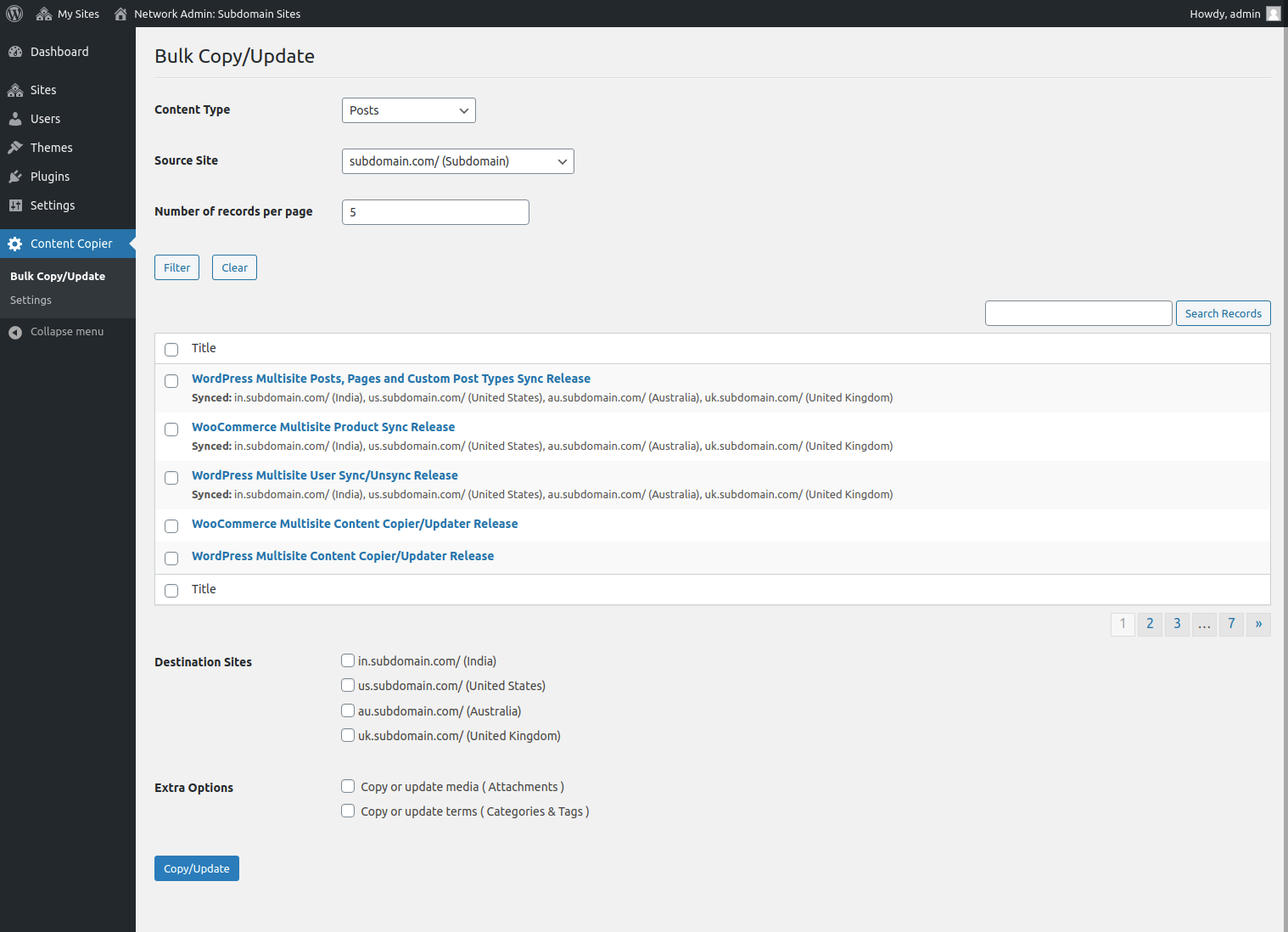
Bulk Copy/Update: You can copy/update bulk posts/pages (public, private and future) from one site to the other sites.
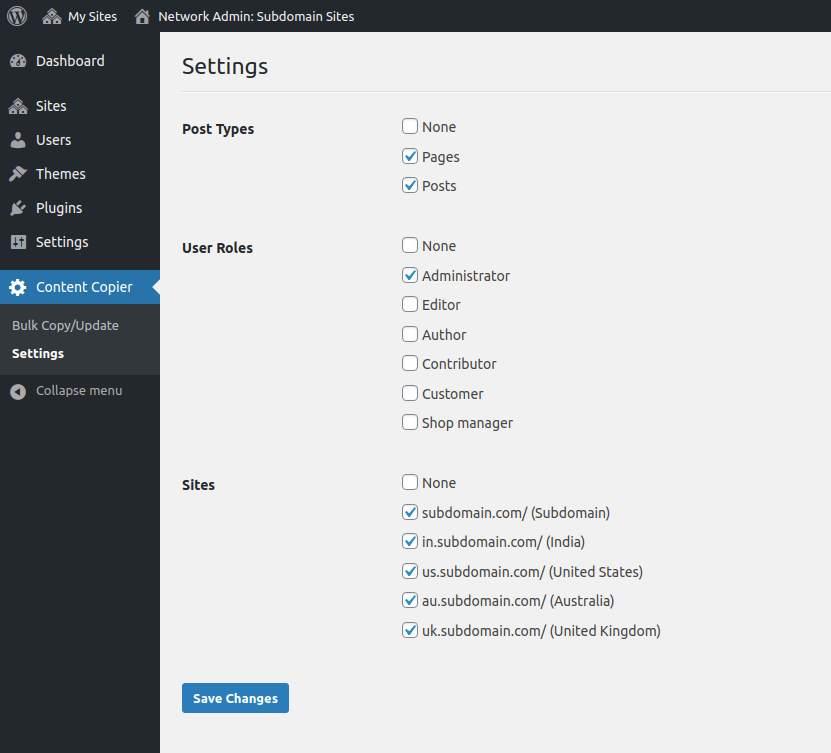
Individual Copy/Update: Settings
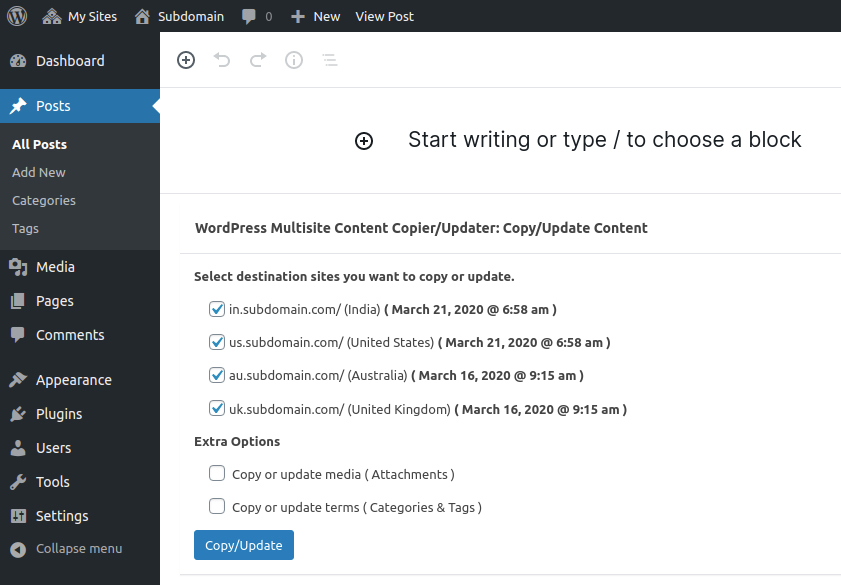
Individual Copy/Update: You can copy/update individual posts/pages (public, private and future) from one site to the other sites.
Reviews
Absolutely amazing!
By 
This is not a plugin. This is pure internet magic. Huge thanks for this. I wish I'd known about it years ago. So much better than the export/import feature.
Useful plugin
By 
This plugin had useful functions when we split off part of our main site, and moved some pages and content to a subsite.
Does not seem to work with Elementor
By 
The Elementor content/layout is broken in the copied page.
good
By 
Simply the best
By 
Spaghetticode mit einigen Bugs
By 
Outstanding
By 
Works like a charm!
By 
Simple way to create a copy
By 
Code Quality
By 
Changelog
2.0.2
- Security release.
1.5.0
- Security release.
1.4.0
- Maintenance release.
1.3.0
- Maintenance release.
1.2.1
- Add support for copy post with actual created date.
1.2.0
- Add site (blog) title with domains. Also update PRO version details.
1.1.0
- Fixed version compatibility.
1.0.0
- Initial release.