WP Permastructure

WP Permastructure
Description
In addition to controlling your custom post type permalinks this plugin adds support for using custom taxonomies in your permalink structures as well.
Not only that but you can control the full permalink so the post type slug is not required at the start of the link.
Multiple post types can use the same permalink structure.
Usage
There are 2 ways to use this plugin:
Permalink Settings
The plugin adds fields to the permalinks settings page for any public facing custom post types.
In Code
When registering a post type you can add a value to the rewrite property with the key ‘permastruct’ to define your default permalink structure.
eg:
<?php

register_post_type( 'my_type', array(
    ...
    'rewrite' => array(
        'permastruct' => '/%custom_taxonomy_name%/%author%/%postname%/'
    ),
    ...
) );

?>
Installation
- You can install the plugin using the auto-install tool from the WordPress back-end.
- To manually install, upload the folder
/wp-permastructure/to/wp-content/plugins/directory. - Activate the plugin through the ‘Plugins’ menu in WordPress
- You should now see input boxes for any custom post types you have on the permalink settings page
Screenshots
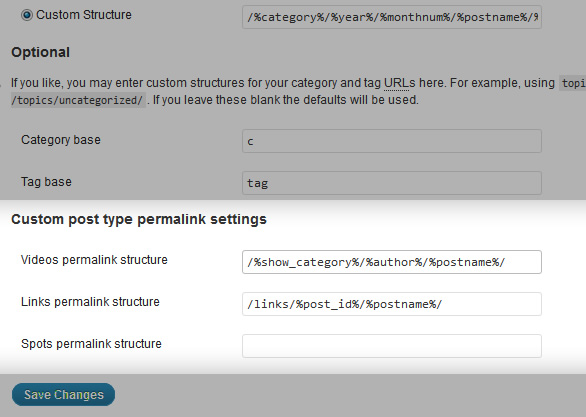
The extended permalink settings panel
Faq
None so far.
Reviews
Finally a plugin that does this
By 
After deactivating plugin, website is broken -> No support
By 
The plugin did not what I expected. I decided to deactivate the plugin.
After that, every page gave a 404 error.
When I asked for support, a few months ago, I didn't receive any reaction.
So my advice, think twice before installing this plugin
Great
By 
Exactly what I needed thanks !
We were about from the craziness but .......
By 
AWESOME
By 
OMG, your plugin is awesome 😀 thank you so much for this excellent plugin
works for CPTs
By 
this is the only way/plugin/code which works for me. thank you very much!!
Works like a charm!
By 
I wanted to rewrite a custom post type permalink that would include a taxonomy term (www.site.com/custom-post-type/term/postname) but I was unable to make it work. I tried bits and pieces of code I found on StackExchange but none worked 100%.
I found this plugin and after activating it and updating the permalink structure for my post type, my permalink structure worked like a charm!
Archive pages for post and taxonomy work also.
Not sure what I did is correct, but both my CPT and the taxonomy have the same slug in the rewrite rule.
After several hours trying to get permalinks fixed, this did it for me !
By 
THANK YOU!
For anyone who is still stuck, you have to juggle the permalinks set up until you get the desired effect. This is not a fault of the plugin, but of the seemingly fragile nature of WordPress permalinks and rewrite rules.
For my set up, I simply wanted to get example.com/custom-post-type/taxonomy/post-name
This is how I set it up
Dashboard > Settings > Permalinks > SELECT POST NAME
YOUR CUSTOM POST: permalink structure > your-custom-post-type-name/%taxonomy_name%/%postname%/
MAKE SURE this is added to your register_post_type arguments
(Yes, under the register post type, not under taxonomies.)
'rewrite' => array( 'permastruct' => 'your-custom-post-type-name/%taxonomy_name%/%postname%/' ),
Good luck ! WordPress CPT permalinks suck - but thanks to this plugin I'm rocking and rolling again!
Changelog
- 1.4.3: Remove
create_functioncalls - 1.4: Handles sample filters without the need for the get post call
- 1.3: Added permalink sanitisation function, current one incorrectly truncated placeholders
- 1.2: Fixed attachment URL rewrites, fixed edge case where permastruct is %postname% only
- 1.1: Fixed problem with WP walk_dirs and using %category% in permalink – overly greedy match
- 1.0: Initial import