WP Restaurant Price List

WP Restaurant Price List
Description
A simple plugin that helps you show the price list of your business thanks to its visual interface you can enter both the titles of the categories (of sales items), and the name and description of the items in addition to the price.
You can use it to create the menu of your restaurant, pub or brewery, or simply to enter the price list of any business.
This plugin is meant for all website owners who need to show their price list, plus it can be easily implemented by website developers who need to give a simple interface to site managers (who are not familiar with WordPress).
WP Restaurant Price list allows you to easily manage the price lists of restaurants or businesses, thanks to its drag and drop interface.
WHAT TO EXPECT FROM THE PLUGIN
- Adding price lists quickly and easily
- Custom Currency Symbol
- Custom Decimal and Thousands separator
- Display/Hide Decimal Numbers
- 2 layout templates
- Compatible with Guthemberg
Pro version
- Infinite Lists and Items (pro)
- 5 layout templates (pro)
- Personalized appearance (pro)
- Lightbox pop up (pro)
- Allergens Section (pro)
- Products variants (pro)
- Google Fonts (pro)
Not only Restaurant!
- Spas & Salons
- Barber Shop
- Retail Businesses
- Graphic and Web Designers
- Travel & Tourism
- Massage studios
- Photographers
- Wedding Planner
- Much more
How does it work
WP Restaurant Price List allows you to create a price list and add it to your site pages using the shortcode [wprpl]
You can choose between two types of layouts, with and without photo preview.
WP Restaurant Price List involves the use of categories to divide the price list.
In the pro version it is also possible to change the appearance of the price list, changing the font family, colors and size of the fonts.
Also in the pro version it is possible to insert the allergen table mandatory in many countries for food products.
Instructions
- Install the plugin from the WordPress repository
- Activate the plugin from the plugin menu of your dashboard
- Go to Settings > WP Restaurant Price List and create your price list
- Enter the shortcode in your page or post
Shortcode
[wprpl]
Authors
- Theme in the Box – project idea – Themeinthebox.com
- WpGuru – code development – WordPressGuru.it
- Marco Dedo – project management – MarcoDedo.it
Credits
- Icons made by Flaticon
- Graphics pikisuperstar – freepik.com
Installation
To install WP Restaurant Price List, follow these steps:
- Download and unzip the plugin
- Upload
wp-restaurant-price-list.phpto the/wp-content/plugins/directory - Activate the plugin through the ‘Plugins’ menu in WordPress
- Go to Settings > WP Restaurant Price List and create your price list
- Enter the shortcode [wprpl] in your page or post
Screenshots
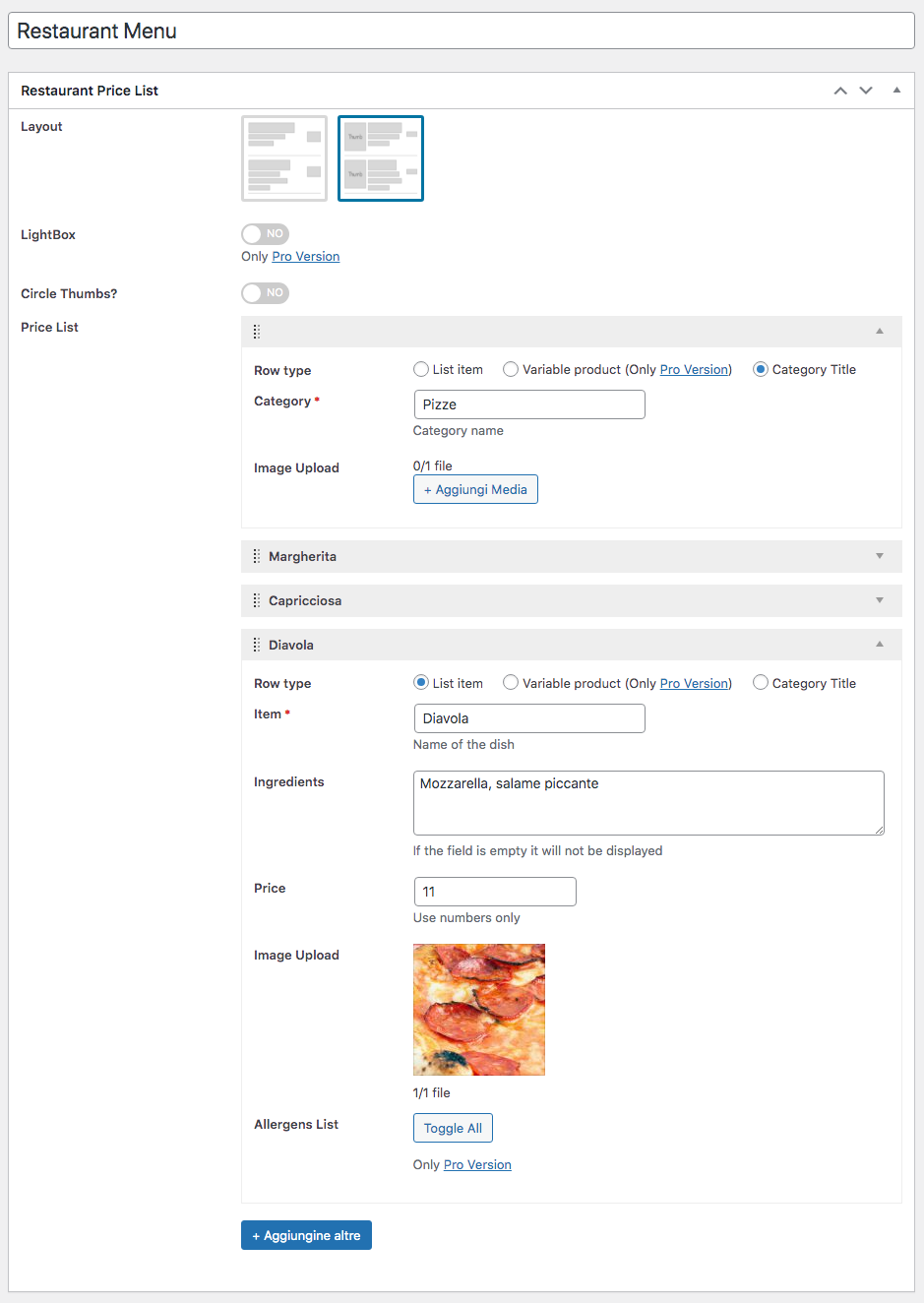
Create your price list in the dashboard

Display of the price list on Twenty Nineteen

Settings
Faq
Yup! WP Restaurant Price List automatically adapts its style to that of your WordPress theme, in order to integrate perfectly.
You can enter the shortcode [wprpl] in your page or post
Sure! You can safely use the Shortcode widget present by default in Gutemberg
You can try the PRO version of the plugin, here you will find all the information
Reviews
The best menu management plugin
By 
Easily create price lists for your restaurant business
By 
Beautiful and Useful
By 
Income plugin
By 
Awesome plugin
By 
best plugin for business website
By 
simplest plugin
By 
excellent plugin
By 
Nice plugin
By 
Missing Basics
By 
Changelog
1.4.1 – 2021-11-11
- Minor CSS fixes
1.4.0 – 2021-05-22
- NEW added pro version compatibility
- Others minor tweaks
1.3.1 – 2020-10-13
- Fixed issues PHP error line 111 (Thanks Marc Riou)
1.3 – 2020-10-09
- Fixed issues
- Update Core framework
1.2.1 – 2020-04-17
- Fixed Error on activation
1.2 – 2020-04-08
- NEW select for comma separator
- NEW select for decimal separator
1.1 – 2020-03-14
- NEW Layouts management
- Tweak Dynamic style management
- Update Core framework
= 1.0.5 – 2019-12-31
* Tweak Settings menu
* Others minor tweaks
= 1.0.4 – 2019-09-28
* Added decimals option to show/hide decimal numbers (thanks to Kevin)
* Added link “settings” in plugin page
* Fixed Warning message when not set numeric prices
1.0.3 – 2019-09-21
- Fixed some little issue
1.0.2 – 2019-09-03
- Fixed issue with Gutenberg block
1.0.1 – 2019-08-30
- Bug Fix
1.0.0 – 2019-08-24
- Initial release