WP Activity Log
WP Activity Log
Description
Monitor activity on your WordPress sites and get clear insights into what’s happening with detailed user and event logging.
Keep WordPress logs of everything that happens on your sites and multisite networks with WP Activity Log instantly, without writing a line of code.
- Easily detect suspicious activity on your WordPress site before it escalates
- Record failed login attempts to detect potential security breaches and strengthen site protection
- Track user logins and logouts to ensure SLAs are consistently met
- Monitor user activity and productivity to boost accountability
- Know exactly what all your users are doing in real time
- Know what happened before an outage for faster, easier troubleshooting
- Ensure compliance with regulations and standards like GDPR and PCI DSS
- Better manage & organize your site and users for smoother operations
- Simple setup ensures you start benefiting quickly and easily
WP Activity Log is a complete logging solution, helping hundreds of thousands of administrators and security professionals track changes on their websites thanks to real-time user activity monitoring.
💎 Need more extensive features? Unlock advanced reporting, exports/mirroring, session management, and real-time alerts with WP Activity Log premium or enterprise.
What WordPress changes WP Activity Log tracks
A website activity log is important for improving troubleshooting, compliance, user management, and security.
Get WP Activity Log and keep track of events on your site. The log not only tells you that a post, a user profile, or an object was updated, it also lets you know exactly what changed, when, and includes a user log (by whom), so you always have the information you need.
Below is a summary of the changes that the plugin can keep a record of:
-
Post, page, and custom post type changes: Status, content changes, title, URL, custom field, and other metadata changes
-
Tags and category changes: Creating, modifying, deleting, and adding/removing them from posts
-
Widget and menu changes: Creating, modifying, or deleting them
-
User changes: User created or registered, deleted, or added to a site on multisite network
-
User profile changes: Password, email, display name, and role changes
-
Access logging: User login, logout, failed logins, and terminating other sessions
-
WordPress core and settings changes: Installed updates, permalinks, default role, URL, and other site-wide changes
-
WordPress multisite network changes: Adding, deleting, or archiving sites, adding or removing users from sites, etc.
-
Plugin and Theme changes: Installing, activating, deactivating, uninstalling, and updating
-
WordPress database changes: When a plugin adds or removes a table
-
Third-party plugin changes: WooCommerce Stores & products, Yoast SEO, RankMath, Termly, WPForms, Gravity Forms, Advanced Custom Fields (ACF), MainWP, ManageWP, WP Umbrella, and other popular WordPress plugins
-
WordPress site file changes: New files added, or existing files modified or deleted.
Event details recorded
Detailed event logging ensures that for every event that the plugin records, it reports the:
- Date & time (and milliseconds) of when it happened
- User & role of the user who did the change
- Source IP address from where the change happened
- The object on which the change has taken place
Refer to WordPress activity log event IDs for a complete list of all the changes WP Activity Log can keep a record of and a detailed explanation of what change every event ID represents.
💎 Upgrade to WP Activity Log Premium and get even more
The premium edition of WP Activity Log takes WordPress user activity tracking to the next level. It comes bundled with even more features, including log mirroring, enterprise-grade support, user session management, and much more!
Premium features list
- See who is logged in and monitor their current activities in real-time
- Log off any user at the click of a button
- Generate fully-configurable HTML and CSV reports for easy data analysis
- Receive email, SMS, and Slack notifications for important changes (fully configurable)
- Use search filters to fine-tune results and find what you need in seconds
- Store the activity logs in an external database to enhance security and scalability
- Mirror the activity log to log management systems such as AWS CloudWatch, Loggly, Papertrail, and others in real-time
- Mirror the logs to business communication systems like Slack
- Send a copy of your website’s activity log to a log file on your web server
- Archive old activity log data to another database for improved storage and log management
- Add notes to activity log entries for better context and internal documentation
Refer to the WP Activity Log plugin features and benefits page to learn more about the benefits of upgrading to WP Activity Log Premium.
🔌 WP Activity Log third-party plugin support
All WP Activity Log editions include activity tracking for third-party plugins, including (in alphabetical order):
- Advanced Custom Fields (ACF) – Log changes to post types, taxonomies, and taxonomy terms
- bbPress – Track changes to forums, topics, and bbPress settings
- Gravity Forms – Track changes to Gravity Forms settings, forms, and entries (leads)
- LearnDash – Track changes to courses, lessons, and other system changes, as well as student activity such as course, lesson, and quiz enrollments and completions.
- MemberPress – Log changes to plugin settings, memberships, payments, subscriptions, and other actions
- Multisite & management tools – Track changes across your network for MainWP, ManageWP, Modular DS, Infinite WP, WP Umbrella, WP Remote, and other multisite management plugins
- Paid Membership Pro – Log changes to membership levels, user assignments, and more. Premium users can also track order and checkout activity, and access a Members Activity panel inside each member’s profile for instant visibility into recent actions.
- RankMath – Log changes to RankMath settings, SEO configurations, and on-page SEO edits
- Redirection – Keep a log of changes to redirections and redirection groups
- Termly – Log changes to Termly settings and configurations
- WooCommerce – Keep a log of changes to store settings, orders, products, coupons, and more
- WPForms – Log changes to WPForms settings, forms, form files, and entries (leads)
- Yoast SEO – Track changes to Yoast SEO settings and on-page SEO in the Yoast SEO meta box
Extra Features for Enhanced Monitoring and Management
Both free and premium editions of WP Activity Log include a number of non-logging specific features that make the plugin a complete WordPress monitoring solution. Here is what is included:
Free
- Built-in support for reverse proxies and web application firewalls
- Integration with WhatIsMyIpAddress.com – get all information about an IP address with a single click
- Limit who can view the WordPress activity log by users or roles
- Enable or disable individual event IDs from the activity log
- Configurable dashboard widget highlighting the most recent critical activity
- Configurable WordPress activity log retention policies
- Display user avatars in events for better recognizability
- And much more!
Premium
Everything that’s included in the Free edition, plus:
- Full WordPress multisite support
- Create custom alerts & notifications to monitor additional functionality
- Import and export plugin settings
- Real-time activity log visible in the WordPress admin toolbar
- And much more!
🛠️ Free and premium plugin support
If you encounter any issues with the free edition of WP Activity Log, you can post and get help on the WordPress.org support forums. You can also find more technical information and plugin documentation on the Melapress knowledge base.
Premium plugins include a full year of free updates and dedicated one-to-one premium email support. This means you get direct access to our support team who will assist you with any questions or issues related to the plugins.
As featured on:
- Kinsta
- Pagely
- Shout Me Loud
- The Dev Couple
- WPKube
- Techwibe
- Tidy Repo
- KitPloit
- and many others.
MAINTAINED & SUPPORTED BY MELAPRESS
Melapress develops high-quality WordPress management and security plugins such as Melapress Login Security, WP 2FA, and Melapress Role Editor.
Browse our list of WordPress security and administration plugins to see how our plugins can help you better manage and improve the security and administration of your WordPress websites and users.
Installing WP Activity Log
Install WP Activity Log from within WordPress
- Visit ‘Plugins > Add New’
- Search for ‘WP Activity Log’
- Install and activate the WP Activity Log plugin
- Allow or skip diagnostic tracking
Install WP Activity Log manually
- Extract the plugin ZIP file and upload it to the
/wp-content/plugins/directory - Activate the WP Activity Log plugin from the ‘Plugins’ menu in WordPress
- Allow or skip diagnostic tracking
Screenshots

The WordPress activity logs from where the site administrator can see all the user and site changes.
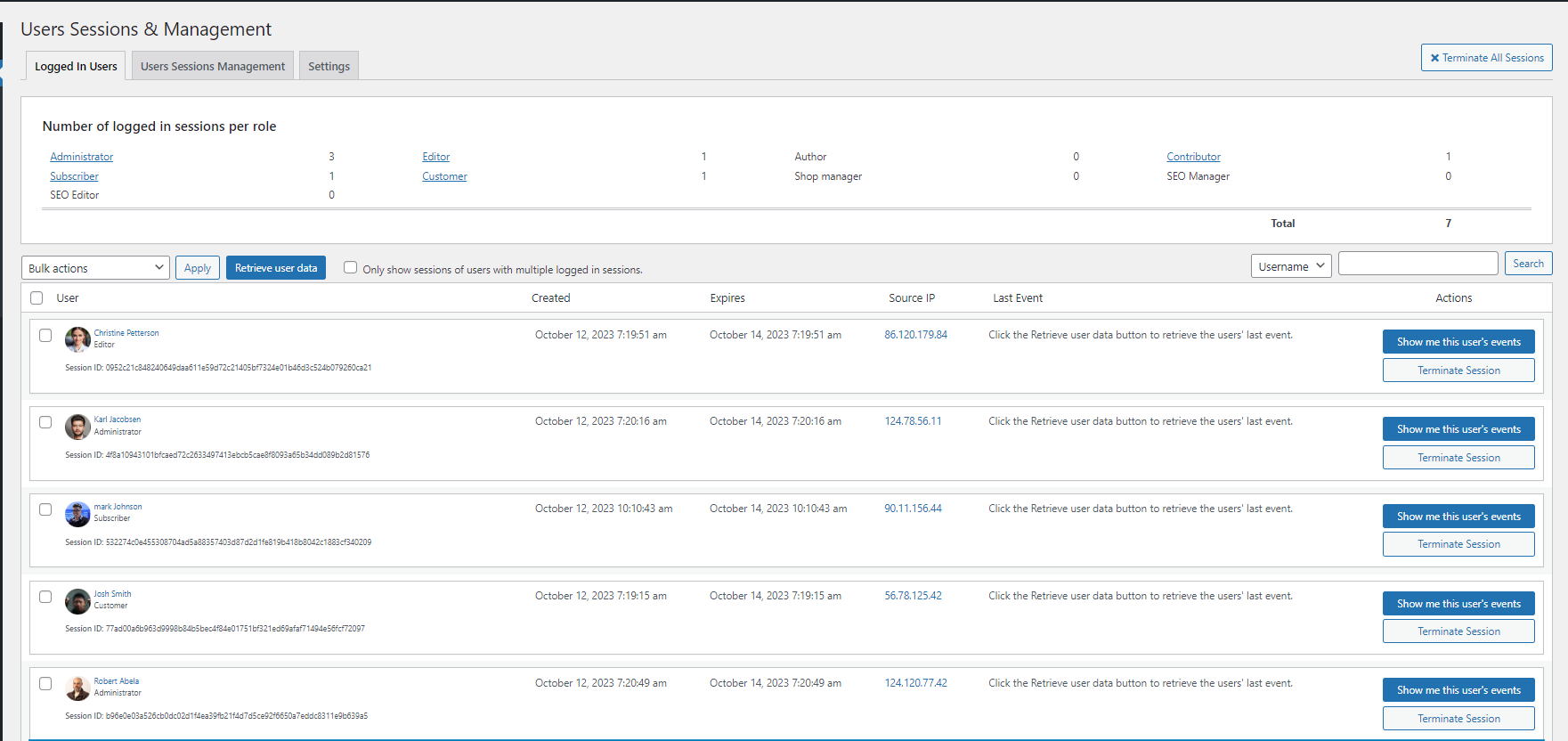
See who is logged in to your WordPress and manage user sessions with User Sessions Management in the Premium edition.
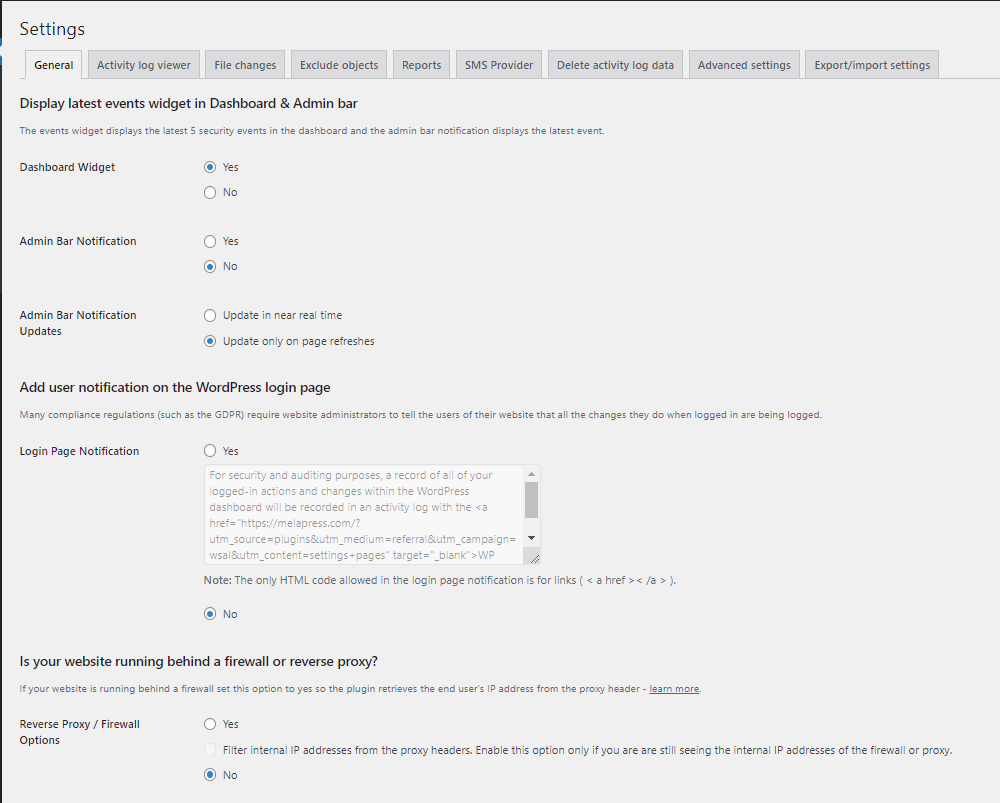
The plugin settings from where the site administrator can configure generic plugin settings, such as reverse proxy support, who can manage the plugin, etc.
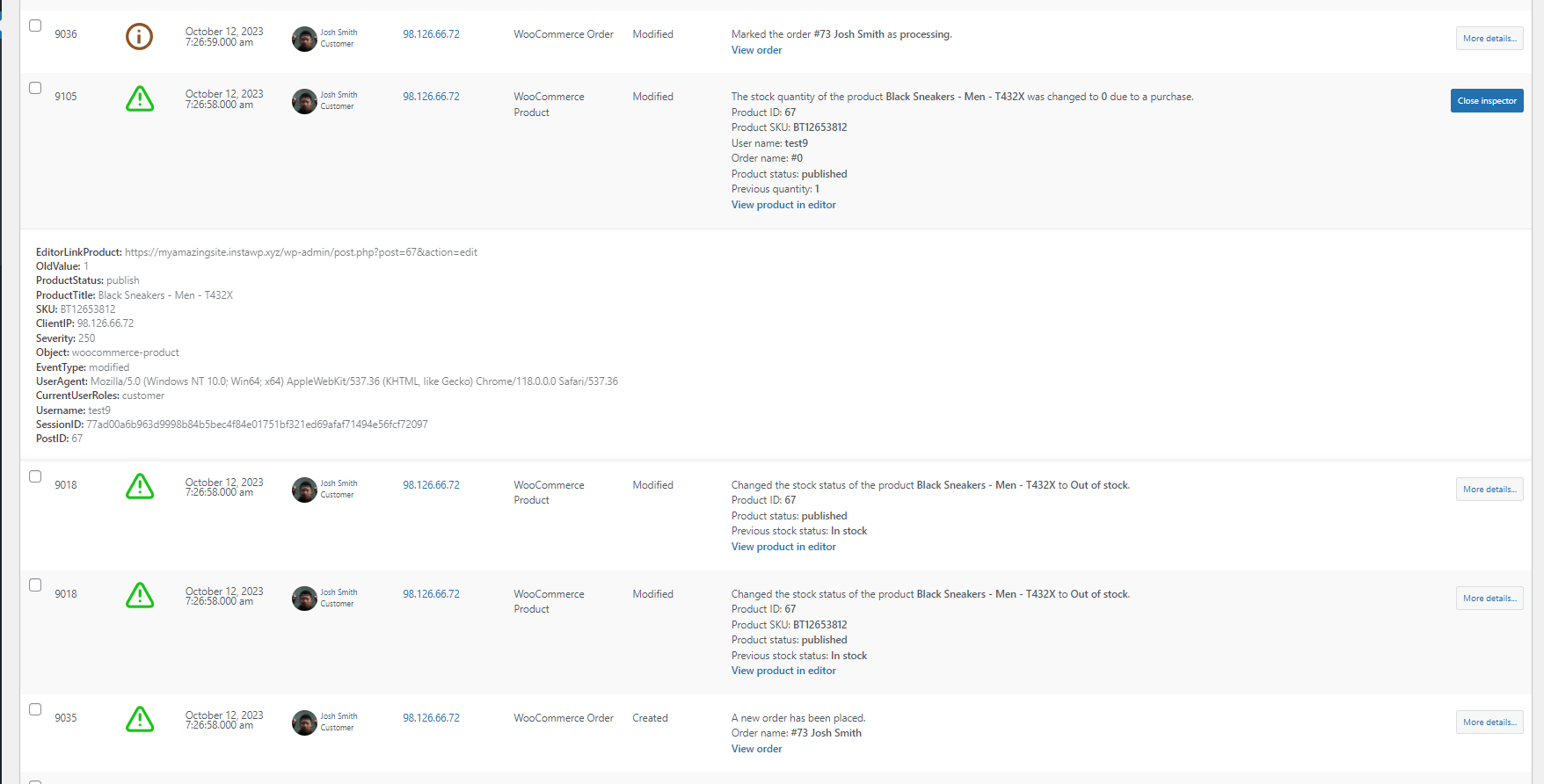
Use the event Inspector to see more technical details about each event in the activity log, such as the session ID and UserAgent string.
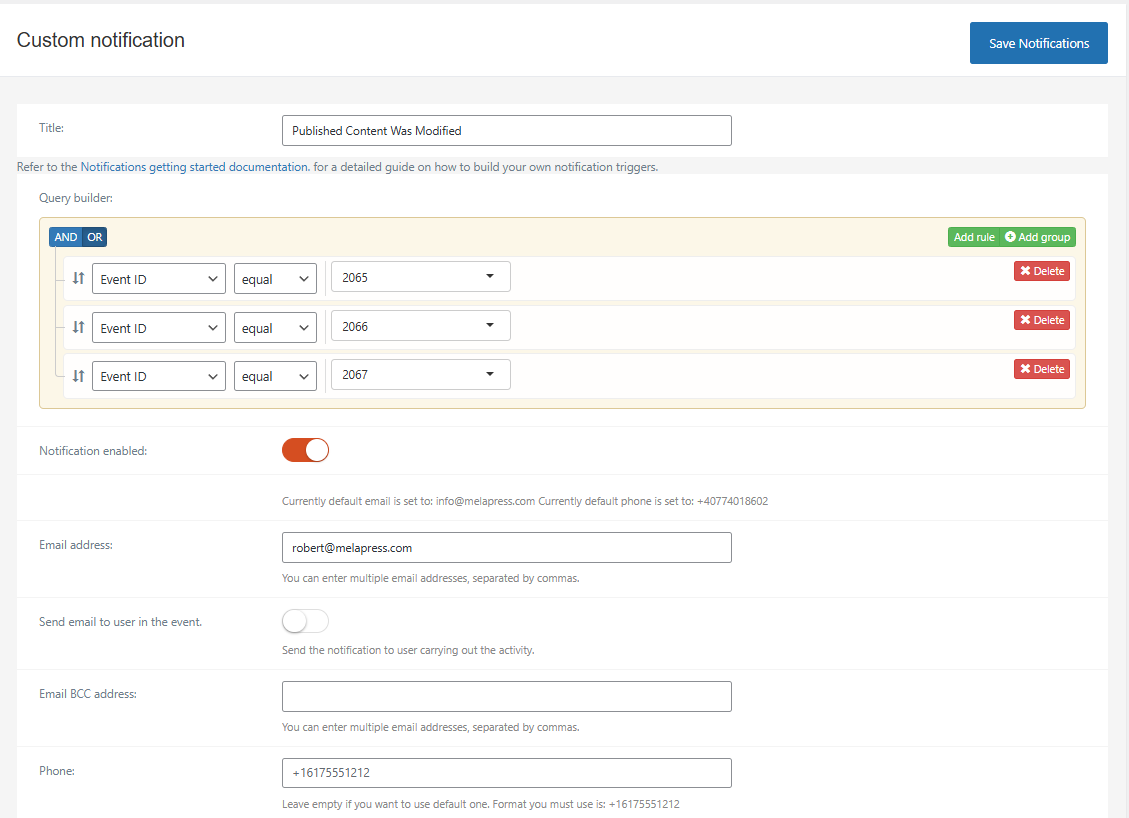
Configuring WordPress email and instant SMS or Slack alerts with the Email, SMS & Slack Notifications module in the Premium edition.
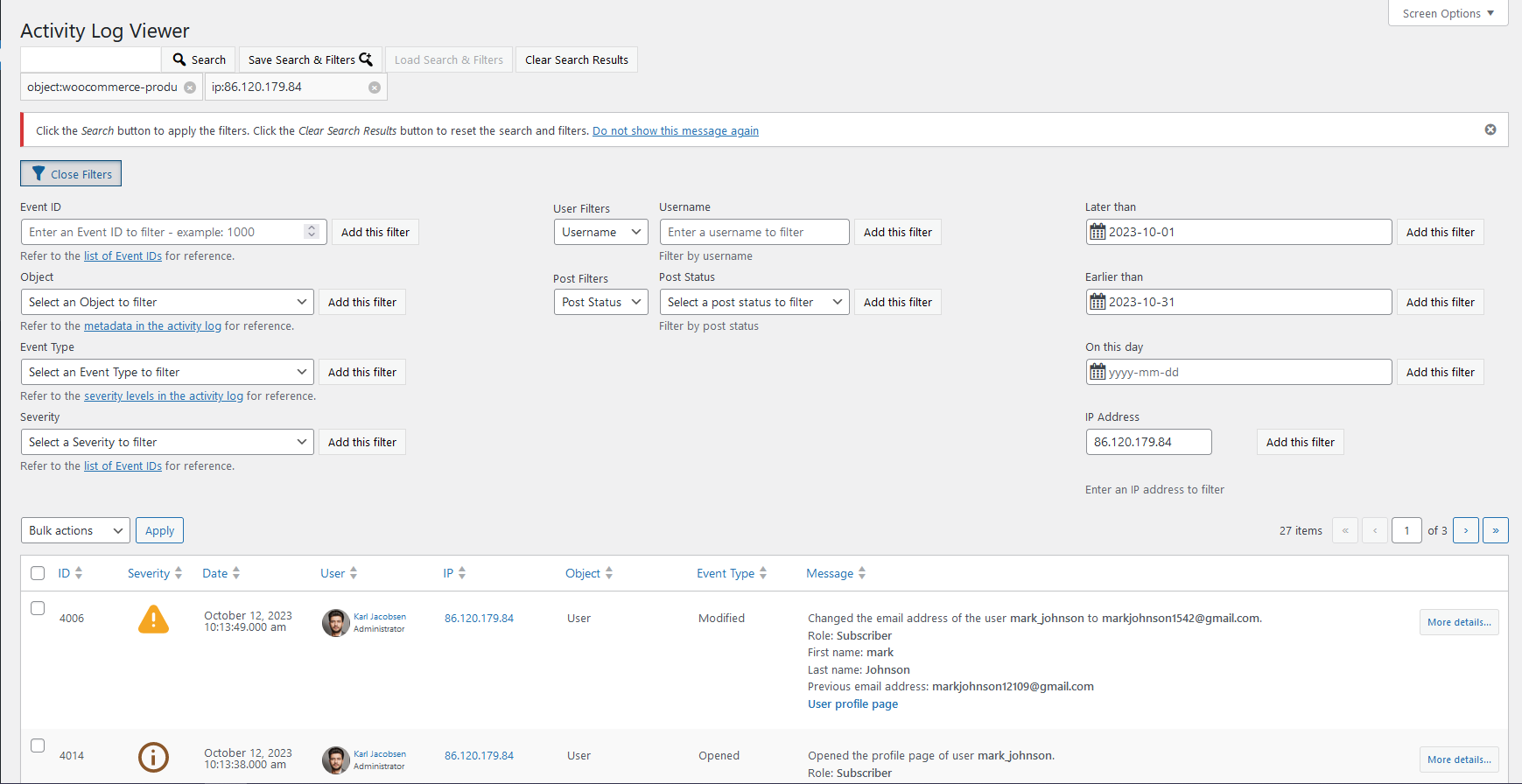
Search in the WordPress activity log using filters to fine-tune the search results.
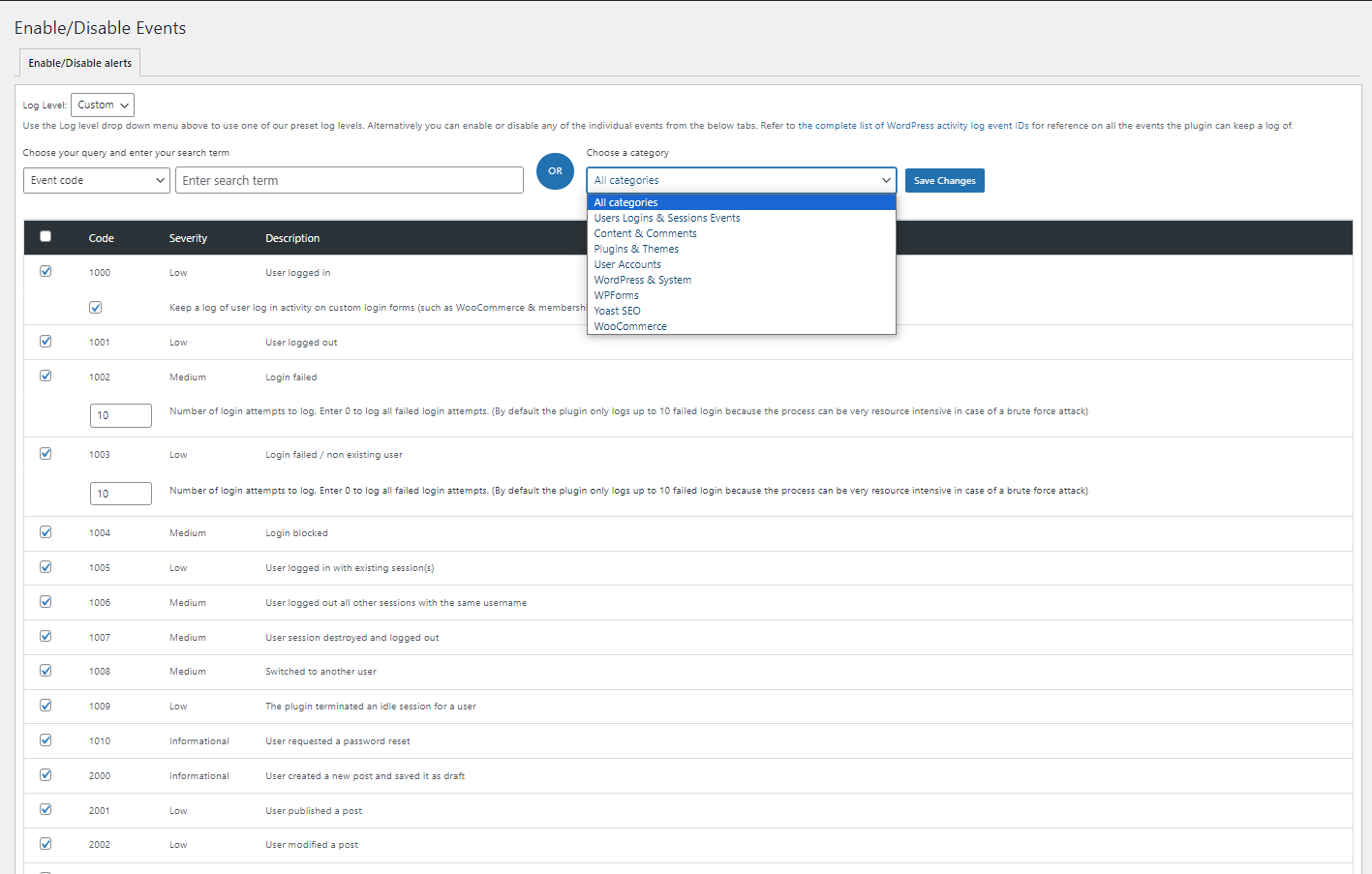
The Enable/Disable events section from where Administrators can disable or enable activity log events.
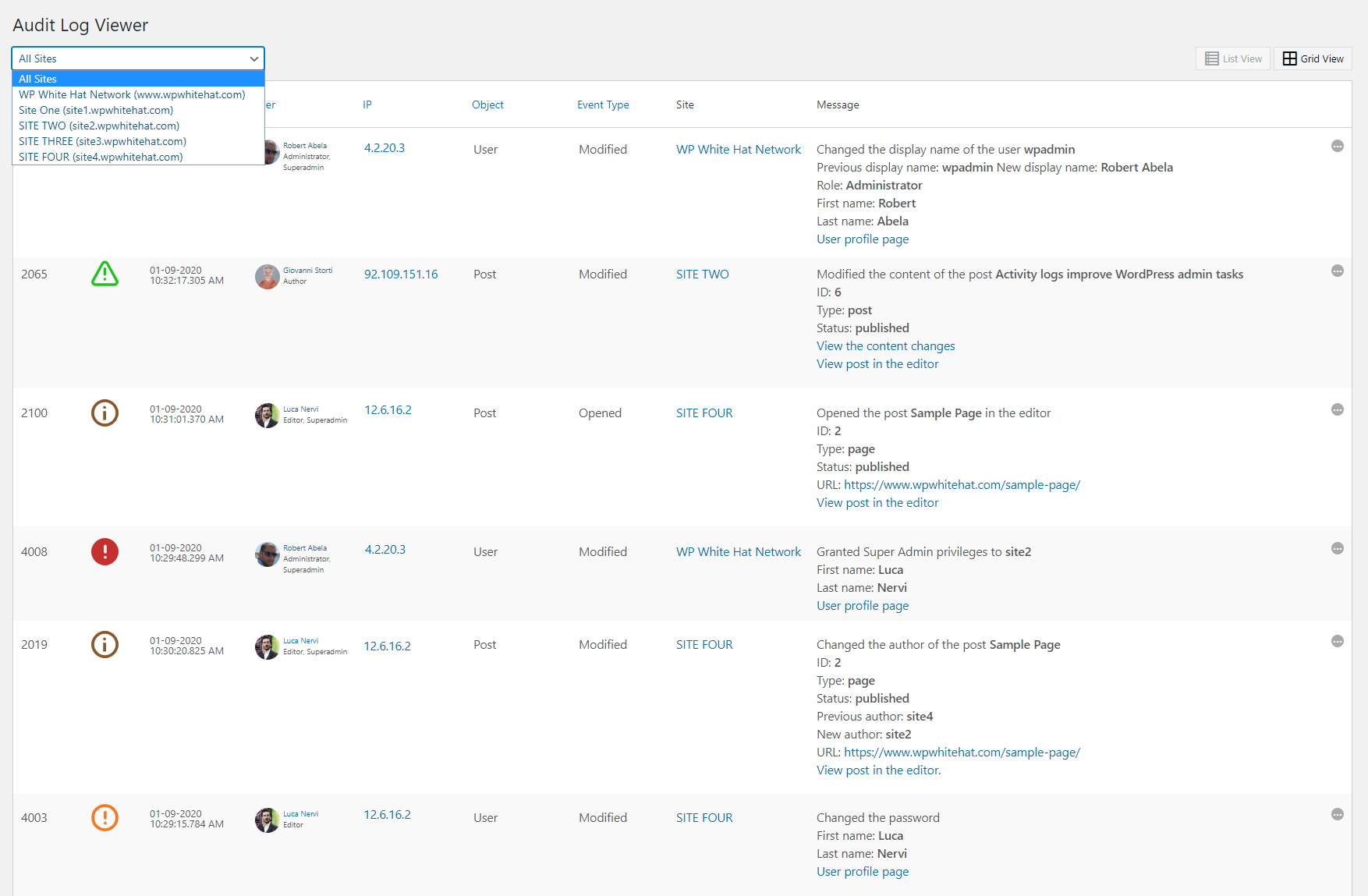
The Activity Log Viewer of a Super Admin in a WordPress multisite network installation allows the admin to view the logs from all the network, or filter the logs of a specific site.
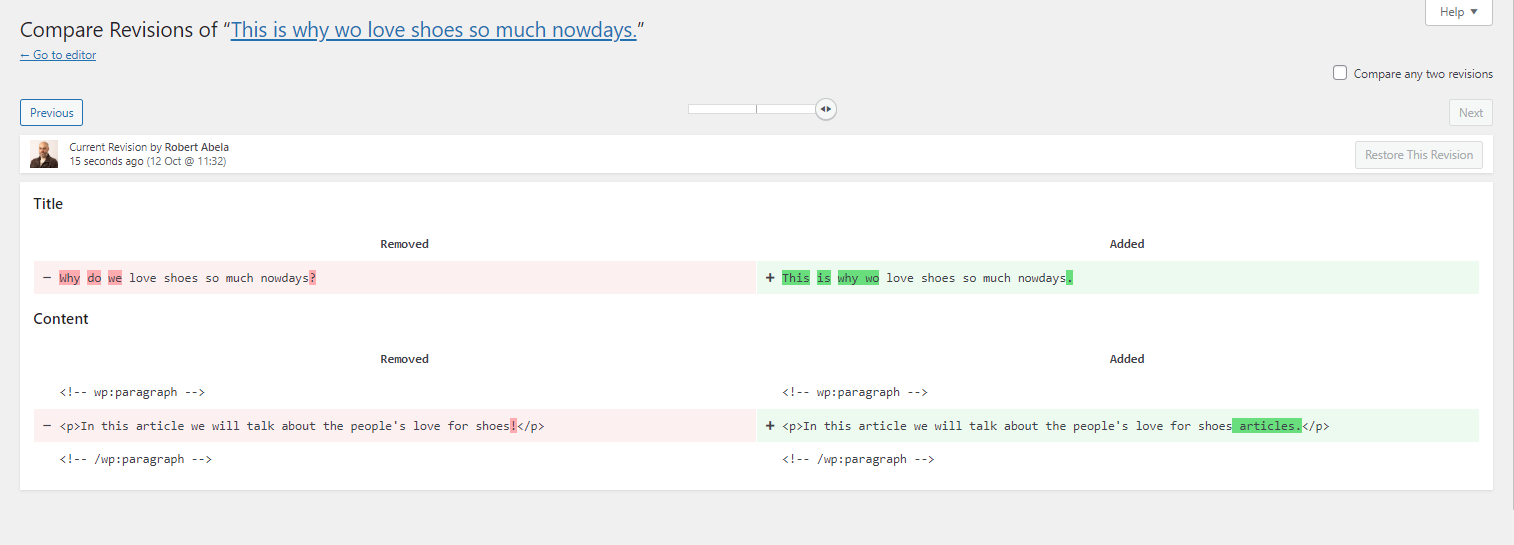
WP Activity Log is integrated with the built-in revision system of WordPress, thus allowing you to see what content changes users make on your WordPress posts, pages and custom post types. For more information read Keep Record of All WordPress Content Changes

Mirror the WordPress activity log to an external solution such as Syslog or Papertrail to centralize logging in the Premium edition, to ensure logs are always available and cannot be tampered with in the unfortunate case of a hack attack.
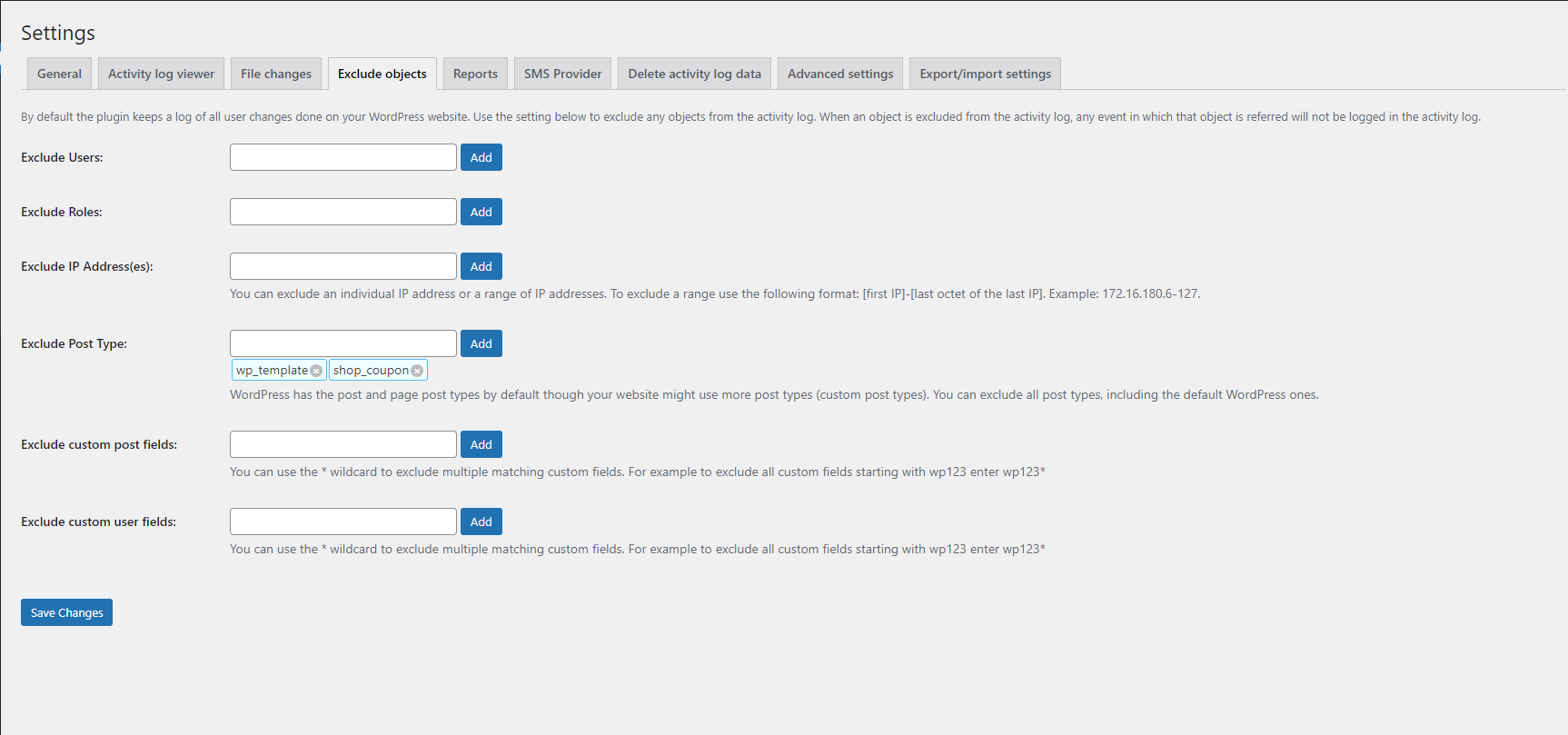
Use the plugin settings to exclude objects from the logs, configure automatic pruning of events, which timestamp to be shown in the logs, and much more. The plugin is fully configurable.
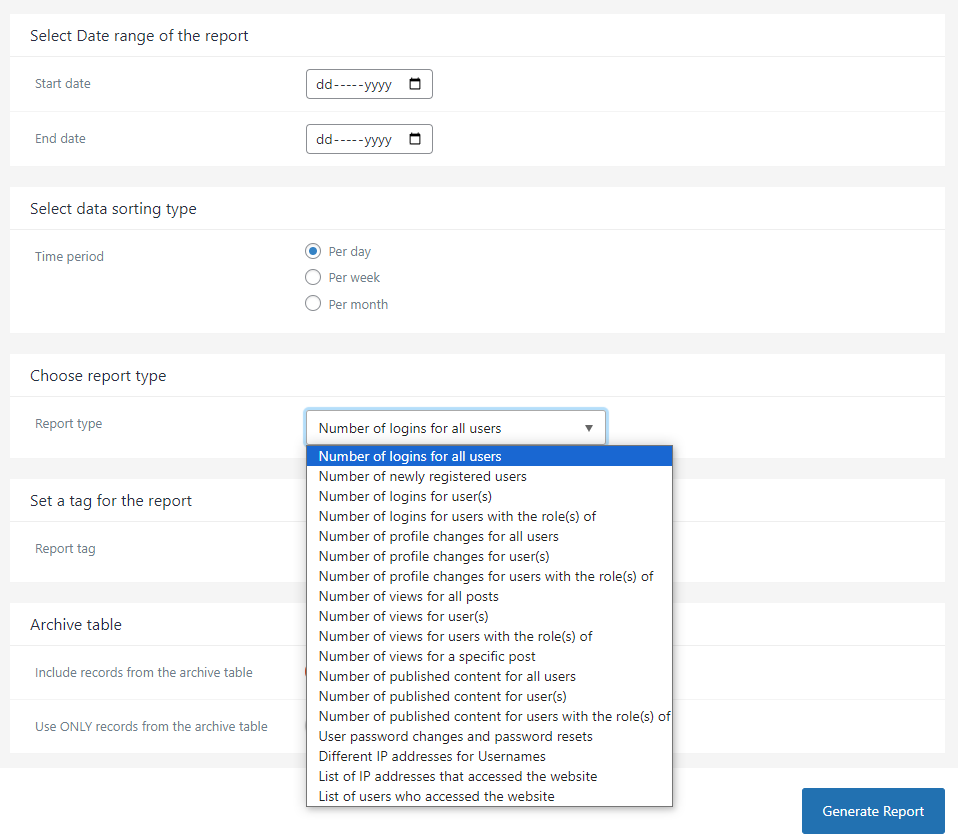
Generate any type of statistics reports from the activity log with the Premium edition. You can see statistics such as number of newly registered users, number of user profile changes, number of logins, different IP addresses per user, and much more.
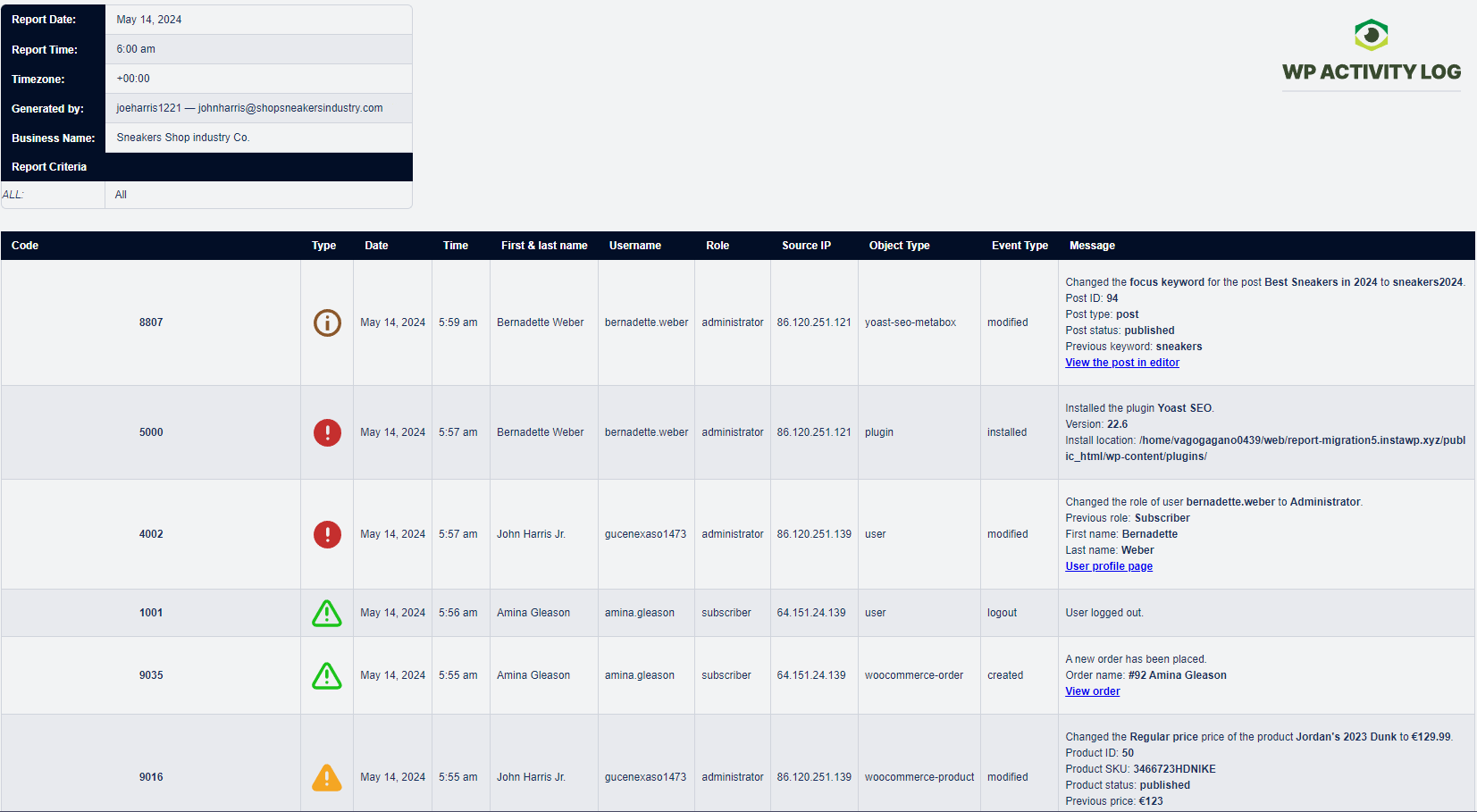
Use the Premium edition to also export any activity log data to an HTML report or CSV file. CSV files are the most widely supported format and can easily be read, parsed, and imported into third-party systems.
Faq
No, the free edition does not limit the data the plugin collects whatsoever. All events logged by the premium edition are available in the free edition. The premium edition adds additional features such as extensive log filtering options, external database/log management service integration, user session management, and much more.
Log data can be kept indefinitely in both free and premium editions. By default, the plugin retains all audit logging data for 3 months however this can be changed from the initial configuration wizards or the plugin’s settings (activity log retention policies).
By default, the log is stored in the WordPress database. WP Activity Log Enterprise edition includes an option to save the activity log to an external database and log mirroring to AWS Cloudwatch, Loggly, Papertrail, Syslog, & other SIEMs
Yes, the log can easily be exported as either CSV or HTML. The reports module in the Premium plugin is required for this functionality.
WP Activity Log keeps a record of security-related user and system activities, including logins, logouts, failed login attempts, changes to settings and configurations, and post edits among other things. This security log can not only uncover suspicious or untoward behaviour, but also aid in forensics and post-mortems for quicker recoveries.
By default, all users with administrator role can view the activity log. However, you can restrict this to a specific administrator or access can be given to other users through the plugin’s settings. Refer to the WordPress activity log privileges for more information on how you can do this.
No, the plugin does not send any log data to us whatsoever. The only data we receive is license data from the premium edition of the plugin.
We update the plugin fairly regularly to ensure the plugin continues to run in tip-top shape while adding new features from time to time.
WP Activity Log will not slow down your website. Each version is tested before release to ensure it works in the best way possible. Having said that, you need to make sure your WordPress web server has adequate resources to manage the load of your website.
Support for the Free edition of the plugin is provided only via the WordPress.org support forums. You can also refer to our support pages for all the technical and product documentation.
If you are using the Premium edition, you get direct access to our support team via one-to-one email support.
You can report security bugs through the Patchstack Vulnerability Disclosure Program. Please use this form. For more details, please refer to our Melapress plugins security program.
WP Activity Log stands out as one of the most detailed WordPress activity logging solutions on the market. Unlike many competitors, it offers:
- Unlimited log retention – keep a complete history of all user and system activity without arbitrary limits
- Detailed event information – see who made each change, when it happened, and from which IP address
- Feature-rich monitoring – including real-time activity tracking, user session management, advanced reporting, alerts, and support for a wide range of third-party plugins
- Vulnerability Disclosure Program – through Patchstack, we allow security researchers to report vulnerabilities responsibly, helping us address potential issues quickly and maintain a secure plugin for all users
These capabilities make WP Activity Log a comprehensive solution for site security, troubleshooting, and compliance, helping administrators and security teams maintain full visibility over their WordPress websites and multisite networks.
Reviews
The best plugin for log
By 
I've been using this plugin for several years on all our managed websites, and its integration with MainWP is by far crucial for controlling, auditing, and securing our network of websites. It's an essential plugin with excellent support, giving us the confidence to continue using it and consider the paid version in the future, given the great work the Melapress team does with the free version.
World Class Support
By 
I, too, have suffered from the compatibility issue with 7.1 and ended up having to restore a site backup to get back into WP 7.0.4. Melapress responded and sent a solution within hours. I have uploaded the patch they provided, upgraded to 7.1 and the plugin is now working as it should.
I couldn't wish for better service and the free version of the plugin is great
Exactly what I needed
By 
WP Activity Log does exactly what I need. I needed a way to track User activity on my client websites, and any other pertinent log information of the WordPress environment.
Support is responsive, and listens to user feedback and bug fixes quickly and efficiently. For example, when WordPress 7.1 released, I encountered a critical error in WP Activity Log 5.6.5 to view the Log Viewer, and they immediately put out a patch, responded to my support request to download the patch on their website to install on your environment and fixed my issue on a couple of client websites.
A great quality team that cares about their products. Thank you!
Fast and effective support for a WordPress 7.1 compatibility issue
By 
After updating our development environment to WordPress 7.1, we encountered a fatal error in WP Activity Log 5.6.5 caused by a compatibility issue that affected specific configurations.
The Melapress team responded very quickly, identified the cause, prepared a patch, and asked affected users to verify it. We tested the patch on WordPress 7.1 with PHP 8.3, and it resolved the problem completely. The activity log works correctly again, and no new errors have appeared in our debug log.
We especially appreciate the team’s clear communication, transparency, and fast response. This is exactly the kind of support that builds confidence in a plugin used for security monitoring. Thank you for handling the issue so professionally.
Super Fast & effective Response 👍
By 
New WordPress 7.1 upgrade wasn't compatible. sent mail and 5 mins later reply from Lucien including patch and now everything is fine again! I wish some of my other plugin support guys were so quick to help out!
Excellent, fast, and effective support
By 
I recently ran into a fatal PHP error caused by a compatibility issue between WP Activity Log and WordPress 7.1 on PHP 8.3. I reported the issue with a detailed error log, and the support team's response really stood out.
Their turnaround time was impressive — they identified the root cause quickly, confirmed it matched a known issue, and provided a patched build the same day. Communication throughout was clear, friendly, and professional. Once I applied the patch, the error was completely resolved with no further issues.
It's rare to get support this responsive and effective, especially for a free plugin. Great work from the team — highly recommended!
Very useful plugin and great support
By 
I run a small website and installed this plugin on a recommendation. There is so much going on in the background you just don't realise. Not just users logging in and out, but attempted break-ins by bots, the updates that the likes of WooCommerce does too.
It can feel a bit like overkill, but there's nothing else that does the same with such little setup required.
First-rate Plugin with Superior Customer Support
By 
We used the Pro version of WP Activity Log. We needed a plugin for log shipping to AWS CloudWatch, and the plugin set up was intuitive, and simple to configure and connect to CloudWatch. The documentation is comprehensive and was easy to follow, and customer support reponses were quick and knowledgeable. Highly recommend WP Activity Log.
Awesome team behind a great product
By 
We've been using WP Activity Log and have been extremely happy with both the product and the team behind it. The plugin does exactly what it promises and gives us valuable insight into what's happening on our WordPress sites.
What really stood out, though, was the customer support. We ran into a very small issue and reached out to their team for help. They responded quickly, provided clear guidance and gave us exactly what we needed to resolve the problem. It's always reassuring to know there's a knowledgeable and responsive support team backing up a great product.
Highly recommend WP Activity Log and Melapress to anyone looking for a reliable activity logging solution for WordPress.
Very Useful Plugin with Great Support
By 
Great support. Fast and responsive. Highly recommended.
Changelog
5.6.6 (2026-08-24)
-
Functionality & plugin improvements
- Improved username search queries by using WordPress prepared statements.
- Replaced
json_encode()withwp_json_encode()in Search extension AJAX responses for better character encoding support. - Made connection validation messages translatable by passing them to JavaScript through WordPress localization.
- Updated the PHP_CodeSniffer development dependency to version 3.13.6.
- Improved order editor link handling by applying WordPress URL escaping.
- Added automated validation for Free builds to prevent Premium-only files or functionality from being included.
-
Bug fixes
- Fixed compatibility with WP 7.1 by addressing a fatal
strtolower()error in the Log Viewer on PHP 8.2 and 8.3 when another plugin or theme registers a non-string callback identifier for admin notices. - Fixed a fatal error on the Reports page and other file operations when WordPress cannot initialize its filesystem. The affected page now remains available and displays a clear warning.
- Fixed the file append option incorrectly replacing existing file contents instead of adding new content.
- Fixed compatibility with WP 7.1 by addressing a fatal
Refer to the complete plugin changelog for more detailed information about what was new, improved and fixed in previous version updates of WP Activity Log.