WP Widget Clipboard – Duplicate widgets intuitively

WP Widget Clipboard – Duplicate widgets intuitively
Description
Duplicate multiple widgets by drag & drop. so you can intuitively copy and paste widgets.
It is hard to copy widgets one by one manually. Using this plugin makes duplicating widgets very easy.
Widgets duplication procedure is the following :
- Select multiple widgets you want to copy.
- Then drag and drop “Coied Widget” which in clipboard to any position.
- Selected widgets is duplicated at that location.
Or, you can duplicate widgets individually.
For more detailed usage, install this plugin and read usage manual by opening “Settings” -> “WP Widget Clipboard” from the menu.
Installation
- Download and install this plugin
- Activate the plugin through the ‘Plugins’ menu in WordPress
Screenshots

Select multiple widgets you want to copy.
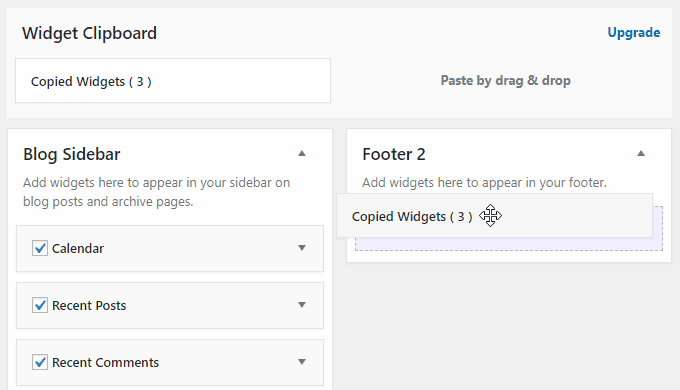
Then drag and drop "Coied Widget" which in clipboard to any position.
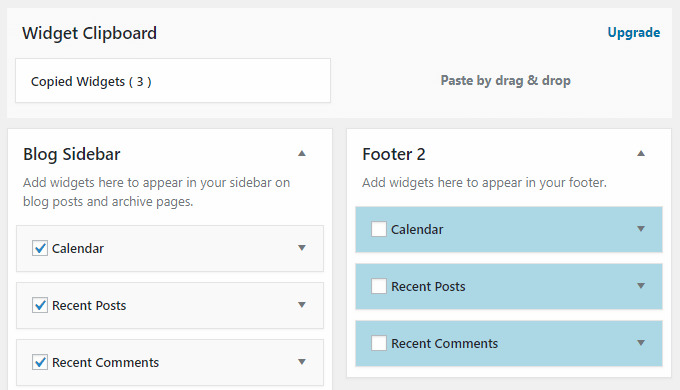
Selected widgets is duplicated at that location.
Reviews
Works very good for now
By 
So far...
By 
наконец то!
By 
It works! WPML support would be nice
By 
Awesome!
By 
Changelog
1.2.14
- Tested up to WordPress 5.3.
1.2.10
- Tested up to WordPress 5.2.2.
- Added new page to guide area.
1.1.9
- Tested up to WordPress 5.2.1.
1.1.7
- Fine-tuned the clipboard layout.
- Tested up to WordPress 5.2.
1.1.4
- Tested up to WordPress 5.1.1.
1.1.3
- Deleted not used images on usage guide page.
1.1.2
- Added widget collective selection feature.
1.0.2
- Fixed to display borders in widget and widget area when dragging copied widget.
- Fixed to display a border when hover over copied widget.
1.0.1
- Fixed untranslated text.
- Added text domain and domain path.