WP Admin Page Browser Tab Title
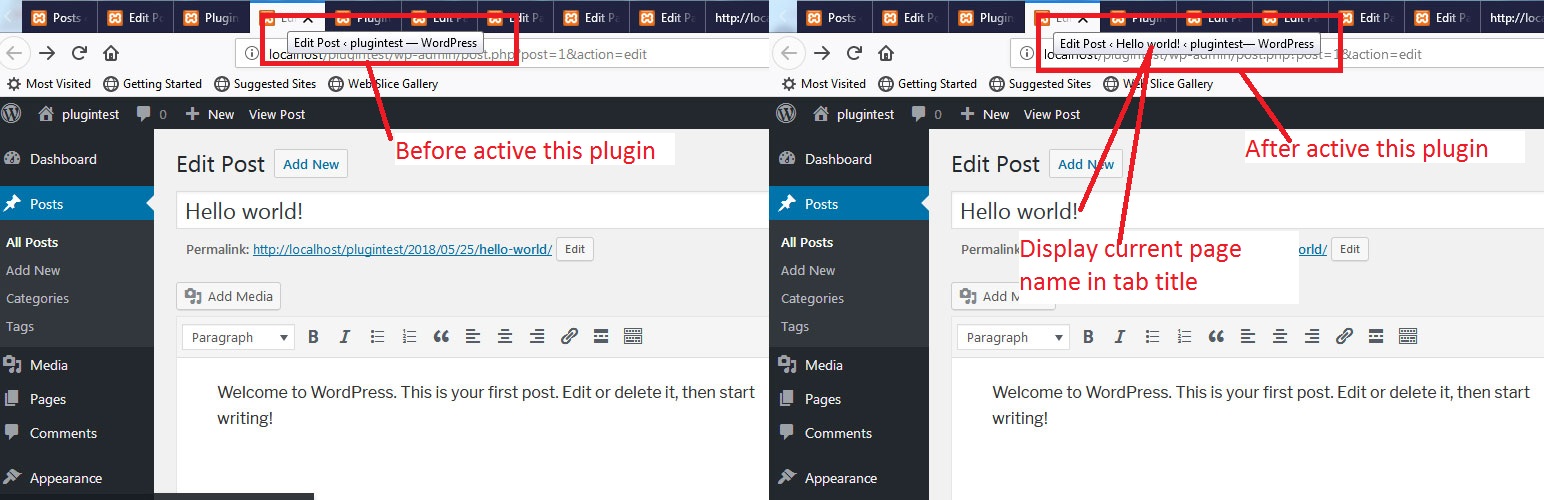
WP Admin Page Browser Tab Title
Description
This plugin are display current page title in browser tab title in wordpress admin section.
Installation
Automatic installation through WordPress:
- Log-in to your WordPress site.
- Hover over Plugins and click Add New.
- Under Search type in wpadmin-page-browser-tab-title, then click Search Plugins.
- In the results page, click Install Now.
- Once installed, click Activate Plugin. You’re done!
Manual installation:
- Upload the ‘wpadmin-page-browser-tab-title’ directory to the /wp-content/plugins/ directory.
- Go to your WordPress dashboard and navigate to Plugins -> Installed Plugins.
- On the Plugin page in your WordPress Administration area, activate the wpadmin-page-browser-tab-title plugin.
You can mail me at rajeshkumawat78@gmail.com for any kind of query and support.
Thanks
Screenshots

Step 1.
Reviews
Set browser tab name to "Edit [pagename]" instead of "Edit Page - [sitename]..."
By 
Set browser tab name to "Edit [pagename]" instead of "Edit Page - [sitename]..."
Changelog
1.0
- A change since the previous version.
- Another change.