WPF Force External Nofollow

WPF Force External Nofollow
Description
If you need paid support to have this plugin installed or need to have a customized version please send an email to support@wordpressforge.com.
Simple, if you use this plugin, rel="nofollow" will be inserted automatically for all the external links on your wordpress posts or pages.
Feature
- Adds
rel="nofollow"to all external links in your wordpress posts/pages - Will not add
rel="nofollow"to any of the internal links of your wordpress posts/pages. - Will not add another
rel="nofollow"to links that already haverel=nofollow - Will remove existing
dofollowfromrel=""if it exists within the link
You can visit our blog blog.wordpressforge.com
Support
Donations
Are always welcome 😉
Installation
- Download the latest zip file and extract the ‘wpf-force-external-nofollow’ directory.
- Upload it to your ‘/wp-content/plugins/’ directory.
- Activate ‘WPF Force External Nofollow’ in the ‘Plugins’ menu in WordPress.
Screenshots
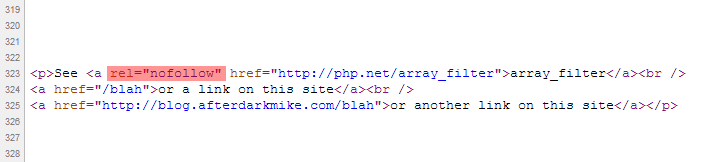
Example of how the
rel="nofollow"tag is inserted into all the external links.
Reviews
Changelog
1.3
- Fixed readme.txt wording
1.2
- Fixed Typo
1.0
- First released version.