WP Genealogy – Your Family History Website

WP Genealogy – Your Family History Website
Description
Easily build a family history site on your WordPress site
The plugin for anyone wanting to build a family history website. Manage and share family data with ease.
Thanks for checking us out. We hope you like the plugin. It’s fairly new and quite powerful, but if you do happen to find a bug or have features you would like to see, please don’t leave a bad review! Instead let us know by posting feedback or help requests here
This plugin includes –
WPGenealogy Features
- Set up wizard to help you get started
- Create records for up to 200 family members (unlimited in Premium version)
- Multiple types of family chart (“family trees”) showing ancestors and descendants
- Options to display vertical, horizontal, compact and text only charts
- Family member reports showing personal information and relatives
- Individual person time lines showing key personal events (plus can add additional events such as historical dates)
- Options to allow users to download family information via PDF
- Allow visitors to search for family members on multiple criteria
- Control access to your family information
- Enable logged in users to collaborate in your project with suggestions and editing rights
- Easy to configure family history hub landing page
- Shortcode enabling you to insert a descendants chart on any blog post or page
WPGenealogy Premium Version
- Import and export Gedcom format files
- Allow users to download Gedcom family files
- Add multiple separate families
- Display an unlimited number of generations in a single tree
- Add photos to tree and family reports
- Style your family tree to suit your site – add colours (eg show male and female in different colour boxes)
- Add additional fields for recording different facts
- Enhanced shortcode add ancestor charts on any page or post in your blog
Links
You Might Also Like
- FamilyHistory.Zone – keep up-to-date with genealogy news and advice
- GenealogyOnline.Zone – bespoke websites and web development for family history and genealogy websites
Installation
Manual Install From WordPress Dashboard
If your server is not connected to the Internet, then you can use this method-
- Download the plugin by clicking on the blue ‘Download’ button above. A ZIP file will be downloaded.
- Login to your site’s admin panel and navigate to Plugins -> Add New -> Upload.
- Click ‘Choose File’, select the plugin file and click install.
Install Using FTP
If you are unable to use any of the methods due to internet connectivity and file permission issues, then you can use this method-
- Download the plugin by clicking on the blue ‘Download’ button above. A ZIP file will be downloaded.
- Unzip the file.
- Launch your favourite FTP client. Such as FileZilla, FireFTP, CyberDuck etc. If you are a more advanced user, then you can use SSH too.
- Upload the folder to wp-content/plugins/
- Log in to your WordPress dashboard.
- Navigate to Plugins -> Installed
- Activate the plugin.
Screenshots

Front end: Built in Default Family History Hub Page

Front end: Example of a Customized Family History Hub Page

Front end: Person Report - Free Version

Front end: Person Report - Premium Version

Front end: Surnames List and Popularity Chart

Front end: Family Chart

Front end: Standard Ancestor Chart

Front end: Vertical Ancestor Chart

Front end: Compact Ancestor Chart

Front end: Text Ancestor Chart

Front end: Standard Descendants Chart

Front end: Compact Descendants Chart

Front end: Text Descendants Chart

Front end: Allow Users to Suggest a Change

Front end: Allow Users to Create and Download PDF Reports

Set Up Wizard: Screen 1 - Name the Page you want your Family History hub to display in

Set Up Wizard: Screen 2 - Configure Welcome Page Image, Text and Links

Set Up Wizard: Screen 3 - Add a Family Group (Tree) and optional Sub-group (Branch)

Set Up Wizard: Screen 4 - Add First Family Member or (Premium Version) Import Gedcom

Set Up Wizard: Screen 5 - Support Information

Back end: Manage Your Information from a Central Dashboard

Back end: Family History Hub Set up and Configuration Options
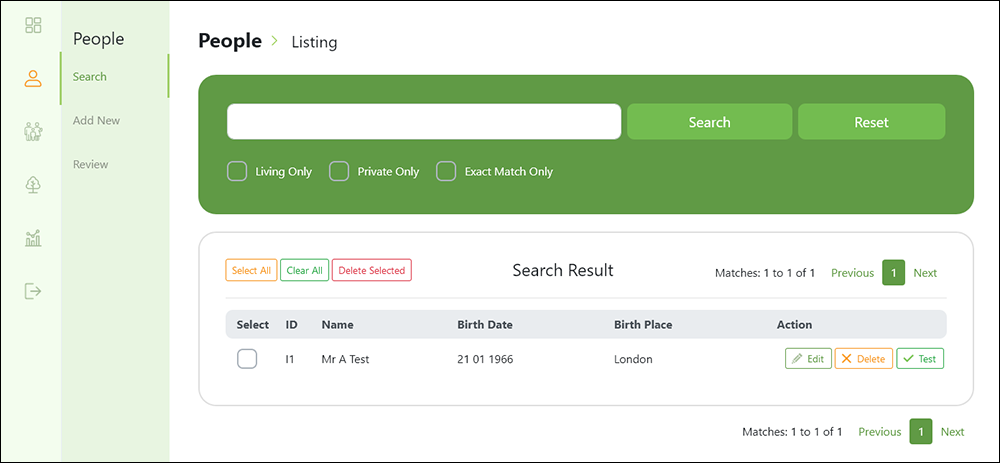
Back end: People List Page

Back end: Manage Gedcom Tags and Create Unique Life Events

Back end: Add Places

Back end: Add Personal or Historical Events to Family Member Timelines

Back end: Customize the Design of Charts Built with the Shortcode
Faq
Let us know by posting feedback or help requests here
Start here
Yes.
Yes. Although please note that Gedcom has a lot of variations and we cannot guarantee to import all data or every date format – check our support docs and keep back ups!
Make sure the free version is disabled or removed to avoid this error message.
Yes! You can earn 20% on sales of our Premium version by linking to our website or WordPress page – check out the Affiliation link in the plugin sidebar after installing.
Please contact us via our site here to discuss your bespoke requirements.
Reviews
Really sad
By 
When activating the plugin, a fatal error was generated, meaning the plugin was useless!
It's a shame because it seemed really good.
Does not work
By 
When activating an error pops up: Fatal error occurred
doesn't work ¯\_(^/^)_/¯
By 
Tried multiple times but can't activate Plugin because it triggered a fatal error... despite that, it seems like a great tool, so I will revisit it later to rate it after it has actually worked. For now, I'm giving it 3 stars for the idea and effort.
Changelog
0.1.9 – 11 February 2025
- Freemius SDK verion 2.11.0
= 0.1.0 – 20 July 2021- Beta Test
= 0.1.1 – 23 December 2021 - Update SDK
= 0.1.2 – 20 January 2021 - Update / Fix
= 0.1.3 – 21 October 2022 - Activation Fix
- Beta Test