WPMove Migration Connector
WPMove Migration Connector
Description
WPMove Migration Connector exports the posts, pages and custom post types of a WordPress site to a portable .json file, and imports such a file into another site. It runs entirely on your own server — no sign-up, no API key, and no external service is contacted.
- Export the posts, pages and custom post types of this site to a portable file you download.
-
Import a previously exported file into another WordPress site. Imported items are added as new posts — nothing existing is overwritten or deleted.
-
Receive a direct migration. Another WordPress site you control can send content to this site, or read content from it, without any file changing hands.
Text, public custom fields and taxonomy terms (categories, tags and custom taxonomies) travel with each post. An optional export setting preserves the full taxonomy structure — all terms with their descriptions and parent-child hierarchy — so the target site is ready before posts are imported. The plugin is fully functional on its own, with no account required.
When it receives a direct migration, this plugin also accepts the custom fields that the REST API normally leaves behind — Elementor layouts, ACF fields, SEO metadata — which are otherwise lost in transfer. The other site does the work; this one only answers, and only to requests carrying a valid WordPress application password for an account allowed to edit the content concerned.
Need to migrate directly between two live sites, with media?
Moving content as a file is perfect for a one-off transfer. If you instead need to copy content directly between two running WordPress sites over their REST APIs — including media (featured images and inline files), import from or export to another site (pull/push), post-by-post selection and resumable runs — there is a separate premium add-on, WPMove Migration Connector Premium, available from wpmove.app. It pairs with a wpmove.app account and is the practical option when one of the two sites cannot be reached from the internet (localhost, a firewall, a private network). The premium add-on is optional and is not required to use this free plugin.
Features
- Free, offline export of posts, pages and custom post types to a portable file.
- Free import that appends content — no overwrite, no ID conflicts.
- Public custom fields and taxonomy terms included.
- Optional: export the full taxonomy structure (all terms with descriptions and parent-child hierarchy) so it is recreated correctly on import.
- Optional at import: the source site’s settings (homepage, icon, title, formats…) and its menus — navigation and classic menus, with their links pointed at the imported content.
- Optional at import: its widgets, into the widget areas this site’s theme also has and that are still empty, with their menus, images and links pointed at what this site has.
- No account, no API key, no external connection.
External services
This plugin contacts no external services. It never sends your data anywhere on its own, and requires no account.
It does expose an authenticated endpoint under /wp-json/wpmvc/v1/ so that another WordPress site you control can migrate content to or from this one. Any such traffic happens only between your own sites, at your initiative, and only with a valid application password.
Installation
- Install and activate the plugin, then open WPMove Migration Connector in the admin menu.
- To export: choose Export to a file, pick the post types, status and options, and download the file.
- To import: choose Import from a file, select the file, and import. Items are added as new posts.
Screenshots
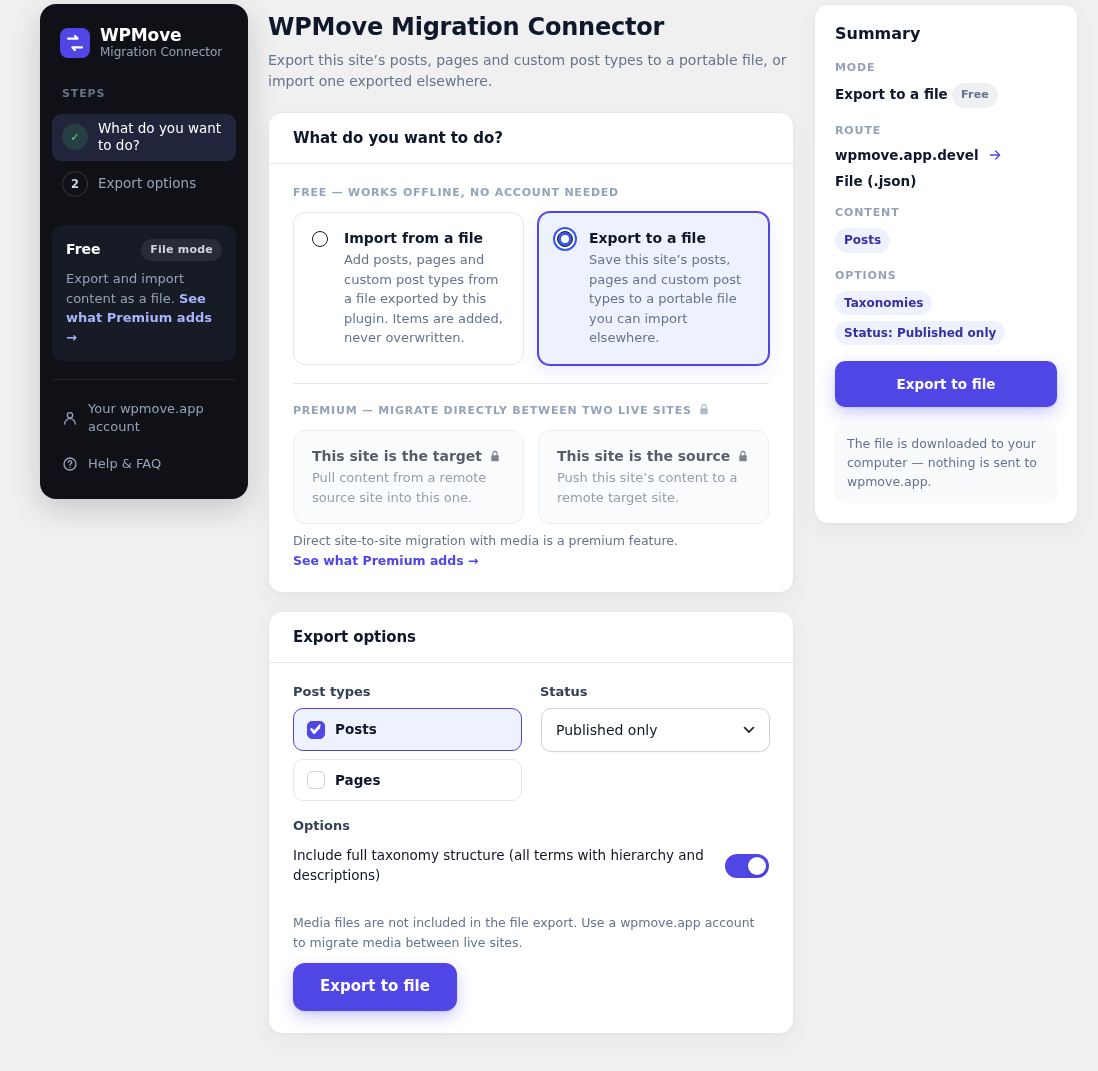
Export to file: choose post types and status, then download a portable .json file. No account needed.
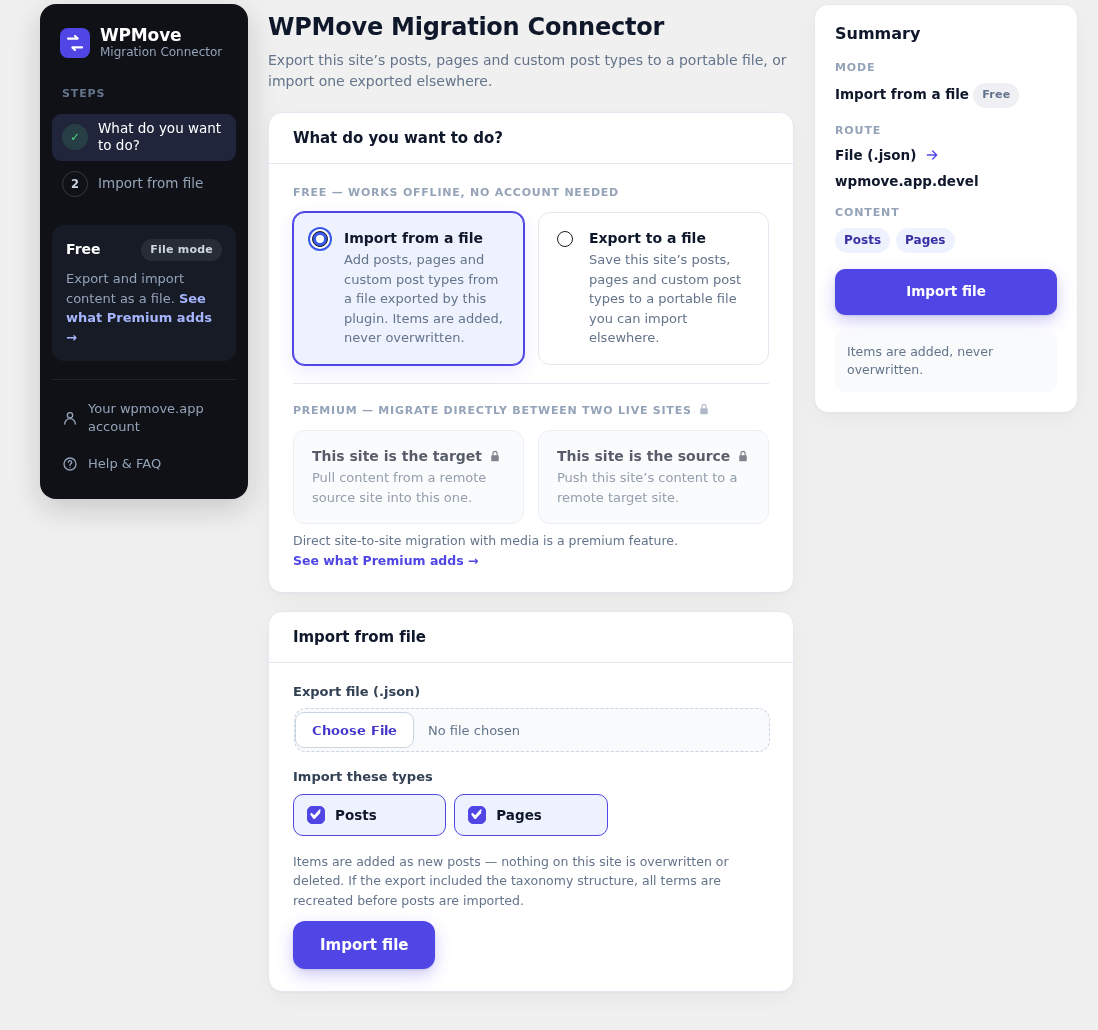
Import from file: upload a previously exported file and add its posts. Nothing is overwritten.
Faq
No. The export and import work fully offline with no account and no API key. This plugin never contacts any external service.
No. The import is append-only: every item becomes a new post. Nothing on the destination site is overwritten or deleted.
No. The file export contains posts, pages and custom post types (text, public custom fields and taxonomy terms). Migrating media files directly between two live sites is handled by the optional premium add-on.
Yes, with WP-CLI. Run them as an administrator so WordPress keeps your embeds and can write menus and settings:
wp wpmove export content.json --types=post,page --taxonomies --user=admin
wp wpmove import content.json --dry-run --user=admin
wp wpmove import content.json --menus --widgets --yes --user=admin

wp help wpmove <command> lists every option. The import ends with a non-zero exit code when an item failed, so scripts can tell.
That is what the premium add-on, WPMove Migration Connector Premium, does. It is distributed from wpmove.app and replaces this free plugin once installed.
This plugin never starts a connection of its own: it contacts no external service, and the file you export stays on your computer until you import it elsewhere yourself.
It does answer one kind of incoming request. Since version 2.1.0 it exposes a migration endpoint so that another WordPress site you control can send content to this site or read content from it. Requests without a valid application password are refused.
Only someone holding a WordPress application password for an account on this site that is allowed to edit the content concerned. Application passwords are created by you, from your own user profile, and can be revoked there at any time. Unauthenticated requests get a 401, and an account without editing rights gets a 403 — nothing is readable or writable by the public.
Reviews
Changelog
2.1.26
- New: widgets travel in export files too (file format 7). The export always carries the active widget areas and their widgets; at import, tick “Widgets” (or
wp wpmove import --widgets) to apply them. Same rules as the direct modes: only into widget areas that exist and are still empty here — importing the same file twice duplicates nothing — with their menu, images and links pointed at what this site has. A file carries no files: images are linked when this site’s media library already holds them (same path under uploads/). Plugin widgets closed to the REST API are written by this site’s receiver. The pre-import report lists what will be copied and what cannot be.
2.1.25
- Fix: a menu item whose order was 0 — common when a theme or a script created the menu — was refused by WordPress, and the menu arrived empty. Items are now renumbered in their order before they are written.
2.1.24
- New: the receiver endpoint gains
POST /wpmvc/v1/widgets(announced aswidgets.writeby/ping, administrator only). When wpmove.app migrates widgets to this site, plugin widgets that keep their settings closed to the REST API are created here through it — signed with this site’s keys and saved by WordPress’s own widget route, so the widget’s own validation applies. Without it they cannot be copied.
2.1.23
- Change: clearer labels for the premium direct modes — “Import from another site” and “Export to another site”, the same verbs as the file modes, with a small Pull / Push tag.
2.1.22
- New: WooCommerce shops migrate through file export/import too. The export file now carries each product’s WooCommerce data — type, prices, stock, attributes, variations, reviews, linked products, category images — and the import rebuilds them with WooCommerce’s own API: global attributes are created, linked products point to the imported ones, reviews are added silently. Images and downloadable files are not inside the file: they are used when this site’s media library already holds them (same path under uploads/), otherwise they are left out and the import log says so. The pre-import report has a WooCommerce section.
- Fix: importing products on a site where WooCommerce is not active turned them into plain posts without a word; the import log now says so.
2.1.21
- New: when WPMove migrates a WooCommerce shop to this site, product reviews are written silently — no email to the product author for each migrated review — with their rating and “verified owner” badge, and the product’s average rating is recalculated.
2.1.20
- Fix: WooCommerce upsells, cross-sells, grouped-product children and product galleries are no longer copied with the source site’s IDs — on a site that already had content, they pointed at unrelated products or images. They are left out until they can be translated, and the log now says, once per run, what a WooCommerce product does not carry over yet.
2.1.19
- New: WP-CLI commands.
wp wpmove export <file>andwp wpmove import <file>do what the Export and Import screens do — same file, same options,--dry-runfor the pre-import report. Run them as an administrator (--user=). Free, no account, no external service.
2.1.18
- New: every imported item remembers where it came from (source site and ID, stored in a private field). A later site-to-site migration from the same source finds it exactly, even renamed, instead of creating a duplicate.
- New: the connection check can tell another WPMove which contents of this site came from which source, and record it — no content is read or changed by it.
- Improvement: adjusting a migrated page afterwards (pointing a navigation block at the imported menu) no longer leaves an extra revision behind.
2.1.17
- Fix: on a multisite network, importing as a site administrator silently loses iframes, scripts and on… attributes — only super admins may publish unfiltered HTML there. The import log now names every content it happened to.
- Fix: a file exported from the root of a multisite network now lists the network’s other sites; at import, their links and files are left as they are instead of being pointed at this site. Files under another site’s uploads/sites/N/ folder are recognised even in older export files.
- Improvement: the connection check answers with the network’s other sites, so a migration from a network root leaves their links alone.
2.1.16
- Fix: a navigation block placed inside a page (not in the header) kept pointing at the source site’s menu after import. It now shows the imported one.
2.1.15
- New: export files now carry the site’s menus — block navigation menus and classic menus. At import, a “Menus” box (off by default) recreates them here: each link points to the page imported from the same file, or to this site’s own page or category with the same address; a link to content that is not here becomes a plain link, still visible. Theme locations are filled only when this site’s theme has them and they are free. A menu already imported from the same source is left as is.
- New: the pre-import report says when a file carries menus.
2.1.14
- New: export files now carry the source site’s settings — homepage, posts page, site icon and logo, title, tagline, language, timezone, date formats. At import, two boxes (off by default) apply them to this site: the homepage is matched to the page imported from the same file, or found by its address and title; the icon and logo are applied only if the same file is already in this site’s library. Never the site address, the admin email, the theme or plugins.
- New: the pre-import report says when a file carries site settings.
2.1.13
- Fix: once a migration had finished, the summary column still said a migration was running (until “Back” was clicked). It now shows nothing to launch, the results being in the Progress card.
2.1.12
- New: app-style layout, as on wpmove.app — a step sidebar (with your plan and links to your account and help) and a summary column that recaps the mode, the route, the content and the options, with the main action button always in reach.
- Change: “Import from a file” is now the default mode.
- Change: mode cards in the same order as the Premium — “Import from a file” before “Export to a file”, then “This site is the target” before “This site is the source” (same labels as the Premium).
- New: refreshed admin screen, aligned with the wpmove.app app — new header, clearer cards, option rows, larger fields and buttons. The WPMove mark replaces the generic menu icon.
- Fix: the lock icons on the Premium cards are now drawn in CSS instead of an emoji, which some systems rendered as an empty box.
- Security: comments written by the receiver (
/wpmvc/v1/comments) are now filtered like post content when the account cannot post unfiltered HTML (multisite site administrators,DISALLOW_UNFILTERED_HTML). Author name, email and URL are always sanitized. - New: uninstalling the plugin removes its “REST API visibility” choices — unless the Premium build is still installed, as it shares them.
2.1.11
- Fix: the “Unlock direct site-to-site migration” popin (shown when clicking a locked Premium card) rendered inline in the page instead of as a centered overlay — the wrapper styling had never been added to this plugin’s stylesheet, even though the popin’s own content was. Purely visual, no functional impact.
2.1.10
- New: pre-import report. Choosing an export file now shows, under it, what the file contains and what the import would do on THIS site: how many items already exist here under the same address (the import only adds, so they would be created again as duplicates), content types or taxonomies this site does not have, page-builder layouts (Elementor, Divi, Beaver Builder) whose builder is not active here, reusable blocks that will be created. Nothing is written, and the file is not kept.
- New: the receiver endpoint gains
GET|POST /wpmvc/v1/preflight(announced aspreflightby/ping, administrator only): an exact, read-only analysis of this site — counts by content type, media, comments, page builders, reusable blocks, content types and taxonomies not exposed to the REST API — used by wpmove.app and by the Premium plugin to build their pre-migration report.
2.1.9
- New: the “Taxonomy REST visibility” setting becomes “REST API visibility” and also covers custom post types registered without REST API support — the same opt-in, per type, with the same caveat (an exposed type becomes readable through this site’s public REST API).
- Fix: an item already opted in disappeared from the list at the next page load (it now had REST support), so it could never be unticked again. Opted-in items stay listed.
2.1.8
- New: “Taxonomy REST visibility” setting. A custom taxonomy that a plugin or theme registered without REST API support (
show_in_rest) is invisible to WPMove — this new opt-in list lets you expose one specifically, on a per-taxonomy basis. Nothing is exposed automatically.
2.1.7
- New: the receiver endpoint gains
POST /wpmvc/v1/comments(announced ascomments.writeby/ping). A migration driven by wpmove.app or by the Premium plugin now writes comments on this site throughwp_insert_comment()instead of the core REST route — so a migrated comment is no longer treated as a new one: no moderation heuristics, no duplicate rejection, and no notification email to the post author for each comment. Administrator account required, and a parent comment must belong to the same post (the core does not check).
2.1.6
- Security: reading meta through the receiver endpoint now requires an administrator account too (it returns every meta of a post, protected keys included).
- Fix: a post status the target does not know is imported as a draft instead of being stored as-is and hidden from every listing.
2.1.5
- Fix: the file export/import dropped every protected meta key (
_elementor_data,_wp_page_template, …): a page built with a page builder came back without its layout. Those keys now travel like in direct migrations (ID references still left out, since a file cannot remap them), with the source domain swapped inside them — JSON included. - Fix: the file carried the post date in the source site’s local time only; imported on a site in another timezone, a recently published post could turn into a scheduled one. The GMT date is now exported and used on import (older files still import with their local date).
2.1.4
- Security: writing meta through the plugin’s receiver endpoint now requires an administrator account. Any account allowed to edit a post could previously write arbitrary meta on it, protected keys included.
2.1.3
- New: the file export now bundles any reusable Gutenberg block referenced by the exported items (a “pattern” is never itself selectable for export, but its content can be hidden inside another item’s content). Import recreates those blocks and rewrites the references to point at them, instead of importing content whose blocks point at nothing on the new site.
2.1.2
- Fix: another plugin’s admin notice no longer lands in the middle of this page’s header, splitting the title from the text below it.
2.1.1
- Improvement: when this site is the source of a direct migration, image and gallery fields now carry enough information for the other site to attach the right file. Previously those fields could be skipped rather than risk pointing at the wrong image.
2.1.0
- New: this plugin can now receive a direct migration from another WordPress site you control — content is sent straight from one site to the other, with no file to download and re-upload. Crucially, the custom fields that the REST API normally drops (Elementor layouts, ACF fields, SEO metadata) now travel too, so a page arrives laid out the way it left. The other site drives the migration; this one answers, and only to requests carrying a valid application password from an account allowed to edit the content. This plugin still contacts no external service on its own.
2.0.5
- Improvement: unchecking every content type is no longer possible — at least one is always kept selected, and the server now rejects an empty selection instead of silently defaulting to Posts.
- Improvement: choosing a file to import now shows a quick preview (source site, export date, item count) before you import, with a clear message if the file isn’t a recognized export.
- Improvement: items skipped during import (a type you didn’t select) now appear individually in the import log, not just in the summary count.
- Smaller plugin download — removed unused CSS left over from a shared codebase with the Premium add-on.
2.0.4
- Fix: “Media” is no longer offered as a selectable content type in file export/import. This plugin never transfers the underlying file (media migration between live sites is a premium feature), so selecting it previously created a broken media entry with no file attached on import.
2.0.3
- Fix: Lite plugin now activates correctly when the Premium add-on is installed but deactivated on the same site.
2.0.2
- New option to export the full taxonomy structure (all terms with descriptions and parent-child hierarchy). On import, terms are recreated before posts so hierarchy is preserved correctly.
2.0.1
- Post type selector now lists all public post types registered on the site, not just Posts and Pages.
2.0.0
- This plugin is now file export/import only — free, offline, with no external connection.
- Direct site-to-site migration (pull/push) and media transfer have moved to the separate premium add-on, WPMove Migration Connector Premium, available from wpmove.app.
1.2.0
- Import categories, tags and other taxonomy terms.
- Refined admin interface.
1.1.0
- Free, offline file export and import of posts and pages. Imports are append-only.
1.0.0
- Initial release.