WPO365 | SEAMLESS WORDPRESS + MICROSOFT INTEGRATION (WPO365 | LOGIN)
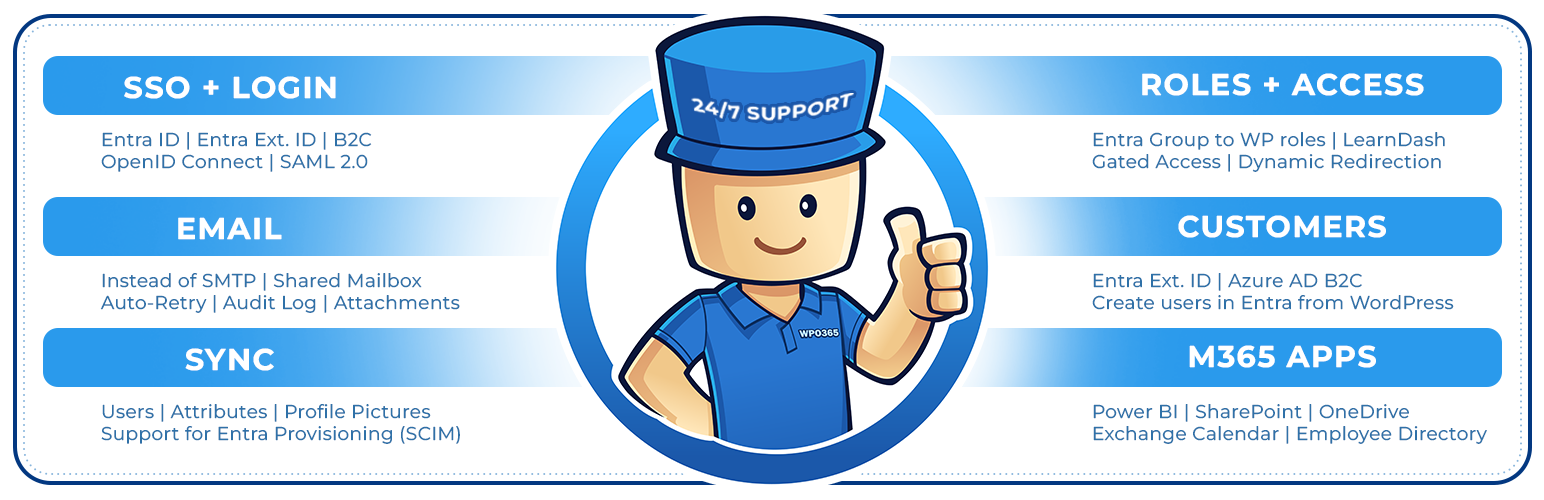
WPO365 | SEAMLESS WORDPRESS + MICROSOFT INTEGRATION (WPO365 | LOGIN)
Description
Seamless Microsoft Entra | Ext. ID | B2C | M365 Integration for WordPress. For SSO, Mail, Roles, Access, Sync, Copilot, SharePoint, PowerBI.
SINGLE SIGN-ON (SSO)
- Enable Microsoft based Single Sign-on more
- Supported Identity Providers (IdPs): Azure Active Directory, Azure AD B2C, Entra External ID (Azure AD for Customers) more
- Supported SSO protocols: OpenID Connect and SAML 2.0 more
- Supported OpenID Connect User Flows: Authorization Code User Flow (recommended) and Hybrid User Flow more
NEW USERS
- New users that sign in with Microsoft automatically become WordPress users more
INTRANET
- Configure the intranet authentication mode to restrict access to all front-end posts and pages more
- Hide the WordPress Admin Bar for specific roles more
- Send emails using Microsoft Graph instead of SMTP from your WordPress website more
- Choose between delegated (send mail as a user) and application-level (send mail as any user) type permissions.
- Or: Select either a Microsoft 365 account or a personal Microsoft account, like Hotmail.com or Outlook.com, to send WordPress emails.
- Or: Configure RBAC for Exchange Online and authorize as an application but with a limited scope e.g. one specific mailbox.
- Send as HTML
- Save to the Sent Items folder
- Support for file attachments
- Daily refresh of Microsoft Graph access and refresh token
- Auto-flagging and suppression of duplicate emails
- Auto-retry when throttled (HTTP 429)
SCIM
- Entra User Provisioning (SCIM) more
- Create new WP Users
MICROSOFT TEAMS
- Support for (seamless) integration of your WordPress website into a Microsoft Teams Tabs and Apps more
POWER BI
- Embed Microsoft Power BI content (user owns data) more
SHAREPOINT
- Embed a SharePoint Online library more
- Embed a SharePoint Online list more
- Embed an Outlook / Exchange calendar more
- Embed a SharePoint Online search more
EMPLOYEE DIRECTORY
- Embed an intuitve Azure AD / Microsoft Graph based Employee Directory into a front-end post or page more
WPO365 INSIGHTS
- See what matters, when it happens Track key WPO365 events like logins, sent emails and user creation and updates with WPO365 Insights more
WORDPRESS MULTISITE
- Support for WordPress Multisite more
REST API ENDPOINT PROTECTION
- Protect your WordPress REST API endpoints with a combination of a WordPress cookie and a nonce for delegated access more
DEVELOPERS
- Developers can now connect to a RESTful API for Microsoft Graph in their favorite programming language and without the hassle of authentication and authorization more
- PHP hooks for developers to build custom Microsoft Graph / Office 365 integrations more
ADD FUNCTIONALITY WITH PREMIUM EXTENSIONS
Features below can be unlocked with premium WPO365 plugins.
SINGLE SIGN-ON (SSO)
- Hide the WordPress login page “/wp-login.php” and replace with a fully customizable login / logged-out page. more
SYNC
- Full User Sync using MS Graph from Entra to WordPress more
- Create new WP Users
- Update existing WP Users
- (Soft) Delete existing WP Users
- Lookup / Add a user in Entra ID (Azure Active Directory) on WordPress’s built-in Add New User page. more
WP User Roles, Profiles and Avatars will be updated and other rules e.g. LearnDash Enrollments will be applied
SCIM
- Integrate with Entra User Provisioning (SCIM) more
- Create new WP Users
- Update existing WP Users
- (Soft) Delete existing WP Users
- Map User Attributes beyond name and email and store as WordPress user meta
WP User Roles, Profiles and Avatars will be updated and other rules e.g. LearnDash Enrollments will be applied
INTRANET
- Block Direct Access to the Media Library more
ROLES + ACCESS
- Assign WordPress roles by Entra Groups, Entra User Attributes, Domains and / or App Roles more
- Restrict access to site / pages by Entra Groups, Domains and / or WPO365 Audiences more
- Redirect after login by Entra Groups and / or Domains more
COPILOT
- Copilot Rewrite will help authors to generate improved versions of their content without leaving WordPress more
- Use Copilot Chat for WordPress and embed directly in your WordPress intranet or extranet more
LEARNDASH
- Auto-Enroll WP Users in LearnDash Courses and Groups by Entra Groups, Domains and / or Defaults more
CUSTOM USER FIELDS
- Enhance WordPress / BuddyPress User Profiles with Entra User Attributes more
- Auto-retry to deliver emails that failed to send more
- Send attachments larger than 3MB more
- Send as / On behalf more
- Send from a Shared Mailbox more
- Send from alias addresses more
- Enable Staging Mode more
- Mail Throttle more
- Send as BCC more
- Default Reply-To more
MICROSOFT 365 APPS
- Power BI more
- SharePoint Library more
- SharePoint List more
- SharePoint Search more
- Exchange Calendar more
- Viva Engage more
- Employee Directory more
ADVANCED LOGIN OPTIONS
- Support for Multitenancy more
- Support for multiple IdPs more
- Force SSO more
- Dual Login more
- Intercept manual login more
- Prevent pwd. / email change more
- Single Sign-out more
- Sign out of M365 more
- Custom login URL more
- Custom loading template more
- B2C custom domain more
- Embedded B2C login more
- Custom new User email more
WPO365 INSIGHTS
- Get WPO365 Alerts in your inbox when a critical WPO365 event occurs more
AVATAR
- M365 Profile Picture as WordPress / BuddyPress Avatar more
REST API ENDPOINT PROTECTION
- Enable Azure AD based protection for your WordPress REST API endpoints more
CONFIGURATION
- Save multiple configurations
- Directly edit (the JSON representation of) a configuration
Prerequisites
- Make sure that you have disabled caching for your Website, especially when you configure a WordPress based intranet and access to WP Admin and all pubished pages and posts requires authentication. With caching enabled, the plugin may not work as expected
- We have tested our plugin with WordPress >= 5 and PHP >= 7.4
- You need to Entra ID Tenant Administrator to configure both Azure Active Directory and the plugin
- When configuring a WordPress based intranet, you should consider restricting access to the otherwise publicly available wp-content directory more
Support
We will go to great length trying to support you if the plugin doesn’t work as expected. Go to our Support Page to get in touch with us. We haven’t been able to test our plugin in all endless possible WordPress configurations and versions so we are keen to hear from you and happy to learn!
Feedback
We are keen to hear from you so share your feedback with us and contact us using the contact form on our website!
Open Source
When you’re a developer and interested in the code you should have a look at our repo over at WordPress.
Installation
Please check out our Getting Started page for detailed installation and configuration instructions.
Screenshots
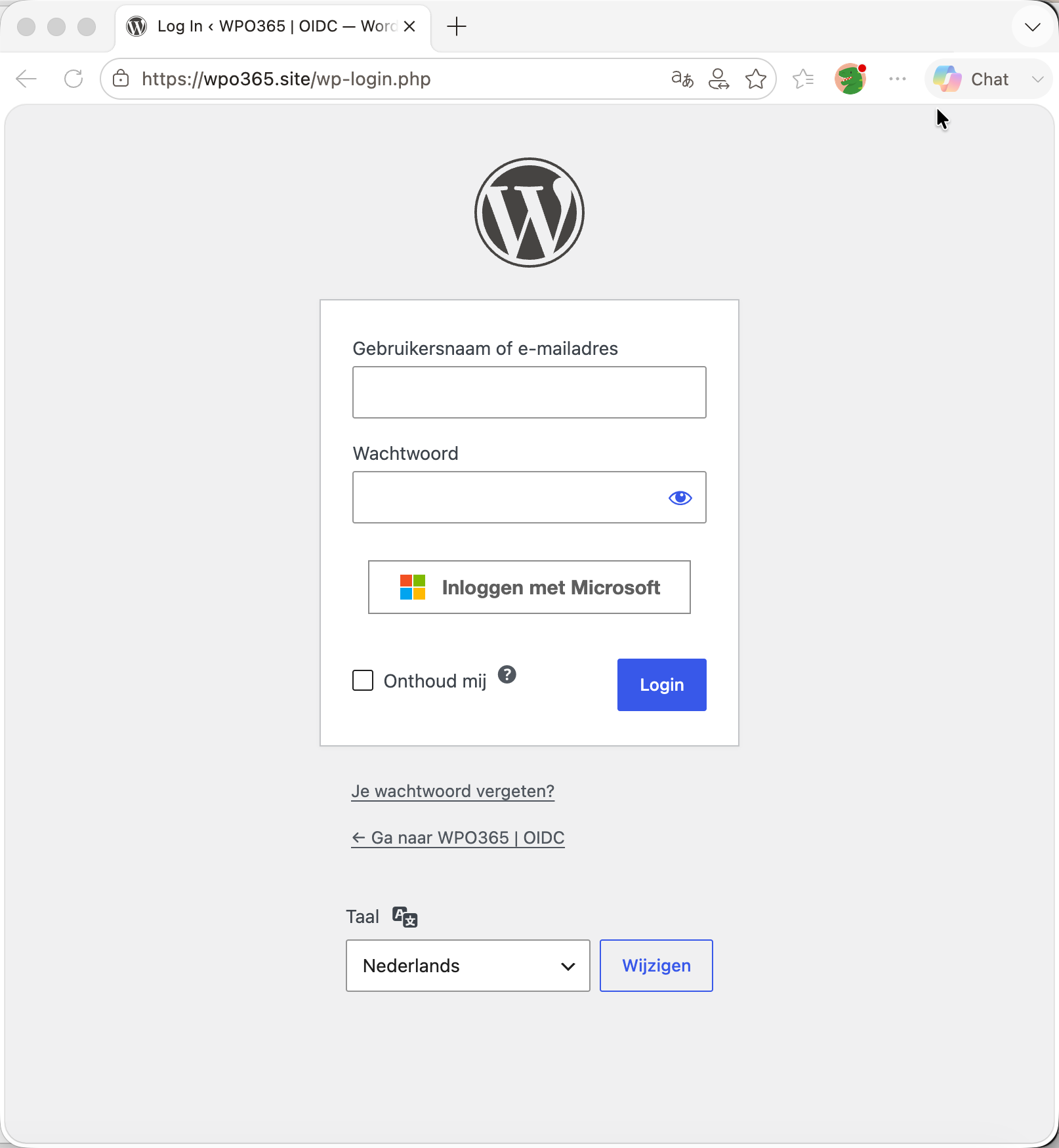
Microsoft Entra ID based Single Sign-on (SSO).
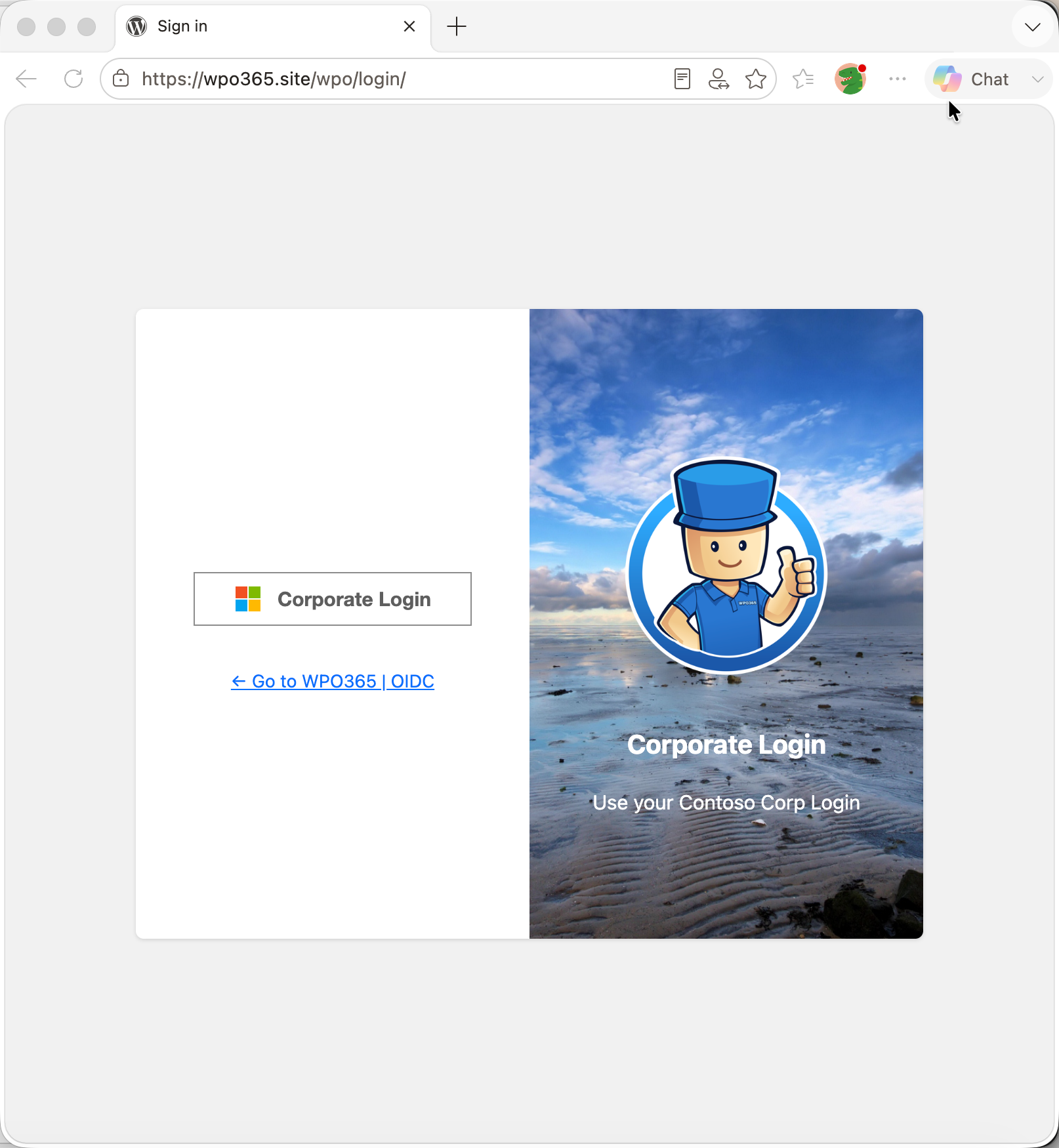
Hide WordPress Login and custom login route / page.
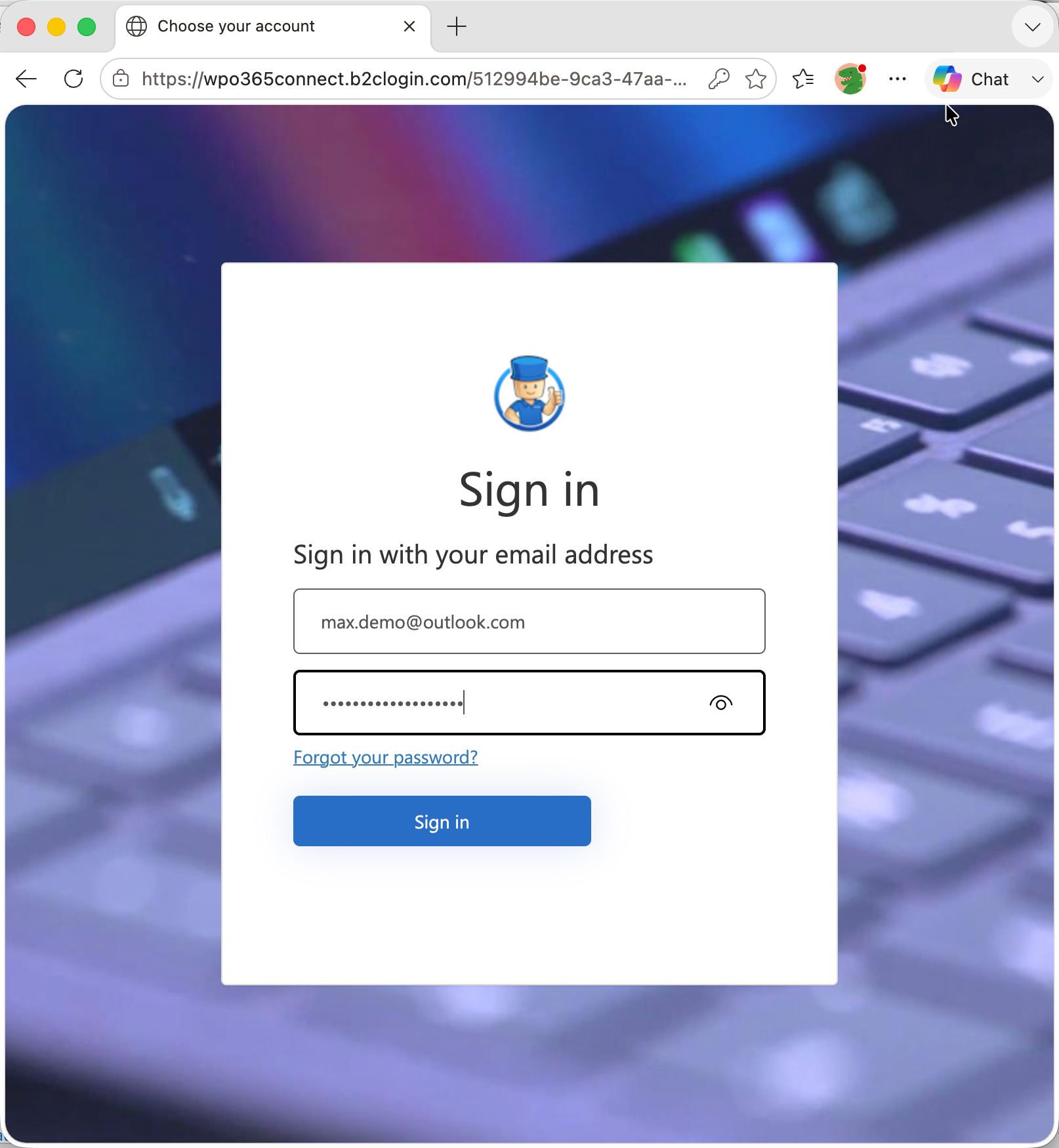
Support for Azure AD B2C / Entra External ID.
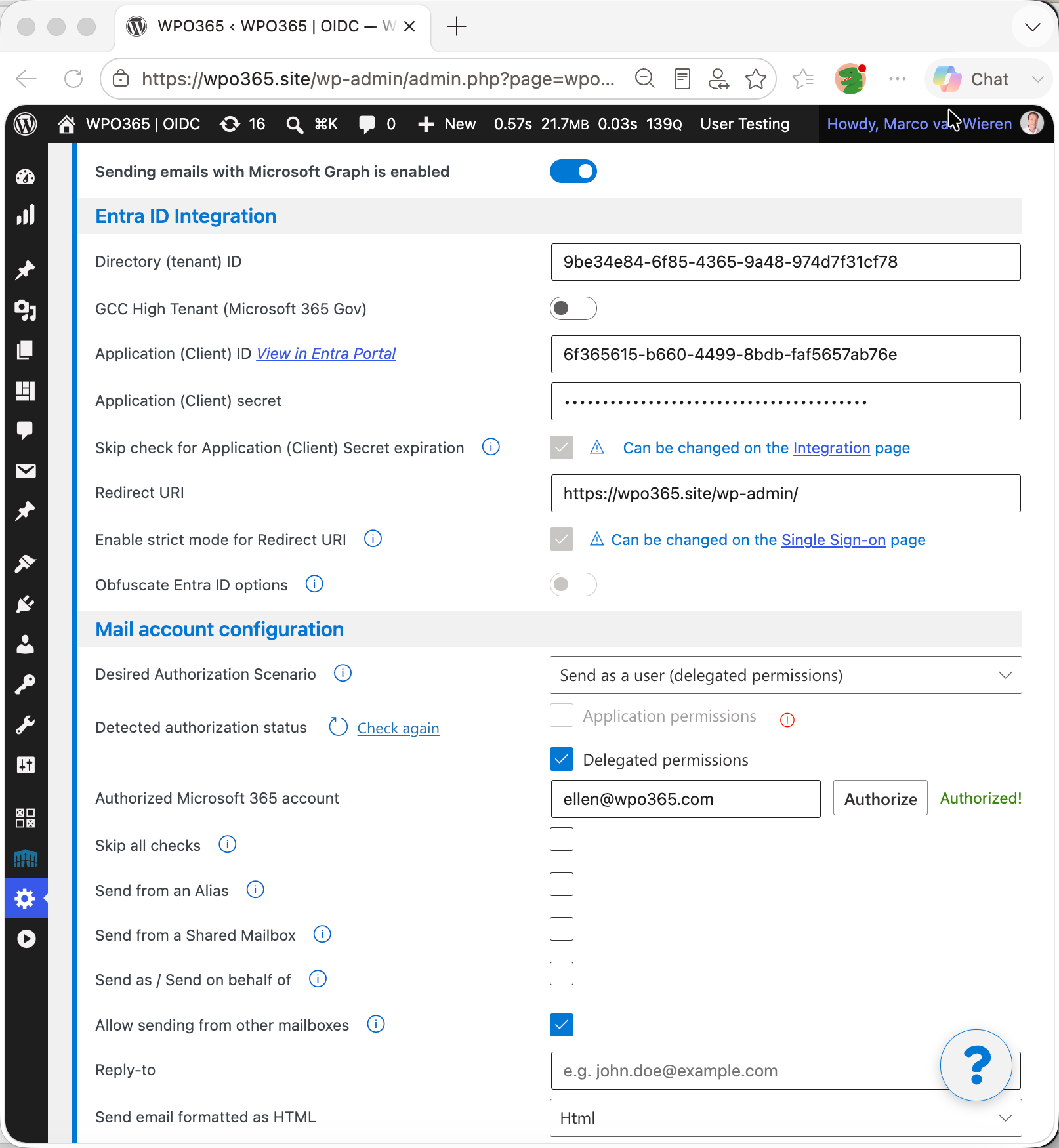
Send WordPress emails using Microsoft Graph.
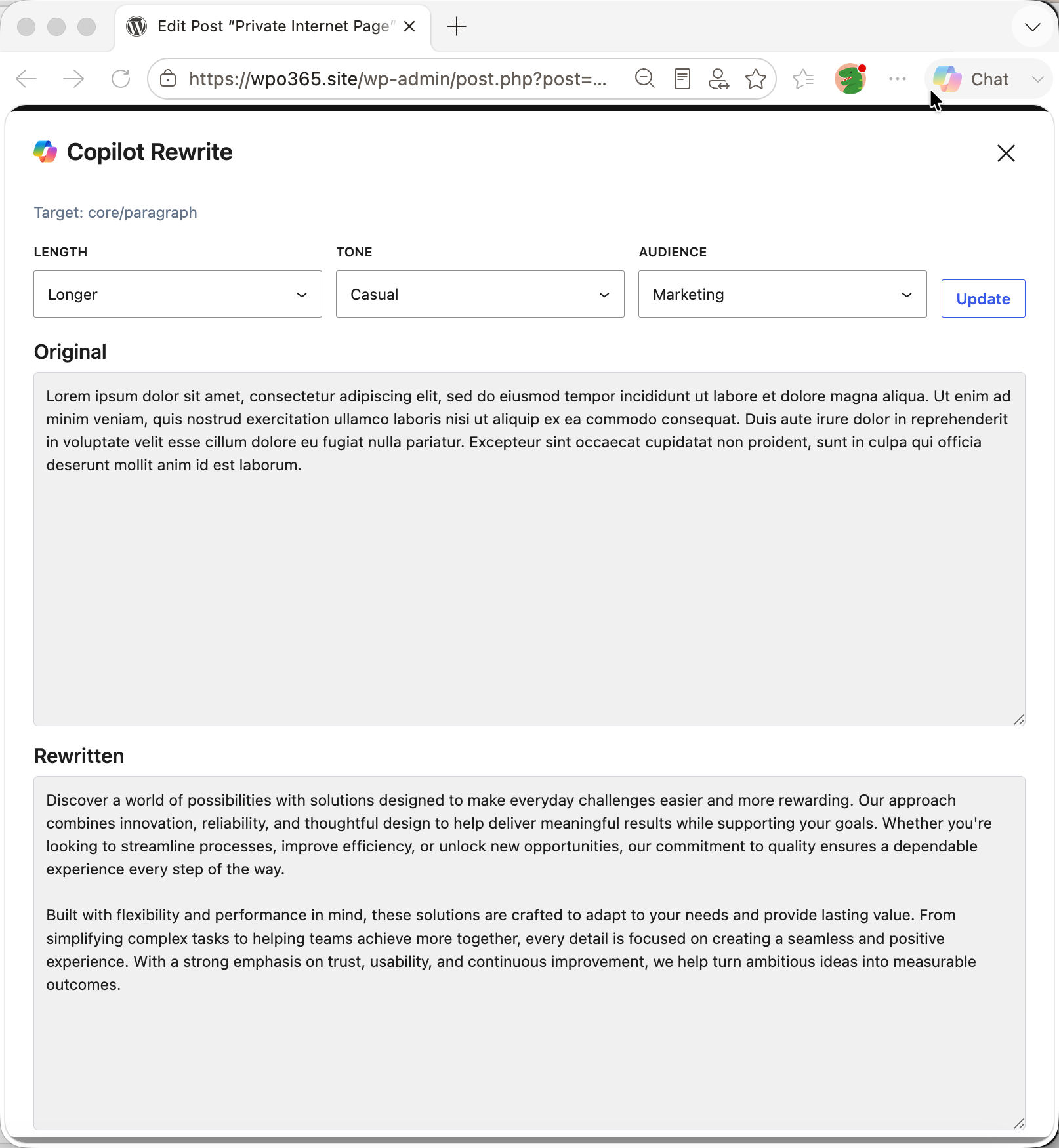
Co-pilot Rewrite for WordPress (block editor).
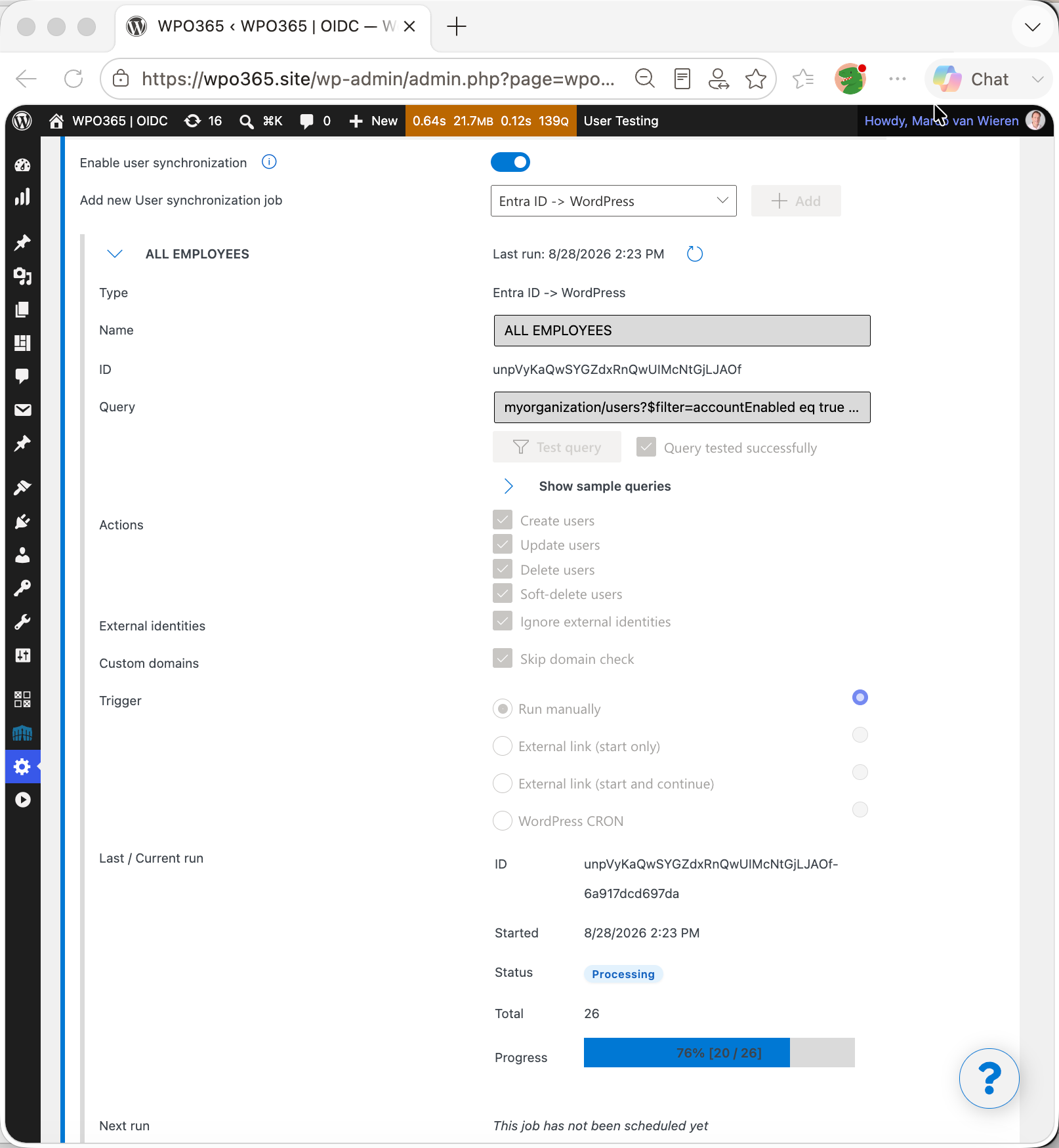
Synchronize users from Entra ID to WordPress.
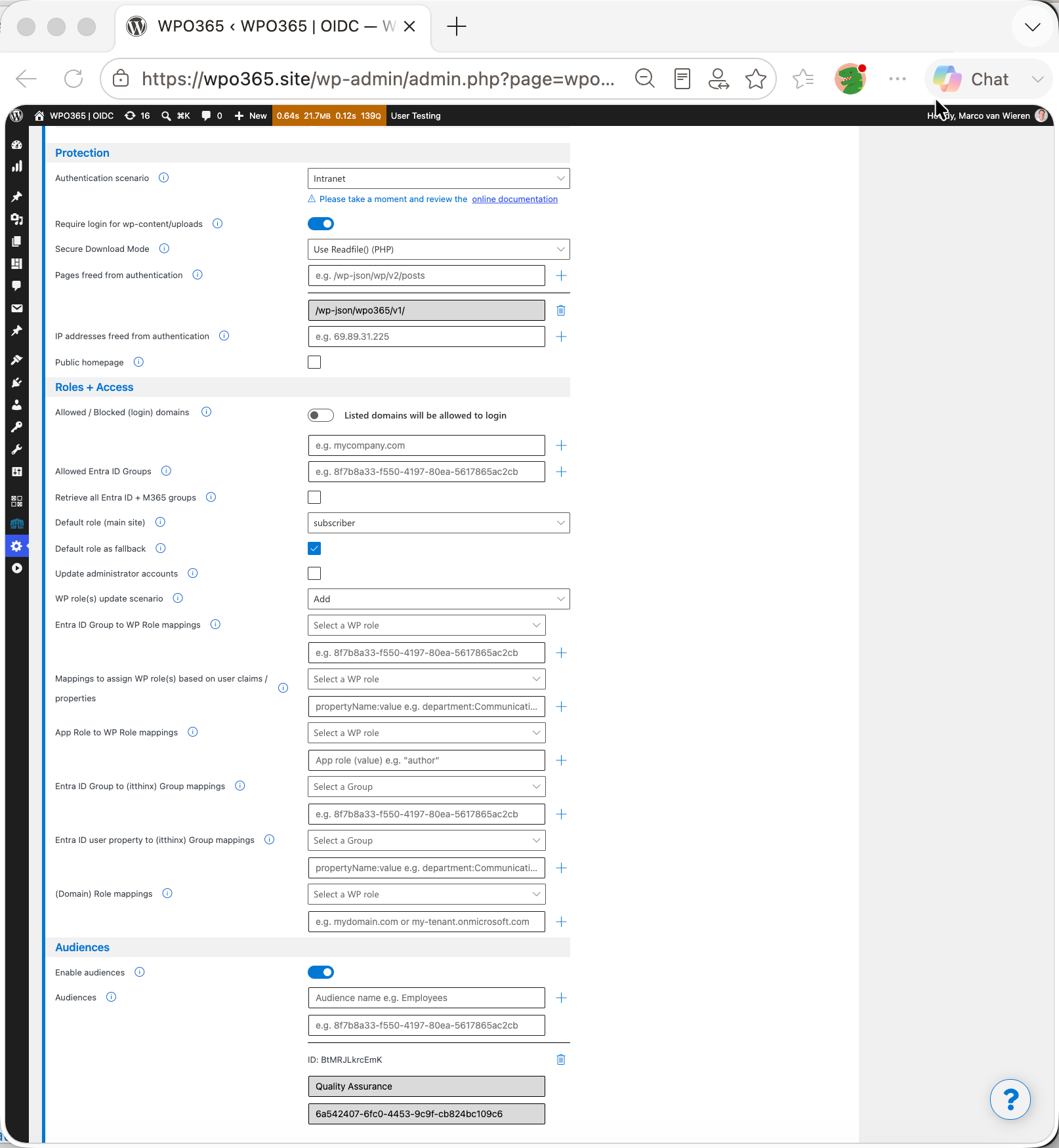
WP role assignment and access rules for Entra ID groups.
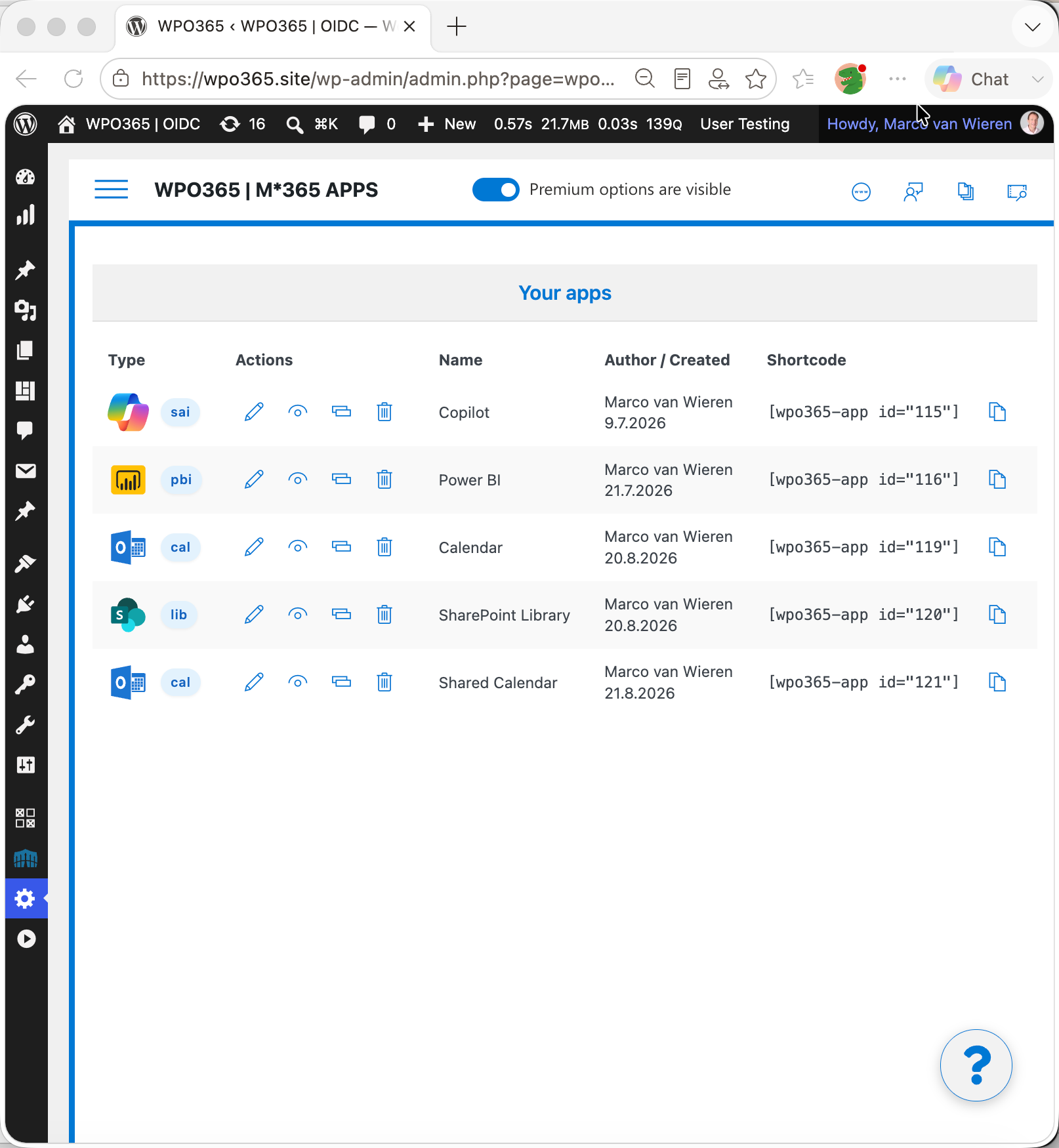
Apps to embed Microsoft 365 services in WordPress.
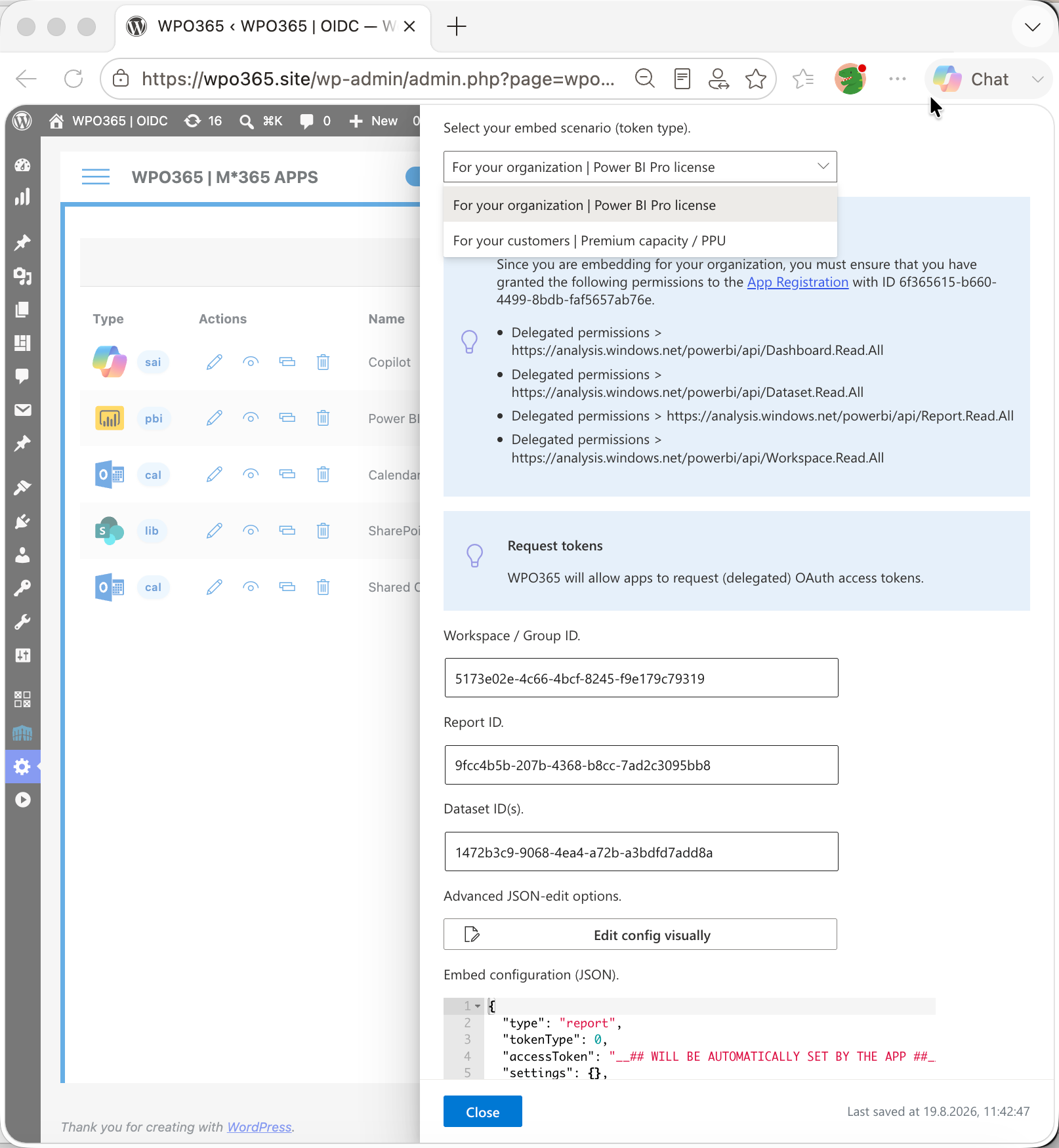
Embed Power BI for WordPress (configuration).
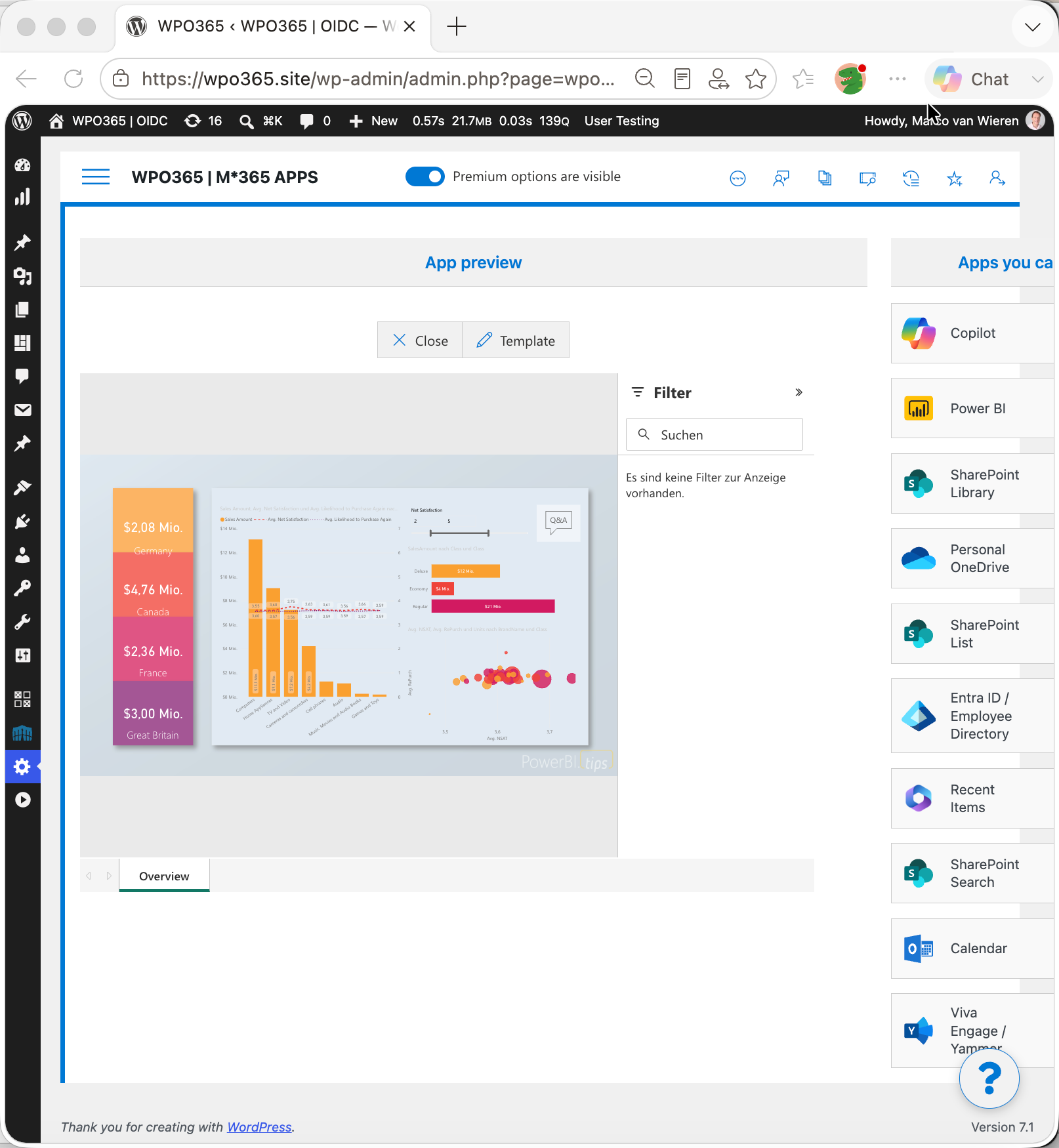
Embed Power BI content in WordPress.
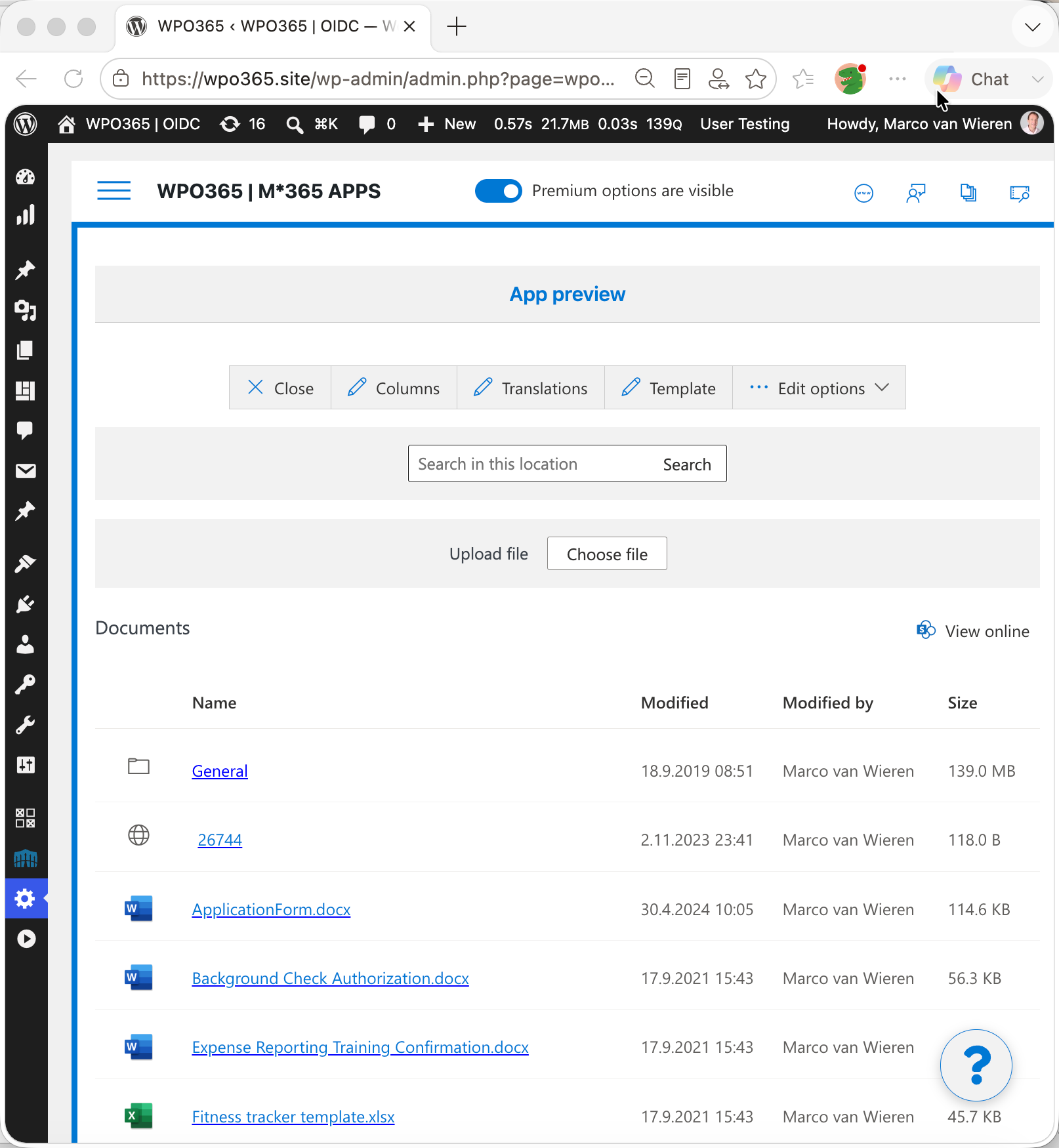
Embed SharePoint Library in WordPress.
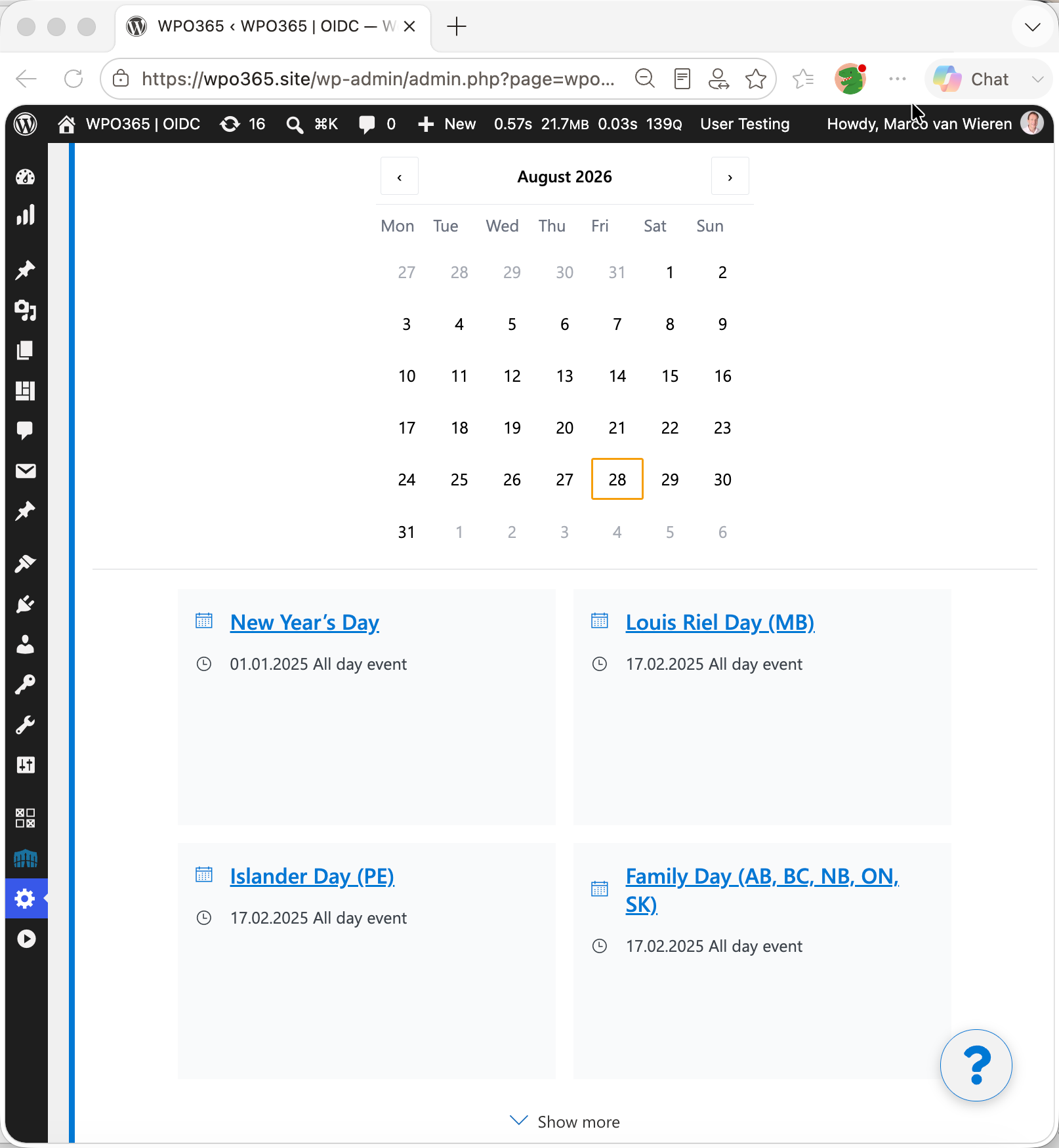
Embed Outlook / Exchange calendar in WordPress (date picker).
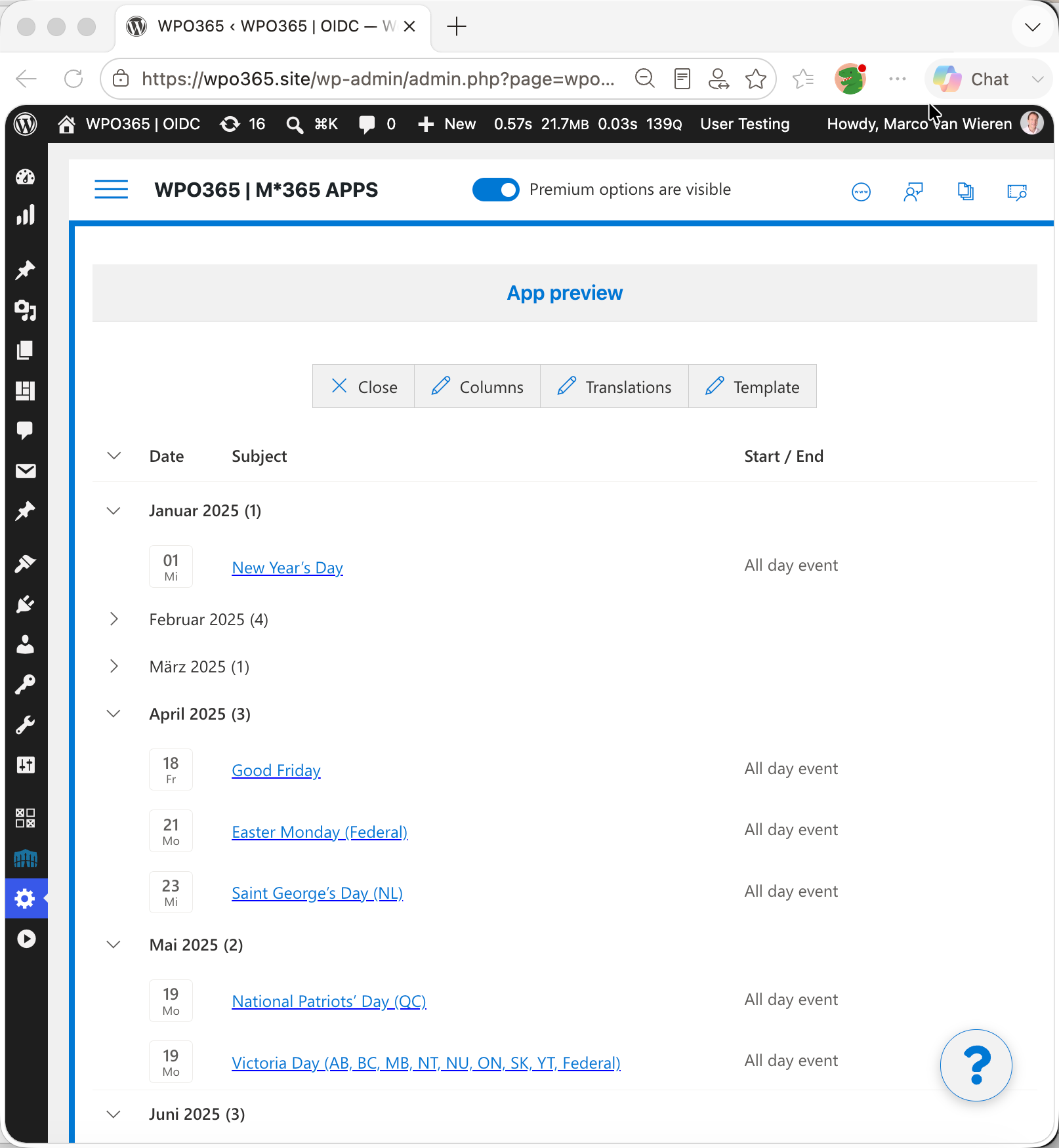
Embed Outlook / Exchange calendar in WordPress (list view).
Faq
Please check out our online FAQs for answers to commonly asked questions.
Reviews
Greate product with amazingly good support
By 
This plugin works brilliantly and the documentation is thorough and clear. Even better, on the rare times I have needed to ask for assistance the customer support has been swift and clear. Highly recommended!
Amazing customer support!
By 
The very best customer support I've ever experienced. Responsive, detailed and clear communication. Very much recommend WPO360!
Ties together multiple sites
By 
So far I'm only using this for team SSO across multiple subdomains in our business, but it's fantastic. I haven't needed support, but I have tweaked the styling on the login page, so as not to draw external uses into clicking the SSO button!
Many thanks. I would usually buy a paid licence for a free plugin that is this useful, just to support the developer, but I'm pretty sure I will need some more of the features. I just don't know which yet!
Powerful Intranet Solution
By 
This is a great solution for my company to have an Intranet based on our Microsoft365 tenant users. Its very powerful without unneeded obfuscation or fluff. I'd give ten starts if it were an option!
For me this was new territory and I have to say that the support has been nothing short of spectacular! I have not been feeling lost and if I do feel lost support always rights me up and sets me on the correct path. I wish every plug-in was as well executed and as well supported as this.
Thank you so much for making my work better and easier!
The Gold Standard for Microsoft 365 Integration
By 
WPO365 has been one of the most useful WordPress plugins we've implemented.
What I like most is that it brings a lot of Microsoft 365 functionality together in one place. Rather than managing separate plugins for SSO, email, Teams, SharePoint, user provisioning, and other services, we were able to handle everything through WPO365. That has made administration much simpler and reduced the amount of maintenance involved.
One of the first things we set up was sending WordPress email through Microsoft 365. This let us use the same DKIM, SPF, and DMARC policies already in place across the organization. Setup was straightforward, and we noticed better email deliverability almost immediately.
The documentation has been a big help. It's thorough, easy to follow, and covers a wide range of scenarios. More than once, I've found features or configuration options I probably wouldn't have discovered otherwise just by working through the documentation.
A feature that has worked particularly well for us is silent authentication in Microsoft Teams. Users can access WordPress applications embedded directly within the Teams window without having to leave Teams or sign in again, which makes the experience much smoother and cuts down on login-related support requests.
Support has also been excellent. Marco, the developer, is very responsive and clearly knows the product inside and out. When we've run into issues, the responses have been thoughtful and focused on solving the actual problem rather than working through a generic support script. That has saved us a lot of time.
If you're running both WordPress and Microsoft 365, WPO365 is worth a serious look. It has helped us simplify integration, improve the user experience, and reduce the overhead of managing multiple plugins.
Nothing but outstanding and helpful
By 
Our organization worked on a project that required M365 application services on a website.
We experienced difficulties with the setup and support have been nothing but outstanding and helpful.
Like one of the reviews out there, they offer swift service and give all inquiries personal attention. Even with the free version of the plugin, it is already feature rich.
To support their work and help the future development of the plugin. We recommend, although optional, purchase a license of the plugin.
Excellent Customer Support
By 
First off, I NEVER write reviews except in very rare cases and this is one of those. The customer support is wonderful even when I'm just a "free" customer. They step-by-step went through the issue with me over multiple back-and-forth emails until the issue was resolved, so I love them for this and if/when I'm ever not poor as sht I'm going to definitely get a pro membership.
Thanks again for all that you do.
Fantastic plugin and support
By 
This plugin works perfectly and the support from Marco is amazing. I am a beginner with adding SharePoint to the website, I had a lot of questions for Marco and he was very accommodating, responsive and generous with his help. After following his video instructions, which are clear and easy to follow, I was able to set up the plugin and have the SharePoint files showing on my website very quickly and easily. I can't recommend highly enough. 10 out of 5 stars !
Exceeded all my expectations
By 
Like many other reviewers have said, this plugin is fantastic! My client purchased the Integrate bundle which we’re using to build a custom intranet to replace their existing SaaS product. The plugin has everything they need, and more. It was a bit overwhelming at first since this was my first time using the plugin but the WPO365 documentation is very thorough and walked me through everything step by step. There are even tooltips that link to the docs for almost every option in the plugin settings.
A few times I did get stuck and needed to reach out for support. The plugin developer, Marco, got back to me right away and was extremely helpful and professional.
I highly recommend this plugin to anyone needing to integrate with Microsoft services.
Feature rich with great support!
By 
I've been using WPO365 for a few years. It works great. Great documentation. Great tutorials. Great support. Along the way, I've made a few requests for improvements and new feature implementations. I always feel like my feedback matters and in many cases, the improvements have been implemented that I requested. Extremely happy with support and the ongoing development efforts.
Changelog
Also available online.
v45.1
- Security: Hardened how WPO365 processes the mail authorization response. [LOGIN, GRAPH MAILER]
- Security: While “Skip NONCE verification” is turned on for a website that uses the OpenID Connect Hybrid Flow, WPO365 now shows a warning that the website must be considered vulnerable to replay attacks. [LOGIN]
- Security: Fixed a cross-site scripting (XSS) vulnerability affecting the premium mail Log. [MAIL]
- Security: Hardened “Require login for the Media Folder”: The access cookie is now signed with a per-site secret, it no longer contains sensitive information, and is only issued while the feature is switched on. [ESSENTIALS, ROLES + ACCESS, PROFESSIONAL, INTEGRATE, CUSTOMERS (LOGIN+, SYNC, INTRANET)]
- Security: If you use “Require login for the Media Folder” on an Apache website that relies on .htaccess for access control, please disable and then re-enable the option on the plugin’s “Roles + Access” configuration page after updating, to apply an important update to the .htaccess access rules. [ESSENTIALS, ROLES + ACCESS, PROFESSIONAL, INTEGRATE, CUSTOMERS (LOGIN+, SYNC, INTRANET)]
- Security: Requests for Media Library items protected by “Require login for the Media Folder” are now only handled by an active WPO365 premium plugin, never by an inactive (possibly outdated) one that is merely installed. [ESSENTIALS, ROLES + ACCESS, PROFESSIONAL, INTEGRATE, CUSTOMERS (LOGIN+, SYNC, INTRANET)]
- Security: Hardened how WPO365 checks the requested path of a Media Library item while “Require login for the Media Folder” is switched on. [ESSENTIALS, ROLES + ACCESS, PROFESSIONAL, INTEGRATE, CUSTOMERS (LOGIN+, SYNC, INTRANET)]
- Security: While “Require login for the Media Folder” is switched on, WPO365 now shows a warning in the WordPress admin if the premium plugin that provides it has not yet been updated, so that the security improvements that are available with version 45.1 are fully applied. [ESSENTIALS, ROLES + ACCESS, PROFESSIONAL, INTEGRATE, CUSTOMERS (LOGIN+, SYNC, INTRANET)]
- Security: “Require login for the Media Folder” now blocks requests for certain files in the uploads folder, such as PHP files and hidden files (e.g. .htaccess), so that their contents can no longer be downloaded. [ESSENTIALS, ROLES + ACCESS, PROFESSIONAL, INTEGRATE, CUSTOMERS (LOGIN+, SYNC, INTRANET)]
- Feature: “Require login for the Media Folder” is now available on WordPress multisite networks, both with subdirectories and with subdomains. Each site’s own settings (and in dedicated mode, its own on/off switch) apply to its files. Existing networks that still have the option switched on must disable and then re-enable the option on the plugin’s “Roles + Access” configuration page after updating. [ESSENTIALS, ROLES + ACCESS, PROFESSIONAL, INTEGRATE, CUSTOMERS (LOGIN+, SYNC, INTRANET)]
- Change: While “Require login for the Media Folder” is switched on but no active WPO365 premium plugin provides it, Media Library items are no longer protected, and WPO365 shows a warning in the WordPress admin. [ESSENTIALS, ROLES + ACCESS, PROFESSIONAL, INTEGRATE, CUSTOMERS (LOGIN+, SYNC, INTRANET)]
- Improvement: WPO365 now shows a warning in the WordPress admin when “Require login for the Media Folder” is switched on but its rules are not applied, e.g. after importing a configuration. [ESSENTIALS, ROLES + ACCESS, PROFESSIONAL, INTEGRATE, CUSTOMERS (LOGIN+, SYNC, INTRANET)]
- Improvement: When a sign-in fails with “Your login might be tampered with”, WPO365 now logs why the sign-in could not be verified (e.g. the sign-in link had been used before, or was not created by this website), to help find caching and server configuration issues. [LOGIN]
- Fix: When a WordPress session expires, the “Session expired” prompt now always appears, instead of the website’s home page opening in the popup window. [LOGIN]
- Fix: Single sign-on inside Microsoft Teams (silent authentication) failed since version 45.0. It now bypasses the nonce check in a safe way and also works with Redirect URI’s “strict mode”. [LOGIN]
- Fix: Deactivating WPO365 | LOGIN now switches “Require login for the Media Folder” off and removes its .htaccess rules, instead of leaving the rules behind and causing a critical error for requests for Media Library items. [ESSENTIALS, ROLES + ACCESS, PROFESSIONAL, INTEGRATE, CUSTOMERS (LOGIN+, SYNC, INTRANET)]
- Fix: An updated “Secure Download Mode” now takes effect for Media Library items the next time a user signs in or opens a page while signed in, instead of only after switching “Require login for the Media Folder” off and on again. [ESSENTIALS, ROLES + ACCESS, PROFESSIONAL, INTEGRATE, CUSTOMERS (LOGIN+, SYNC, INTRANET)]
- Fix: A Microsoft 365 app no longer shows “A deprecated version of a Microsoft 365 (Embed) App has been detected” when the premium plugin is up to date but WPO365’s cached list of active plugins was outdated. If the plugin is really outdated, only administrators see the details; other visitors see a short notice. [LOGIN]
- Fix: On WordPress multisite networks, activating, deactivating or updating a WPO365 premium plugin network-wide now refreshes every site’s list of active premium plugins, so that the premium options appear in each site’s configuration. [ESSENTIALS, ROLES + ACCESS, PROFESSIONAL, INTEGRATE, CUSTOMERS (LOGIN+, SYNC, INTRANET)]
- Fix: For a “Government GCC (High)” tenant, WPO365 now sends its requests to Microsoft Graph (e.g. to retrieve a user’s attributes, group memberships or profile picture) to graph.microsoft.us instead of graph.microsoft.com, where they failed with “SecurityTokenInvalidCloudInstanceException”. [LOGIN]
v45.0
- Security: Fixed a cross-site scripting (XSS) vulnerability. [LOGIN]
- Security (breaking): Discontinued the option that let apps request any Microsoft Graph endpoint, because it could be misused to reach services it was never meant to; each endpoint must now be explicitly allow-listed. [LOGIN]
- Security: Hardened how allow-listed Microsoft Graph endpoints are matched, so a look-alike web address can no longer slip past the check. [LOGIN]
- Security: Apps can now only request the application-level Microsoft Graph permissions that an administrator has explicitly allowed. [LOGIN]
- Security: Whether a request to Microsoft Graph uses application-level or the signed-in user’s permissions is now decided by the app’s saved configuration rather than by the request itself. [LOGIN]
- Security (breaking): Uploading a file to SharePoint now always uses the signed-in user’s own permissions, addressing a security concern with application-level uploads. [LOGIN]
- Security: Detailed Microsoft 365 error responses are now shown only to administrators and no longer to other visitors. [LOGIN]
- Security: Added a safeguard so that an access token with application-level permissions can never be handed to the browser. [LOGIN]
- Security: Prevented apps from influencing an outgoing request in a way that could send the website’s credentials to an unintended destination. [LOGIN]
- Security: Hardened the “Licenses” page. License requests to wpo365.com now also verify the server’s SSL certificate, unless “Skip SSL host verification” is checked on the plugin’s “Miscellaneous” configuration page. [LOGIN]
- Security: Fixed an authentication bypass affecting sites that enabled the deprecated option “Use Firebase\JWT instead of phpseclib”. The option has been removed. [LOGIN]
- Security: Fixed an issue that allowed users from tenants that were not allow-listed to sign in to multi-tenant websites. ID tokens are now always checked for the right issuer and audience, and the option “Skip ID token verification” has been removed. [LOGIN]
- Improvement: When “Require login for the Media Folder” is enabled, visitors from one of the “IP addresses freed from authentication” can now also open files in the Media Library without signing in. Developers can use the new filter “wpo365/media/skip_authentication” to grant the same access based on their own rules, e.g. an IP range. [ESSENTIALS, PROFESSIONAL, INTEGRATE, CUSTOMERS (LOGIN+, SYNC, INTRANET)]
- Improvement: The authentication scenarios “Internet (auth. only)” and “Intranet (auth. only)” and the option “Require login for the Media Folder” are now also available with WPO365 | ROLES + ACCESS (requires version 45.0 of that plugin). [ROLES + ACCESS]
- Improvement: Power BI reports that use the optimized mobile layout now switch between the mobile and desktop layout when the browser window is resized. [APPS, INTEGRATE (INTRANET)]
- Change (breaking): “Require login for the Media Folder” is no longer available on WordPress multisite networks due to reliability concerns. [ESSENTIALS, PROFESSIONAL, INTEGRATE, CUSTOMERS, ROLES + ACCESS]
- Fix: License keys are now always saved in the database. Any license keys in your wp-config.php overrides (WPO_OVERRIDES) are copied to the database automatically after updating to version 45.0 and then ignored. [ANY PREMIUM]
- Fix: On websites that use wp-config.php overrides (WPO_OVERRIDES), one-time upgrade tasks no longer run again on every page load. [ANY PREMIUM]
- Fix: After signing in, files from the Media Folder were not always delivered with the configured “Secure Download Mode” (e.g. for LiteSpeed servers) for up to 24 hours. [ESSENTIALS, PROFESSIONAL, INTEGRATE, CUSTOMERS (LOGIN+, SYNC, INTRANET)]
- Fix: “Require login for the Media Folder” now also works when WPO365 | CUSTOMERS is the only premium plugin installed. Until now, files from the Media Folder then failed to load. [CUSTOMERS]
- Fix: Adding an app in the wizard right after adding one “For customers” no longer creates it with “Allow anonymous users to interact with this app” checked. [LOGIN]
- Fix: The SAML 2.0 Service Provider metadata generated by WPO365 now has a valid logout URL (also repaired automatically on sites that saved the malformed default of earlier versions), no longer claims that sign-in requests are signed, and includes the NameID format. [LOGIN]
v44.1
- Fix: Microsoft’s infrastructure is currently incompatible with OpenSSL 3.5 and higher’s new default settings (as shipped with e.g. Debian 13), which could make sign-in or Microsoft Graph requests unexpectedly fail with a “Not Found” error on affected web hosts (e.g. IONOS / Fasthosts) – the plugin now automatically detects this and works around it. [LOGIN, MAILER]
v44.0
- Support for WordPress 7.1. [ALL]
- Feature: Use Copilot Rewrite – a block-editor sidebar tool – to rewrite selected content blocks (paragraphs, headings, lists, quotes, code, and more) with AI assistance, including support for personal and organization-wide rewrite instructions. [ESSENTIALS, PROFESSIONAL, INTEGRATE (LOGIN+, SYNC, INTRANET)] Read more
- Feature: Copilot Chat is a new app that lets visitors have an AI-powered conversation grounded in your organization’s Microsoft 365 / SharePoint content, embeddable anywhere on your WordPress site – with conversation export, retry-on-failure, source attributions, and custom styling support. [APPS, INTEGRATE (INTRANET)] Read more
- Feature: Enable a fully customizable WordPress Login Page at https://{your website}/wpo/Login and optionally hide the classic WordPress page “/wp-login.php”, with an option to hide the username / password form, custom branding, layout (single or split-column), colors, logo, custom title / description text, and translatable labels. [ESSENTIALS, PROFESSIONAL, INTEGRATE (LOGIN+, SYNC, INTRANET)] Read more
- Feature: Added a matching custom “Logged Out” page (‘/wpo/loggedout’) that can be used as the default landing page after sign-out or an SSO sign-in error, without needing a separately configured error page. [ESSENTIALS, PROFESSIONAL, INTEGRATE (LOGIN+, SYNC, INTRANET)]
- Improvement: A fully redesigned, more compact calendar list layout with a day-badge, and a combined start/end time column. Events that span multiple days or last all day are now displayed more clearly, showing correct start / end dates and an “All day event” label instead of confusing time ranges. [LOGIN, APPS, INTEGRATE (INTRANET)] Updated screenshots
- Improvement: The plugin will now – on a daily base – automatically refresh the Microsoft Graph mail connection’s access and refresh token, so outgoing mail no longer risks failing due to a long-expired token after periods of low activity. [LOGIN, MAILER] Consult the update tutorial
- Improvement: Added automatic detection and suppression of duplicate outgoing emails sent within a short time window. [LOGIN, MAILER] Read more
- Improvement: The existing “obfuscate Entra ID options” switch – that will delete sensitive Entra ID settings from the database once they’re defined in ‘wp-config.php’ when toggled on – is now capable of automatically restoring those settings if switched off again. [ANY PREMIUM] Read more
- Improvement: Added an optimized mobile layout option (portrait or landscape) for embedded Power BI reports on narrow screens. [APPS, INTEGRATE (INTRANET)]
- Improvement: The “Sign in with Microsoft” button – when multiple identity providers are configured – now highlights the identity-provider dropdown in red if you try to sign in without picking one, instead of just leaving the button disabled with no explanation. [LOGIN]
- Improvement: The “block direct Media Folder access” feature now (again) support a “Secure Download Mode” for Litespeed servers (requires additional server-configuration – consult online documentation). [ESSENTIALS, PROFESSIONAL, INTEGRATE, CUSTOMER (LOGIN+, SYNC, INTRANET)]
- Improvement: Added “Default LD assignment scope” as an additional option to configure default LearnDash course and group assignments, so you can control whether those assignments should be applied to new users only, instead of always being applied to all users. [ROLES + ACCESS, PROFESSIONAL, INTEGRATE, CUSTOMERS (SYNC, INTRANET)] Read more
- Improvement: The plugin’s built-in “Send WordPress emails using Microsoft Graph” feature nows honor a “Retry-After” header – when Microsoft Graph throttles a request – with a short automatic retry, instead of failing immediately. [LOGIN, MAILER]
- Improvement: If you have configured multiple Identity Providers, you can now configure the “Allow users from other tenants” setting individually for each identity provider in wp-config.php. [LOGIN]
- Fix: Tested for compatibility with multilingual plugins that add language-specific URL paths, such as “/en” and “/nl”. [LOGIN]
- Fix: The start / end date and time of Calendar app events are now correctly translated to the user’s timezone. [LOGIN, APPS, INTEGRATE (INTRANET)]
- Fix: The “Access Denied” message shown to users blocked for not belonging to a required group has been corrected to a more accurate, specific message. [ROLES + ACCESS, PROFESSIONAL, INTEGRATE, CUSTOMERS (SYNC, INTRANET)]
- Fix: The wizard no longer shows a misleading “invalid secret” warning for a masked secret field when Entra ID options have been obfuscated. [ANY PREMIUM]
- Fix: Identified a bug where selecting a specific identity provider from a multi-tenant sign-in dropdown when “Use client-side redirect” has been selected, would drop the selected Identity Provider, incorrectly falling back to the default identity provider. [LOGIN]
- Fix: On a WordPress Multisite installation, the “block direct Media Folder access” feature would generate a download-authorization cookie for one network site and replay it when connected to another network site. Now the service includes a host check, when validating the cookie. [ESSENTIALS, PROFESSIONAL, INTEGRATE, CUSTOMER (LOGIN+, SYNC, INTRANET)]
- Fix: A new installation of the WPO365 | LOGIN plugin will no longer produce an initial “List of pages freed from authentication” with absolute URLs but with site relative paths instead – to prevent a WPO365 Health Message from showing up. [LOGIN]
- Fix: The SSO bypass cookie (set by the plugin when SSO for the login page is enabled and the correct secret has been added to the login page URL) was being cleared immediately after being set under certain circumstances, preventing the bypass from working beyond the first page load. [ESSENTIALS, PROFESSIONAL, INTEGRATE, CUSTOMERS (LOGIN+, SYNC, INTRANET)]
- Fix: If you have configured multiple Identity Providers, the plugin can now refresh access tokens for users who signed in using a non-default Identity Provider. [LOGIN]
- This release updates the version numbers of all premium plugins to 44.0 to align with the core plugin WPO365 | LOGIN.
v43.4
- Fix: Fixed an issue on WordPress Multisite installations where content embedded from another site could fail to render when WPO365 Audiences was enabled. [ROLES + ACCESS, PROFESSIONAL, CUSTOMERS, INTEGRATE (SYNC, INTRANET)]
- Fix: Fixed an issue where a double forward slash inside a query string value (e.g. “https://” within a redirect_to parameter) could be incorrectly collapsed to a single slash while the plugin sanitized the current request URL, which could prevent users from signing in successfully. [LOGIN, MAILER]
v43.3
- Security Fix: Strengthened verification of certain AJAX requests to help prevent unauthorized changes to plugin settings. [ALL]
v43.2
- Fix: Fixed an issue that prevented externally triggered WPO365 User Synchronization jobs from starting via the public “?wpo365_sync_run” endpoint. [INTEGRATE, CUSTOMERS (SYNC, INTRANET)]
- Fix: Removed support for the LiteSpeed-specific “Secure Download Mode” that relied on the X-LiteSpeed-Location header due to technical issues. [ESSENTIALS, PROFESSIONAL, INTEGRATE, CUSTOMERS (LOGIN+, SYNC, INTRANET)]
- Fix: Added no-cache headers to responses generated by the custom endpoint that initiates single sign-on, helping prevent client-side caching issues that could result in “nonce not found” exceptions. [LOGIN]
v43.1
- Fix: Fixed an issue that could prevent anonymous AJAX requests (admin-ajax.php) from working correctly on WordPress sites that configured WPO365 Intranet Mode. [LOGIN]
- Fix: Administrators are now allowed to exclude site-relative paths that start with “/wp-admin”. [LOGIN]
v43.0
- BREAKING CHANGE: To address multiple vulnerabilities that could allow attackers to bypass WPO365 Intranet Mode, entries in the “Pages freed from authentication” list are now interpreted as server-relative paths. All entries must start with a forward slash (/) and are matched against the beginning of the requested URI path. Consult this article for details. [LOGIN, MAILER]
- This release updates the version numbers of all premium plugins to 43.0 to align with the core plugin WPO365 | LOGIN. No functional changes were made to the premium plugins.
v42.11
- Change: The plugin will no longer redirect AJAX and REST request to Microsoft but instead return a 401 Unauthorized message and terminate the connection. [LOGIN]
- Improvement: A new hand-off mode can now be configured for protected Media Library downloads, helping improve performance and the delivery of large files. See updated documentation for details. [ESSENTIALS, PROFESSIONAL, CUSTOMERS, INTEGRATE (LOGIN+, SYNC, INTRANET)]
- Fix: Fixed Teams silent authentication, which could fail when an internal redirect to the custom SSO endpoint interrupted the authentication response. [LOGIN]
- Fix: The SCIM manager attribute is now returned as a complex object, in line with Entra ID expectations, to prevent provisioning errors. [SCIM, INTEGRATE, (INTRANET)]
- Fix: Manager IDs received from Entra ID are now stored as user meta (with key “wpo365_manager_id”). When enabled, the user profile displays a link to view the corresponding WordPress manager. [SCIM, INTEGRATE (SYCN, INTRANET)]
- Fix: the SCIM userName property’s value is now sourced from Entra ID’s userPrincipalName (by default always stored as user meta with key “userPrincipalName”), replacing the WordPress username – used previously – to prevent mismatches and provisioning errors. [SCIM, INTEGRATE (INTRANET)]
- Fix: Users deactivated in Entra ID and synchronized as inactive in WordPress are now correctly reactivated in WordPress when re-enabled in Entra ID. [SCIM, INTEGRATE (INTRANET)]
- Fix: WPO365 Insights will now correctly log all updated user attributes when more than one is patched by the integration with Microsoft Entra ID’s Application Provisioning Service. [SCIM, INTEGRATE (INTRANET)]
- Fix: A reactivation button is now correctly displayed on the WordPress “Users” page when a user is deactivated and Entra ID Application Provisioning integration is enabled. [SCIM, INTEGRATE (INTRANET)]
- Fix: The identity provider dropdown on the login page now consistently displays the default placeholder text when multiple providers are configured. [LOGIN]
- Fix: Fixed broken and outdated links in the plugin wizard. [LOGIN, MAILER]
v42.10
- Fix: Updated phpseclib to version 3.0.52 (was 3.0.43), which patches CVE-2026-44167. [LOGIN, MAILER]
- Fix: Resolved an issue where WordPress 7 styles forced showing an unwanted border on the Toast element (for displaying embed-app errors) [LOGIN, APPS, INTEGRATE (INTRANET)]
v42.9
- Fix: Fixed an issue where incorrect URL encoding caused query string parameters to be lost when redirecting users to their originally requested page. [LOGIN]
- Fix: The plugin will now load modern JavaScript modules correctly on a subdomain-based WordPress Multisite installation, to avoid CORS related issues. [LOGIN]
v42.8
- Fix: Improved the interim-login experience when a WordPress session expires. The plugin now detects this scenario earlier and ensures the “Session expired” prompt is shown. [LOGIN]
v42.7
- Fix: Resolved an issue that prevented the plugin from forcing Single Sign-on for the login page when a custom authentication scenario WPO_AUTH_SCENARIO has been defined (in wp-config.php). [LOGIN]
v42.6
- Fix: Resolved an issue that prevented the plugin for redirecting the user back to the URL they intended to navigate to, before WPO365 initialized SSO and sent the user to Microsoft to authenticate. [LOGIN]
v42.5
- Fix: Resolved an issue that prevented Single Sign-On from starting when a custom authentication scenario WPO_AUTH_SCENARIO was defined (in wp-config.php) in combination with using client-side redirection to Microsoft (see option “Use client-side redirect on the plugin’s “Login / logout” configuration page). [LOGIN]
v42.4
- Fix: Resolved an issue that could prevent Single Sign-On from starting when the request URL was altered by plugins, reverse proxies, or subdirectory setups. [LOGIN]
v42.3
- Fix: Resolved an issue that prevented Single Sign-On from starting when a custom authentication scenario WPO_AUTH_SCENARIO was defined (in wp-config.php). [LOGIN]
v42.2
- Fix: To maintain compatibility with legacy premium Power BI embed-app configurations, the plugin now automatically converts specific string values into arrays when processing manually edited Token Request JSON. [LOGIN]
- Fix: The body of the email sent when an (OpenID Connect) Application (Client) Secret is about to expire now includes the blog’s name. [LOGIN]
v42.1
- Improvement: Redirection to Microsoft for SSO now consistently routes through the plugin’s custom endpoint /wpo/sso/start. This allows administrators to exclude a single endpoint from caching, ensuring reliable nonce verification and preventing cache-related errors such as “Your login has been tampered with”. Read this article to get a better understanding. [LOGIN, MAILER, ESSENTIALS, PROFESSIONAL, CUSTOMERS, INTEGRATE (LOGIN+, SYNC, INTRANET)]
- Fix: Dynamic tokens such as “wp_user_email” in a custom Power BI token request JSON are once again properly resolved to their corresponding values. [APPS, INTEGRATE (INTRANET)]
- Fix: Translation for the “Your login has been tampered with” error is now correctly resolved. [LOGIN, MAILER]
v42.0
- Change: To improve and streamline the Microsoft Single Sign-On flow, authentication is now consistently initiated via the /wpo/sso/start endpoint (or ?wpo_sso_start=1 without permalinks), and all login buttons have been updated accordingly. See the updated online documentation for details. [LOGIN, MS GRAPH MAILER]
- Improvement: You can now send emails from alias addresses when using Microsoft Graph, enabling more tailored and professional communication. Consult the online documentation for details. [MAIL, PROFESSIONAL, INTEGRATE, CUSTOMERS (SYNC, INTRANET)]
- Improvement: New you can configure the SharePoint Library (premium) embed-app to hide folders and enforce file downloads (instead of opening files in Microsoft 365). [APPS, INTEGRATE (INTRANET)]
- Improvement: Completely refactored the WPO365 User Synchronization feature for improved reliability e.g. to eliminate caching issues with expired next-links and enhance logging for better diagnostics. [INTEGRATE (SYNC, INTRANET)]
- Improvement: Users of the new automated embed-app configurator can now duplicate apps – allowing them to effectively create an embed-app template. [LOGIN, APPS, INTEGRATE (INTRANET)]
- Fix: Nonce handling has been enhanced to prevent caching issues and ensure more secure authentication requests. [LOGIN, MS GRAPH MAILER]
- Fix: Enhanced Microsoft Teams experience by updating to the latest Microsoft Teams JavaScript SDK. Also refactored existing support for embedded WordPress running in an iframe. [LOGIN]
- Fix: Media Folder protection now supports query string variables for greater flexibility. Administrators using Apache should reinitialize the feature to apply the required .htaccess updates. [ESSENTIALS, PROFESSIONAL, CUSTOMERS, INTEGRATE (SYNC, INTRANET)]
- Fix: Resolved a race condition in the automated embed-app configurator that could overwrite existing configuration and lead to permission-related issues. [LOGIN, APPS, INTEGRATE (INTRANET)]
- Fix: Users of the new automated embed-app configurator are now asked to choose between embedding for their organization or for customers to ensure the correct permissions are applied – when applicable. [APPS, INTEGRATE (INTRANET)]
- Fix: Users of the new automated embed-app configurator for Power BI are now able to configure XmlaPermissions (for Paginated Reports). [APPS, INTEGRATE (INTRANET)]
- Fix: Resolved several issues affecting configurations with multiple Identity Providers. [ESSENTIALS, PROFESSIONAL, CUSTOMERS, INTEGRATE (LOGIN+, SYNC, INTRANET)]
- Support for WordPress 7.0.
v41.3
- Fix: The Mail Log Viewer now reliably displays attachment names without crashing. [LOGIN, MAILER]
- Fix: Corrected an issue that could cause a crash while generating client secret expiration warning emails. [LOGIN, MAILER]
- Fix: Resolved a “Failed to execute ‘querySelector’ on ‘Document'” error in the wizard app triggered by invalid auto-generated element IDs. [LOGIN, MAILER]
v41.2
- Fix: Prevented duplicate or incorrect type attributes on script tags, which could cause “Cannot use import statement outside a module” errors. [LOGIN]
- Fix: Resolved a critical error that could occur when obtaining an access token for an embed-app due to an undefined method call. [LOGIN]
- Fix: Automatically disables SSO when the mail function is invoked in the context of the WPO365 | MICROSOFT GRAPH MAILER plugin (preventing the plugin from logging unconfigured-warnings). [MAILER].
v41.1
- Fix: Prevented duplicate or incorrect type attributes on script tags, which could cause “Cannot use import statement outside a module” errors. [LOGIN]
v41.0
- Change: Added a brand‑new M*365 Apps Framework for embedding content from SharePoint Online, Microsoft Entra ID, Exchange Online, and Power BI, with persistent app configuration stored in the database, a preview option, and a guided configuration wizard. [LOGIN, APPS, INTEGRATE (INTRANET)]
- Change: Redesigned the menu of the plugin’s Configuration Pages – new with a new vertical navigation, Redesigned the plugin menu with a new vertical navigation, improving clarity and access to features. [ALL]
- Improvement: To align with Microsoft’s current branding, Azure AD has been renamed to Microsoft Entra ID throughout the plugin, and all portal links now open in entra.microsoft.com. [ALL]
- Improvement: Added major enhancements to the Premium SharePoint Library embed: users can now search the library, upload files, and choose from new card templates or a more customizable HTML table view. [APPS, INTEGRATE (INTRANET)]
- Improvement: Enhanced the Exchange Online Calendar embed-app, including a date picker with event cards, and support for displaying events across a rolling one‑year period. [APPS, INTEGRATE (INTRANET)]
- Improvement: Refactored the plugin’s “User Registration” configuration and move “Roles + Access” to its own configuration page for better clarity and maintainability. [LOGIN]
- Fix: Fixed an issue in the stand‑alone WPO365 | MICROSOFT GRAPH MAILER plugin and tested and confirmed compatibility with GCC High tenants. [MAILER]
- Fix: The WPO365 | PROFESSIONAL now ships with the required integration source code for itthinx Groups. [PROFESSIONAL]
- Fix: Updated the Exchange Online Calendar embed-app so links in event descriptions now open in a new tab. [LOGIN, APPS, INTEGRATE (INTRANET)]
- Fix: Dropped the core‑js polyfill dependency as it is no longer required by the plugin. [LOGIN]
v40.3
- Improvement: Protecting the Media Library by restricting access to logged-in users is now also supported for Auth.-Only authentication scenarios. [ESSENTIALS, PROFESSIONAL, INTEGRATE, CUSTOMERS (LOGIN+, SYNC INTRANET)]
- Improvement: When protection of the Media Library is enabled, WPO365 will award a cookie when a user signs in with SSO, further optimizing the performance. [ESSENTIALS, PROFESSIONAL, INTEGRATE, CUSTOMERS (LOGIN+, SYNC INTRANET)]
- Fix: When a cookie granting access to the Media Library is not found, WordPress will now loaded in an isolated function to prevent conflicts with other variables. [ESSENTIALS, PROFESSIONAL, INTEGRATE, CUSTOMERS (LOGIN+, SYNC INTRANET)]
- Fix: The exported SAML 2.0 service provider XML configuration file is now “well-formed”. [LOGIN]
- Fix: The ROLES + ACCESS (premium) plugin now includes the mapping tool for itthinx Groups. [ROLES + ACCESS]
- Fix: The SCIM (premium) plugin now unlocks the “custom field mapping tool” on the plugin’s “User Sync” configuration page. [SCIM]
v40.2
- Security Fix: An XSS vulnerability has been patched. [ALL]
v40.1
- Fix: Two free / basic apps for embedding Microsoft 365 services — SharePoint Online Search and Employee Directory — failed to perform their search functionality. [LOGIN]
v40.0
- Security Fix: A Server Side Request Forgery (SSRF) vulnerability has been patched. [ALL]
- (Breaking) Change: The long-term deprecated version of WPO365 User Synchronization has now been removed. [INTEGRATE (SYNC, INTRANET)]
- Improvement: When an administrator enables WPO365’s “shared” WPMU-mode, WPO365 can now be configured to update the user’s WordPress role(s) based on your Entra group-to-WP-role mappings not only for the current site, but also for all subsites where the user is a member. See the online documentation for details. [ROLES + ACCESS, PROFESSIONAL, INTEGRATE, CUSTOMERS (SYNC, INTRANET)]
- Improvement: This version introduces a number of enhancements when embedding an Outlook / Exchange Online calendar in WordPress:
- The free version now supports clickable items to pop up a dialog with the event’s details.
- Premium versions can now also use a Shared Calendar as their source.
- The event’s HTML content will now be rendered in an iframe.
- Event details will now list the event start and end date, location and a clickable link in case of an online meeting.
- By default will (new) calendars show an extra column for the event’s end date.
- Multi-day events are now easily identifiable by a dedicated icon.
- See the updated feature documentation.
- Improvement: Confirms support for WordPress 6.9. [ALL]
- Improvement: When embedding Power BI content in WordPress for customers, WPO365 will now also update dynamic tokens found in an Effective Identity’s customData property. The online documentation has been updated to reflect this. [APPS, INTEGRATE (INTRANET)]
- Improvement: Direct Access to the Media Library now uses a cookie, to prevent 429 Too Many Requests errors and to reduce the server load. The online documentation has been updated accordingly. [ESSENTIALS, PROFESSIONAL, INTEGRATE, CUSTOMERS (LOGIN+, SYNC, INTRANET)]
- Fix: When WPO365 User Synchronization is triggered via an external link, WPO365 now waits for WordPress to fully initialize, ensuring that all hooks (filters and actions) are properly attached. [INTEGRATE (SYNC, INTRANET)]
Older versions
Please check the online change log for previous changelogs.