WordPress.org Glossary

WordPress.org Glossary
Description
This plugin registers a glossary custom post type for defining words, acronyms or terms. Those terms will be highlighted in public posts, with the definition displayed in a popup tooltip.
Installation
To use the plugin, simply install and activate, then visit the Glossary section in your wp-admin dashboard to begin adding glossary terms.
Screenshots
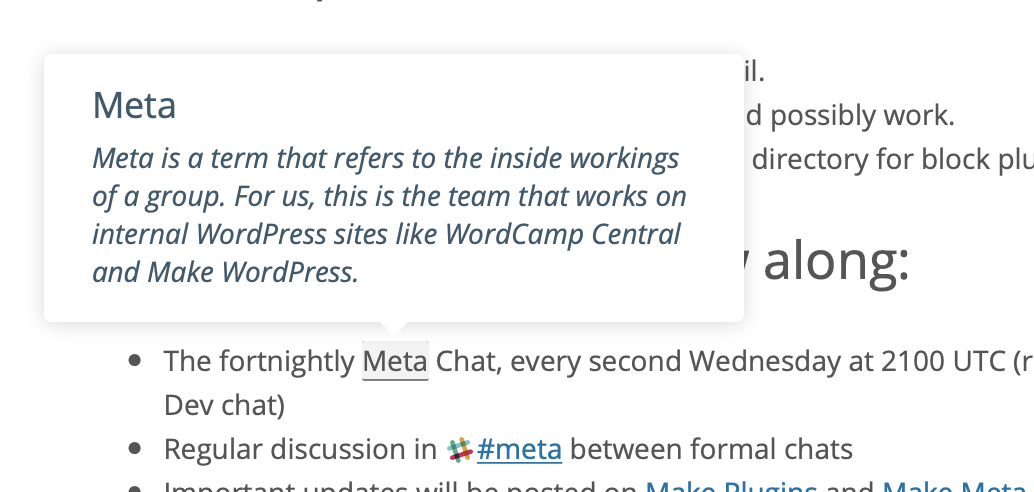
An example showing a tooltip with a definition for the term "meta".
Reviews
You don't need more
By 
If you are looking for a simple Glossary plugin, this is it. You don't need more or any other gimmicky features.
Charming simple to use
By 
Could be excellent
By 
Simple, Easy to Use, Does the Job
By 
Simple and effective
By 
Changelog
1.2
- Bump Tested up to.
- Don’t create glossary hovercards for phrases within
<option>tags. - Don’t create glossary hovercards wtihin oEmbed responses.
- PHP Notice fixes.
- Fixes to ensure that the matched text isn’t past the current element.
- PHP 8 fatal fix,
array_merge() does not accept unknown named parameters.
1.1
- Added hoverIntent to avoid accidental showing of the glossary items when scrolling the page.
1.0
- Switch to a different tooltip library to avoid some glitchy behaviour.
- Eliminate some unnecessary highlighting, and generally improve the accuracy of term matching.
- Fix some visual glitches.
- Cooperate better with O2 auto-linking and tagging.
0.1
- Initial public release.