Advance Chart Addon for Elementor – WPTD

Advance Chart Addon for Elementor – WPTD
Description
The #1 Advance Chart Addon for Elementor
WPTD Chart is advanced elementor chart plugin. Convert easily data into chart. We gives you 4 models of charts example: pie chart, line chart, doughnut chart, bar chart. Also you can control chart legend details. In future we planned to give more chart types as free.
Rate
The Features
Pie chart, line chart, doughnut chart, bar chart and many features:
Also you can convert data into chart as we mentioned some examples below
- Student data into chart.
- Trade details into chart.
- Medicine details into chart.
- Hospitals details into chart.
- Doctors details into chart
- Any theme support
- Easy to Use.
- Customizing the width, height and legend position for the chart.
Live Demo
Contact Us for More Works
Installation
Installation
- Upload ‘wptd-chart’ folder to the ‘/wp-content/plugins/’ directory.
- Activate the plugin through the ‘Plugins’ menu in WordPress.
- Now read How of Use
Screenshots

Chart Shortcode Search. Goto Elementor page builder. Search name like "chart". You can get our chart shortcode.

Chart Shortcode. or search tab wise Our chart shortcode under WPTD tab.

Chart Output Model 1. This is preview of Pie Chart.
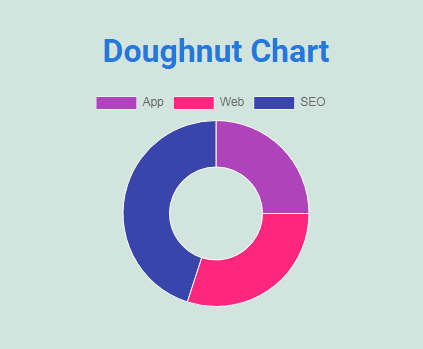
Chart Output Model 2. This is preview of Doughnut Chart.
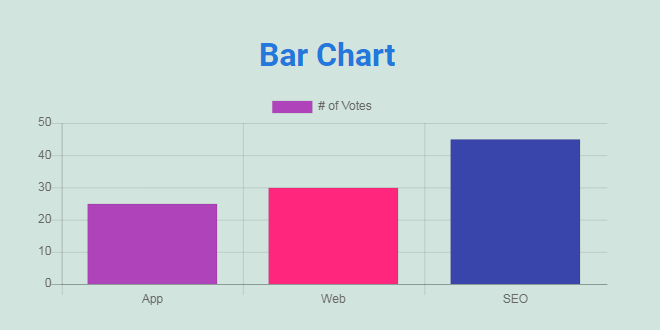
Chart Output Model 3. This is preview of Bar Chart.

Chart Output Model 4. This is preview of Line Chart.
Faq
No. You cannot use without Elementor since it’s an addon for Elementor.
Absolutely! It will work with any theme where Elementor works.
Absolutely! Feel free contact us. We can upgrade or create plugins.
Reviews
Changelog
1.1
- Elementor _register_controls deprecation issue updated.
1.0
- Intial release.