WPZOOM User History – Lock Users & Change Usernames
WPZOOM User History – Lock Users & Change Usernames
Description
User History tracks all changes made to user profiles and displays a complete history log on the user edit page. It also lets admins lock or unlock user accounts, change usernames, monitor login/logout activity, manage active sessions, and search for users by their previous details.
Profile Change Tracking:
- Track Profile Changes – Automatically logs changes to username, email, display name, first/last name, nickname, website, bio, and role
- Password Change Logging – Records when passwords are changed (without storing any password data)
- See Who Made Changes – Each log entry shows whether the user changed their own profile or if an admin made the change
- IP Address Tracking – Records the IP address for each change (can be disabled for GDPR compliance)
- Search by Previous Values – Find users on the All Users page by their old email or username
- Clear History – Admins can clear the history log for any user
Login & Session Monitoring:
- Login/Logout Tracking – Records successful logins, logouts, and failed login attempts with date, IP address, and browser info
- Failed Login Attempts – Track failed login attempts for existing user accounts
- Active Sessions – View all active WordPress sessions for any user, including login time, IP address, browser, and expiry
- Log Out Everywhere – Destroy all active sessions for a user with one click
- Browser & OS Detection – Automatically detects and displays the browser and operating system from the user agent
Lock/Unlock User Accounts:
- Lock User Accounts – Prevent users from logging in by locking their account
- Instant Session Termination – Locked users are logged out immediately and all active sessions are destroyed
- Application Password Blocking – Locked users cannot authenticate via application passwords (REST API, XML-RPC)
- Status Column – See which users are locked at a glance with a status column on the All Users page
- Bulk Lock/Unlock – Lock or unlock multiple users at once from the All Users page
- Row Actions – Quickly lock or unlock individual users from the All Users list
- Locked Users Filter – Filter the All Users list to show only locked accounts
- Custom Lock Message – Set a custom message shown to locked users on the login screen (Settings > User History)
- WP-CLI Access – Locked users can still be managed via WP-CLI
Admin Tools:
- Change Username – Allows admins to change usernames directly from the user edit page (WordPress normally doesn’t allow this)
- Delete User Button – Quick access button to delete a user directly from their profile page
- Data Retention – Automatically delete old logs after a configurable number of days (default: 30 days)
- Clear All Logs – Bulk delete all history logs for every user from the settings page
Privacy & Compliance:
- IP Tracking Toggle – Enable or disable IP address recording for GDPR compliance (Settings > User History)
- Configurable Retention – Set how long logs are kept (1-365+ days, or keep forever)
- Automatic Cleanup – Daily cron job removes logs older than the configured retention period
Compatibility:
- Multisite Compatible – Works with WordPress multisite installations, including super admin username changes
- Members Plugin Compatible – Correctly tracks role changes when using the Members plugin for multiple role assignments
- Migration from Lock User Account plugin – Automatically migrates locked users from the Lock User Account plugin
Use Cases:
- Find customers who changed their email after making a purchase
- Track when and who changed user roles
- Audit user profile modifications for security
- Monitor login activity and detect suspicious access
- View and manage active user sessions
- Allow username changes without database access
- Lock compromised or suspended accounts instantly
- Temporarily disable user access without deleting accounts
Installation
- Upload the
wpzoom-user-historyfolder to the/wp-content/plugins/directory - Activate the plugin through the ‘Plugins’ menu in WordPress
- Visit any user’s edit page to see their Account History section
Screenshots
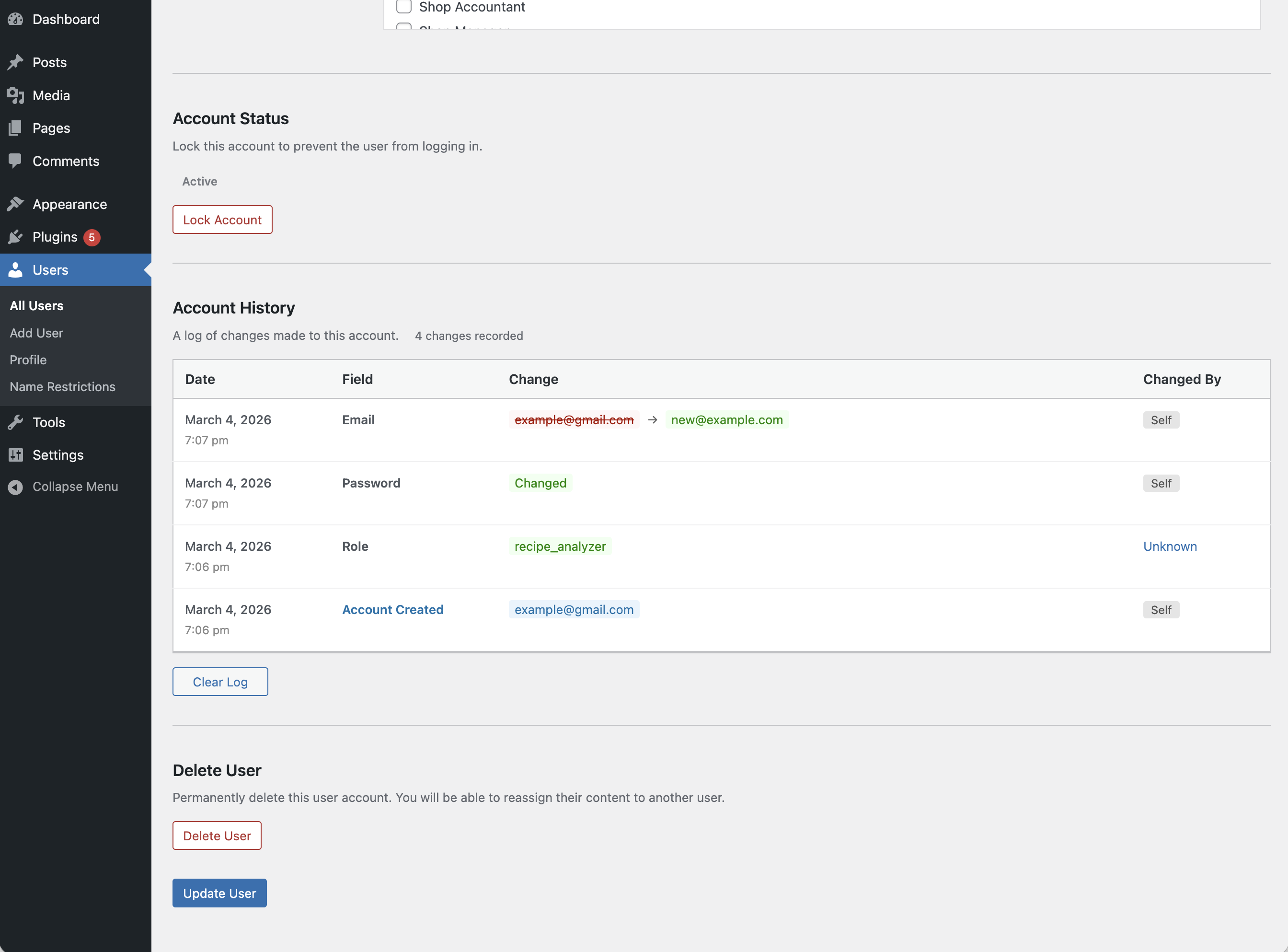
Account History section on the user edit page
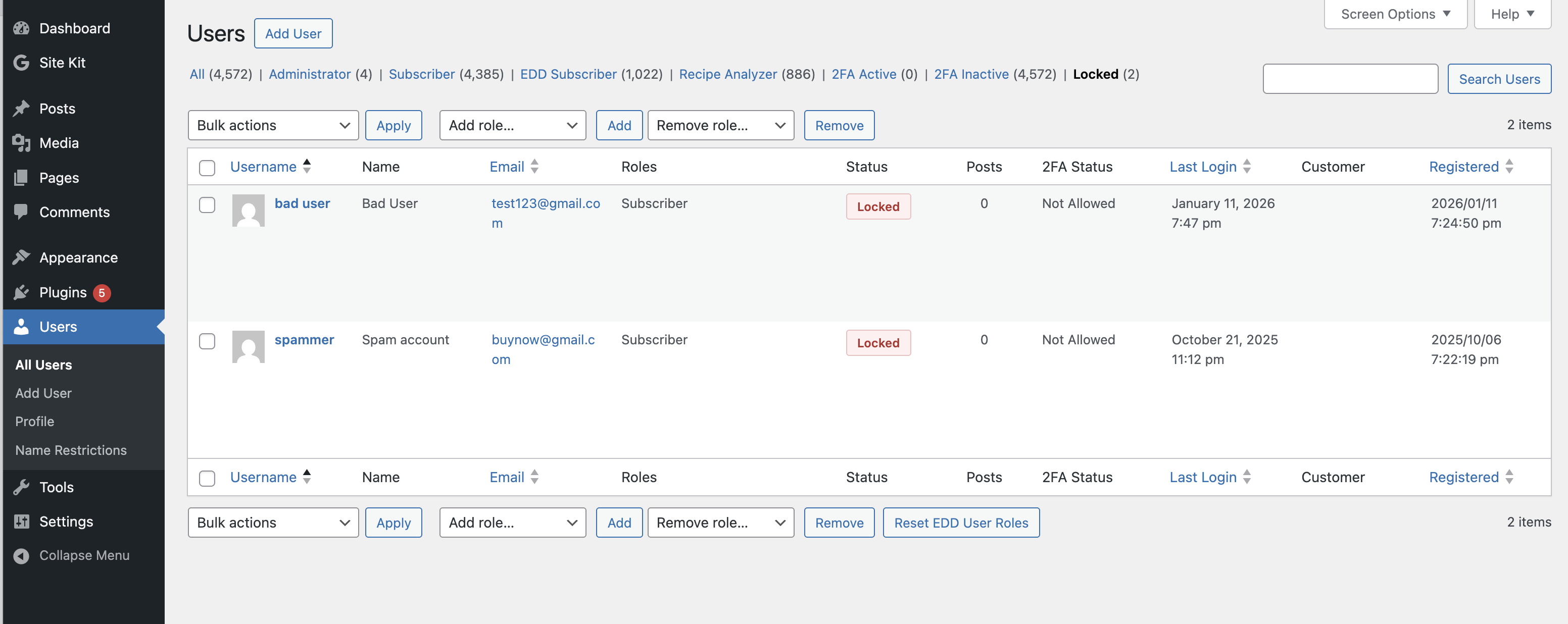
Lock/unlock user account from the user edit page
Faq
Go to Users > All Users, click on any user to edit their profile, and scroll down to the “Account History” section.
On the user edit page, click the “Change” link next to the username field. Enter the new username and click “Change” to save.
No. The plugin only logs that a password was changed, along with the date and who changed it. No password values (hashed or otherwise) are ever stored.
Yes! On the All Users page, use the search box to search for any previous email, username, or name. Users who previously had matching values will appear in the results.
- Username (user_login)
- Email (user_email)
- Password (change event only)
- Display Name
- Nicename
- Website URL
- First Name
- Last Name
- Nickname
- Biographical Info
- Role (including multiple roles with Members plugin)
Yes. The plugin works on multisite installations and properly handles super admin username changes.
Yes. The plugin correctly tracks role changes when using the Members plugin, which allows assigning multiple roles to users.
There are several ways to lock a user:
- User edit page – Go to a user’s profile and click “Lock Account” in the Account Status section
- Row action – Hover over a user on the All Users page and click “Lock”
- Bulk action – Select multiple users on the All Users page, choose “Lock” from the Bulk Actions dropdown, and click Apply
Locked users are logged out immediately and cannot log back in until unlocked.
- All active sessions are destroyed immediately
- The user cannot log in via the login form
- Application password authentication (REST API, XML-RPC) is blocked
- A customizable error message is shown on the login screen
- WP-CLI access is still allowed so admins can manage the account
Go to Settings > User History. You can set a custom message that locked users will see when they try to log in. Leave it empty to use the default message.
On the user edit page, scroll down to the Account History section and click the “Clear Log” button. To clear all logs for every user at once, go to Settings > User History and click “Clear All Logs”.
Go to Settings > User History. Under “Data Retention”, set the number of days to keep logs (default: 30). Old logs are automatically deleted daily. Set to 0 to keep logs indefinitely.
Yes! The Account History section on each user’s edit page has a “Logins” tab that shows all login events, logouts, and failed login attempts with timestamps, IP addresses, and browser information.
On the user edit page, scroll down to Account History and click the “Sessions” tab. You can see all active sessions including login time, IP address, browser, and when each session expires. Click “Log Out Everywhere” to destroy all sessions.
Yes. Go to Settings > User History and uncheck “Record IP addresses” under the Privacy section. This helps with GDPR compliance.
Yes. When you activate User History, any users locked with the Lock User Account plugin will be automatically migrated to the new lock system.
Reviews
Changelog
1.2.0
- Added login/logout tracking with dedicated “Logins” tab showing successful logins, logouts, and failed login attempts
- Added “Sessions” tab showing all active WordPress sessions for a user with login time, IP, browser, and expiry
- Added “Log Out Everywhere” button to destroy all active sessions for a user
- Added IP address tracking for all changes and login events
- Added IP tracking toggle in Settings for GDPR compliance
- Added configurable data retention setting (default: 30 days) with automatic daily cleanup
- Added “Clear All Logs” button in Settings to delete all history logs at once
1.1.1
- Minor fixes
1.1.0
- Add Lock User functionality
1.0.3
- Added Delete User button on user edit page for quick access
- Added Requires at least and Requires PHP headers to plugin file
- Code improvements for WordPress.org plugin directory compliance
1.0.2
- Added Clear Log button to delete history for a user
- Improved role change tracking for Members plugin compatibility
- Fixed false positive password change logging when saving without changes
- Fixed duplicate role change entries
1.0.1
- Added search functionality to find users by previous email/username
- Added database index for faster history searches
- Improved password change logging (no values stored)
- Added table existence check to prevent errors
1.0.0
- Initial release
- Track user profile changes
- Change username feature
- Account History display on user edit page