Wishlist for WooCommerce

Wishlist for WooCommerce
Description
Wishlist is an eCommerce feature that enables shoppers to create and save a list of products they wish to buy at a later point in time. This is similar to bookmarking your favorite websites to easily visit them when needed.
E-Commerce store owners can analyze the effectiveness of their overall marketing efforts by tracking which items end up in the customers wish lists. This way they can easily identify the current trends and improve their trading techniques.
Customers can save their valuable time by adding their desired products to the wishlist and purchasing them at a later time.
You can add the wishlist feature to your WooCommerce store with the help of a Wishlist plugin. This WooCommerce Wishlist Plugin provides the following functionalities by allowing users to add and manage their favorite products to their wishlist.
For guidance on the installation and setup of the plugin, refer to the plugin documentation.
Features of Wishlist for WooCommerce Plugin:
🔸 Let the customers add products to the wishlist from the product page and/or shop page .
🔸 Create a dedicated ‘My Wishlist’ Page or choose from existing pages to display the wishlist.
🔸 Supports Text/Icon/Default theme style buttons for wishlist.
🔸 Choose the button position for the wishlist on the shop page.
🔸 Let the customers manage the wishlist from the ‘My Account’ Page.
🔸 Tested OK with WooCommerce 10.3.6
Importance of WooCommerce Wishlists Plugin
If you own a WordPress/WooCommerce store, a WooCommerce Wishlist plugin can easily enable the wishlist feature for your website. It does a lot more than just creating a list. Both store owners and customers can benefit from the wishlist feature.
Benefits of the wishlist for store
- Manage stock – WooCommerce Wishlists helps the store admin anticipate the stock level.
- To promote an item – The data about who is saving, the wishlist item, area helps to promote an item which in turn helps in sales of that particular item.
- Customize WooCommerce marketing campaign – Data derived from wishlists help customize your marketing campaign in order to promote a certain product or to appeal to a certain group of individuals in a particular area.
- Fewer returns – Wishlists include products that the customers really want ie; they gave enough time over the decision to purchase the product by putting it on the wishlist. Thus returns will be very less compared to an instant purchase.
- Increases sale – Persuading potential customers to purchase by providing discounts and offers on the items of their WooCommerce wishlist will increase the sales revenue.
Customers always find something in the store that they wish to buy but do not intend to buy now. This presents the opportunity for the store owners by letting their customers make a note of the product that they are considering buying.
This is a great way to ensure the customers return to the store. And knowing what a customer likes, you can also create custom offers that can help create a loyal customer base for the business.
Wishlist is the best way to know your customer’s likes and dislikes and keep them attracted to your store forever. Therefore timely analysis of wishlists and putting those conclusions to develop marketing strategies will help a long way in the growth of your WooCommerce store.
Other useful plugins for WooCommerce from WebToffee
🔸 WooCommerce Product Import Export Plugin: Easily import and export products to/from your WooCommerce store using a CSV file.
🔸 WooCommerce Order/Coupon Import Export: The plugin lets you export and import woocommerce orders and woocommerce coupons via CSV to and from your WooCommerce store.
🔸 Import Export WordPress Users and WooCommerce Customers: Import and export the users in WordPress and customers in your WooCommerce store using a CSV file with the help of this plugin.
🔸 WebToffee WooCommerce Gift Cards – Ultimate Gift Card Plugin for WooCommerce: Create and sell gift card in your WooCommerce store. Allow your customers to buy, redeem, and share gift card.
🔸 WooCommerce Product Feed & Facebook Catalog Sync Manager: Generate WooCommerce product feed for Google shop, Facebook shops, Bing, Twitter,…etc and sync WooCommerce products with Facebook catalog.
🔸 Related Products – Create Upsells, Cross-sells, and Product Recommendations for WooCommerce: Display custom related products, upsells, and cross-sells in WooCommerce by disabling default WooCommerce related products.
Installation
This section describes how to install the plugin and get it working.
e.g.
- Upload wt-woocommerce-wishlist’ to the /wp-content/plugins/ directory
- Activate the plugin through the ‘Plugins’ menu in WordPress
Screenshots

Wishlist text option on product page.

Wishlist text option on shop page.

Wishlist icon option on shop page.

Wishlist normal button(theme) option on shop page.
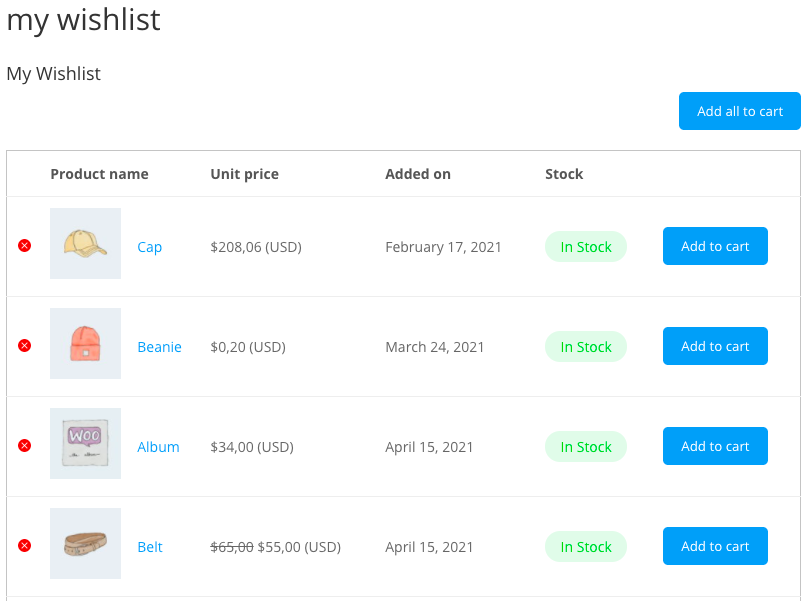
My Wishlist page.

Admin general settings.

Admin wishlist page settings.
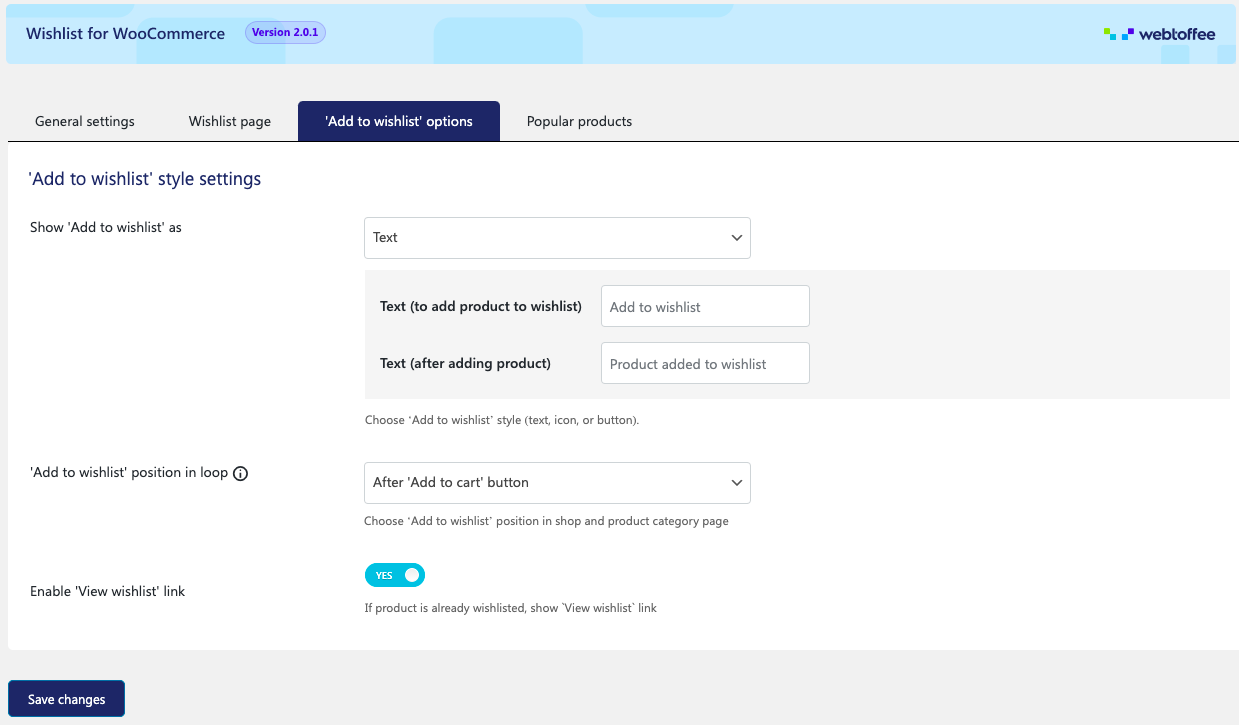
Admin add to wishlist style settings.

Admin popular products list.
Faq
Just go under Settings -> Permalinks -> Save settings, the page will be updated.
Reviews
good plugin
By 
Easy setup & works perfectly
By 
Simple & Useful
By 
Nice and simple
By 
Love the plugin
By 
Changelog
2.1.6 03-12-2025
- [Compatibility] – Tested OK with WooCommerce 10.3.6
- [Compatibility] – Tested OK with WordPress 6.9