Zozta Connector for WooCommerce

Zozta Connector for WooCommerce
Description
Zozta Connector for WooCommerce links your WooCommerce store to the Zozta mobile-app platform. It syncs products, categories, orders, customers, coupons, reviews, and store configuration, and receives app orders back into WooCommerce in real time over a signed, replay-protected channel. The same sync does double duty: your store also appears in the Zozta marketplace shopping app as an additional sales channel — in addition to your own branded app — with no extra work on your side.
Features:
* One-click store registration and API-key generation
* Automatic hourly sync via WP-Cron + manual sync
* Real-time product/order/customer/coupon webhooks
* Secure reverse-push of app orders (HMAC-signed, nonce replay-protected)
* Self-hosted automatic plugin updates
External services
This plugin connects to the Zozta platform (a third-party SaaS) to generate and operate your mobile app. To function, it sends your store data — products, categories, orders, customers, coupons, reviews, and store settings — to the Zozta API endpoint you configure.
- Service: Zozta — https://zozta.com
- Terms of Service: https://zozta.com/terms
- Privacy Policy: https://zozta.com/privacy
Data is transmitted only after you register your store and only to the endpoint you enter in the plugin settings. The plugin also checks that endpoint for plugin updates.
Installation
- Download the plugin .zip and upload it via Plugins Add New Upload Plugin (or extract to /wp-content/plugins/zozta-connector-for-woocommerce).
- Activate the plugin.
- Go to WooCommerce Zozta.
- Click “Register store” — the server address is already filled in for you.
- Click “Sync now” to push your catalog.
Screenshots
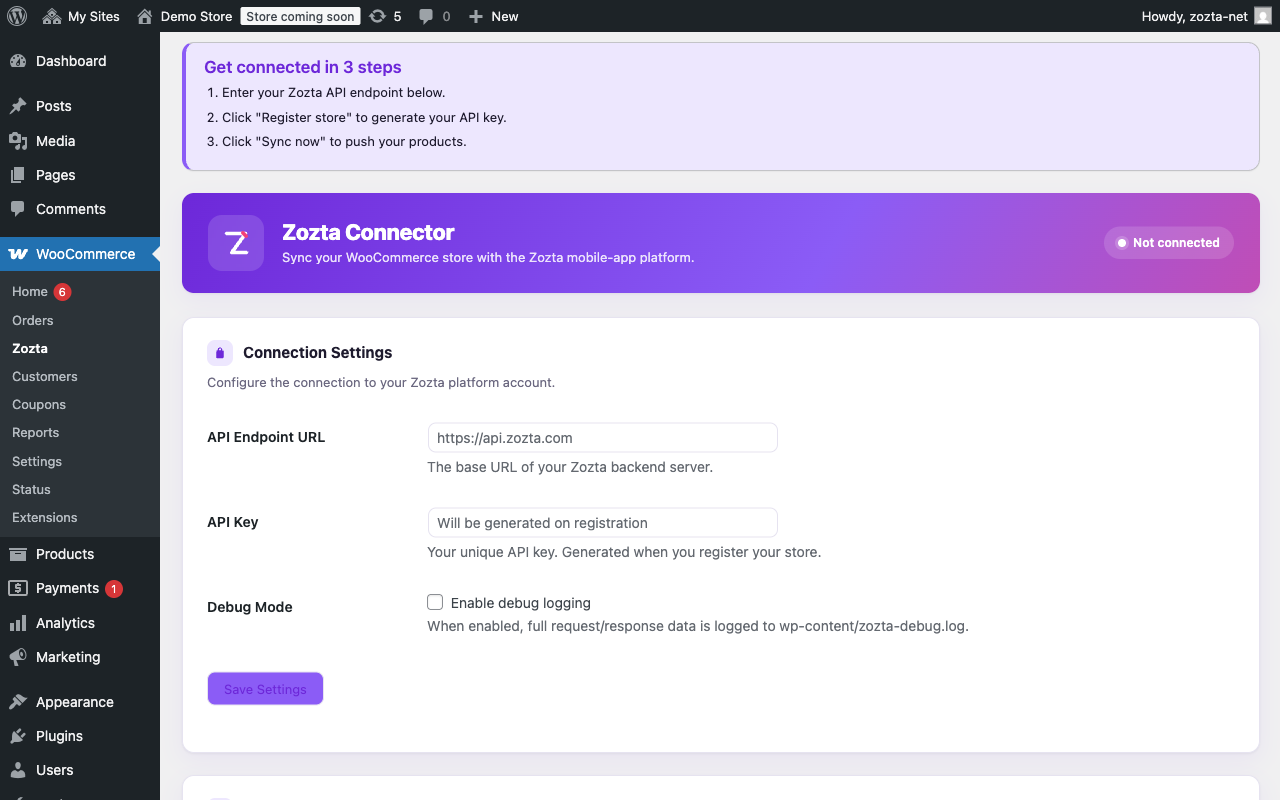
The Zozta settings page with guided onboarding.
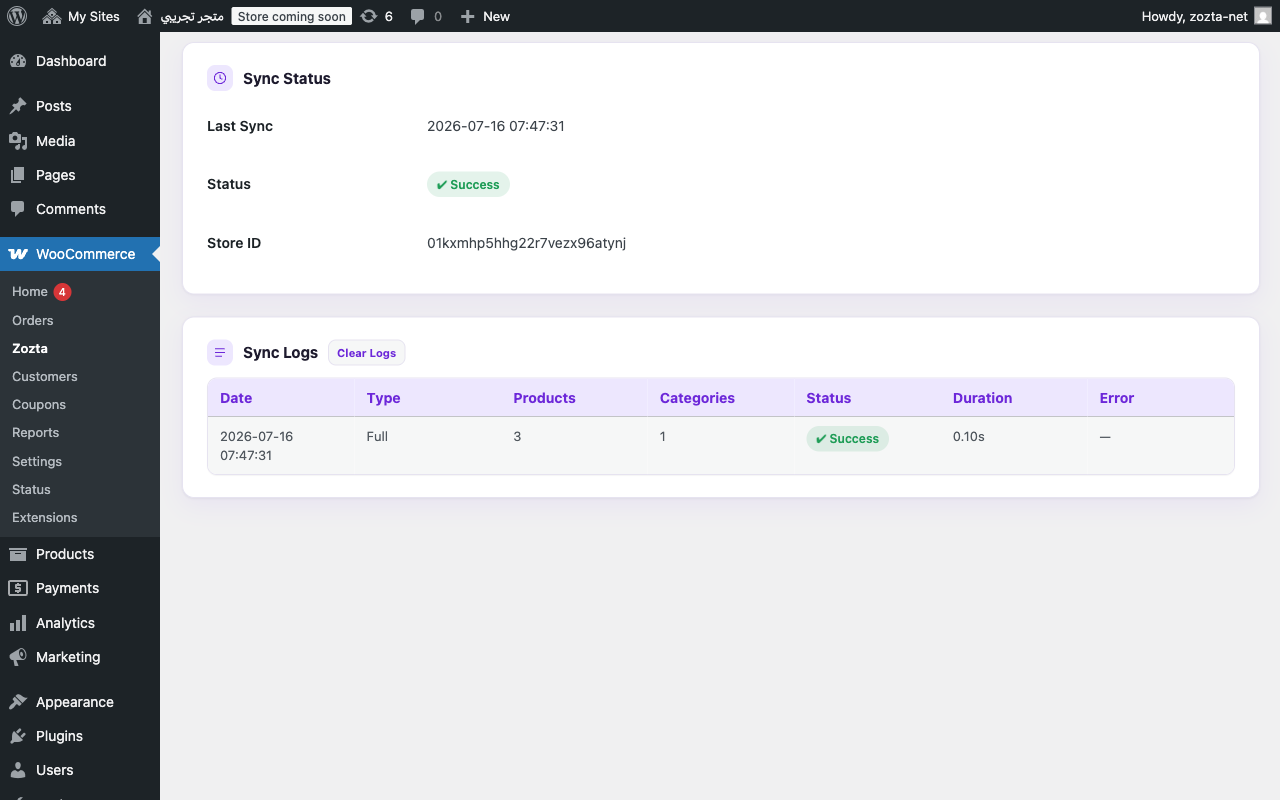
A completed sync with status and logs.
Faq
Yes. The plugin connects your store to the Zozta platform; registration creates your store record and a 14-day trial.
API keys and secrets are encrypted at rest. Inbound app-order pushes are HMAC-signed with timestamp and single-use nonce replay protection.
Once connected, the plugin checks your configured endpoint for new versions and offers one-click updates in WP Admin.
Reviews
Changelog
1.5.0
- New “Get our app” badge on your storefront: visitors scan a QR code (or tap a link) to install the Zozta shopping app, which opens straight on your store. Toggle it under Zozta Settings, where you’ll also find your shareable app link and QR code.
1.4.2
- Deleting the plugin now tells Zozta to hide your store from the shopper app, so shoppers no longer see a store that can’t take orders. Your synced data is kept — reinstalling and reconnecting brings the store back automatically.
1.4.1
- Fixed three strings — including the plugin name — that could never be translated, so they always appeared in English no matter your site language.
1.4.0
- Declared High-Performance Order Storage (HPOS) compatibility, so WooCommerce no longer shows an incompatibility warning on your admin pages.
- Updated the bundled update library, clearing PHP 8.4 deprecation notices from the error log on directly-installed copies.
- Connecting is now two steps instead of three — the server address is filled in for you, so you can go straight to “Register store”. The old settings hint pointed at an address that does not exist.
1.3.1
- Security: debug logging no longer writes to a publicly reachable file in the uploads folder. Logs now go to WooCommerce Status Logs, and any log left behind by an earlier version is deleted on update.
- Fixed the hourly sync re-sending the whole catalogue every run instead of only what changed. Large stores will see far fewer sync requests.
- Variable products now sync their attribute names and option labels, so translated attributes such as “المقاس: صغير” display correctly in the app instead of internal identifiers.
- Customers whose name is only on their billing address now sync with that name instead of an empty one.
- Coupon edits made outside the classic coupon screen (WP-CLI, REST API, importers, other plugins) now sync.
- Your API key is no longer written into the settings page HTML. Leave the field blank to keep the saved key.
- A shopper edit that arrives with blank fields can no longer clear the contact or delivery details on an existing order.
- Connection problems now show a readable message instead of a raw cURL error.
- Uninstalling removes the last of the plugin’s options, so a later reinstall starts clean.
1.3.0
- Shoppers can cancel a pending/on-hold order or fix contact/shipping details from the app; changes push through a new
/orders/updateendpoint.
1.2.0
- Report the WooCommerce version to the Zozta platform so it appears in the merchant portal.
- Support portal-initiated full sync (“Force sync”): the plugin now polls for and executes force-sync requests, then acknowledges them.
1.1.3
- Sync failures caused by plan limits now show a specific notice with an upgrade link instead of a generic error message.
1.1.2
- Full Arabic (ar) translation of the plugin interface.
- Refreshed the admin branding with the canonical Zozta mark.
1.1.1
- Security: reclaim proof endpoint now serves a hash binding instead of the raw token.
- Admin scripts moved to wp_enqueue_script/wp_add_inline_script.
- Added Requires Plugins header.
1.1.0
- Auto-pairing: plugin pairs automatically when API key is saved; no manual connection step.
1.0.0
- Initial release.